
Isingeniso
Thank you for choosing the AWEI T95 Wireless Earbuds. This manual provides essential information for setting up, operating, maintaining, and troubleshooting your new earbuds. Please read it carefully to ensure optimal performance and longevity of your device.
The AWEI T95 earbuds are designed for a secure fit and deliver high-fidelity audio with advanced Bluetooth 5.3 technology. They feature IPX6 waterproofing, making them suitable for various activities, including workouts.
Okuqukethwe Kwephakheji
Qinisekisa ukuthi zonke izinto zikhona kuphakheji yakho:
- AWEI T95 Wireless Bluetooth Headset (Left and Right Earbuds)
- Ikesi lokushaja
- Ikhebuli yokushaja ye-USB-C
- User Instructions (This Manual)
Setha
1. Ukushaja ama-Earbud nekesi
Ngaphambi kokusebenzisa okokuqala, shaja ngokugcwele ama-earbud nekesi lokushaja.
- Connect the provided USB-C charging cable to the charging port on the case and to a USB power source.
- Izibani zesikhombisi ebhokisini lokushaja zizobonisa isimo sokushaja.
- Faka ama-earbud ekesini lokushaja. Azoqala ukushaja ngokuzenzakalela.
A 5-minute quick charge provides approximately 1 hour of usage.
2. Ukumatanisa Kokuqala
The AWEI T95 earbuds feature automatic pairing for convenience.
- Vula ikesi lokushaja. Ama-earbud azovula ngokuzenzakalelayo futhi angene kumodi yokumatanisa.
- Edivayisini yakho (i-smartphone, ithebhulethi, ikhompyutha ephathekayo), vula i-Bluetooth.
- Cinga available Bluetooth devices and select "AWEI T95" from the list.
- Uma usuxhunyiwe, uzozwa ithoni yokuqinisekisa, futhi ama-earbud azobe elungele ukusetshenziswa.
3. Automatic Reconnection
After initial pairing, the earbuds will automatically connect to the last paired device when removed from the charging case, provided Bluetooth is enabled on the device and it is within range (up to 33 feet).
4. Ukugqoka ama-Earbud
The AWEI T95 earbuds are designed with ergonomic ear hooks for a secure and comfortable fit, especially during physical activities.
- Faka kahle i-earbud endlebeni yakho.
- Adjust the ear hook over your ear until it feels snug and stable.
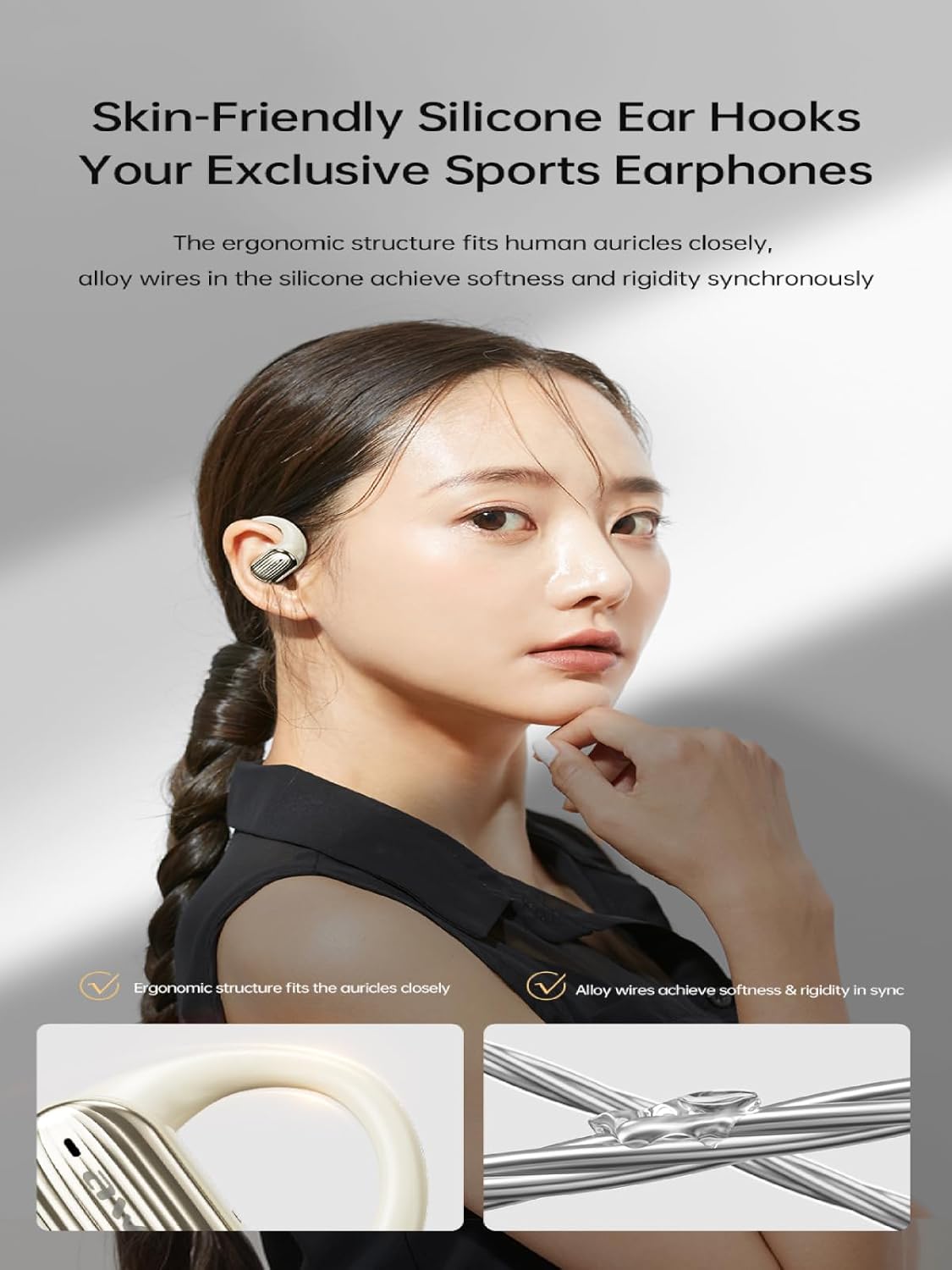
Image: The AWEI T95 earbud with its skin-friendly silicone ear hook, designed for a secure and comfortable fit. The image highlights the ergonomic structure and the alloy wires that provide both softness and rigidity.
Imiyalelo yokusebenza
1. Vula/Vala
- Vula: Open the charging case, or press and hold the touch area on both earbuds for a few seconds.
- Cisha ugesi: Place the earbuds back into the charging case and close the lid, or press and hold the touch area on both earbuds for a few seconds until they power off.
2. Izilawuli zokuthinta
The AWEI T95 earbuds feature intuitive touch controls. Specific functions may vary slightly depending on your device and operating system.
- Dlala/Misa kancane: Ukuthepha okukodwa kunoma iyiphi i-earbud.
- Ithrekhi Elandelayo: Thepha kabili ku-earbud engakwesokudla.
- Ithrekhi yangaphambilini: Thepha kabili ku-earbud engakwesokunxele.
- Phendula/Phendula ikholi: Ukuthepha okukodwa kunoma iyiphi i-earbud ngesikhathi socingo olungenayo.
- Yenqaba Ucingo: Cindezela bese ubamba noma iyiphi i-earbud imizuzwana emi-2 ngesikhathi socingo olungenayo.
- Yenza kusebenze umsizi wezwi: Thepha kathathu kunoma iyiphi i-earbud.
3. Izici Zomsindo
The AWEI T95 earbuds are equipped with 14.2mm drivers and ULF Enhancement Algorithm for a rich audio experience.

Image: An illustration of the AWEI T95 earbud's internal structure, emphasizing the ULF Enhancement Algorithm designed to enhance low-frequency sounds for deep bass. A graph indicates an 83% increase in bass details.
Enjoy crisp trebles, full midranges, and deep bass across various music genres. The earbuds also offer dynamic spatial sound effects for an immersive listening experience.

Image: A visual representation of the AWEI T95 earbuds' dynamic spatial sound effects, showing sound waves creating an immersive 3D surround stereo experience around a listener.
4. Directional Propagation
The earbuds feature directional sound propagation, allowing you to stay aware of your surroundings while listening to audio, and maintaining privacy during calls in crowded environments.

Image: An AWEI T95 earbud in an ear, demonstrating directional sound propagation. This technology helps users remain aware of their environment and ensures privacy during calls by directing sound efficiently.
Isondlo
1. Ukuhlanza
- Hlanza njalo ama-earbud nekesi lokushaja ngendwangu ethambile, eyomile, engena-lint.
- Ungasebenzisi izinto zokuhlanza abrasive, utshwala, noma izincibilikisi zamakhemikhali.
- Khipha ngobumnene noma iyiphi i-earwax noma udoti kumathiphu e-earbud kanye nemeshi yesipika usebenzisa ibhulashi elincane, elithambile noma iswabhu kakotini.
2. Ukumelana Namanzi (IPX6)
The AWEI T95 earbuds are IPX6 waterproof, meaning they are protected against powerful water jets. This makes them resistant to sweat and rain.
- Ungawacwilisi ama-earbud emanzini.
- After exposure to sweat or rain, wipe the earbuds dry with a clean cloth before placing them back in the charging case to prevent damage to the charging contacts.
- The charging case is not waterproof. Keep it dry.
3. Isitoreji
- Gcina ama-earbud kukesi lawo lokushaja uma lingasetshenziswa ukuze uwavikele futhi uwagcine eshajiwe.
- Avoid storing the earbuds in extreme temperatures or high humidity.
Ukuxazulula inkinga
If you encounter issues with your AWEI T95 earbuds, try the following solutions:
1. Ama-earbud Awamatanisi noma Awaxhumeki
- Qinisekisa ukuthi ama-earbud ashajiwe.
- Qiniseka ukuthi i-Bluetooth ivuliwe kudivayisi yakho.
- Place the earbuds back in the charging case, close the lid, wait a few seconds, then open it again to re-enter pairing mode.
- On your device, forget or delete "AWEI T95" from your Bluetooth device list, then attempt to pair again.
- Ensure the earbuds are within the 33-foot operating range of your device.
2. Awukho Umsindo noma Ivolumu Ephansi
- Hlola amazinga evolumu kokubili kuma-earbud akho kanye namadivayisi akho axhunyiwe.
- Qinisekisa ukuthi ama-earbud axhunywe kahle kudivayisi yakho.
- Clean any debris from the earbud speaker mesh that might be obstructing sound.
- Zama ukudlala umsindo ovela ohlelweni oluhlukile noma umthombo.
3. Earbuds Not Charging
- Qinisekisa ukuthi ikhebuli yokushaja ixhumeke ngokuphephile kukho kokubili ikesi nomthombo wamandla.
- Qinisekisa ukuthi umthombo wamandla uyasebenza.
- Hlanza oxhumana nabo bokushaja kuma-earbud kanye nangaphakathi kwebhokisi lokushaja.
- Try using a different USB-C charging cable or power adapter.
4. Intermittent Connection
- Reduce the distance between the earbuds and your device.
- Avoid obstacles between the earbuds and your device, such as walls or large electronic equipment.
- Minimize interference from other 2.4GHz wireless devices (e.g., Wi-Fi routers, microwaves).
Imininingwane

Image: The AWEI T95 TWS Sports Earphones, showcasing the earbuds and their charging case. This image highlights their open wearable stereo design, heavy bass capabilities, Bluetooth 5.3 connectivity, and snug fit.
| Isici | Imininingwane |
|---|---|
| Imodeli | T95 |
| Ibhrendi | Awei |
| Ubuchwepheshe bokuxhumana | Okungenantambo (Bluetooth 5.3) |
| I-Wireless Communication Technologies | I-Bluetooth |
| Ukubekwa Kwendlebe | Vula Indlebe |
| I-Form Factor | True Wireless |
| Izinga Lokumelana Namanzi | IPX6 (amanzi) |
| Ibanga eliphezulu lokusebenza | Amafidi angama-33 (10 amamitha) |
| Impilo Yebhethri | Kuze kube amahora angama-28 (ngecala lokushaja) |
| Usayizi Womshayeli | 14.2 mm |
| Izingxenye Ezihlanganisiwe | USB-C Charging Cable, Wireless Bluetooth Headset, User Instructions, Wireless Bluetooth Headset Charging Case |

Isithombe: Okwangaphakathi view of the AWEI T95 earbud, emphasizing the Bluetooth 5.3 technology. This image illustrates how Bluetooth 5.3 ensures stable audio and video synchronization, reduces interference, and offers high-speed transmission with lower power consumption.
Iwaranti kanye Nokusekela
1. Ulwazi Lwewaranti
The AWEI T95 Wireless Earbuds come with a Iwaranti yonyaka ongu-1 from the date of purchase. This warranty covers manufacturing defects. It does not cover damage caused by misuse, accidents, unauthorized modifications, or normal wear and tear.
Sicela ugcine ubufakazi bakho bokuthenga izimangalo zewaranti.
2. Ukwesekwa Kwamakhasimende
For technical assistance, warranty claims, or any other inquiries, please contact Awei customer support through their official webisayithi noma umthengisi lapho uthenge khona umkhiqizo.
When contacting support, please provide your product model (T95) and a detailed description of the issue.