Isingeniso
This manual provides comprehensive instructions for the Konitee IDW25 Smart Watch. It covers setup, operation, maintenance, and troubleshooting to ensure optimal use of your device. The Konitee IDW25 is a multi-functional smartwatch designed for both men and women, featuring a 1.83-inch display, Bluetooth calling capabilities, fitness tracking with over 100 sport modes, and built-in Amazon Alexa voice assistance.

Figure 1: Konitee IDW25 Smart Watches (Black and Pink)
Okuqukethwe Kwephakheji
Sicela uqinisekise ukuthi zonke izinto zikhona ephaketheni lakho:
- Konitee IDW25 Smart Watch (Black)
- Konitee IDW25 Smart Watch (Pink)
- Ikhebuli yokushaja (x2)
- Incwadi Yomsebenzisi (le dokhumenti)
Setha
1. Ukushaja Kwasekuqaleni
Before first use, fully charge your Konitee IDW25 Smart Watch. Connect the charging cable to the watch's charging port and a standard USB power adapter (not included). A full charge typically takes approximately 2 hours.
2. Ukufakwa kohlelo lokusebenza
The Konitee IDW25 Smart Watch requires the "VeryFit" application for full functionality. Download the "VeryFit" app from your smartphone's app store (Apple App Store for iOS or Google Play Store for Android).
- Compatible with iOS 9.0 and above.
- Compatible with Android 6.0 and above.
3. Ukumatanisa Kwedivayisi
To pair your smartwatch with your smartphone:
- Qinisekisa ukuthi i-Bluetooth ivuliwe ku-smartphone yakho.
- Open the "VeryFit" app on your smartphone.
- Follow the in-app instructions to search for and connect to your Konitee IDW25 Smart Watch.
- Qinisekisa isicelo sokumatanisa kukho kokubili iwashi lakho ne-smartphone.
Imiyalelo yokusebenza
1. Ukuhamba Okuyisisekelo
The Konitee IDW25 features a responsive 1.83-inch HD touchscreen. Swipe left, right, up, or down to navigate through menus, access quick settings, and view notifications. Tap to select items.

Figure 2: 1.83" HD Touchscreen and Customizable Dials
2. Bluetooth Calls and Message Notifications
With its built-in microphone and speaker, the IDW25 allows you to manage calls directly from your wrist when connected via Bluetooth to your smartphone.
- Ukwenza/Ukwamukela Izingcingo: Use the watch to dial numbers, answer incoming calls, and view call records. You can also store contacts for quick access.
- Izaziso Zomlayezo: Receive real-time text messages and notifications from various social media applications (e.g., SMS, Facebook, WhatsApp, Instagram, TikTok, Twitter, Snapchat) directly on your watch display.
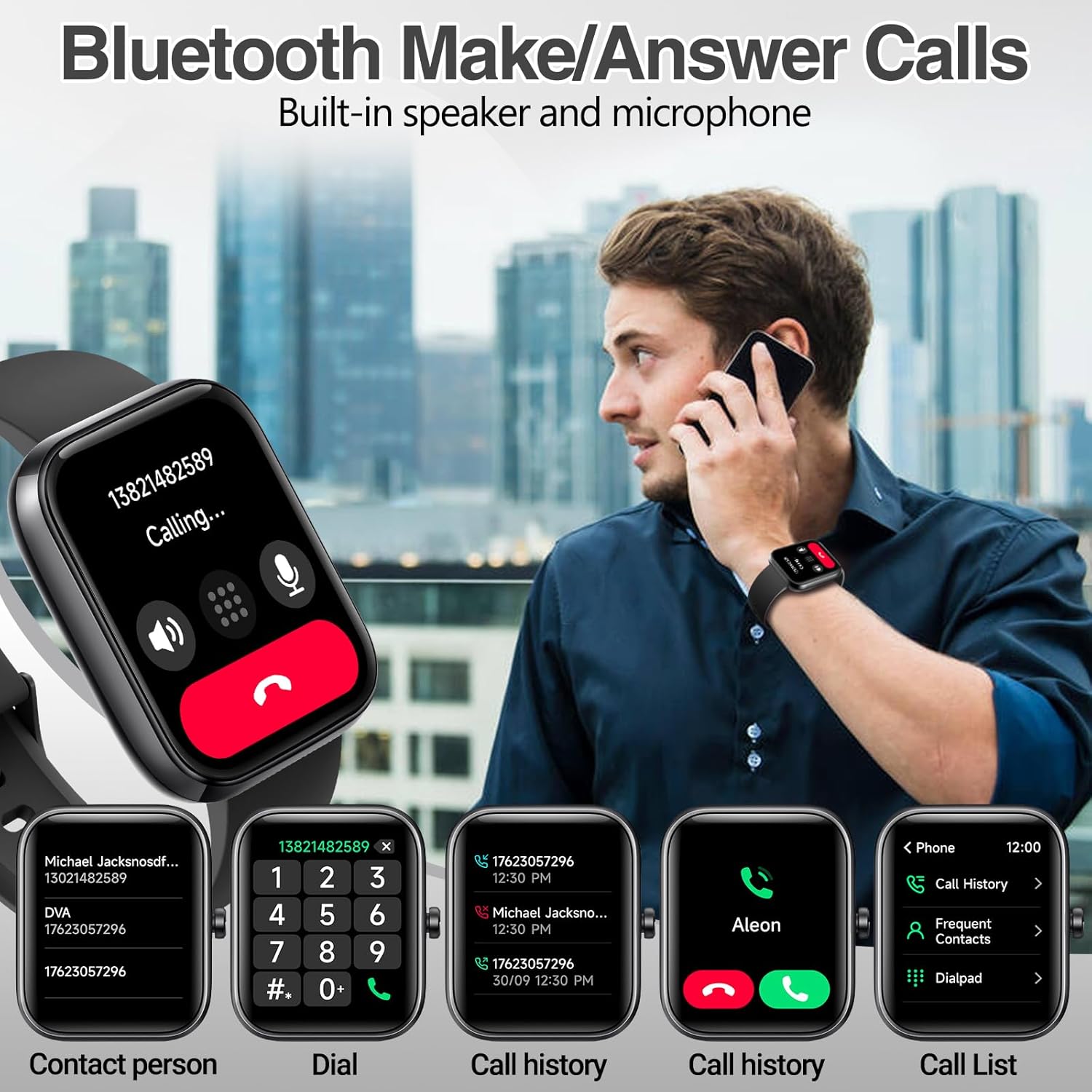
Umfanekiso 3: Ukusebenza Kocingo lwe-Bluetooth

Figure 4: Multi-Functional Message Reminder
3. Alexa Voice Assistant
The Konitee IDW25 has Amazon Alexa built-in, providing convenient voice assistance directly from your wrist. Activate Alexa to:
- Check news and weather forecasts.
- Set alarms and timers.
- Control compatible smart home devices (e.g., lights, air conditioning).

Figure 5: Alexa Voice Assistant Integration
4. Ukuqapha Impilo
The IDW25 smartwatch provides comprehensive health monitoring features to help you track your well-being:
- Isiqaphi sezinga lenhliziyo: Ilandelela ngokuqhubekayo izinga lokushaya kwenhliziyo yakho usuku lonke.
- SpO2 Monitor: Ikala amazinga akho okugcwala komoyampilo egazini.
- Isiqapha Sokulala: Ihlaziya amaphethini akho okulala, okuhlanganisa nokulala okujulile, ukulala okuncane, nezikhathi zokuvuka.
- I-Stress Monitor: Kukusiza ukuthi uqonde futhi uphathe amazinga akho okucindezeleka.
- I-Step Tracker: Accurately records steps taken, distance traveled, and calories burned.

Figure 6: 24/7 Accurate Health Monitoring
5. Izindlela Zezemidlalo
The IDW25 offers over 100 built-in exercise modes to track your workouts. You can add your preferred modes via the VeryFit app. The watch records exercise data such as duration, calories burned, and heart rate during activities like walking, running, cycling, swimming, and more.

Figure 7: 100+ Sports Mode Activity Tracking
6. Ukwenza ngokwezifiso ubuso bewashi
Personalize your Konitee IDW25 with over 100 cloud dials available through the VeryFit app. You can also upload your own photos to create custom watch faces that suit your style.
Isondlo
1. Ukuhlanza
To maintain your smartwatch, regularly wipe the screen and strap with a soft, dry, lint-free cloth. For stubborn dirt, slightly dampen indwangu ngamanzi. Gwema ukusebenzisa amakhemikhali anokhahlo noma izinto ezilumayo.
2. Ukumelana Namanzi (IP68)
The Konitee IDW25 Smart Watch is IP68 rated for water resistance. This means it is protected against immersion in water up to 1.5 meters for up to 30 minutes. You can wear it while washing your hands, face, or during daily sweating without concern.
Important Note: The IP68 rating does not cover hot water or steam. Do not use the watch for baths, saunas, hot springs, or diving, as this may damage the device and void the warranty.

Figure 8: IP68 Waterproof and Long Battery Life
3. Impilo Yebhethri Nokushaja
The IDW25 is equipped with a 300mAh battery, offering extended usage times:
- Isikhathi sokusebenza: Up to 5-7 days of active use.
- Isikhathi sokulinda: Kuze kube yizinsuku eziyi-30.
- Isikhathi sokushaja: Cishe amahora angu-2 ukuze ukhokhiswe ngokugcwele.
Use the provided charging cable and a compatible USB power source to charge the device. Avoid using damaged cables or non-standard chargers.
Ukuxazulula inkinga
If you encounter issues with your Konitee IDW25 Smart Watch, please refer to the following common solutions:
| Inkinga | Isixazululo Esingenzeka |
|---|---|
| Iwashi elingavuliwe | Ensure the watch is fully charged. Connect to charger for at least 30 minutes. |
| Ayikwazi ukubhanqa ne-smartphone |
|
| Izaziso aziveli |
|
| Idatha yezempilo engalungile | Ensure the watch is worn snugly on your wrist, about one finger's width above the wrist bone. Clean the sensor on the back of the watch. |
| Impilo yebhethri emfushane | Reduce screen brightness, disable unnecessary features, and ensure the watch is fully charged before use. |
Imininingwane
| Isici | Imininingwane |
|---|---|
| Imodeli | IDW25 |
| Uhlobo lokubonisa | Digital, 1.83" HD Touchscreen |
| Ubuchwepheshe bokuxhumana | I-Bluetooth |
| Izinga Lokuxhumana Okungenantambo | I-Bluetooth |
| Izici ezikhethekile | Activity Tracker, Bluetooth Call, Alexa Built-in, Heart Rate Monitor, SpO2 Monitor, Sleep Monitor, Stress Monitor, 100+ Sport Modes |
| Ukumelana Namanzi | IP68 |
| Amandla ebhethri | 300mAh |
| Impilo Yebhethri (Ukusetshenziswa Okusebenzayo) | Izinsuku ezingu-5-7 |
| Impilo Yebhethri (Ilindile) | 30 izinsuku |
| Isikhathi sokushaja | Cishe. Amahora angu-2 |
| Amamodeli Efoni Ahambisanayo | iPhone (iOS 9.0 and above), Android (6.0 and above) |
| Uhlobo Lwempahla Yebhendi | I-Silicone |
| I-GPS | Ayikho i-GPS |
Iwaranti kanye Nokusekela
Konitee products are designed for reliability and performance. For warranty information or technical support, please refer to the contact details provided on the product packaging or visit the official Konitee webindawo. Sicela ugcine ubufakazi bakho bokuthenga izimangalo zewaranti.
For further assistance, you may also contact Konitee customer service through the "VeryFit" app or the retailer where the product was purchased.