
Isingeniso
Thank you for choosing the Care Bears Wireless LED Headphones. These Bluetooth-enabled headphones are designed for a fun and interactive audio experience, featuring light-up ears and earcups, an adjustable headband, and convenient on-ear controls. This manual will guide you through the setup, operation, and maintenance of your new headphones.
Okuqukethwe Kwephakheji
- Care Bears Wireless LED Headphones
- Ikhebula lokushaja le-USB
- Imaniwali yosebenzisayo
Umkhiqizo Uphelileview
Familiarize yourself with the various components of your headphones:

Umfanekiso 1: Ngaphambili view of the Care Bears Wireless LED Headphones, showcasing the adjustable headband, soft ear pads, and light-up ear features.
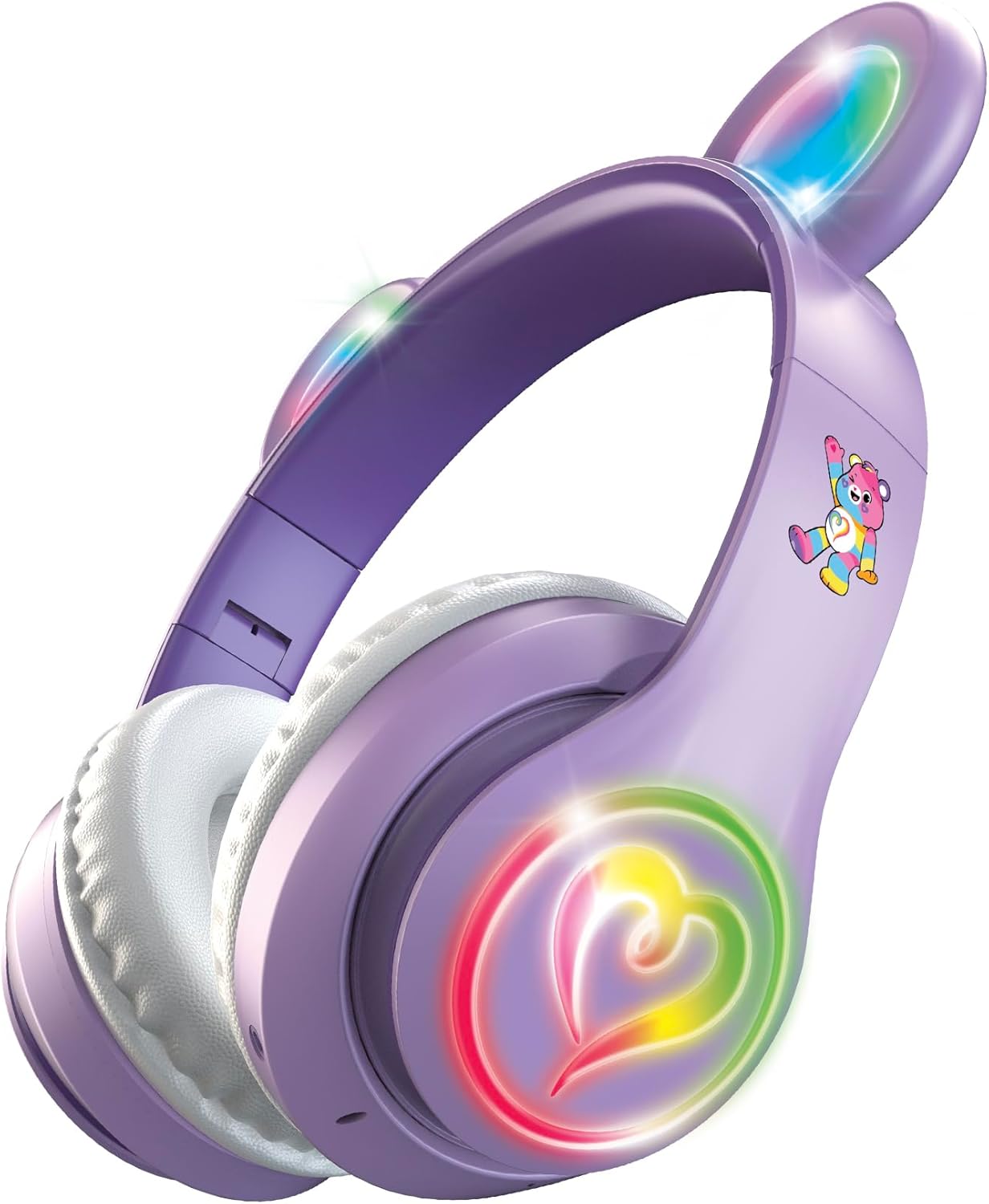
Umfanekiso 2: I-engeli view of the headphones with the multicolor LED lights activated on both the ears and the heart-shaped design on the earcups.
Izici Eziyinhloko:
- Ibhande lekhanda elilungisekayo: Ukuze ilingane kahle futhi ivikeleke.
- Ama-Earpad Athambile: Designed for extended listening comfort.
- Light-Up Ears and Earcups: Multicolor LED lights for a vibrant visual effect.
- On-Ear Control Panel: Buttons for power, play/pause, track navigation, and volume.
- Imakrofoni: Ihlanganiswe nezingcingo ezingenazingcingo.
- Imbobo yokushaja: Micro USB port for recharging the internal battery.
Setha
1. Ukushaja ama-headphones
- Locate the Micro USB charging port on one of the earcups.
- Connect the provided USB charging cable to the headphones and a compatible USB power source (e.g., computer USB port, USB wall adapter).
- The LED indicator light will illuminate during charging and change color or turn off when fully charged.
- Ukushaja okugcwele kunikeza cishe amahora ayi-8 okusetshenziswa okuqhubekayo.
2. Ukubhanqa kwe-Bluetooth
- Qinisekisa ukuthi ama-headphone ashajwe ngokugcwele.
- Press and hold the Power button on the earcup until the LED indicator light flashes, indicating pairing mode.
- Edivayisini yakho (i-smartphone, ithebhulethi, ikhompuyutha), vula i-Bluetooth bese usesha amadivaysi atholakalayo.
- Select "Care Bears Headphones" (or similar name) from the list of found devices.
- Once paired, the LED indicator light will stop flashing and remain solid, or turn off, depending on the model.
- Ama-headphone azozama ukuxhuma kabusha ngokuzenzakalelayo kudivayisi yokugcina ebhangqiwe uma evuliwe.
Imiyalelo yokusebenza
Vula/Vala
- Ukuvula: Cindezela futhi ubambe inkinobho yamandla kuze kube yilapho inkomba ye-LED ikhanya.
- Ukucisha: Cindezela futhi ubambe inkinobho yamandla kuze kube yilapho inkomba ye-LED icima.
Ukudlala Komculo
- Dlala/Misa kancane: Cindezela inkinobho ethi Dlala/Misa isikhashana kanye.
- Ithrekhi Elandelayo: Press the 'Next Track' button (often marked with a forward arrow or '+').
- Ithrekhi yangaphambilini: Press the 'Previous Track' button (often marked with a backward arrow or '-').
- Ivolumu ephezulu: Press and hold the 'Volume Up' button (often marked with '+').
- Ivolumu Phansi: Press and hold the 'Volume Down' button (often marked with '-').
Ukushaya Ngezandla
- Phendula/Phendula ikholi: Press the Play/Pause button once during an incoming call to answer, and once again to end the call.
- Yenqaba Ucingo: Press and hold the Play/Pause button for approximately 2 seconds during an incoming call.
- Phinda ushaye inombolo yokugcina: Double-press the Play/Pause button when not on a call.
Ukulawulwa Kokukhanya Kwe-LED
The headphones feature multicolor LED lights on the ears and earcups. Refer to the specific button on your headphones, often labeled 'Light' or a light bulb icon, to cycle through light modes or turn them off.
Isondlo
- Ukuhlanza: Sebenzisa indwangu ethambile, eyomile ukuhlanza ama-headphone. Ungasebenzisi izinto zokuhlanza abrasive noma izincibilikisi.
- Isitoreji: Gcina ama-headphone endaweni epholile, eyomile ekude nelanga eliqondile namazinga okushisa aphezulu.
- Gwema Amanzi: Lawa ma-headphone awawona angangenwa amanzi. Gwema ukuchayeka emanzini noma umswakama owedlulele.
Ukuxazulula inkinga
- Awekho Amandla: Qinisekisa ukuthi ama-headphone ashajwe ngokugcwele.
- Awukwazi ukubhanqa: Make sure Bluetooth is enabled on your device and the headphones are in pairing mode. Move closer to your device.
- Awukho Umsindo: Check the volume level on both the headphones and your connected device. Ensure the headphones are properly paired.
- Izibani Azisebenzi: Ensure the headphones are powered on and check if there is a dedicated button to activate the LED lights.
Imininingwane
- Inombolo Yemodeli: CBHPLEDGV101-MFN
- Ukuxhumana: I-Bluetooth 4.2
- Ukubekwa Kwendlebe: Ngendlebe
- Impilo Yebhethri: Kufika emahoreni ayi-8 (isilinganiso)
- Ibanga Lemvamisa: 20Hz - 20,000Hz
- Indlela yokulawula: Inkinobho Yokucindezela
- Okubalulekile: Ipulasitiki, Indwangu, I-Silicone
- Isisindo Sento: 0.3 Amakhilogremu
- Izici ezengeziwe: Light-Up Ears and Earcups with Multicolor LED Lights
Ulwazi Lwewaranti
These headphones come with a Isiqinisekiso Esinomkhawulo Wezinsuku ezingama-30 from the manufacturer. Please retain your proof of purchase for any warranty claims. The warranty covers manufacturing defects but typically does not cover damage caused by misuse, accidents, or unauthorized modifications.
Ukusekela
For further assistance, troubleshooting, or warranty inquiries, please refer to the contact information provided on the product packaging or visit the official Care Bears product support webindawo.