
EIGIIS K22
EIGIIS K22 Smartwatch User Manual
Imodeli: K22
1. Isingeniso
Welcome to the EIGIIS K22 Smartwatch user manual. This guide provides essential information for setting up, operating, and maintaining your new smartwatch. The EIGIIS K22 is a robust military-grade smartwatch designed for active lifestyles, featuring an AMOLED HD Always On Display, Bluetooth calling, comprehensive health monitoring, and over 100 sports modes.

Image: EIGIIS K22 Smartwatch, showcasing its rugged design and vibrant display.
2. Yini EseBhokisini
Sicela uhlole okuqukethwe kwephakheji uma ususa ibhokisi:
- EIGIIS K22 Smartwatch (with 1 Watch Band)
- Ikhebula lokushaja
- Incwadi Yomsebenzisi (le dokhumenti)
3. Ukusetha Kwasekuqaleni
3.1 Ukushaja i-Smartwatch
Before first use, fully charge your EIGIIS K22 Smartwatch. The device features a 400mAh battery that typically charges in approximately 2 hours.
- Xhuma ikhebula lokushaja elinozibuthe koxhumana nabo bokushaja ngemuva kwewashi elihlakaniphile.
- Xhuma ingxenye yekhebula le-USB ku-adaptha yamandla ye-USB ejwayelekile (kunconywa i-5V/1A) noma imbobo ye-USB yekhompyutha.
- Isibonisi sewashi sizobonisa isimo sokushaja.

Image: The smartwatch displaying its charging status, indicating a 400mAh battery capacity and charging time.
Ukufaka kwe-3.2
Ukuze uvule ukusebenza okugcwele kwewashi lakho elihlakaniphile, landa bese ufaka I-FitCloudPro uhlelo lokusebenza ku-smartphone yakho.
- Scan the QR code provided in the quick start guide or search for "FitCloudPro" in your smartphone's app store (Google Play Store for Android, Apple App Store for iOS).
- Install the app and grant necessary permissions for optimal performance.
3.3 Ukumatanisa Nomakhalekhukhwini Wakho
After installing the app, pair your smartwatch with your phone via Bluetooth.
- Qinisekisa ukuthi i-Bluetooth ivuliwe ku-smartphone yakho.
- Open the FitCloudPro app and follow the on-screen instructions to add a new device.
- Select the EIGIIS K22 from the list of available devices.
- Qinisekisa isicelo sokubhanqa kokubili efonini yakho kanye newashi elihlakaniphile.
4. Ukusebenzisa i-Smartwatch
4.1 Isibonisi nokuzulazula
The EIGIIS K22 features a 1.43-inch AMOLED HD Always On Display. You can navigate the watch interface using touch gestures and the physical buttons.
- Swayiphela Phezulu/Phansi: Finyelela izilungiselelo noma izaziso ezisheshayo.
- Swayiphela Kwesokunxele/Kwesokudla: Cycle through widgets like activity data, heart rate, weather, etc.
- Cindezela Inkinobho Eseceleni: Return to the home screen or access the app menu.

Image: Close-up of the 1.43-inch AMOLED display, showing a detailed watch face with time and activity data.
4.2 Bluetooth Calling and Smart Notifications
The smartwatch allows you to make and receive calls directly from your wrist and receive notifications from your paired smartphone.
- Ukushaya izingcingo: Use the built-in dialer or access your contacts through the watch interface.
- Yamukela Izingcingo: Answer or reject incoming calls directly on the watch.
- Izaziso: Receive alerts for messages, social media, and other app notifications. Ensure notification permissions are enabled in the FitCloudPro app.

Image: The smartwatch displaying an incoming call and various app notification icons, illustrating its Bluetooth call and smart notification capabilities.
4.3 Izindlela Zezemidlalo
The EIGIIS K22 supports over 100 sports modes to track your physical activities. Data such as calories burned, steps taken, and distance covered are recorded and synced to the FitCloudPro app.
- Access the Sports menu on your watch.
- Select your desired activity (e.g., Running, Cycling, Basketball).
- The watch will begin tracking your workout data.

Image: A user hiking while the smartwatch displays workout metrics like calories, distance, and steps, alongside icons for various sports modes.
4.4 Ukuqapha Ezempilo
The smartwatch continuously monitors key health metrics.
- Isilinganiso senhliziyo: Real-time heart rate tracking.
- Ukushaya kwegazi: Ilinganisa amazinga omfutho wegazi.
- I-Blood Oxygen (SpO2): Kukala ukugcwala komoya-mpilo egazini.
- Ukuqapha Ukulala: Analyzes sleep patterns (Awake, Light Sleep, Deep Sleep) to provide insights into sleep quality.
All health data is synced to the FitCloudPro app for detailed analysis and historical trends.
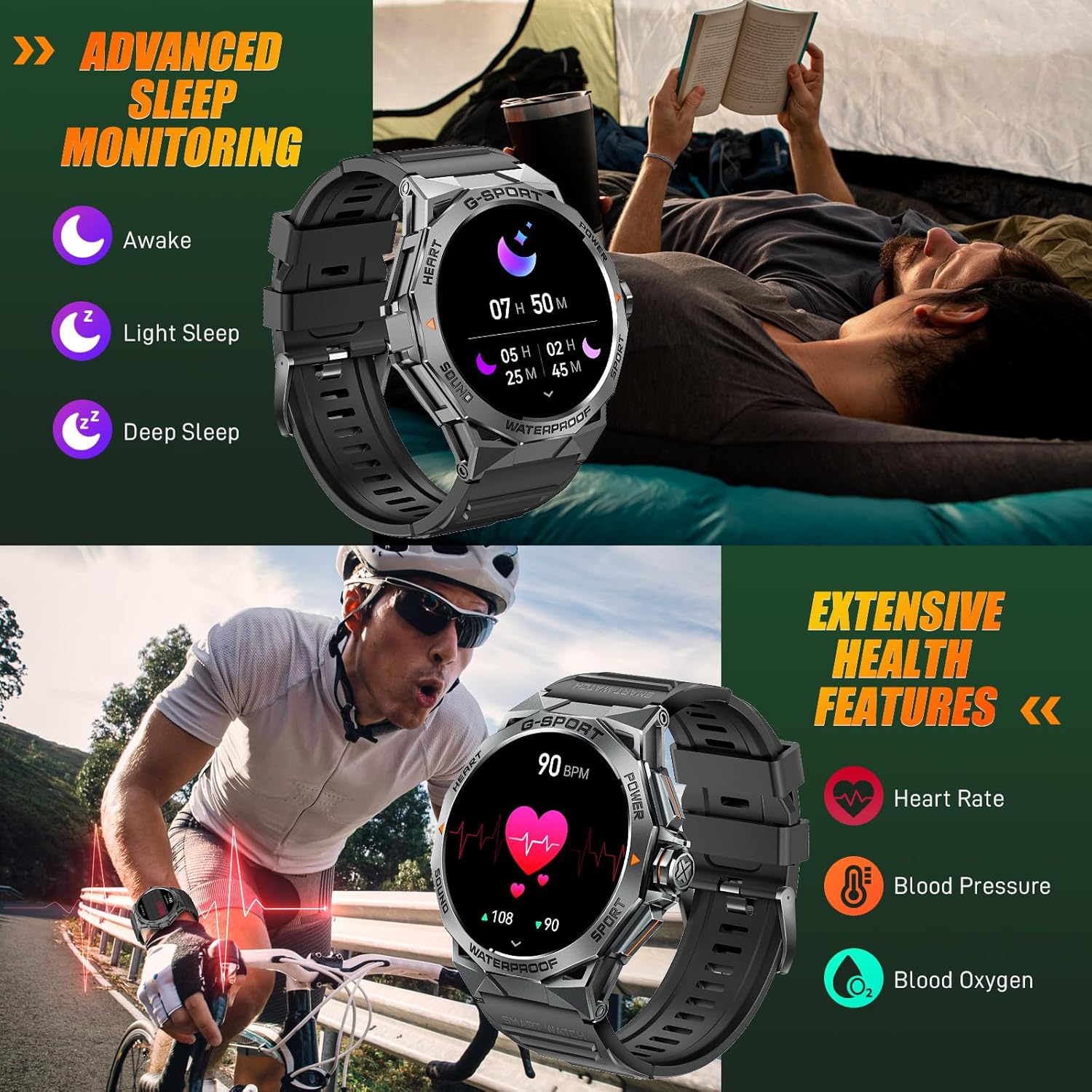
Image: The smartwatch displaying sleep data and heart rate monitoring, with icons for heart rate, blood pressure, and blood oxygen.
4.5 Ezinye izici ezihlakaniphile
The EIGIIS K22 offers several additional features to enhance daily convenience:
- Ukulawula Umculo: Lawula ukudlalwa komculo ku-smartphone yakho.
- Isilawuli Sekhamera Ekude: Sebenzisa iwashi lakho njengesivalo esikude sekhamera yefoni yakho.
- Izibuyekezo zesimo sezulu: Get real-time weather forecasts.
- Iwashi eline alamu: Setha ama-alamu ngqo esandleni sakho.
- Thola Ucingo: Thola i-smartphone yakho elahlekile.
- Izikhumbuzi Zokuhlala: Thola izexwayiso zokuhamba ngemva kwezikhathi zokungasebenzi.
- Umsizi Wezwi: Finyelela umsizi wezwi wefoni yakho.

Image: A collage showing the smartwatch controlling music, acting as a camera remote, displaying weather, and featuring stopwatch, alarm, and 'find phone' functions.
5. Isondlo Nokunakekela
5.1 Ukumelana Namanzi (IP68)
The EIGIIS K22 Smartwatch is IP68 waterproof, meaning it is resistant to dust and can withstand immersion in water up to 1.5 meters for 30 minutes. It is suitable for daily use, including washing hands and swimming.
- Avoid prolonged exposure to hot water, steam, or high-pressure water jets.
- Ungazisebenzisi izinkinobho ngaphansi kwamanzi.
- Dry the watch thoroughly after exposure to water.

Image: A person swimming while wearing the EIGIIS K22 Smartwatch, highlighting its IP68 waterproof rating.
5.2 Ukuthuthukisa Impilo Yebhethri
The 400mAh battery provides 4-7 days of typical usage and up to 25 days on standby. To maximize battery life:
- Adjust screen brightness to a lower setting.
- Limit the use of the Always On Display feature if extended battery life is critical.
- Khubaza izaziso ezingadingekile.
- Close background apps on the watch when not in use.
5.3 Ukuhlanza
Regularly clean your smartwatch and watch band to prevent skin irritation and maintain performance.
- Wipe the watch and band with a soft, damp indwangu.
- Gwema ukusebenzisa amakhemikhali anokhahlo noma izinto ezilumayo.
6. Ukuxazulula izinkinga
If you encounter issues with your EIGIIS K22 Smartwatch, refer to the following common solutions:
| Inkinga | Isixazululo Esingenzeka |
|---|---|
| Iwashi elingavuliwe | Qinisekisa ukuthi iwashi lishajwe ngokugcwele. Yixhume kushaja okungenani imizuzu engama-30. |
| Ayikwazi ukubhanqa ne-smartphone | Ensure Bluetooth is enabled on your phone. Restart both the watch and phone. Make sure the FitCloudPro app has Bluetooth permissions. |
| Izaziso azitholwanga | Check notification settings in the FitCloudPro app and your phone's system settings. Ensure the app is running in the background. |
| Impilo yebhethri emfushane | Disable the Always On Display feature. Reduce screen brightness. Limit frequent heart rate monitoring. See Section 5.2 for more tips. |
| Bluetooth audio defaults to watch speaker | This is a common behavior for smartwatches with built-in speakers. In your phone's Bluetooth settings, you may be able to disconnect the watch's audio profile while keeping the data connection. Alternatively, some apps allow you to select the audio output device. |
| Idatha yezempilo engalungile | Ensure the watch is worn snugly on your wrist, about one finger's width above the wrist bone. Avoid excessive movement during measurements. Note that smartwatches are not medical devices and readings are for reference only. |
7. Imininingwane
| Isici | Imininingwane |
|---|---|
| Inombolo Yemodeli | K22 |
| Bonisa | 1.43 Inches AMOLED HD Always On Display |
| Amandla ebhethri | 400 mAh |
| Impilo Yebhethri | 4-7 days (typical use), up to 25 days (standby) |
| Isikhathi sokushaja | Cishe amahora angama-2 |
| Ukumelana Namanzi | IP68 |
| Ukuxhumana | I-Bluetooth |
| Isistimu esebenzayo | Gqoka i-OS |
| Ukuhambisana | I-Android 4.4 nangaphezulu, iOS 8.0 nangaphezulu |
| Isisindo sento | Amagremu angu-50 (ama-ounces angu-1.76) |
| Ubukhulu bomkhiqizo | 6.69 x 4.33 x 1.18 amayintshi |
8. Iwaranti kanye Nokusekela
8.1 Iwaranti Yomkhiqizo
The EIGIIS K22 Smartwatch comes with a Isiqinisekiso sekhwalithi sezinyanga eziyi-12 from the date of purchase. This warranty covers manufacturing defects and issues arising from normal use. It does not cover damage caused by misuse, accidents, unauthorized modifications, or failure to follow instructions.
8.2 Ukwesekwa Kwamakhasimende
For any questions, technical assistance, or warranty claims, please contact EIGIIS customer support through the following channels:
- Refer to the contact information provided with your product packaging.
- Visit the official EIGIIS webindawo yezinsiza zokusekela.
- Contact the seller directly through the platform where you purchased the product.
Please have your purchase receipt and product model number (K22) ready when contacting support.
Ask a question about this manual
Ask about setup, troubleshooting, compatibility, parts, safety, or missing instructions. Manuals+ will review the question and use this page’s manual context to help answer it.