Isingeniso
This manual provides essential information for the safe operation, assembly, maintenance, and troubleshooting of your new Electric Children's Buggy Can-am Maverick. Please read this manual thoroughly before assembly and use to ensure proper function and safety.
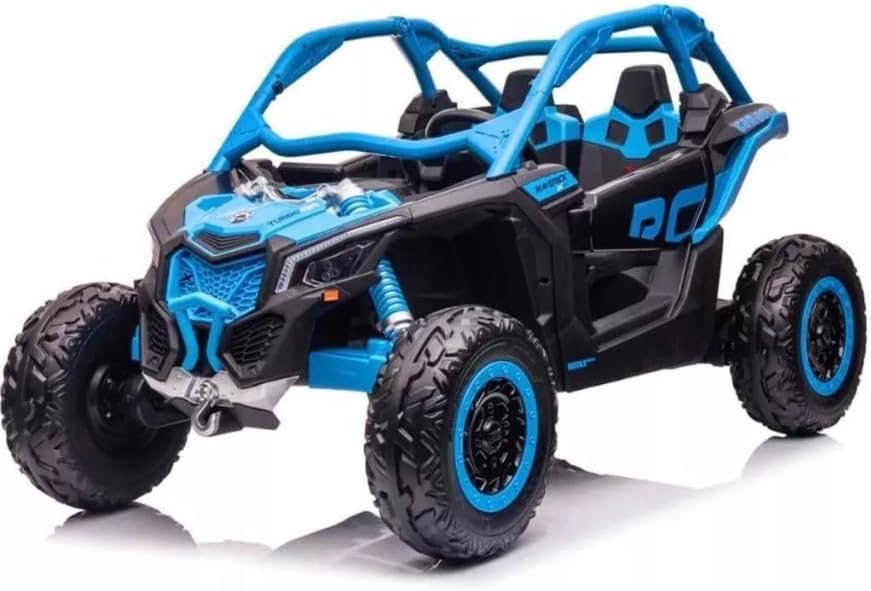
Image: A dynamic side view of the Electric Children's Buggy Can-am Maverick, showcasing its robust design and vibrant blue and black color scheme.
Ulwazi Lokuphepha Olubalulekile
To reduce the risk of injury, adult supervision is required at all times. Never use this vehicle on roadways, near cars, near steep inclines or steps. Do not submerge the vehicle in water or other liquids.
- Always ensure the child is wearing appropriate safety gear, such as a helmet.
- Qinisekisa ukuthi zonke izinsimbi ziqiniswa ngokuphephile ngaphambi kokusetshenziswa ngakunye.
- Only operate on flat, dry surfaces away from hazards.
- Gcina izandla, izinwele, nezingubo kude nezingxenye ezihambayo.
Ukusetha nokuhlanganisa
Assembly is required for this product. Please follow the steps below carefully.
Ukukhumula kanye Nokuhlola Kokuqala
Carefully remove all components from the packaging. Verify that all parts listed in the packing list are present and undamaged. If any parts are missing or damaged, do not proceed with assembly and contact customer support.
Izinyathelo Zomhlangano
- Ukufakwa Kwamasondo: Attach the wheels to the axles, ensuring they are securely fastened with the provided hardware.
- Umhlangano Wesondo Lokuqondisa: Connect the steering wheel to the steering column. Ensure it clicks into place or is secured with the designated screw.
- Ukufakwa Kwesihlalo: Place the seats into the designated slots and secure them. Ensure seatbelts are accessible and functional.
- Uxhumano Lwebhethri: Connect the battery terminals. Refer to the battery compartment for specific instructions. Ensure the connection is firm.
- Inkokhelo yokuqala: Before first use, fully charge the battery for 8-12 hours. Do not overcharge.

Isithombe: Emuva view of the electric buggy with the door open, highlighting the spacious interior and robust rear suspension components.
Imiyalelo yokusebenza
Izilawuliview

Image: The dashboard of the electric buggy, featuring the steering wheel, a digital speedometer display, and a multimedia screen.
- Inkinobho yokuqala / yokumisa: Located near the key slot, press to turn the vehicle on or off.
- I-Accelerator Pedal: Press to move forward. Release to brake.
- Isiteringi: Jikela kwesobunxele noma kwesokudla ukuze uqondise imoto.
- Isikhethi segiya: (If applicable) Switch between forward, neutral, and reverse.
- Multimedia Screen: Provides entertainment and vehicle information.
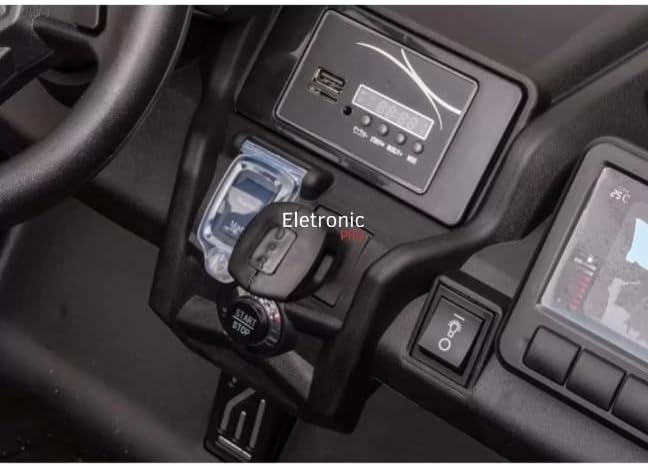
Isithombe: Ukuvala view of the electric buggy's central console, showing the start/stop button and the key ignition slot.
Ukushayela Imoto
- Ensure the child is seated properly and the seatbelt is fastened.
- Press the Start/Stop button to power on the vehicle.
- Gently press the accelerator pedal to move forward. Release the pedal to stop.
- Use the steering wheel to navigate.
- Always supervise the child during operation.

Image: The interior of the electric buggy, featuring two black, contoured seats equipped with safety seatbelts.
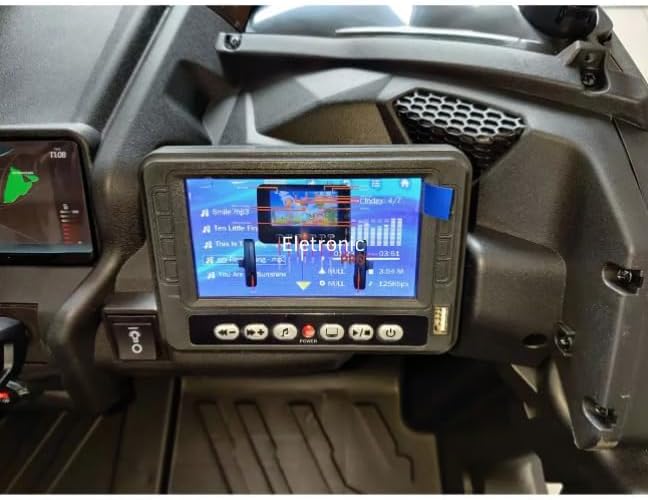
Image: A close-up of the electric buggy's multimedia screen, showing a music playback interface with song titles and an equalizer display.
Isondlo
Ukunakekela Ibhethri
- Shaja ibhethri ngemva kokusetshenziswa ngakunye.
- Ungavumeli ibhethri ukuthi liphume ngokugcwele.
- If storing for extended periods, charge the battery once a month.
- Only use the charger provided with the vehicle.
Ukuhlanza Nokugcina
- Wipe the vehicle with a damp indwangu. Ungasebenzisi izinto zokuhlanza ezihlabayo.
- Store the vehicle in a dry, cool place away from direct sunlight and moisture.
- Protect the vehicle from extreme temperatures.
Ukuxazulula inkinga
| Inkinga | Imbangela Engenzeka | Isixazululo |
|---|---|---|
| Imoto ayinyakazi | Battery is low or disconnected; Loose wire connection; Blown fuse. | Charge battery; Check battery connections; Check fuse and replace if necessary. |
| Imoto ihamba kancane | Battery is low; Overloaded vehicle; Operating on rough terrain. | Recharge battery; Reduce load; Operate on smoother surfaces. |
| No sound from multimedia screen | Volume is too low; Audio cable disconnected. | Increase volume; Check audio connections. |
Imininingwane
- Imodeli: DK-CA001
- Ibhrendi: Okujwayelekile
- Iminyaka Enconyiwe: Izinyanga ezingama-36 - iminyaka eyi-8
- Izinto zokwakha: Plastic, Rubber, Steel Alloy
- Ubukhulu bomkhiqizo: 145 x 84 x 79 cm
- Isisindo Somkhiqizo: 42 kg
- Kudingeka Umhlangano: Yebo
- Isitifiketi: Akufaneleki
Iwaranti kanye Nokusekela
This product comes with a return policy of 7 days from the date of purchase. For any issues, questions, or to claim warranty support, please contact the seller directly. Please retain your proof of purchase for any warranty claims.
Umdayisi: ELETRONIC PRO LTDA