
Umkhiqizo Uphelileview
The Mesqool CR1025 is a versatile alarm clock radio designed to provide multiple functionalities in a compact form factor. It integrates an alarm clock, Bluetooth speaker, FM radio, LED night light, and dual USB charging ports for convenience.
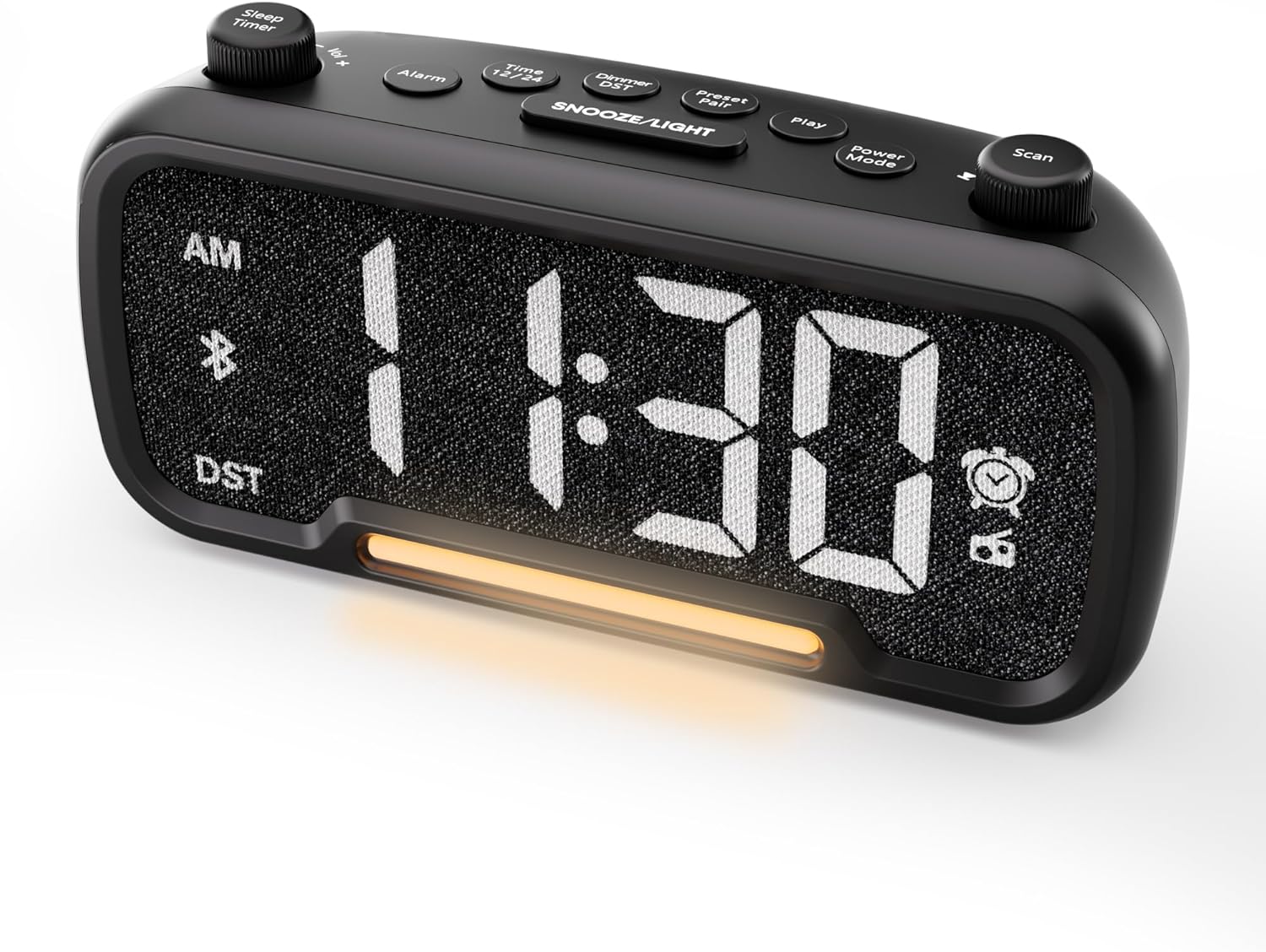
Umfanekiso 1: Ngaphambili view of the Mesqool CR1025 Alarm Clock Radio, displaying the digital time and control layout.

Figure 2: Key features of the Mesqool CR1025, highlighting its multi-functional design.
Umhlahlandlela Wokusetha
1. Ukuxhunywa kwamandla
- Connect the provided power adapter to the DC IN port on the back of the alarm clock.
- Plug the adapter into a standard electrical outlet. The clock will power on and the display will illuminate.

Figure 3: The alarm clock radio connected to power, ready for use.
2. Ukufakwa Kwesipele Sebhethri
- The unit includes a CR2032 lithium battery for backup. This battery retains alarm settings and time during a power outage, but the display will not show the time and the alarm will not sound until power is restored.
- Thola indawo yebhethri phansi kweyunithi.
- Insert the CR2032 battery with the correct polarity (+ side up).
- Vala indawo yebhethri ngokuphephile.
3. Ukusetha Isikhathi Sokuqala
- Cindezela inkinobho Isikhathi 12/24 inkinobho. Izinombolo zehora zizokhanya.
- Zungezisa i- Skena knob (right knob) to adjust the hour.
- Cindezela inkinobho Isikhathi 12/24 inkinobho futhi. Amadijithi amaminithi azokhanya.
- Zungezisa i- Skena inkinobho ukulungisa umzuzu.
- Cindezela inkinobho Isikhathi 12/24 button once more to confirm and exit time setting.
4. 12/24 Ifomethi Yesikhathi Sehora
- To switch between 12-hour and 24-hour time formats, press and hold the Isikhathi 12/24 inkinobho imizuzwana engu-2.
- In 12-hour format, 'AM' or 'PM' indicators will appear on the display.

Figure 4: Display options for 12-hour and 24-hour time formats.
5. Daylight Saving Time (DST) Mode
- To activate or deactivate Daylight Saving Time, press and hold the Dimmer DST inkinobho imizuzwana engu-2.
- The time will adjust by one hour forward or backward, and the 'DST' indicator will appear or disappear.
Imiyalelo yokusebenza
1. Ukubeka i-alamu
- Cindezela bese ubamba i I-alamu button for 2 seconds. The hour digits will flash.
- Zungezisa i- Ivolumu -/+ knob (left knob) to adjust the alarm hour.
- Cindezela inkinobho I-alamu inkinobho futhi. Amadijithi amaminithi azokhanya.
- Zungezisa i- Ivolumu -/+ knob to adjust the alarm minute.
- Cindezela inkinobho I-alamu button again. The alarm source icon will flash. Rotate the Ivolumu -/+ knob to select between buzzer or FM radio as the alarm sound.
- Cindezela inkinobho I-alamu button again. The volume level will flash. Rotate the Ivolumu -/+ knob to adjust the alarm volume (L01-L16).
- Cindezela inkinobho I-alamu button once more to confirm and activate the alarm. The alarm icon will appear on the display.
Ikhansela i-Alamu
- To cancel the alarm, press the I-alamu button. The alarm icon will turn off, indicating the alarm has been deactivated.
Umsebenzi wokusnuza
- Uma i-alamu ikhala, cindezela inkinobho SNULA / UKUKHANYA button to activate the snooze function. The alarm will pause for 9 minutes and then sound again.
- This can be repeated up to 9 times. To stop the alarm for the day, press the I-alamu inkinobho.

Figure 5: The alarm clock radio offers two alarm sound options: radio or buzzer.
2. Bluetooth Speaker Operation
- Cindezela inkinobho Imodi yamandla button repeatedly until 'bt' appears on the display and the Bluetooth icon starts flashing. This indicates the clock is in Bluetooth pairing mode.
- On your mobile device, enable Bluetooth and search for available devices. Select 'CR1025' from the list.
- Once connected, the Bluetooth icon on the clock's display will stop flashing and remain solid. You can now play audio from your device through the clock's speaker.

Figure 6: Bluetooth 5.0 connectivity for wireless audio streaming.
3. Ukusebenza komsakazo we-FM
- Cindezela inkinobho Imodi yamandla button repeatedly until the radio icon lights up on the display, indicating FM radio mode.
- Skena ngokuzenzakalela: Cindezela inkinobho Skena button to automatically search for and store up to 20 FM radio stations. The clock will cycle through frequencies and save strong signals as presets (P01, P02, etc.).
- Ukusesha Mathupha: Zungezisa i- Skena knob to manually browse FM frequencies.
- Londoloza Ukusetha ngaphambilini: To save a manually found station, press and hold the Preset Pair button for 2 seconds. The preset number will flash. Rotate the Skena knob to select a preset slot, then press Preset Pair futhi ukusindisa.
- Khumbula ukusetha ngaphambilini: Kumodi ye-FM, cindezela kafushane Preset Pair inkinobho yokujikeleza eziteshini ezilondoloziwe.
- Lungisa Ivolumu: Zungezisa i- Ivolumu -/+ knob to adjust the radio volume (16 levels).

Figure 7: Enjoying FM radio with a wide frequency range and 20 presets.
4. Night Light and Brightness Dimmer
- The clock features a built-in LED night light.
- Cindezela inkinobho SNULA / UKUKHANYA button to cycle through 5 adjustable brightness levels for the main display and the night light.
- The lowest setting is suitable for sleeping, while the brightest is for daytime visibility.

Figure 8: The 5-level brightness dimmer allows customization for various lighting conditions.
5. Phone Charging Ports
- The Mesqool CR1025 is equipped with two USB charging ports: one USB-C and one USB-A.
- Connect your devices (e.g., smartphone, smartwatch) to these ports using appropriate charging cables.
- The clock must be powered via its AC adapter for the charging ports to function.
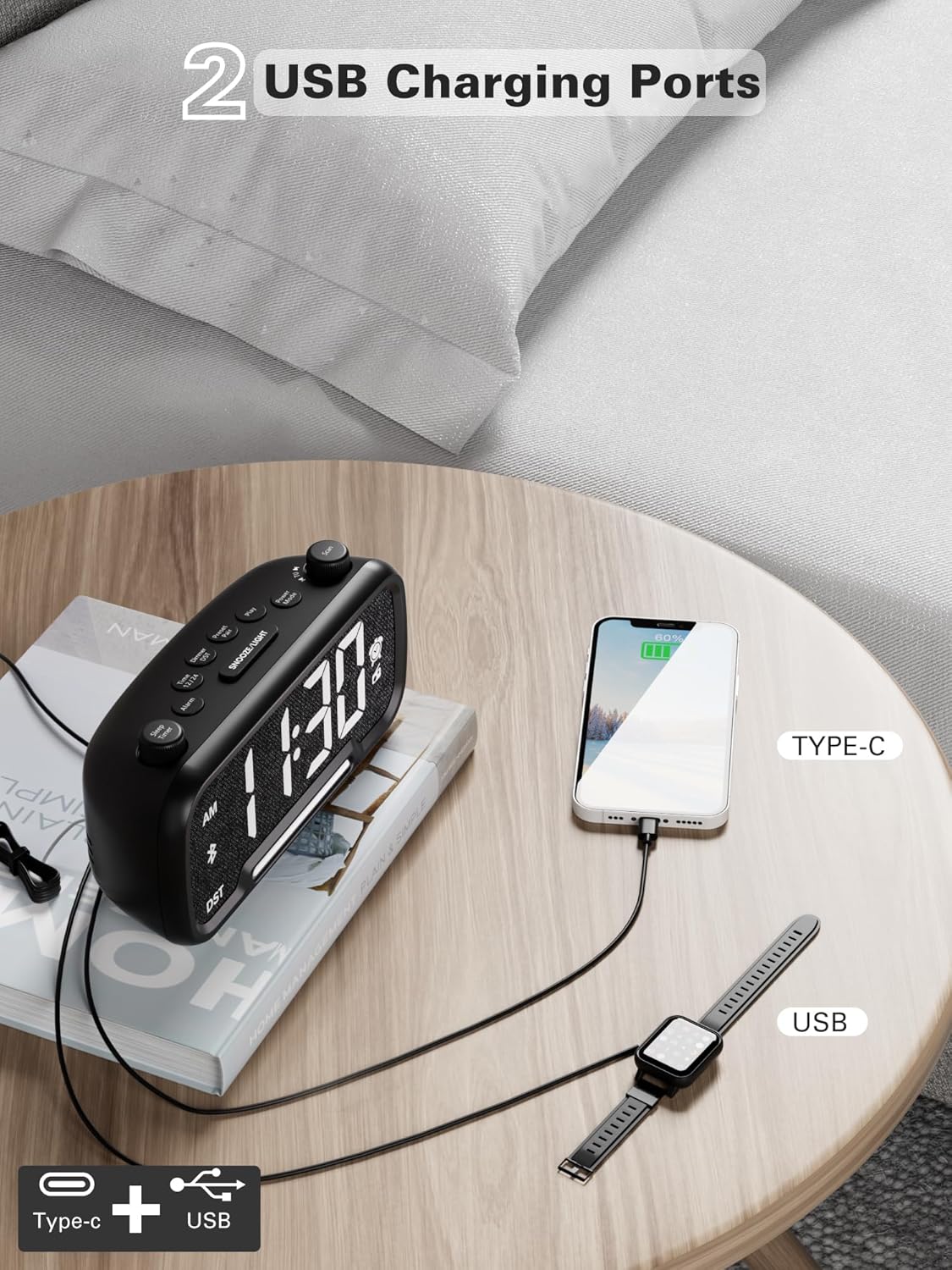
Figure 9: Dual USB charging ports for convenient device power.
6. Sleep Timer Setting
- When using the FM radio or Bluetooth speaker, you can set a sleep timer to automatically turn off playback after a set duration.
- Cindezela inkinobho Isikhathi Sokulala button (left knob) to access the settings.
- Zungezisa i- Isikhathi Sokulala knob to select the desired duration: 15, 30, 60, 90, or 120 minutes, or OFF.
- The display will show the selected duration, and then return to the current time. The music/radio will play for the set time and then automatically turn off.
Ividiyo Yokufundisa
Video 1: This instructional video demonstrates various settings for the Mesqool CR1025, including alarm setting, time setting, 12/24H format, DST mode, dimmer setting, Bluetooth pairing, FM radio operation, and sleep timer. Refer to the specific sections above for detailed steps.
Isondlo
- Ukuhlanza: Use a soft, dry cloth to clean the surface of the alarm clock. Do not use liquid cleaners or abrasive materials.
- Ukushintshwa Kwebhethri: If the battery backup is no longer retaining settings during power outages, replace the CR2032 battery in the compartment on the bottom of the unit. Ensure correct polarity.
- Isitoreji: If storing the unit for an extended period, disconnect it from power and remove the backup battery.
Ukuxazulula inkinga
- Akukho Ukuvula/Ukubonisa Okucishiwe: Ensure the power adapter is securely connected to both the clock and a working electrical outlet. Check if the outlet has power.
- I-alamu Ayikhali: Verify that the alarm is set correctly (time, source, volume) and that the alarm icon is visible on the display. Ensure the alarm volume is not set to L00.
- Ukwamukelwa Okubi Komsakazo We-FM: Extend the FM antenna fully. Try repositioning the clock to improve signal reception. Perform an auto-scan to find stronger stations.
- I-Bluetooth Ayixhumeki: Ensure the clock is in Bluetooth pairing mode (flashing 'bt' icon). Make sure your device's Bluetooth is enabled and within range. Forget the device on your phone and try pairing again.
- USB Charging Not Working: Confirm the clock is connected to AC power. Check if the charging cable is functional and properly connected to both the clock and your device.
- Display Too Bright/Dim: Cindezela inkinobho SNULA / UKUKHANYA inkinobho ukulungisa izinga lokukhanya.
Imininingwane
| Isici | Ukucaciswa |
|---|---|
| Ibhrendi | I-Mesqool |
| Inombolo Yemodeli | CR1025 |
| Ubukhulu bomkhiqizo | 5.9 x 3.81 x 8.4 cm |
| Isisindo sento | 216 g |
| Okubalulekile | Indwangu |
| Uhlobo lokubonisa | I-LED yedijithali |
| Izici ezikhethekile | Radio Clock, LED Display, Bluetooth Speaker, Night Light, Phone Charger |
| Imisakazo ye-FM Radio | 87.5MHz - 108.0MHz |
| Amazinga Evolumu Ye-alamu | 16 (L01-L16) |
| Display Brightness Levels | 5 |
| Okokukhiphayo kokushaja kwe-USB | USB-C and USB-A ports |
| Isipele Sebhethri | CR2032 (for settings retention) |
Iwaranti kanye Nokusekela
For warranty information, technical support, or further assistance, please refer to the contact details provided with your product packaging or visit the official Mesqool webindawo.