
1. Isingeniso
Siyabonga ngokuthengaasing the Philco Portable CD Player Boombox. This versatile audio system combines modern and classic audio playback options, including CD, cassette, FM radio, and Bluetooth connectivity. This manual provides essential information for safe and efficient use of your device.
2. Imiyalelo Yezokuphepha Ebalulekile
- Funda yonke imiyalelo ngaphambi kokusebenzisa idivayisi.
- Gcina leli bhukwana ukuze lisetshenziswe esikhathini esizayo.
- Ungayivezi iyunithi emvuleni noma emswakama ukuze uvimbele umlilo noma ukushaqeka kukagesi.
- Qinisekisa ukungena komoya ngendlela efanele; ungavimbi noma yiziphi izimbobo zokungenisa umoya.
- Sebenzisa kuphela okunamathiselwe/izinsiza ezicaciswe umenzi.
- Khipha iyunithi ngesikhathi seziphepho zombani noma uma ingasetshenziswa isikhathi eside.
- Thumela zonke izinsiza kubasebenzi benkonzo abaqeqeshiwe.
- Ungavuli i-casing; azikho izingxenye ezisebenzisekayo ngaphakathi.
- Gwema ukubeka iyunithi eduze kwemithombo yokushisa njengama-radiator, amarejista okushisa, izitofu, noma ezinye izinto zokusebenza (okuhlanganisa ampama-lifiers) akhiqiza ukushisa.
3. Izingxenye Zomkhiqizo Nokulawula
Familiarize yourself with the various parts and controls of your Philco Portable CD Player Boombox.
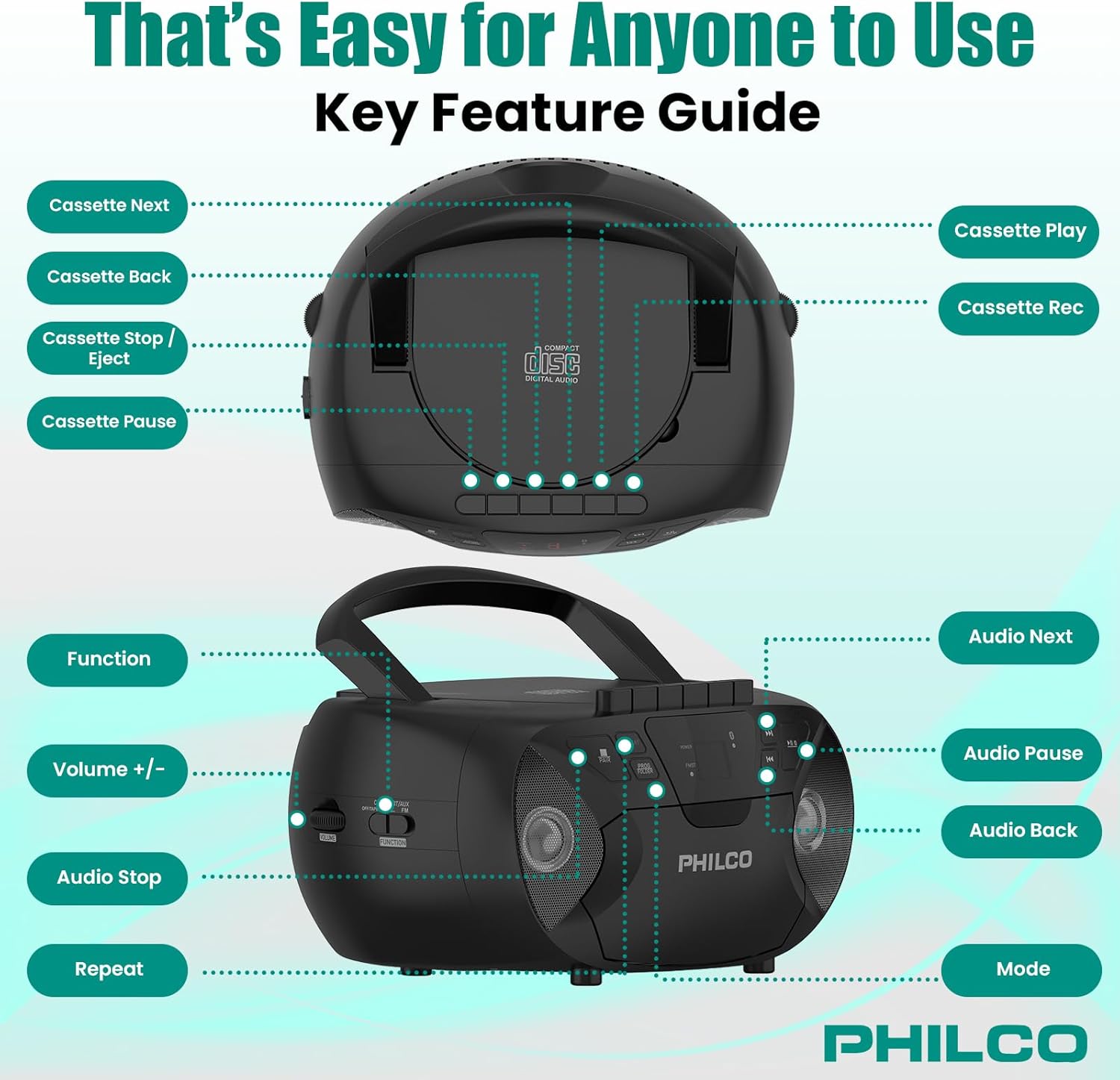
Isithombe 3.1: Phezulu nasohlangothini view of the Philco Boombox with key controls labeled. This image shows the layout of buttons for cassette functions (Next, Back, Stop/Eject, Pause, Play, Record) and audio controls (Next, Pause, Back, Mode, Volume, Function, Stop, Repeat).
Izilawuli zephaneli yangaphambili:
- AMANDLA Inkinobho: Ivula noma ivale iyunithi.
- Inkinobho ye-MODE: Switches between CD, Cassette, FM Radio, Bluetooth, and AUX modes.
- PLAY/PAUSE Button (CD/Bluetooth): Iqala noma imisa kancane ukudlala.
- STOP Button (CD/Bluetooth): Imisa ukudlala.
- SKIP/SEARCH Buttons (<< / >>): Skips tracks or fast forwards/rewinds.
- Ukulawulwa kweVOLUME: Ilungisa izinga lokuphuma komsindo.
- FM TUNER Dial: Selects FM radio stations.
Izilawuli Zedekhi Yamakhasethi:
- Inkinobho yokudlala: Iqala ukudlala ikhasethi.
- Inkinobho YOKUREKHODA: Initiates cassette recording (from CD, FM, or AUX).
- REWIND/FAST FORWARD Buttons: Rewinds or fast forwards the tape.
- Inkinobho Yokumisa/Ukukhipha: Stops tape playback/recording and opens the cassette door.
- Inkinobho ethi MUSA: Temporarily pauses cassette playback/recording.
Rear/Side Panel Connections:
- Ukufaka Amandla we-AC: Ixhuma intambo yamandla ye-AC.
- Igumbi Lebhethri: Holds 6 x 'C' size batteries (not included) for portable use.
- I-AUX IN Jack (3.5mm): Ixhuma amadivayisi omsindo angaphandle.
- HEADPHONE Jack (3.5mm): Ukuze ulalele ngasese ngama-headphone.
- I-FM Antenna: I-antenna enwebekayo ukuze kuthuthukiswe ukwamukelwa kwe-FM.
4. Setha
4.1 Ukunika amandla iyunithi
Your Philco Boombox can be powered by either AC power or batteries.

Isithombe 4.1: Illustration of AC power connection and battery installation for the Philco Boombox.
Amandla e-AC:
- Qinisekisa ukuthi iyunithi ivaliwe.
- Connect the supplied AC power cord to the AC power input jack on the back of the unit.
- Xhuma olunye uhlangothi lwentambo yamandla e-AC endaweni yokuxhuma evamile yodonga (i-AC 120V ~ 60Hz).
Amandla Ebhethri:
- Qinisekisa ukuthi iyunithi icishiwe futhi ayixhunyiwe kumandla e-AC.
- Open the battery compartment cover located on the bottom or rear of the unit.
- Insert 6 x 'C' size batteries (not included), observing the correct polarity (+/-) as indicated inside the compartment.
- Vala ikhava yengxenye yebhethri ngokuphephile.
Qaphela: When using AC power, batteries are automatically disconnected. Remove batteries if the unit will not be used for an extended period to prevent leakage.
4.2 Amandla Okuqala Avuliwe
Cindezela inkinobho AMANDLA button to turn on the unit. The unit will typically default to the last used mode or CD mode.
5. Ukusebenza
5.1 Ukusebenza kwesidlali se-CD
Isithombe 5.1: Demonstrating the top-loading CD compartment for disc insertion.
- Cindezela inkinobho IMODE button until "CD" mode is selected.
- Open the CD compartment door by gently lifting it.
- Place a CD (CD-R, CD-RW, MP3, WMA compatible) onto the spindle with the label side facing up.
- Close the CD compartment door securely.
- Cindezela inkinobho DLALA/YIMISA inkinobho ukuqala ukudlala.
- Sebenzisa i- Eqa / SEARCH buttons (<< / >>) to navigate between tracks.
- Cindezela inkinobho IMA inkinobho yokuqeda ukudlala.
- Cindezela inkinobho PHINDA button to repeat the current track or all tracks.
5.2 Cassette Player/Recorder Operation

Isithombe 5.2: View of the cassette deck with a tape loaded, ready for playback or recording.
Ukudlala iKhaseti:
- Cindezela inkinobho IMODE button until "TAPE" or "CASSETTE" mode is selected.
- Cindezela inkinobho MISA/KHIPHA inkinobho yokuvula umnyango wekhasethi.
- Insert a cassette tape with the open edge facing upwards and the side to be played facing you.
- Vala umnyango wekhasethi.
- Cindezela inkinobho DLALA inkinobho ukuqala ukudlala.
- Sebenzisa HLELA EMVA/SHESHA PHAMBILI izinkinobho zokuzulazula etheyipini.
- Cindezela inkinobho MISA/KHIPHA button to stop playback and eject the tape.
Ukuqopha ku-Cassette:
- Faka itheyiphu yekhasethi engenalutho edekini yekhasethi.
- Select the desired source (CD, FM Radio, or AUX) using the IMODE inkinobho.
- Start playback on the source (e.g., play a CD track, tune to an FM station).
- Cindezela inkinobho IREKHODI inkinobho ekhoneni lekhasethi. DLALA inkinobho izophinde ibandakanyeke.
- Ukumisa ukurekhoda, cindezela inkinobho IMA button. Press it again to resume.
- Ukumisa ukurekhoda, cindezela inkinobho ethi MISA/KHIPHA inkinobho.
5.3 Ukusebenza komsakazo we-FM
- Cindezela inkinobho IMODE inkinobho kuze kube yilapho kukhethwe imodi ethi "FM".
- Extend the FM telescopic antenna for optimal reception.
- Zungezisa i- Umshuki we-FM dayela ukuze ukhethe isiteshi somsakazo osithandayo.
- Lungisa i- UMQULU control to your preferred listening level.
5.4 I-Bluetooth Audio Streaming

Isithombe 5.3: The Philco Boombox wirelessly connected to a smartphone via Bluetooth for audio streaming.
- Cindezela inkinobho IMODE button until "BT" or "BLUETOOTH" mode is selected. The unit will enter pairing mode, indicated by a flashing Bluetooth indicator.
- Kudivayisi yakho enikwe amandla i-Bluetooth (isb, i-smartphone, ithebhulethi), vula i-Bluetooth bese usesha amadivaysi atholakalayo.
- Select "PHILCO BOOMBOX" (or similar name) from the list of devices to pair.
- Once paired, the Bluetooth indicator will stop flashing and remain solid.
- Start playing audio on your connected device. The sound will be streamed to the boombox.
- Adjust volume on both the boombox and your connected device.
Inothi elibalulekile: This boombox is designed to thola audio via Bluetooth from other devices. It cannot dlulisa audio to Bluetooth headphones, earbuds, or speakers.
5.5 Umsebenzi Wokufaka we-AUX

Isithombe 5.4: The AUX input jack on the Philco Boombox, used for connecting external audio sources.
- Xhuma uhlangothi olulodwa lwekhebula lomsindo elingu-3.5mm (alifakiwe) ku-jack ye-AUX IN ku-boombox.
- Connect the other end of the audio cable to the headphone jack or audio output of your external device (e.g., MP3 player, smartphone).
- Cindezela inkinobho IMODE inkinobho kuze kube yilapho kukhethwe imodi ethi "AUX".
- Qala ukudlala umsindo kudivayisi yakho yangaphandle.
- Adjust the volume on both the boombox and your external device.
5.6 Ukusetshenziswa Kwezindlebe
For private listening, plug any standard 3.5mm headphones into the I-HEADPHONE jack. The internal speakers will automatically mute.
6. Isondlo
6.1 Ukuhlanza Iyunithi
- Sula ingaphandle leyunithi ngento ethambile, damp indwangu. Ungasebenzisi izinto zokuhlanza abrasive noma izincibilikisi.
- For the CD lens, use a specialized CD lens cleaning kit.
- Ngedekhi yekhasethi, hlanza njalo amakhanda etheyiphu nama-pinch roller nge-cotton swab kancane dampifakwe nge-isopropyl alcohol.
6.2 Ukunakekelwa Kwebhethri
- Remove batteries if the unit will not be used for an extended period to prevent battery leakage and corrosion.
- Ungawahlanganisi amabhethri amadala namasha, noma izinhlobo ezahlukene zamabhethri.
- Lahla amabhethri asetshenzisiwe ngokuzibophezela ngokwemithetho yendawo.
7. Ukuxazulula izinkinga
| Inkinga | Imbangela Engenzeka | Isixazululo |
|---|---|---|
| Awekho amandla | Intambo ye-AC ayixhunyiwe; Amabhethri aphelile noma afakwe ngokungalungile. | Hlola uxhumano lwentambo ye-AC; Shintsha amabhethri noma uqinisekise i-polarity efanele. |
| No sound from CD/Cassette/Radio/Bluetooth/AUX | Volume too low; Incorrect mode selected; Headphones connected; CD/Cassette inserted incorrectly or damaged; Bluetooth not paired. | Increase volume; Select correct mode; Disconnect headphones; Check/replace media; Re-pair Bluetooth device. |
| CD skips | CD dirty or scratched; Unit on an unstable surface. | Clean or replace CD; Place unit on a stable, flat surface. |
| Ukwemukelwa kahle kwe-FM | I-Antenna ayinwetshiwe; Isignali ebuthaka. | Fully extend and adjust the FM antenna; Try moving the unit to a different location. |
| Idivayisi ye-Bluetooth ngeke imataniswe | Boombox not in pairing mode; Device too far; Bluetooth already connected to another device. | Ensure boombox is in BT pairing mode; Move device closer; Disconnect from other devices and try again. |
| Cassette tape not playing/recording correctly | Tape damaged; Tape heads dirty; Buttons stuck (as per review). | Try a different tape; Clean tape heads; If buttons are stuck, gently try to free them or contact support if persistent. |
8. Imininingwane
- Ibhrendi: Philco
- Imodeli: B0DHYKCWYN
- Ubuchwepheshe bokuxhuma: I-Bluetooth
- Umbala: Mnyama
- Uhlobo lwesipika: Isitiriyo
- Ubukhulu bento (L x W x H): 10.08 x 5.71 x 10.75 amayintshi
- Umthombo wamandla: AC 120V ~ 60Hz or 6 x 'C' Batteries (not included)
- Amadivayisi Ahambisanayo: MP3 Player (via AUX)
- Amafomethi Omsindo Asekelwe: CD, CD-R, CD-RW, MP3, WMA (from CD)
- Inombolo Yezipikha: 2
- Imodi Yokukhipha Umsindo: Isitiriyo
- Ukusekelwa kwe-Bluetooth: Yes (receive only)
- Imidiya eyakhelwe ngaphakathi: CD, Cassette, FM Radio
9. Iwaranti kanye Nokusekela
9.1 Ulwazi Lwewaranti
For specific warranty details, please refer to the warranty card included with your product or visit the official Philco webindawo. Imigomo nemibandela yesiqiniseko ingahluka ngendawo nomthengisi.
9.2 Ukwesekwa Kwamakhasimende
If you encounter any issues or have questions not covered in this manual, please visit the official Philco website for support resources, FAQs, and contact information. You can typically find support links on the product page where you purchased the item or by searching for "Philco customer support" online.