
1. Isingeniso
This manual provides essential information for the proper use and maintenance of your EBTOOLS 8-Inch 2-in-1 Pocket PC Computer. Please read this guide thoroughly before operating the device to ensure optimal performance and longevity. This compact and versatile device features an 8-inch touchscreen, a 360-degree rotating design, and runs on Windows 11 Pro.

Image: The EBTOOLS 8-Inch 2-in-1 Pocket PC shown in its tablet configuration, with a scenic road displayed on the screen.
2. Okuqukethwe Kwephakheji
Qinisekisa ukuthi zonke izinto ezibalwe ngezansi zifakiwe kuphakheji yomkhiqizo wakho:
- 1 x EBTOOLS 8-Inch 2-in-1 Laptop
- 1 x Intambo Yokuhlinzeka Ngamandla
- I-adaptha yamandla engu-1 x (I-US Plug)
- 2 x User Manuals (this document is one of them)

Image: The EBTOOLS 8-Inch 2-in-1 Pocket PC, its power supply cord, and the US plug adapter, laid out as they would appear in the package.
3. Umkhiqizo Uphelileview
The EBTOOLS 8-Inch 2-in-1 Pocket PC is designed for portability and versatility. It features a compact form factor and a 360-degree rotating display, allowing it to function as both a laptop and a tablet.
Izici Eziyinhloko:
- Iphrosesa: N100 CPU, capable of up to 3.4GHz frequency.
- Inkumbulo: 12GB LPDDR5 RAM.
- Isitoreji: 512GB M.2 SSD, expandable up to 2TB.
- Bonisa: 8-inch touchscreen with 360-degree rotation.
- Ukuxhumana: WiFi6 (2.4G/5G band) and Bluetooth 5.2.
- Ikhamera: 2MP 30 Frame HD built-in front camera for video calls.
- Ikhibhodi: Edge-less full-size QWERTY keyboard with integrated touchpad.
- Ibhethri: Built-in 5000mAh polymer lithium battery, providing 4-6 hours of use.
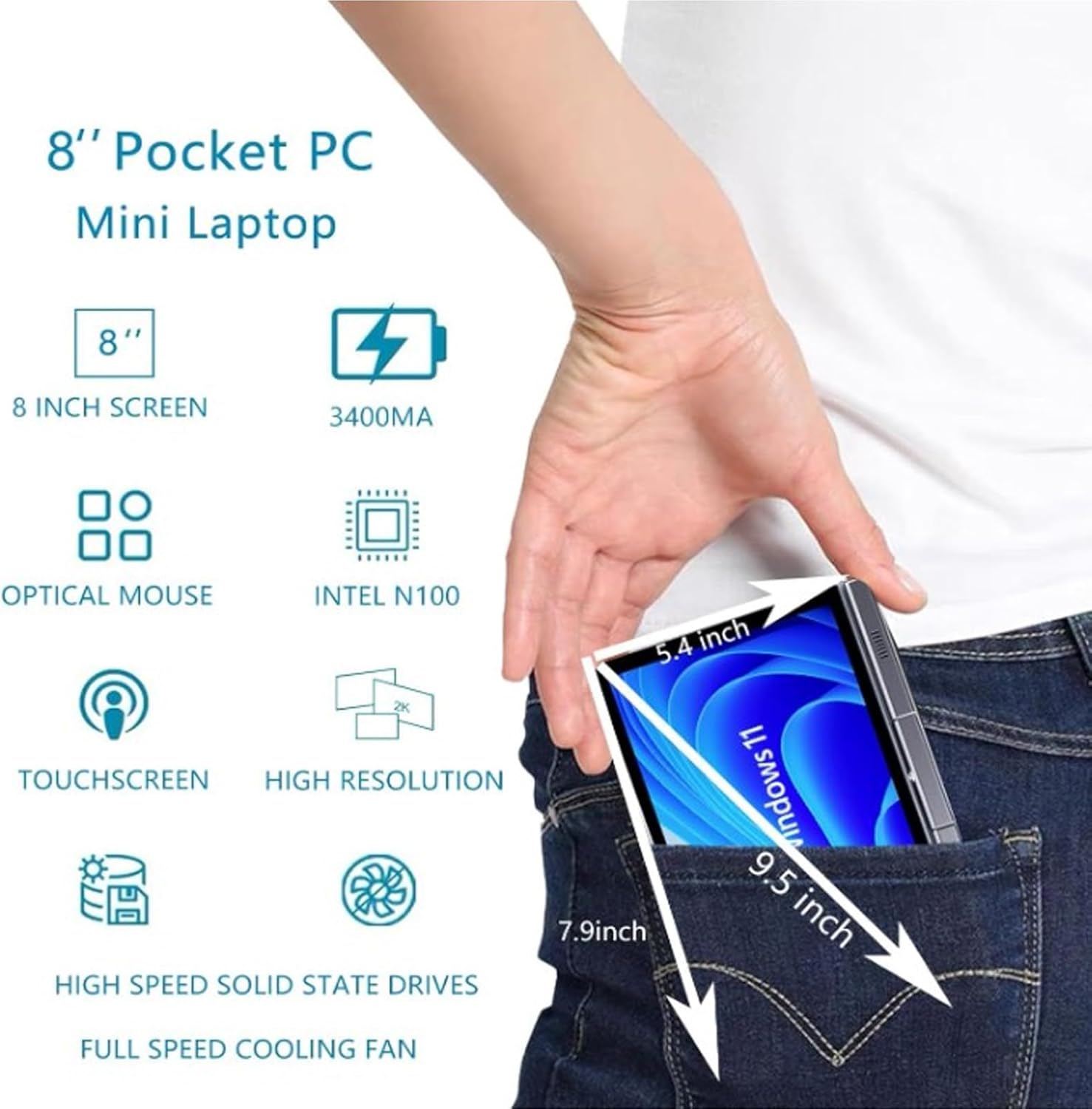
Image: A visual representation of the 8-inch Pocket PC's compact dimensions, demonstrating its portability by showing it fitting into a standard pocket.

Image: A labeled diagram highlighting the various ports (USB 3.0, Type-C, Audio, RJ45) and keyboard components (Front Camera, Speaker, Power Light, Power Button, Left/Right/Middle Mouse Buttons) of the EBTOOLS 8-Inch 2-in-1 Pocket PC.
4. Setha
4.1 Amandla Okuqala Avuliwe Nokushaja
- Shaja idivayisi: Before first use, connect the power adapter to the Type-C port on the device and plug it into a power outlet. Allow the device to charge fully. The power light indicator will show charging status.
- Vula: Press and hold the Power Button located on the keyboard deck until the screen illuminates.
- Ukusethwa Kwasekuqaleni: Follow the on-screen instructions to complete the Windows 11 Pro setup process, including language selection, network connection, and user account creation.
The device is designed for immediate use upon completion of the initial Windows setup.
5. Iziqondiso Zokusebenza
5.1 Ikhibhodi nephedi yokuthinta
- The device features an edge-less full-size QWERTY keyboard for typing.
- The integrated touchpad supports standard mouse functions, including moving the pointer, scrolling, and left/right clicks. The left, right, and middle mouse buttons are clearly indicated on the diagram.
5.2 Ukusebenza kwesikrini esithintwayo
- The 8-inch display is a multi-touch screen. Use gestures such as tap, swipe, pinch-to-zoom, and rotate for navigation and interaction with applications.
5.3 360-Degree Rotation
- The display can be rotated 360 degrees to switch between laptop mode (traditional clamshell) and tablet mode (screen folded back against the base).
- When in tablet mode, the keyboard is automatically disabled to prevent accidental input.
5.4 Ukuxhumanisa amaPheripheral
- I-USB 3.0: Connect external devices such as USB drives, mice, or keyboards to the USB 3.0 port.
- Uhlobo C: Isetshenziselwa ukushaja nokudluliswa kwedatha.
- High Definition Multimedia Interface (HDMI): Connect an external monitor or projector using an HDMI cable for extended display.
- 3.5mm Standard Headphone Jack: Xhuma amahedfoni noma izipikha zangaphandle.
- Imbobo Yenethiwekhi ye-RJ45: Xhuma ikhebula le-Ethernet ukuze uthole uxhumano lwe-inthanethi olunezintambo.
5.5 Ukuxhumana okungenantambo
- I-WiFi6: Access wireless networks (2.4G and 5G bands) for internet connectivity. Enable Wi-Fi through Windows settings.
- I-Bluetooth 5.2: Pair with Bluetooth-enabled devices such as headphones, speakers, or other peripherals. Enable Bluetooth through Windows settings.
6. Isondlo
6.1 Ukuhlanza
- Sebenzisa indwangu ethambile, engenazinti ukuhlanza isikrini kanye nezindawo zangaphandle. Uma unezimpawu eziqinile, susa kancaneampfaka indwangu ngamanzi noma isisombululo sokuhlanza isikrini.
- Avoid using harsh chemicals, abrasive cleaners, or aerosol sprays directly on the device.
- Qinisekisa ukuthi idivayisi ivaliwe futhi ayixhunyiwe ngaphambi kokuhlanza.
6.2 Isitoreji
- Gcina idivayisi endaweni epholile, neyomile kude nelanga eliqondile namazinga okushisa aphezulu.
- If storing for an extended period, ensure the battery is charged to approximately 50% to preserve battery health.
7. Ukuxazulula izinkinga
This section addresses common issues you might encounter with your EBTOOLS 8-Inch 2-in-1 Pocket PC.
7.1 Idivayisi Ayivuli
- Ensure the device is fully charged. Connect the power adapter and wait a few minutes before attempting to power on again.
- Verify the power adapter and cable are securely connected and the power outlet is functional.
- Zama ukubamba inkinobho yamandla imizuzwana engu-10-15 ukuze wenze ukusetha kabusha kanzima.
7.2 Izinkinga Zokuxhumana kwe-Wi-Fi noma i-Bluetooth
- Check if Wi-Fi or Bluetooth is enabled in Windows settings.
- Restart the device and your wireless router/Bluetooth device.
- Ensure you are within range of the Wi-Fi network or Bluetooth device.
- Update wireless drivers if available.
7.3 Touchscreen Not Responding
- Qala kabusha idivayisi.
- Qinisekisa ukuthi isikrini sihlanzekile futhi asinazo izinsalela.
- Check for any system updates that might include touchscreen driver fixes.
7.4 Impilo Yebhethri Emfishane
- Adjust power settings in Windows to optimize battery usage.
- Vala izinhlelo zokusebenza ezingadingekile ezisebenza ngemuva.
- Yehlisa ukukhanya kwesikrini.
- Ensure the device is not running resource-intensive tasks continuously.
8. Imininingwane
| Isici | Ukucaciswa |
|---|---|
| Isistimu esebenzayo | Windows 11 Pro |
| Usayizi Wokubonisa | 8 amayintshi |
| Iphrosesa | N100 CPU (up to 3.4GHz) |
| RAM | I-12GB LPDDR5 |
| Isitoreji | 512GB M.2 SSD (supports up to 2TB) |
| Ikhamera yangaphambili | 2MP 30 Frame HD Built-In Camera |
| I-Bluetooth | I-BT 5.2 |
| Wireless Fidelity Type | 2.4G / 5G Band (WiFi6) |
| Izixhumi ezibonakalayo | 1 x USB3.0, 1 x 3.5mm Standard Headphone Jack, 1 x High Definition Multimedia Interface Port, 1 x Type-C, 1 x RJ45 Network Port |
| Uhlobo Lwebhethri | Ibhethri elakhelwe ngaphakathi elingu-5000mAh Polymer Lithium |
| Impilo Yebhethri | 4-6 hours (typical use) |
| Isisindo sento | 2.68 pounds (approx. 1.22 kg) |
| Ubukhulu bephakheji | 9.45 x 7.09 x 2.36 amayintshi |
9. Iwaranti kanye Nokusekela
9.1 Iwaranti Yomkhiqizo
Specific warranty details for your EBTOOLS 8-Inch 2-in-1 Pocket PC are typically provided with your purchase documentation or on the manufacturer's official website. Please refer to these resources for information regarding warranty coverage, duration, and terms.
9.2 Ukwesekwa Kwamakhasimende
For technical assistance, troubleshooting beyond this manual, or warranty claims, please contact EBTOOLS customer support. Contact information can usually be found on the product packaging, the manufacturer's webisayithi, noma ngomthengisi wakho.
When contacting support, please have your product model number (EBTOOLS9pxf4058ch-12) and purchase information readily available.