
1. Umkhiqizo Uphelileview
The AWEI A996 Pro are over-ear Bluetooth headphones designed to provide an immersive audio experience with Active Noise Cancellation (ANC). Featuring Bluetooth 5.0 for stable connectivity, 40mm drivers for Hi-Res audio, and a comfortable, foldable design, these headphones are suitable for various uses including travel, home, and office environments.

Image: AWEI A996 Pro headphones displaying their sleek design and over-ear form factor.
Izici Eziyinhloko:
- I-Active Noise Cancellation (ANC): Effectively minimizes ambient noise for an enhanced listening experience.
- I-Bluetooth 5.0: Provides a fast, stable, and wide-range wireless connection up to 33 feet.
- Umsindo we-Hi-Res: Equipped with 40mm drivers for deep, powerful, and immersive sound.
- Impilo ende yebhethri: 300mAh rechargeable battery offers up to 20 hours of playtime on a single charge.
- Comfortable & Adjustable Design: Ultra-soft protein leather earcups and a retractable beam ensure comfort for extended wear.
- Wired/Wireless Options: Can be used wirelessly via Bluetooth or wired via an AUX cable when power is low or for non-Bluetooth devices.
- Idizayini Egoqekayo: Enhances portability and reduces storage space.
2. Setha
2.1 Unboxing Contents
Before use, please ensure all items are present in the package:
- AWEI A996 Pro Over-Ear Headphones
- Ikhebula lokushaja le-USB
- Incwadi Yomsebenzisi (le dokhumenti)
2.2 Ukushaja ama-headphones
Before initial use, fully charge the headphones. A full charge takes approximately 2 hours.
- Xhuma ingxenye encane yekhebula lokushaja le-USB embobeni yokushaja kuma-headphone.
- Xhuma ingxenye enkulu yekhebula lokushaja le-USB ku-adaptha yamandla ye-USB (engafakiwe) noma imbobo ye-USB yekhompyutha.
- The LED indicator on the headphones will illuminate during charging and change color or turn off once fully charged.

Image: AWEI A996 Pro headphones, highlighting the charging port and indicating long battery life.
2.3 Ukuvula / Ukuvula
- Ukuvula: Press and hold the Power button (usually marked with a power symbol) for approximately 3 seconds until the LED indicator lights up and you hear an audible prompt.
- Ukucisha: Press and hold the Power button for approximately 3-5 seconds until the LED indicator turns off and you hear an audible prompt.
2.4 Ukumatanisa kwe-Bluetooth
To connect your AWEI A996 Pro headphones to a Bluetooth-enabled device:
- Qinisekisa ukuthi ama-headphone acishiwe.
- Press and hold the Power button for about 5-7 seconds until the LED indicator flashes red and blue alternately, indicating pairing mode.
- Edivayisini yakho (i-smartphone, ithebhulethi, ikhompuyutha), vula i-Bluetooth bese usesha amadivaysi atholakalayo.
- Select "AWEI A996 Pro" from the list of found devices.
- Once paired, the LED indicator on the headphones will typically flash blue slowly, and you will hear a connection confirmation sound.

Image: AWEI A996 Pro headphones demonstrating stable Bluetooth 5.0 connection with multiple devices.
2.5 Uxhumano Lwezintambo (Imodi ye-AUX)
The headphones can be used with an audio cable (AUX cable) for devices without Bluetooth or when the headphone battery is depleted.
- Connect one end of the 3.5mm audio cable (not included) to the AUX port on the headphones.
- Connect the other end of the audio cable to the 3.5mm audio jack on your device.
- The headphones will automatically switch to wired mode. Note that some functions like ANC may require battery power even in wired mode.

Image: AWEI A996 Pro headphones illustrating both wired (AUX) and wireless connectivity options.
3. Iziqondiso Zokusebenza
3.1 Imisebenzi Yenkinobho
The AWEI A996 Pro headphones feature intuitive controls located on the earcups. Refer to the diagram below for button placement (if available on product) and their functions:
- Power Button (Multi-function Button):
- Cindezela bese ubamba imizuzwana engu-3: Vula/Vala amandla.
- Press and hold for 5-7 seconds (from off): Enter Bluetooth pairing mode.
- Short press: Play/Pause music, Answer/End calls.
- Double press: Redial last number.
- Inkinobho yevolumu ephezulu (+):
- Ukucindezela okufushane: Khulisa ivolumu.
- Long press: Next track.
- Inkinobho Yevolumu Ephansi (-):
- Ukucindezela okufushane: Nciphisa ivolumu.
- Long press: Previous track.
- Inkinobho ye-ANC:
- Short press: Toggle Active Noise Cancellation On/Off.
3.2 Ukucishwa Komsindo Okusebenzayo (ANC)
The ANC feature helps reduce ambient noise, providing a quieter listening environment.
- To activate ANC, press the dedicated ANC button. An indicator light (if present) will illuminate, and you may hear an audible confirmation.
- To deactivate ANC, press the ANC button again.
3.3 Ukushaya nokwamukela izingcingo
Uma uxhumeke ku-smartphone nge-Bluetooth:
- Phendula Ucingo: Cindezela inkinobho yamandla/yemisebenzi eminingi kafushane.
- Qeda Ucingo: Short press the Power/Multi-function button during a call.
- Yenqaba Ucingo: Cindezela bese ubamba inkinobho ethi Power/Multi-function cishe imizuzwana emi-2.
- Phinda ushaye inombolo yokugcina: Double press the Power/Multi-function button when not on a call.
4. Isondlo
4.1 Ukuhlanza
- Sebenzisa indwangu ethambile, eyomile, engenabo uboya ukuze uhlanze ama-headphone.
- Do not use abrasive cleaners, solvents, or spray cleaners directly on the headphones.
- Gently wipe the earcups and headband.
4.2 Isitoreji
- Store the headphones in a cool, dry place, away from extreme temperatures and direct sunlight.
- When not in use for extended periods, store them in their folded position to save space and protect them.
- Avoid placing heavy objects on top of the headphones.
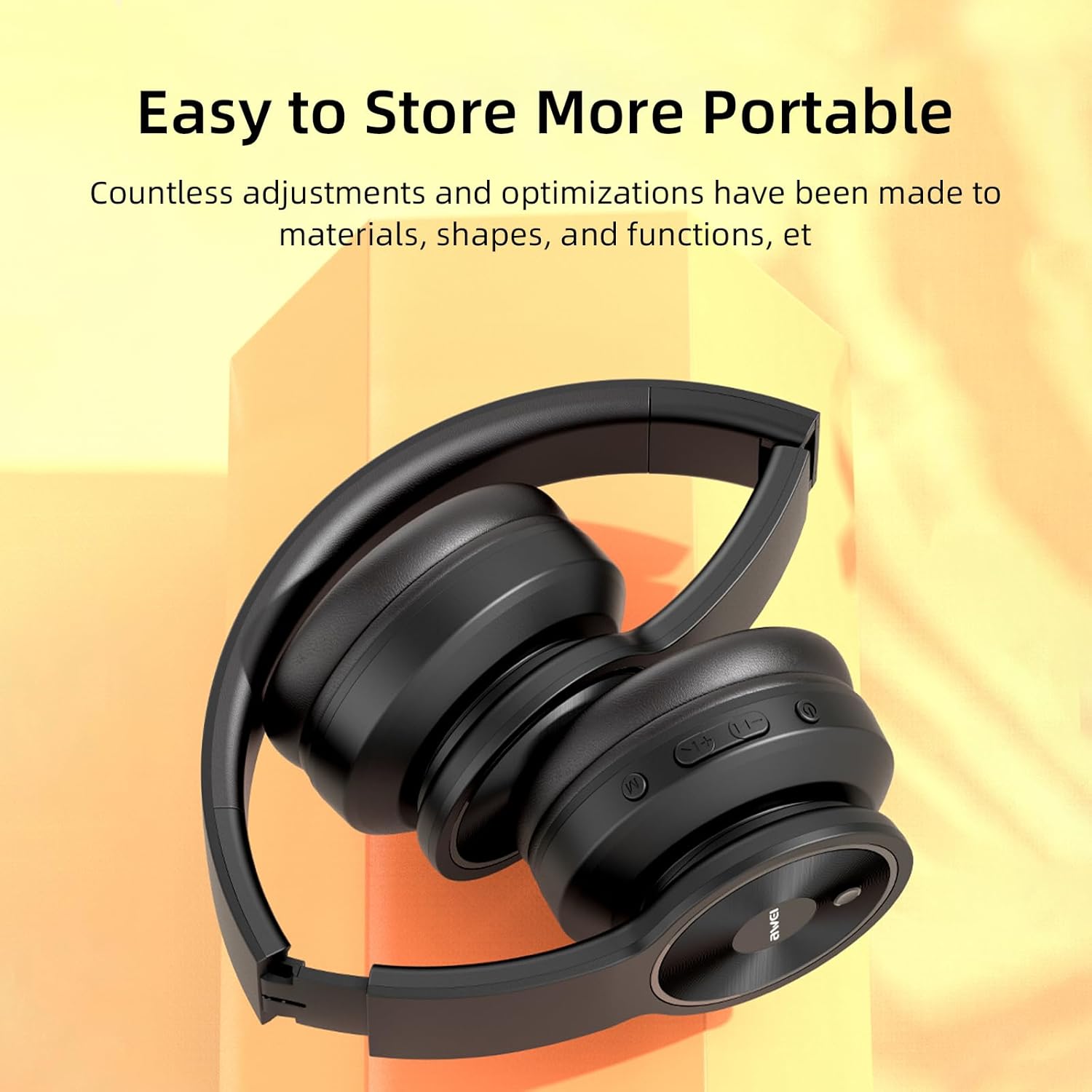
Image: AWEI A996 Pro headphones shown in their folded configuration, emphasizing portability and ease of storage.
4.3 Ukunakekelwa Kwebhethri
- Ukwelula impilo yebhethri, gwema ukukhipha ngokugcwele ama-headphone njalo.
- Charge the headphones regularly, even if not used often.
- Ungayibeki ibhethri emazingeni okushisa aphezulu.
5. Ukuxazulula izinkinga
If you encounter issues with your AWEI A996 Pro headphones, refer to the following common problems and solutions:
| Inkinga | Isixazululo Esingenzeka |
|---|---|
| Ama-headphone awavuli amandla. | Qinisekisa ukuthi ama-headphone ashajiwe. Xhuma kumthombo wamandla bese uzama futhi. |
| Ayikwazi ukubhanqa nge-Bluetooth. | Ensure headphones are in pairing mode (flashing red/blue LED). Turn off and on Bluetooth on your device. Move closer to the device. Forget previous pairings on your device and try again. |
| Awukho umsindo noma ivolumu ephansi. | Check volume levels on both headphones and your connected device. Ensure headphones are properly paired or AUX cable is fully inserted. Try playing different audio sources. |
| ANC is not effective. | Ensure ANC is activated (press the ANC button). Ensure earcups form a good seal around your ears. ANC is most effective against low-frequency, constant noise. |
| Ukuxhumana okungapheli. | Ensure no obstacles between headphones and device. Move closer to the device. Avoid strong electromagnetic interference. |
6. Imininingwane
| Isici | Imininingwane |
|---|---|
| Ibhrendi | Awei |
| Inombolo Yemodeli | I-A996 Pro |
| Ubuchwepheshe bokuxhumana | Wireless (Bluetooth), Wired (AUX) |
| Ubuchwepheshe obungenantambo | I-Bluetooth 5.0 |
| Ukubekwa Kwendlebe | Ngendlebe |
| Usayizi Womshayeli | 40 mm |
| Amandla ebhethri | 300mAh |
| Isikhathi sokudlala | Kufika emahoreni angu-20 (cishe.) |
| Isikhathi sokushaja | Cishe. Amahora angu-2 |
| Izici Ezengeziwe | Active Noise Cancellation (ANC), Ergonomic, Lightweight, Foldable |
7. Iwaranti kanye Nokusekela
7.1 Ulwazi Lwewaranti
The AWEI A996 Pro headphones come with a Iwaranti yezinyanga eziyi-12 kusukela ngosuku lokuthenga, okumboza amaphutha okukhiqiza. Ngaphezu kwalokho, i- Inqubomgomo yokubuyisela yezinsuku ezingu-30 is provided for your peace of mind.
7.2 Ukwesekwa Kwamakhasimende
For any questions, technical assistance, or warranty claims, please contact Awei customer support. Lifetime worry-free user support is available to assist you with any product-related inquiries.
Please refer to the contact information provided with your purchase documentation or visit the official Awei webisayithi ukuze uthole imininingwane yosekelo.