
Isingeniso
Thank you for choosing the Claiks Electric Height Adjustable Desk. This manual provides essential information for the safe and efficient assembly, operation, and maintenance of your new desk. Please read these instructions carefully before use and retain them for future reference.
Ulwazi Lokuphepha
Isexwayiso:
Please use the desk with caution, especially during height adjustment and assembly. Ensure the desk is properly anchored before use. Observe weight restrictions and use the desk only for its intended purpose. Keep children and pets away from the desk during operation to prevent injury. Do not place hands or objects near moving parts during height adjustment.
Okuqukethwe Kwephakheji
Ngaphambi kokuhlanganisa, qinisekisa ukuthi zonke izingxenye zikhona futhi azilimele. Uma kukhona izingxenye ezingekho noma ezilimele, sicela uxhumane nokwesekwa kwamakhasimende.
- Uhlaka lwedeski (Imilenze kanye ne-Crossbar)
- Tabletop (Multi-part)
- Iphaneli yokulawula ene-Memory Presets
- I-adaptha yamandla nekhebula
- Assembly Hardware (Screws, Allen Keys)
- Cable Management Tray and Hooks
- Imaniwali yosebenzisayo
Iziyalezo Zomhlangano
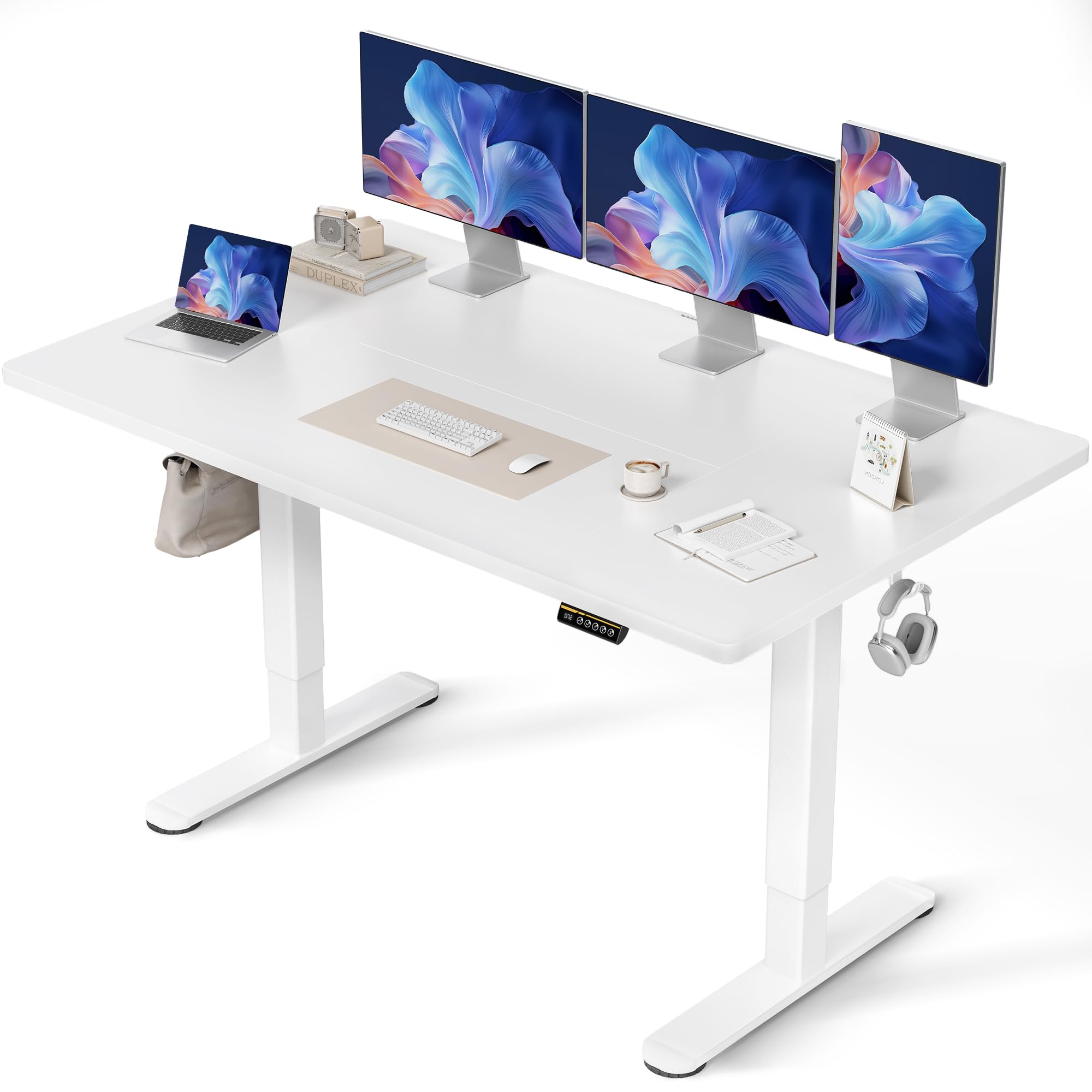
Assembly typically takes approximately 15 minutes. A screwdriver is required (not included). Follow these steps carefully:
- Khipha Izingxenye: Susa ngokucophelela zonke izingxenye ephaketheni futhi uzibeke endaweni ehlanzekile, ethambile ukuvimbela imihuzuko.
- Hlanganisa Uhlaka Lwedeski: Attach the desk legs to the crossbar using the provided screws. Ensure all connections are secure.
- Namathisela I-Tabletop: Place the tabletop sections onto the assembled frame. Align the pre-drilled holes and secure the tabletop to the frame using the designated screws. Note that the tabletop may consist of multiple sections.
- Faka Iphaneli Yokulawula: Mount the control panel to the underside of the tabletop in the desired position.
- Xhuma Izintambo: Connect the motor cables from the legs to the control box, and then connect the control panel cable to the control box. Finally, connect the power adapter to the control box and plug it into a power outlet.
- Faka Izinsiza: Attach the cable management tray and hooks to the underside of the desk as desired.

Imiyalelo yokusebenza
Ukulungiswa Kobude
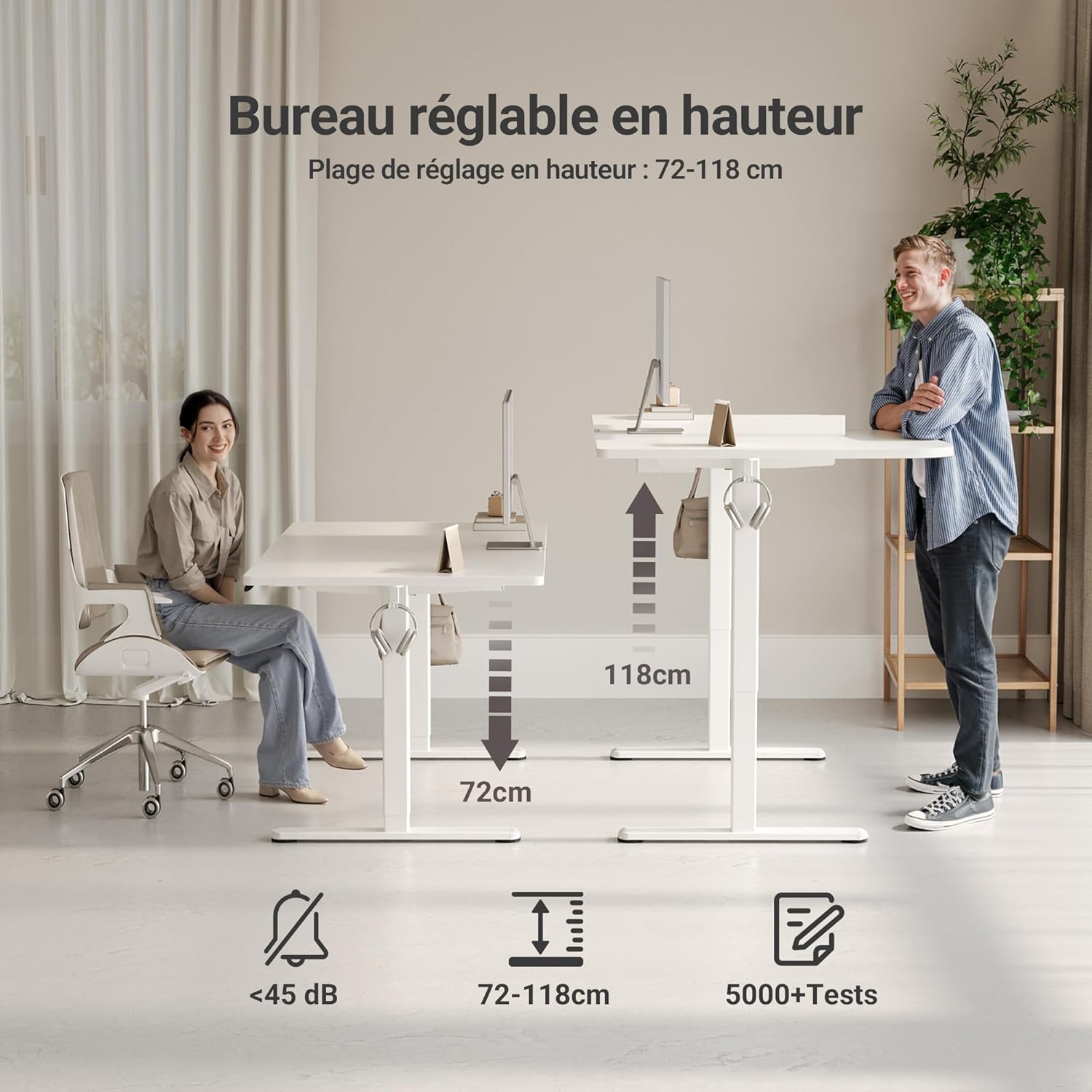
The desk features an electric motor for smooth height adjustment between 72 cm and 118 cm. Use the up and down arrow buttons on the control panel to adjust the desk to your desired height.
I-Memory Presets
The control panel includes three memory preset buttons (1, 2, 3) to save your preferred sitting and standing heights.
- To Set a Memory Preset: Adjust the desk to your desired height using the up/down arrows. Press the 'M' or 'Set' button (if available, otherwise hold the number button) followed by the desired number button (1, 2, or 3). The display will show 'S-' or a beep will confirm the setting.
- To Use a Memory Preset: Simply press the corresponding number button (1, 2, or 3) to automatically move the desk to the saved height.


Izici Eziyinhloko
- FSC Certified Tabletop: The desk features an FSC-certified engineered wood tabletop, promoting responsible forest management.
- Indawo Ebanzi Yokusebenza: Ihlinzeka ample space for multiple monitors and office supplies.
- Silent Motor: Operates quietly (under 45 dB) for minimal disruption in any environment.
- Ukwakhiwa Okuqinile: Stable steel frame supports up to 120 kg, ensuring stability even at maximum height.
- Ukuphathwa Kwekhebula Okudidiyelwe: Includes cable pass-throughs and hooks to keep your workspace organized.
- Indawo Ehlala Njalo: The tabletop is resistant to dirt and water, and features rounded, scratch-resistant edges.

Isondlo
To ensure the longevity and optimal performance of your Claiks desk, follow these maintenance guidelines:
- Ukuhlanza: Sula indawo yedeski ngokuthambile, damp indwangu. Gwema izinto zokuhlanza ezilimazayo noma amakhemikhali anokhahlo angalimaza isiphetho.
- Ukuphathwa Kwekhebula: Periodically check and organize cables to prevent tangles and ensure smooth operation during height adjustments.
- Ukunakekelwa Kwezimoto: The motor is designed for durability. Avoid overloading the desk beyond its maximum weight capacity (120 kg) to prevent strain on the motor.
- Ukuhlola Okuvamile: Periodically inspect all screws and connections to ensure they remain tight and secure.
Ukuxazulula inkinga
Uma uhlangabezana nanoma yiziphi izinkinga ngedeski lakho, bheka izinkinga nezixazululo ezilandelayo ezivamile:
| Inkinga | Imbangela Engenzeka | Isixazululo |
|---|---|---|
| Ideski alinyakazi | Power cable disconnected, motor error, overload | Check power connections. Unplug and replug the power cable. Reduce weight on the desk. Perform a reset (refer to control panel instructions). |
| Ukulungiswa kobude obungalingani | Obstruction, uneven load | Ensure no objects are obstructing the desk legs. Distribute weight evenly on the tabletop. |
| Iphaneli yokulawula ayiphenduli | Loose connection, power issue | Check the control panel cable connection to the control box. Verify power supply. |
| Desk stops mid-adjustment | Overheat protection, obstruction | Allow the motor to cool down for 20 minutes. Remove any obstructions. |
If the problem persists after attempting these solutions, please contact Claiks customer support.
Imininingwane
| Isibaluli | Imininingwane |
|---|---|
| Ibhrendi | Claiks |
| Inombolo Yemodeli | P1.01.016 |
| Umbala | Emhlophe |
| Ubukhulu bomkhiqizo (L x W x H) | 70 x 140 x 75 cm |
| Isisindo sento | 25 kg |
| Okubalulekile | Izinkuni Ezinobunjiniyela (Ithebula), Insimbi (Isisekelo) |
| Ububanzi Bokulungisa Ubude | 72 cm - 118 cm |
| Umthamo Womthwalo Omkhulu | 120 kg |
| Izici | Ergonomic, Adjustable, Scratch-resistant, Silent Motor, Memory Presets, Cable Management |
| Qeda Uhlobo | I-Lacquered |
Iwaranti kanye Nokusekela
The Claiks Electric Height Adjustable Desk comes with a Iwaranti yonyaka ongu-5 on the motor and frame, covering manufacturing defects and malfunctions under normal use. Please retain your proof of purchase for warranty claims.
For technical assistance, troubleshooting not covered in this manual, or warranty inquiries, please contact Claiks customer support through the retailer where you purchased the product or visit the official Claiks webindawo yolwazi lokuxhumana.