
Isingeniso
Thank you for choosing the Mesqool CR1025 Digital Alarm Clock Radio. This device combines multiple functions including a digital alarm clock, Bluetooth 5.0 speaker, FM radio, night light, and dual USB charging ports. This manual provides detailed instructions to help you set up and operate your new device effectively.
Okuqukethwe Kwephakheji
- Mesqool CR1025 Digital Alarm Clock Radio
- I-adaptha yamandla
- Imaniwali yosebenzisayo
- C Battery (for backup)
Umkhiqizo Uphelileview
Familiarize yourself with the components and controls of your Mesqool CR1025 Digital Alarm Clock Radio.
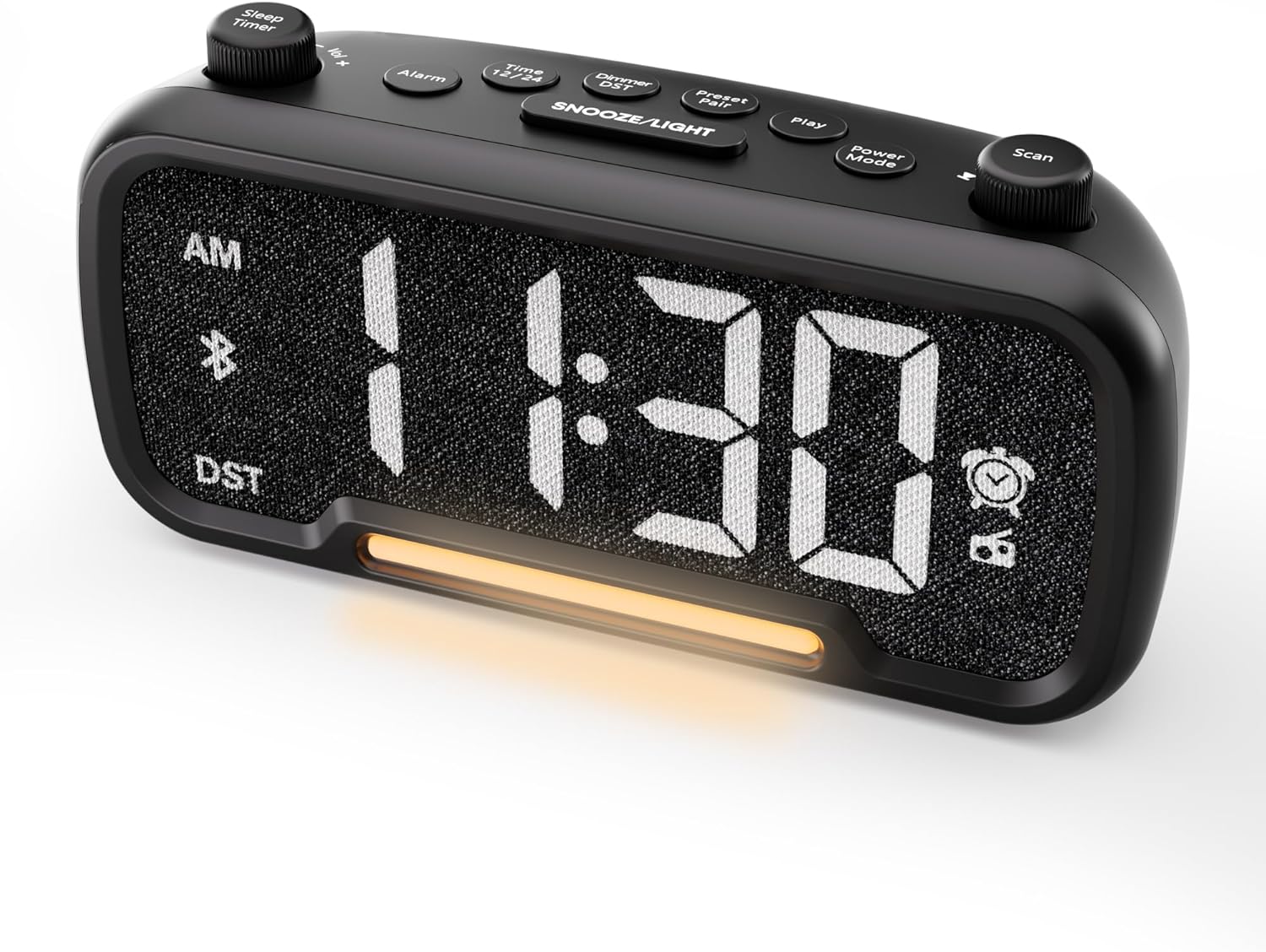

Control Buttons and Knobs:
- Sleep Timer / Vol +/- Knob (Left): Adjusts volume, sets sleep timer duration.
- Inkinobho ye-alamu: Isetha futhi ivule/ivale ama-alamu.
- Time 12/24 Button: Switches between 12-hour and 24-hour time formats.
- Dimmer / DST Button: Adjusts display brightness, activates/deactivates Daylight Saving Time (DST).
- Preset / Pair Button: Saves FM radio presets, initiates Bluetooth pairing.
- Inkinobho yokudlala: Plays/pauses media in Bluetooth mode.
- Inkinobho Yemodi Yamandla: Cycles through operating modes (FM, Bluetooth, AUX).
- Scan / TU +/- Knob (Right): Scans FM radio stations, manually tunes FM frequency.
- SNOOZE/LIGHT Button: Activates snooze function, turns night light on/off.

Setha
1. Amandla Aphezulu Okuqala
Connect the provided power adapter to the DC 5V IN port on the back of the alarm clock and plug it into a standard wall outlet. The display will light up. Ensure the C battery is installed for backup in case of power outage.

2. Ukubeka Isikhathi
- Cindezela bese ubamba i Isikhathi 12/24 button for 2 seconds. The hour digits will begin to flash.
- Zungezisa i- Ivolumu +/- knob (left knob) to adjust the hour.
- Cindezela inkinobho Isikhathi 12/24 inkinobho futhi. Izinombolo zemizuzu zizoqala ukukhanya.
- Zungezisa i- Ivolumu +/- inkinobho ukulungisa umzuzu.
- Cindezela inkinobho Isikhathi 12/24 inkinobho futhi ukuqinisekisa ukusethwa kwesikhathi.
Video demonstrating how to set the time on the Mesqool Digital Alarm Clock Radio.
3. 12/24 Ifomethi Yesikhathi Sehora
Ukuze ushintshe phakathi kwamafomethi esikhathi samahora ayi-12 namahora angama-24, cindezela kafushane Isikhathi 12/24 button. The display will change accordingly.
4. Ukulungiswa Kwesikhathi Sokulondoloza Usuku (DST).
To activate or deactivate DST, press and hold the Dimmer / DST button for 2 seconds. The time will adjust by one hour forward or backward, and the DST indicator will appear or disappear on the display.
Imiyalelo yokusebenza
1. Ukubeka i-alamu
- Cindezela bese ubamba i I-alamu button for 2 seconds. The hour digits will flash.
- Zungezisa i- Ivolumu +/- knob to adjust the desired alarm hour.
- Cindezela inkinobho I-alamu inkinobho futhi. Amadijithi amaminithi azokhanya.
- Zungezisa i- Ivolumu +/- knob to adjust the desired alarm minute.
- Cindezela inkinobho I-alamu button again. The alarm sound selection will flash (bell icon for buzzer, radio icon for FM radio). Rotate the Ivolumu +/- knob to choose between buzzer or FM radio as the alarm sound.
- If FM radio is selected, press the I-alamu button again. The volume level will flash (L01-L16). Rotate the Ivolumu +/- knob to set the desired alarm volume.
- Cindezela inkinobho I-alamu button once more to confirm and activate the alarm. The alarm icon will appear on the display.
To deactivate the alarm, short press the I-alamu button. The alarm icon will disappear from the display.

Umsebenzi wokusnuza:
Uma i-alamu ikhala, cindezela inkinobho SNULA / UKUKHANYA button to activate the snooze function for 9 minutes. The alarm will sound again after 9 minutes. To turn off the alarm completely, press any other button except SNULA / UKUKHANYA.

2. Ukusebenza komsakazo we-FM
- Cindezela inkinobho Imodi yamandla button repeatedly until the radio icon lights up on the display, indicating FM radio mode.
- Skena Ngokuzenzakalelayo Futhi Ugcine Amasethi Asethiwe: Cindezela inkinobho Scan / TU +/- knob (right knob) to automatically search for available FM stations and save them as presets (up to 20 stations). The display will show "P01", "P02", etc., as stations are saved.
- Ukulungisa mathupha: Zungezisa i- Scan / TU +/- knob to manually browse frequencies.
- Khumbula Okusethiwe ngaphambilini: Cindezela iDemo Setha ngaphambilini / Bhangqa inkinobho yokujikeleza eziteshini ezisethiwe ezilondoloziwe.
- Lungisa Ivolumu: Zungezisa i- Ivolumu +/- knob (left knob) to adjust the radio volume (L01-L16).

Video demonstrating how to set the FM radio alarm on the Mesqool Digital Alarm Clock Radio.
3. Bluetooth Speaker Operation
- Cindezela inkinobho Imodi yamandla button repeatedly until the Bluetooth icon (bt) starts flashing on the display, indicating pairing mode.
- On your mobile device, enable Bluetooth and search for "CR1025" in the list of available devices.
- Select "CR1025" to pair. Once connected, the Bluetooth icon will stop flashing and remain solid.
- You can now play audio from your device through the alarm clock's speaker.
- Sebenzisa i- Ivolumu +/- knob on the alarm clock or your mobile device to adjust the volume.
- Cindezela inkinobho Dlala inkinobho yokudlala noma ukumisa isikhashana umsindo.

Video demonstrating how to set up Bluetooth on the Mesqool Digital Alarm Clock Radio.
4. Ukusebenza Kokukhanya Kwasebusuku
The alarm clock features a gentle night light. To turn the night light on or off, short press the SNULA / UKUKHANYA inkinobho.

5. Dimmer Setting
The display brightness can be adjusted to 5 levels. Short press the Dimmer / DST button to cycle through the brightness levels (L01-L05). Select the level that best suits your environment.

6. Sleep Timer Setting
The sleep timer allows you to set a duration for the FM radio or Bluetooth speaker to play before automatically turning off. This is useful for falling asleep to music or podcasts.
- While in FM radio or Bluetooth mode, press the Isikhathi Sokulala button. The display will show the current sleep timer duration (e.g., "30" for 30 minutes).
- Zungezisa i- Sleep Timer / Vol +/- knob to select the desired duration: 15, 30, 60, 90, or 120 minutes. You can also select "OFF" to disable the sleep timer.
- The timer will start counting down, and the device will automatically turn off after the selected duration.
7. Amachweba Okushaja i-USB
The alarm clock is equipped with two USB charging ports (Type-C and USB-A) on the back, each providing 5V/1A output. These ports can be used to conveniently charge your smartphone, tablet, or other USB-powered devices.

Ukuxazulula inkinga
| Inkinga | Isixazululo Esingenzeka |
|---|---|
| Isibonisi sewashi asinalutho. | Ensure the power adapter is securely connected to both the clock and a working power outlet. Check if the power outlet is functional. |
| I-alamu ayizwakali. | Verify that the alarm is set and activated (alarm icon visible on display). Check the alarm volume level. Ensure the correct alarm sound (buzzer or FM radio) is selected. |
| Ukwemukelwa kahle komsakazo we-FM. | Extend the FM antenna fully. Try repositioning the antenna or the clock for better signal. Perform an auto-scan again to find stronger stations. |
| Cannot pair Bluetooth device. | Ensure the clock is in Bluetooth pairing mode (flashing 'bt' icon). Make sure Bluetooth is enabled on your mobile device and it is within range. Forget "CR1025" from your device's Bluetooth list and try pairing again. |
| Izimbobo zokushaja i-USB azisebenzi. | Confirm the alarm clock is powered on. Ensure the charging cables are properly connected to both the clock and your device. Try a different USB cable or device to rule out cable/device issues. |
Imininingwane
| Isici | Imininingwane |
|---|---|
| Ibhrendi | I-Mesqool |
| Inombolo Yemodeli | CR1025 |
| Umbala | Mnyama |
| Uhlobo lokubonisa | I-LED yedijithali |
| Ubukhulu bomkhiqizo | 6.61"L x 3.31"W x 2.32"H |
| Umthombo wamandla | Corded Electric (AC adapter included) |
| Isipele Sebhethri | Ibhethri elingu-1 C (lifakiwe) |
| Inguqulo ye-Bluetooth | V5.0 |
| Imisakazo ye-FM Radio | 87.5-108MHz |
| Ukuhlelwa kwe-FM | Up to 20 stations |
| Khombisa ukufiphala | 5 amazinga |
| Umsindo we-alamu | I-Buzzer, Umsakazo we-FM |
| Ubude bokusnuza | 9 imizuzu |
| Okokukhiphayo kokushaja kwe-USB | Type-C & USB-A, 5V/1A each |
| Okubalulekile | Ipulasitiki |
| Isisindo sento | 0.48 Pound (cishe ama-ounces angu-7.7) |
Isondlo
- Clean the device with a soft, dry cloth. Do not use liquid cleaners or abrasive materials.
- Keep the device away from direct sunlight, extreme temperatures, and high humidity.
- Qinisekisa ukuthi kungena umoya ofanele eduze kocingo ukuze uvimbele ukushisa ngokweqile.
- If the device will not be used for an extended period, remove the backup battery.
Ulwazi Lokuphepha
- Ungalubeki ucingo emanzini noma emswakameni.
- Ungazami ukuqaqa noma ukulungisa idivayisi ngokwakho. Bheka kubasebenzi benkonzo abaqeqeshiwe.
- Gcina idivayisi ikude nezingane.
- Use only the provided power adapter. Using unauthorized adapters may damage the device and void the warranty.
- Avoid placing the device near heat sources or open flames.
Iwaranti kanye Nokusekela
Specific warranty details are not provided in the product information. For warranty claims, technical support, or further assistance, please contact Mesqool customer service through their official website or the retailer where the product was purchased. Please retain your proof of purchase for any warranty-related inquiries.
Visit the Mesqool Store for more information: Mesqool Official Store