
1. Isingeniso
Siyabonga ngokuthengaasing the RCA SP550BT Portable Speaker. This manual provides important information regarding the setup, operation, and maintenance of your new speaker. Please read it thoroughly before use and keep it for future reference.
The RCA SP550BT is a versatile portable speaker featuring 50W output, Bluetooth connectivity, USB playback, FM radio, AUX input, True Wireless Stereo (TWS) function, LED lights, and a microphone input for an enhanced audio experience.
2. Okuqukethwe Kwephakheji
Sicela uhlole iphakheji ngezinto ezilandelayo:
- RCA SP550BT Portable Speaker
- Isilawuli kude
- Ikhebula Lamandla
- Incwadi Yomsebenzisi (le dokhumenti)
3. Umkhiqizo Uphelileview
Familiarize yourself with the main components and features of your RCA SP550BT speaker.

Umfanekiso 3.1: Ngaphambili view of the RCA SP550BT portable speaker. This image displays the speaker in an upright position, highlighting the top control panel and the three prominent speaker cones with red illumination.

Umfanekiso 3.2: Side view of the RCA SP550BT portable speaker. This perspective shows the depth of the speaker and the integrated handle for portability.

Umfanekiso 3.3: Evundlile view of the RCA SP550BT portable speaker. This image illustrates the speaker's design when placed on its side, emphasizing the speaker grille and LED lighting.
3.1 Ukulawula okukude
The included remote control allows for convenient operation of the speaker from a distance.
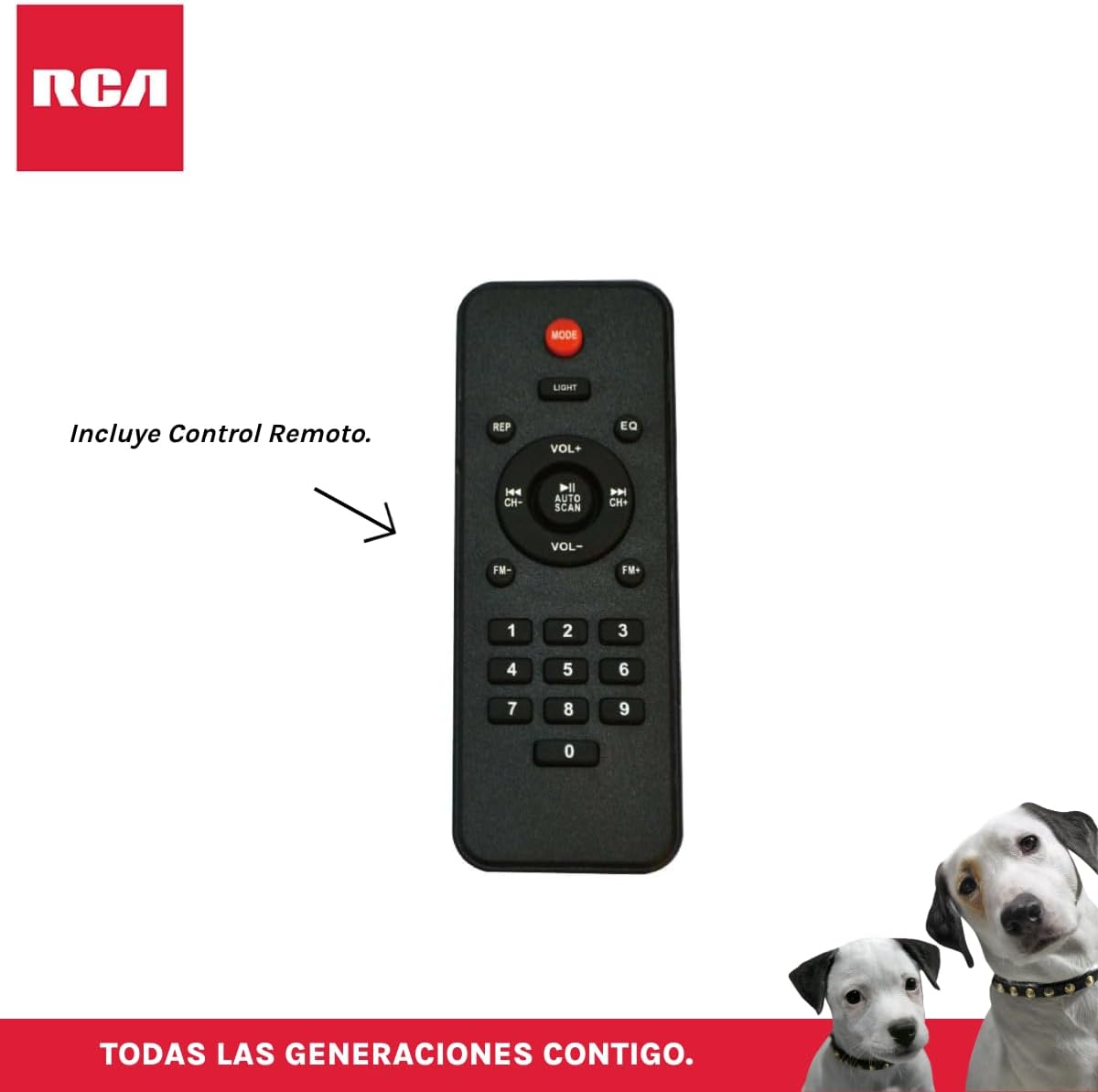
Umfanekiso 3.4: RCA SP550BT Remote Control. This image displays the full layout of the remote control, including buttons for power, mode selection, volume adjustment, track navigation, equalizer settings, and a numeric keypad.
4. Setha
4.1 Ukuxhuma Amandla
- Qinisekisa ukuthi isipikha sibekwe endaweni eqinile, eyisicaba.
- Connect the power cable to the speaker's power input port.
- Plug the other end of the power cable into a standard electrical outlet (AC 100-240V, 50/60Hz).
- Press the power button on the speaker or remote control to turn it on.
5. Iziqondiso Zokusebenza
5.1 Vula/Vala amandla
- To turn on the speaker, press the AMANDLA button on the control panel or the remote control.
- To turn off the speaker, press the AMANDLA inkinobho futhi.
5.2 Ukukhetha Imodi
Cindezela inkinobho IMODE button on the control panel or remote control to switch between Bluetooth, USB, FM, and AUX input modes.
5.3 Ukumatanisa kwe-Bluetooth
- Turn on the speaker and select Bluetooth mode using the IMODE button. The display will show "BLUE" and a pairing indicator will flash.
- Nika amandla i-Bluetooth kudivayisi yakho yeselula (i-smartphone, ithebhulethi, njll.).
- Cinga "RCA SP550BT" in your device's Bluetooth list and select it to pair.
- Uma isibhangqiwe, isipikha sizokhipha umsindo wokuqinisekisa, futhi inkomba ye-Bluetooth izoyeka ukukhanya.
- Manje usungakwazi ukudlala umsindo kusuka kudivayisi yakho usebenzisa isipikha.
5.4 Ukudlala nge-USB
- Insert a USB flash drive (FAT32 format, max 32GB) containing MP3 audio files embobeni ye-USB.
- Isipikha sizoshintshela ngokuzenzakalelayo kumodi ye-USB bese siqala ukudlala ithrekhi yokuqala. Uma kungenjalo, cindezela IMODE inkinobho yokukhetha imodi ye-USB.
- Sebenzisa i- DLALA/YIMISA, EDLULE, futhi OLANDELAYO buttons on the control panel or remote to control playback.
5.5 Umsakazo we-FM
- Turn on the speaker and select FM mode using the IMODE inkinobho.
- Cindezela bese ubamba i DLALA/YIMISA inkinobho (noma Iskena se-AUTO on remote) to automatically scan and save available FM stations.
- Sebenzisa i- EDLULE futhi OLANDELAYO izinkinobho zokuzulazula eziteshini ezigciniwe.
5.6 AUX Okokufaka
- Xhuma idivayisi yomsindo yangaphandle (isib. isidlali se-MP3, i-laptop) echwebeni lokufaka le-AUX lesipikha usebenzisa ikhebula lomsindo elingu-3.5mm (alifakiwe).
- Khetha imodi ye-AUX usebenzisa i IMODE inkinobho.
- Lawula ukudlala kanye nevolumu kusuka kudivayisi yakho exhunyiwe.
5.7 Umsebenzi we-TWS (True Wireless Stereo).
The TWS function allows you to connect two RCA SP550BT speakers wirelessly for a stereo sound experience.
- Ensure both SP550BT speakers are powered on and in Bluetooth mode, but not yet paired with any device.
- Kwesinye sezipikha, cindezela bese ubamba i I-TWS button (if available, or a dedicated TWS pairing button) until you hear a confirmation tone. The speakers will attempt to pair with each other.
- Once successfully paired, one speaker will act as the master (left channel) and the other as the slave (right channel).
- Now, pair your mobile device with the master speaker via Bluetooth as described in section 5.3.
5.8 Izibani ze-LED
Cindezela inkinobho UKUKHANYA button on the control panel or remote control to cycle through different LED light modes or to turn them off.
5.9 Ukusetshenziswa kwemakrofoni
Connect a wired microphone (not included) to the microphone input port on the speaker. Adjust the microphone volume using the dedicated knob (if available) or the main volume control.
6. Isondlo
- Ukuhlanza: Sebenzisa indwangu ethambile, eyomile ukuze uhlanze ingaphandle lesipikha. Ungasebenzisi izinto zokuhlanza abrasive noma izincibilikisi.
- Isitoreji: Lapho singasetshenziswa isikhathi eside, gcina isikhulumi endaweni epholile, neyomile ngaphandle kwelanga eliqondile namazinga okushisa aphakeme.
- Ukuchayeka emanzini: Lesi sipikha asivimbeli manzi. Gwema ukusibeka emanzini noma emswakama owedlulele.
7. Ukuxazulula izinkinga
Uma uhlangabezana nezinkinga ngesikhulumi sakho, bheka izinkinga nezixazululo ezilandelayo ezivamile:
| Inkinga | Imbangela Engenzeka | Isixazululo |
|---|---|---|
| Awekho amandla | Power cable not connected; Power outlet not working; Speaker off. | Check power cable connection; Try a different outlet; Press the POWER button. |
| Awukho umsindo | Ivolumu iphansi kakhulu; Imodi engalungile ikhethiwe; Idivayisi ayixhunyiwe kahle. | Increase volume; Select correct input mode (Bluetooth, USB, AUX); Reconnect device. |
| Ukumataniswa kwe-Bluetooth kwehlulekile | Speaker not in pairing mode; Device Bluetooth off; Speaker already paired. | Ensure speaker is in Bluetooth pairing mode; Turn on device Bluetooth; Disconnect from other devices. |
| Ukudlala i-USB akusebenzi | USB drive format incompatible; Corrupt files; USB drive not inserted correctly. | Ensure USB is FAT32 format; Check file integrity; Reinsert USB drive. |
| Umsakazo we-FM awumukelwa kahle | Isignali ebuthakathaka; Ukuphazamiseka. | Relocate speaker; Extend antenna (if applicable). |
8. Imininingwane
| Isici | Ukucaciswa |
|---|---|
| Imodeli | I-SP550BT |
| Ibhrendi | I-RCA |
| Amandla Okukhipha Isipikha | 50 Watts (Maximum) |
| Ubuchwepheshe bokuxhumana | I-Bluetooth, i-USB, i-AUX |
| Ubuchwepheshe obungenantambo | I-Bluetooth |
| Imodi Yokukhipha Umsindo | Isitiriyo |
| Uhlobo lwesipika | Iyaphatheka, Yangaphandle |
| Uhlobo Lokukhweza | I-Tabletop Mount |
| Indlela Yokulawula | Isilawuli kude |
| Usayizi wesipika | 6.5 amayintshi |
| I-Woofer Diameter | 6.5 amayintshi |
| Amandla ebhethri | 4400 millionamp Amahora |
| Umthombo wamandla | Ikhebula likagesi |
| Amadivayisi Ahambisanayo | Ikhompyutha Ephathwayo, Isidlali se-MP3, I-Smartphone, Ithebhulethi |
| I-GTIN / UPC | 044476152061 |
9. Iwaranti kanye Nokusekela
This product comes with a limited warranty. Please refer to the warranty card included in your package for specific terms and conditions. For technical support or service inquiries, please contact RCA customer service through their official webisayithi noma imininingwane yokuxhumana enikeziwe ngokuthenga kwakho.
Qaphela: Imibandela yewaranti ingahluka ngokwesifunda. Gcina ubufakazi bakho bokuthenga ukuze uthole izimangalo zewaranti.

