
Isingeniso
Thank you for choosing the Claiks Electric Standing Desk. This manual provides essential information for the safe and efficient use of your new desk. Designed for enhanced productivity and comfort, this height-adjustable desk allows you to seamlessly switch between sitting and standing positions, promoting a healthier work environment. Please read these instructions carefully before assembly and operation, and retain them for future reference.

Image: The Claiks Electric Standing Desk set up in an office, showcasing its spacious surface and integrated features like a hanging hook for a backpack.
Ukusetha nokuhlanganisa
Assembly of the Claiks Electric Standing Desk typically takes approximately 1 hour. For optimal efficiency and to prevent fatigue, an electric screwdriver is highly recommended. Please follow the included diagrams for step-by-step instructions.
Okuqukethwe Kwephakheji
Before beginning assembly, ensure all parts are present and undamaged. Refer to the parts list diagram below.

Isithombe: Kuqhume view illustrating all components of the Claiks Electric Standing Desk, including desktop panels, frame parts, and assembly hardware.
Amacebiso Omhlangano
- Review Imiyalelo: Carefully read all assembly steps before starting.
- Hlela Izingxenye: Lay out all components and hardware, matching them against the parts list.
- Isikulufi sikagesi: Use an electric screwdriver with appropriate bits for faster and easier assembly.
- Umhlangano Wabantu Ababili: While possible for one person, having a second person can make assembly easier, especially when handling the desktop.
- Transmission Rod: Ensure the transmission rod is fully and securely inserted into its designated holes to prevent operational issues.

Image: A diagram detailing the desk's dimensions (160cm W x 80cm D x 72-118cm H) and highlighting features like the storage hook, cable clips, and footrest.
Ukusebenza
The Claiks Electric Standing Desk features intuitive controls for height adjustment and memory presets, allowing you to customize your workspace effortlessly.
Ukulungiswa Kobude
- Ibanga: The desk can be adjusted between 72cm and 118cm.
- Isivinini: The lifting speed is approximately 20mm/s.
- Iphaneli yokulawula: Sebenzisa i- Up futhi Phansi arrows on the control panel to manually adjust the desk to your desired height.

Image: Two Claiks desks demonstrating the full height adjustment range, from a low sitting position to a high standing position.
I-Memory Presets
The desk features a memory function to store up to three preferred heights for quick recall.
- Lungisa ideski libe ngobude obufunayo usebenzisa imicibisholo ethi Phezulu/Phansi.
- Cindezela inkinobho M button (if available, or a dedicated 'Set' button) followed by one of the numbered memory buttons (1, 2, noma 3) ukuze ulondoloze ukuphakama kwamanje.
- To recall a saved height, simply press the corresponding numbered button (1, 2, noma 3). The desk will automatically move to the stored position.

Image: A close-up of the desk's control panel, showing the digital height display, up/down arrows, and three memory preset buttons.
Ukusebenza Okuthule Nokushelelayo
The Claiks Electric Standing Desk operates quietly, with noise levels around 45dB, ensuring minimal disruption to your work environment. The lifting mechanism is designed for smooth and stable transitions.
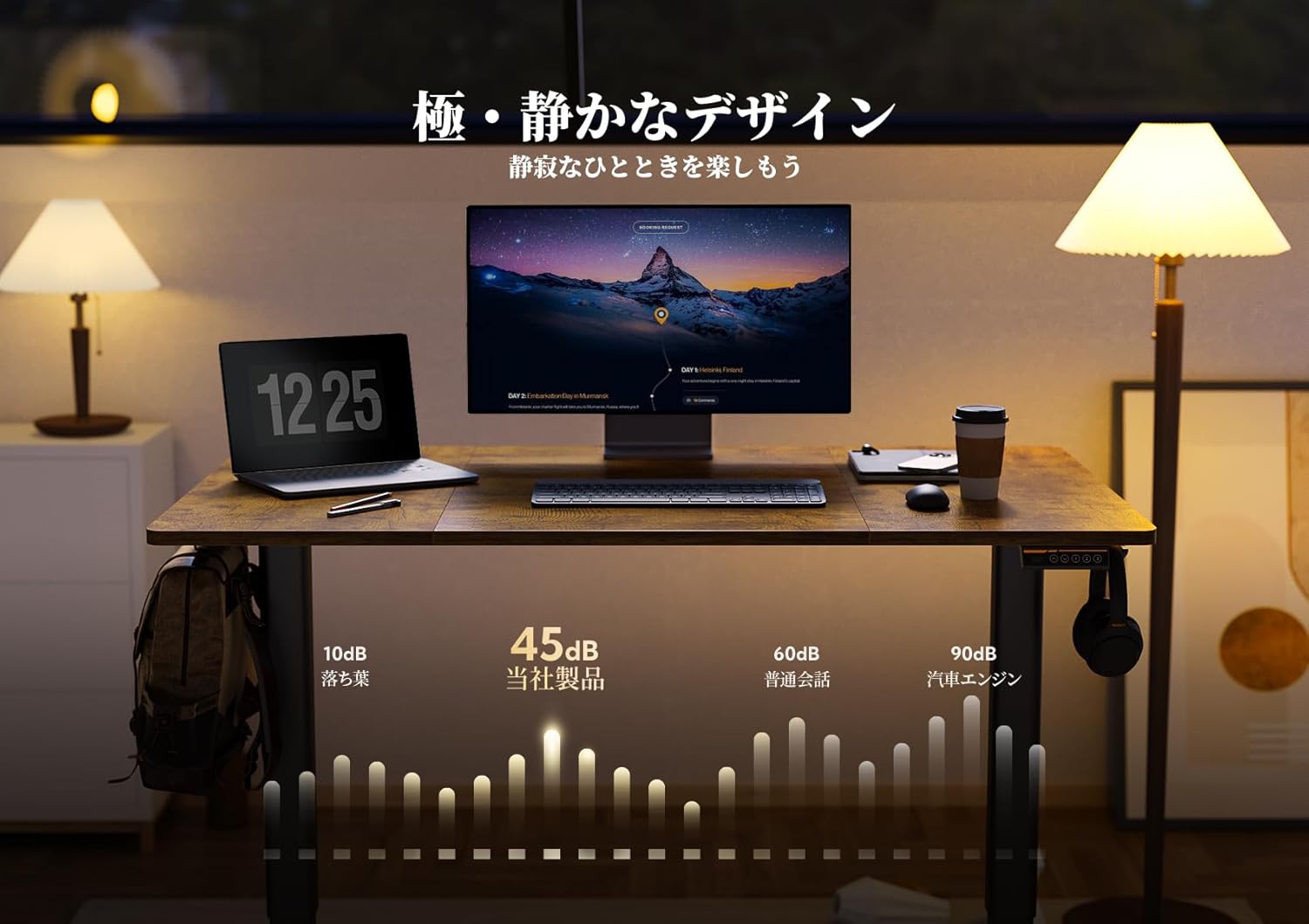
Image: The desk in a quiet setting, with a graphic illustrating its low noise level (45dB) during operation.

Image: A house of cards on the desk, symbolizing the smooth and stable movement of the height adjustment.
Isondlo
Proper care and maintenance will ensure the longevity and optimal performance of your Claiks Electric Standing Desk.
Cleaning the Desktop
- The desktop surface is made of melamine resin, which is resistant to water, heat, and stains.
- For daily cleaning, wipe the surface with a soft, damp indwangu.
- For stubborn stains, use a mild soap solution and then wipe dry immediately.
- Avoid using abrasive cleaners, harsh chemicals, or solvents, as these can damage the surface finish.
Frame and Mechanism
- Njalo hlola zonke izikulufu namabhawudi ukuze uqinisekise ukuthi ziqinile. Phinda uqinise uma kunesidingo.
- Keep the lifting columns free from dust and debris. Wipe with a dry cloth.
- Do not lubricate the lifting mechanism unless specifically instructed by customer support.
- Ensure power cables are not pinched or damaged.
Ukuxazulula inkinga
If you encounter any issues with your Claiks Electric Standing Desk, refer to the following common troubleshooting steps.
Desk Not Moving or Responding
- Ukuxhuma kwamandla: Ensure the power cable is securely plugged into both the desk and a working wall outlet.
- Transmission Rod: Verify that the transmission rod connecting the lifting columns is fully and correctly inserted into its designated holes. A loose connection can prevent movement.
- Ukulayisha ngokweqile: Check if the desk is overloaded. The maximum load capacity is 80kg. Remove excess weight and try again.
- Setha kabusha: Some desks have a reset function. Consult the full manual or contact support for specific reset procedures.
Imisindo Engavamile Ngesikhathi Sokusebenza
- While the desk is designed for quiet operation (approx. 45dB), minor sounds are normal.
- If you hear grinding, clicking, or excessively loud noises, stop operation immediately.
- Check for any obstructions under or around the desk that might be interfering with the lifting mechanism.
- Qinisekisa ukuthi zonke izikulufo zokuhlanganisa ziqinile.
Uneven Lifting
- This can often be resolved by performing a reset procedure.
- Qinisekisa ukuthi ideski lisendaweni eleveli.
- Verify that the transmission rod is properly connected and not bent.
If these steps do not resolve the issue, please contact Claiks customer support for further assistance.

Image: A child seated on the desk, illustrating its robust 80kg load capacity.
Imininingwane
| Isici | Imininingwane |
|---|---|
| Ibhrendi | Claiks |
| Imodeli | 160cm |
| Ubukhulu bomkhiqizo (W x D x H) | 160cm x 80cm x 72-118cm |
| Ububanzi Bokulungisa Ubude | 72cm kuya ku-118cm |
| Ijubane Lokuphakamisa | 20mm/s |
| Layisha Amandla | 80kg |
| Izinga Lomsindo | Cishe. 45db |
| I-Desktop Material | Melamine Resin (Laminate finish) |
| Izinto eziyisisekelo | Insimbi |
| Izici Ezihlanganisiwe | Keyboard tray, Memory function (3 presets) |
| Uhlobo Lwegumbi | Ihhovisi, Igumbi Lokufunda |
| ASIN | B0DBLFCT71 |
Iwaranti kanye Nokusekela
Claiks is committed to providing high-quality products and excellent customer service.
Iwaranti yomkhiqizi
All Claiks Electric Standing Desks come with a Iwaranti yomkhiqizi yonyaka ongu-3. During this warranty period, Claiks offers free repair or replacement services for any manufacturing defects or malfunctions under normal use conditions.
Ukwesekwa Kwamakhasimende
Our customer support team is available to assist you with any questions, assembly issues, or troubleshooting needs. We offer support in multiple languages, including English and Japanese.
Please feel free to contact us anytime through the retailer's platform or directly via the contact information provided on the official Claiks webindawo.