
I-GearLight S1000
I-GearLight S1000 LED Tactical Flashlight Incwadi Yomsebenzisi
Imodeli: S1000
Isingeniso
The GearLight S1000 LED Tactical Flashlight is a powerful and versatile illumination tool designed for a wide range of applications, from everyday tasks to outdoor adventures and emergency situations. Its robust construction and advanced features ensure reliable performance when you need it most.
This manual provides detailed instructions on how to set up, operate, maintain, and troubleshoot your S1000 flashlight to ensure optimal performance and longevity.
Okuqukethwe Kwephakheji
Upon opening your GearLight S1000 package, please verify that all the following items are included:
- (2) GearLight S1000 LED Tactical Flashlights
- (2) Built-in Lithium-Ion Batteries (pre-installed)
- (2) 19-inch USB-C Charging Cables
- (2) Hand Straps
- (1) Holster
- (1) Operation Guide (this manual)
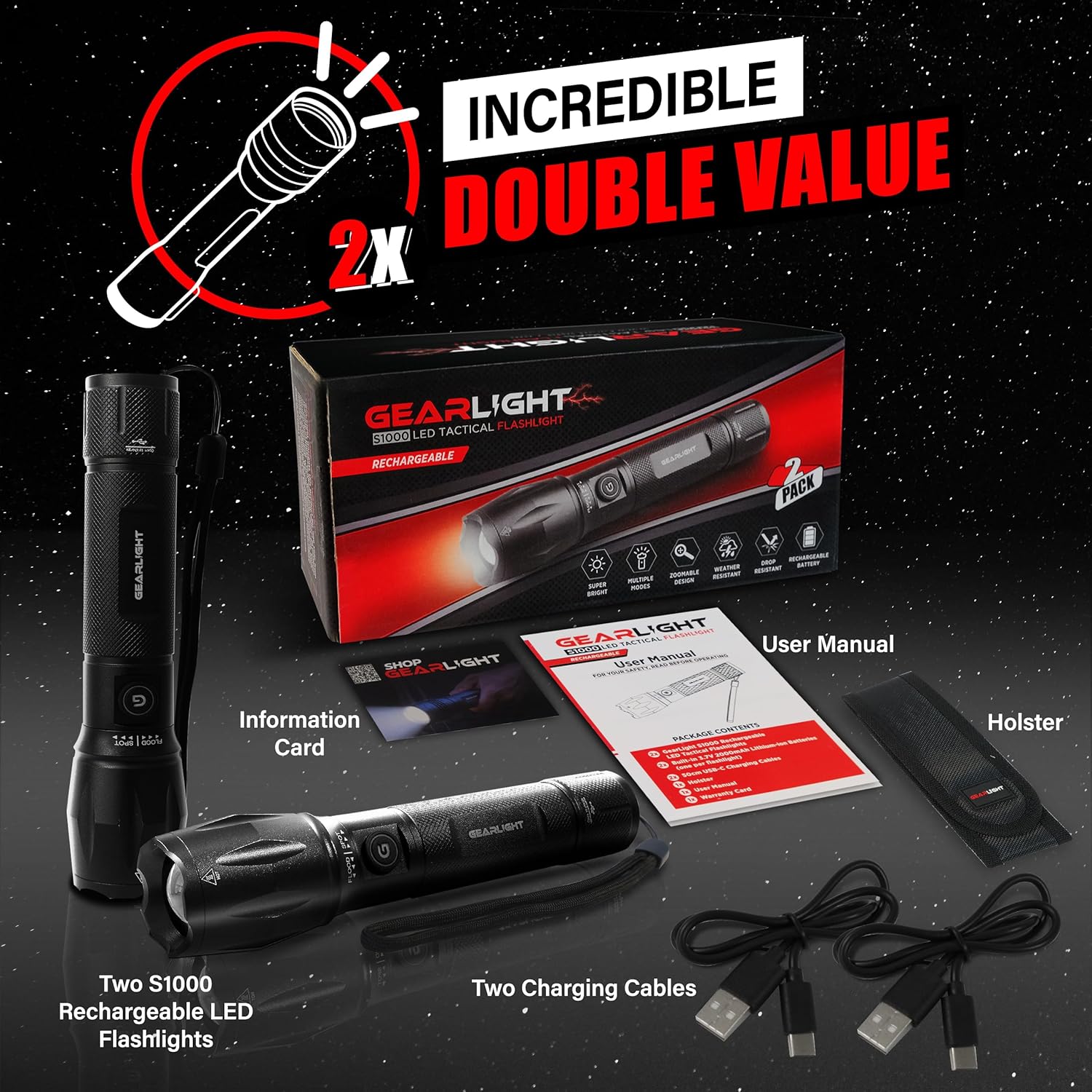
Figure 1: Included items in the GearLight S1000 2-Pack Rechargeable package.
Izici Eziyinhloko
- Bright & Rechargeable: The S1000 provides powerful illumination with multiple modes and a zoomable beam, powered by a CREE LED. It features a built-in rechargeable lithium-ion battery for long-lasting performance.
- Dual-Button Design: Equipped with two power buttons—one on the side and one on the tail—for convenient operation and quick access in various situations.
- Ukushaja Ngokushesha kwe-USB-C: Features a built-in 3.7V 2000mAh lithium-ion battery that charges quickly via USB-C, ensuring your flashlight is always ready.
- I-Lightweight & Pocket-Sized: Compact and easy to carry, fitting comfortably in a pocket, backpack, or glove compartment, making it ideal for travel and emergency kits.
- Ihlala isikhathi eside futhi imelana nesimo sezulu: Constructed from military-grade aluminum with an anti-roll body design. It is IPX4 water-resistant and can withstand drops up to 10 feet.

Figure 2: The S1000 flashlight providing powerful illumination in a dark environment.

Umfanekiso 3: Okuningiliziwe view of the S1000's durable construction and key design elements.

Figure 4: The S1000's resilience against water and impact.
Ukusetha nokushaja
The GearLight S1000 comes with a built-in rechargeable lithium-ion battery. Before first use, it is recommended to fully charge the flashlight.
- Thola i-Charging Port: Twist the tail end of the flashlight to reveal the USB-C charging port.
- Xhuma Ikhebuli: Insert one end of the provided USB-C charging cable into the flashlight's port and the other end into a compatible USB power source (e.g., wall adapter, computer USB port, power bank).
- Inkomba yokushaja: The charging indicator light (usually near the charging port or power button) will illuminate to show charging status. Refer to the flashlight's specific indicator behavior (e.g., red for charging, green for fully charged).
- Imali Egcwele: Allow the flashlight to charge until the indicator shows a full charge. Charging time may vary depending on the power source.
- Secure the Port: Once charging is complete, remove the USB-C cable and twist the tail end back to cover and protect the charging port from dust and water.
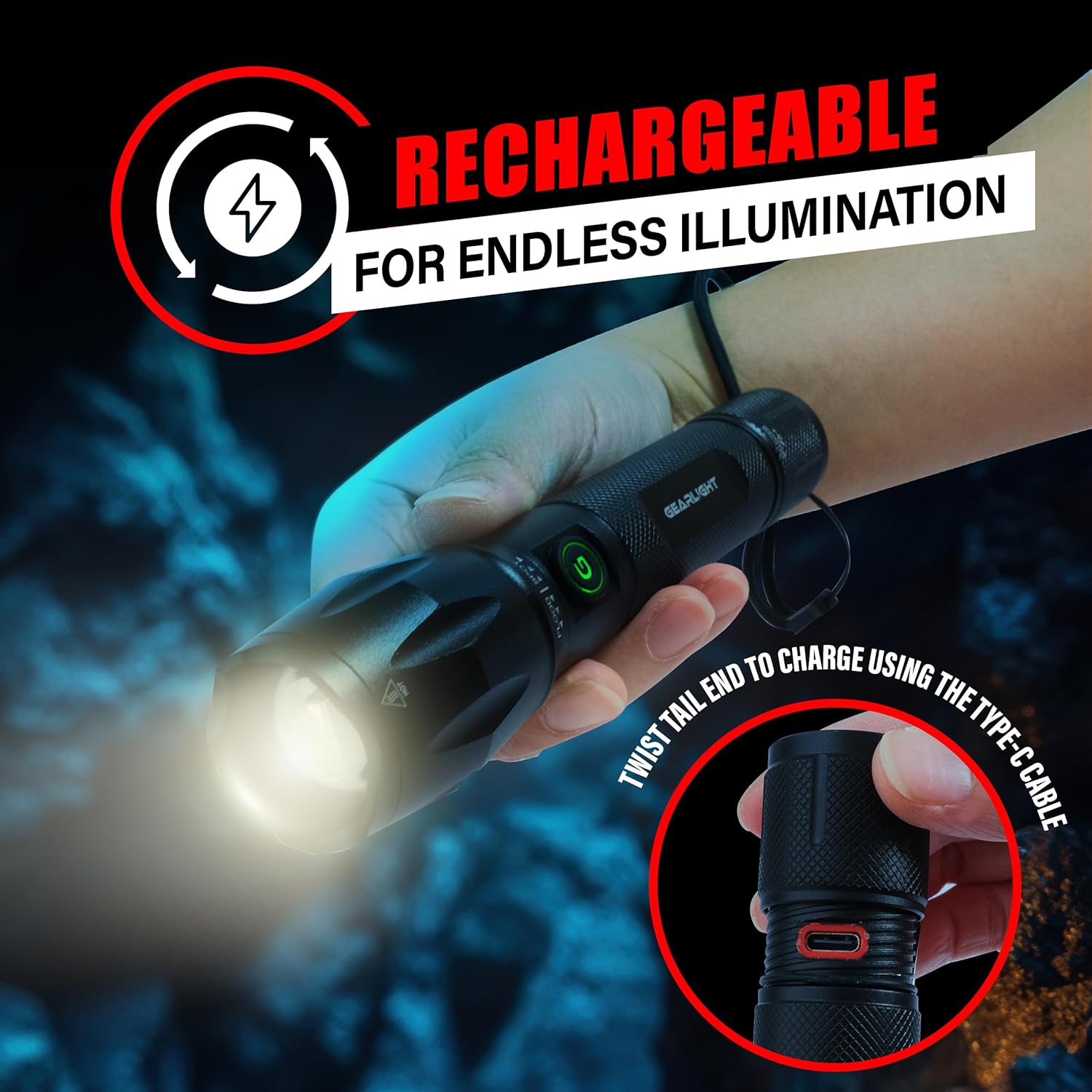
Figure 5: Accessing the USB-C charging port by twisting the tail end.
Imiyalelo yokusebenza
The S1000 flashlight features a dual-button design and multiple lighting modes for various needs.
Vula/Vala
- Inkinobho Eseceleni: Press the side power button to turn the flashlight ON or OFF.
- Tail Button: Press the tail cap button to turn the flashlight ON or OFF. This button often provides momentary on/off functionality with a half-press.
Ukushintsha Amamodi Okukhanyisa
The S1000 offers 5 lighting modes: High, Medium, Low, Strobe, and SOS.
- With the flashlight ON, quickly press the side power button repeatedly to cycle through the modes: High → Medium → Low → Strobe → SOS → High.
- Alternatively, with the flashlight ON, lightly tap the tail cap button (without fully clicking) to cycle through the modes. A full click will turn the flashlight off.
Zoom Umsebenzi
The S1000 features a zoomable beam to adjust between a wide floodlight and a focused spotlight.
- To adjust the beam, simply push or pull the head of the flashlight forward or backward.
- Pulling the head forward will narrow the beam for a focused spotlight.
- Pushing the head backward will widen the beam for a broad floodlight.
Isondlo
Proper maintenance ensures the longevity and optimal performance of your GearLight S1000 flashlight.
- Ukuhlanza: Sula umzimba wethoshi ngesithambile, damp indwangu. Ungasebenzisi izihlanzi ezirhabaxa noma izinyibilikisi. Gcina ilensi ihlanzekile ukuze kukhanye kakhulu.
- Ukuthambisa: Periodically apply a thin layer of silicone grease to the O-rings and screw threads (e.g., tail cap threads) to maintain water resistance and smooth operation.
- Isitoreji: Store the flashlight in a cool, dry place away from direct sunlight and extreme temperatures. If storing for extended periods, ensure the battery is partially charged (around 50%) to preserve battery health. Recharge every 3-6 months if not in use.
- Gwema I-Disassembly: Do not attempt to disassemble the sealed head or other components beyond what is necessary for charging or basic cleaning, as this may void the warranty and damage the flashlight.
Ukuxazulula inkinga
If you encounter issues with your GearLight S1000 flashlight, try the following solutions:
| Inkinga | Imbangela Engenzeka | Isixazululo |
|---|---|---|
| I-flashlight ayivuli. | Ibhethri liphelile. Isivalo somsila esikhululekile. Damaged internal components. | Shaja ibhethri ngokugcwele. Qinisa isivalo somsila ngokuphepha. Xhumana nosekelo lwamakhasimende uma inkinga iqhubeka. |
| Ukukhanya kufiphele noma kuyacwayiza. | Ibhethri eliphansi. Dirty lens or contacts. | Shaja kabusha ibhethri. Clean the lens and ensure contacts are free of debris. |
| Ayikwazi ukushintsha amamodi. | Ukucindezela inkinobho okungalungile. Iphutha lesoftware. | Ensure quick, successive presses of the side button or light taps of the tail button. Try turning off and on again. |
| Isikhombisi sokushaja asisebenzi. | Ikhebuli engalungile noma umthombo wamandla. Ukuvinjelwa kwembobo yokushaja. | Try a different USB-C cable and power source. Check charging port for debris. |
Imininingwane
| Isici | Imininingwane |
|---|---|
| Imodeli | S1000 |
| Uhlobo Lomthombo Wokukhanya | LED (CREE) |
| Umthombo wamandla | Isebenza Ibhethri (Ishajwa kabusha) |
| Uhlobo Lwebhethri | Built-in 3.7V 2000mAh Lithium-Ion |
| Imbobo yokushaja | I-USB-C |
| Okubalulekile | Military-Grade Aluminum |
| Izinga Lokumelana Namanzi | IPX4 Ukumelana Namanzi |
| Yehlisa Ukumelana | Kufika kumafidi angama-10 |
| Ubukhulu bomkhiqizo | 6.1"D x 1.57"W x 1.57"H |
| Isisindo sento | 1.1 amakhilogremu (ngamaphekhi angu-2) |
| I-UPC | 850021168520 |
Iwaranti kanye Nokusekela
For warranty information, technical support, or any inquiries regarding your GearLight S1000 flashlight, please visit the official GearLight webisayithi noma uxhumane nesevisi yabo yamakhasimende ngokuqondile.
Ungavakashela futhi GearLight Store on Amazon ukuze uthole ulwazi olwengeziwe lomkhiqizo nezinsiza zokusekela.
Ask a question about this manual
Ask about setup, troubleshooting, compatibility, parts, safety, or missing instructions. Manuals+ will review the question and use this page’s manual context to help answer it.