
1. Isingeniso
This manual provides detailed instructions for the safe and effective use of your pxton 666S two-way radio. Please read this manual thoroughly before operating the device and retain it for future reference. The pxton 666S is a reliable communication device designed for various applications, featuring 16 memory channels, privacy codes, and multiple functions such as VOX, noise reduction, and a flashlight.
FCC ID: 2AX68GTR8. This device complies with Part 15 of the FCC Rules. Operation is subject to the condition that this device does not cause harmful interference.

Image 1.1: A set of ten pxton 666S two-way radios, each with its charging dock and an earphone, illustrating the complete package.
2. Okuqukethwe Kwephakheji
Qinisekisa ukuthi zonke izinto zikhona kuphakheji yakho:
- 10 x pxton 666S Two-Way Radios
- 10 x USB Charging Docks
- Amabhethri e-Lithium angu-10 x 1500mAh
- 10 x Iziqeshana Zebhande
- 10 x Ama-earphone
- 5 x Imanyuwali yomsebenzisi

Image 2.1: An illustration of the individual components included in the pxton 666S package: the radio unit, charging dock, battery, belt clip, earphone, and user manual.
3. Umkhiqizo Uphelileview
3.1 Izici ezibalulekile
- Iziteshi zememori ezingama-16
- 165 Amakhodi Obumfihlo (50 CTCSS / 210 DCS)
- 5 Levels of VOX Sensitivity Adjustment
- Isikhathi Sokuphela Kwesikhathi (TOT)
- I-alamu Eziphuthumayo
- Ukunciphisa Umsindo
- I-Automatic Squelch
- Isexwayiso Sebhethri Eliphansi
- Imodi Yokonga Amandla
- Iskena Umsebenzi
- Ukuqapha Umsebenzi
- I-Flashlight ye-LED
- Durable PC+ABS material construction
3.2 Radio Components
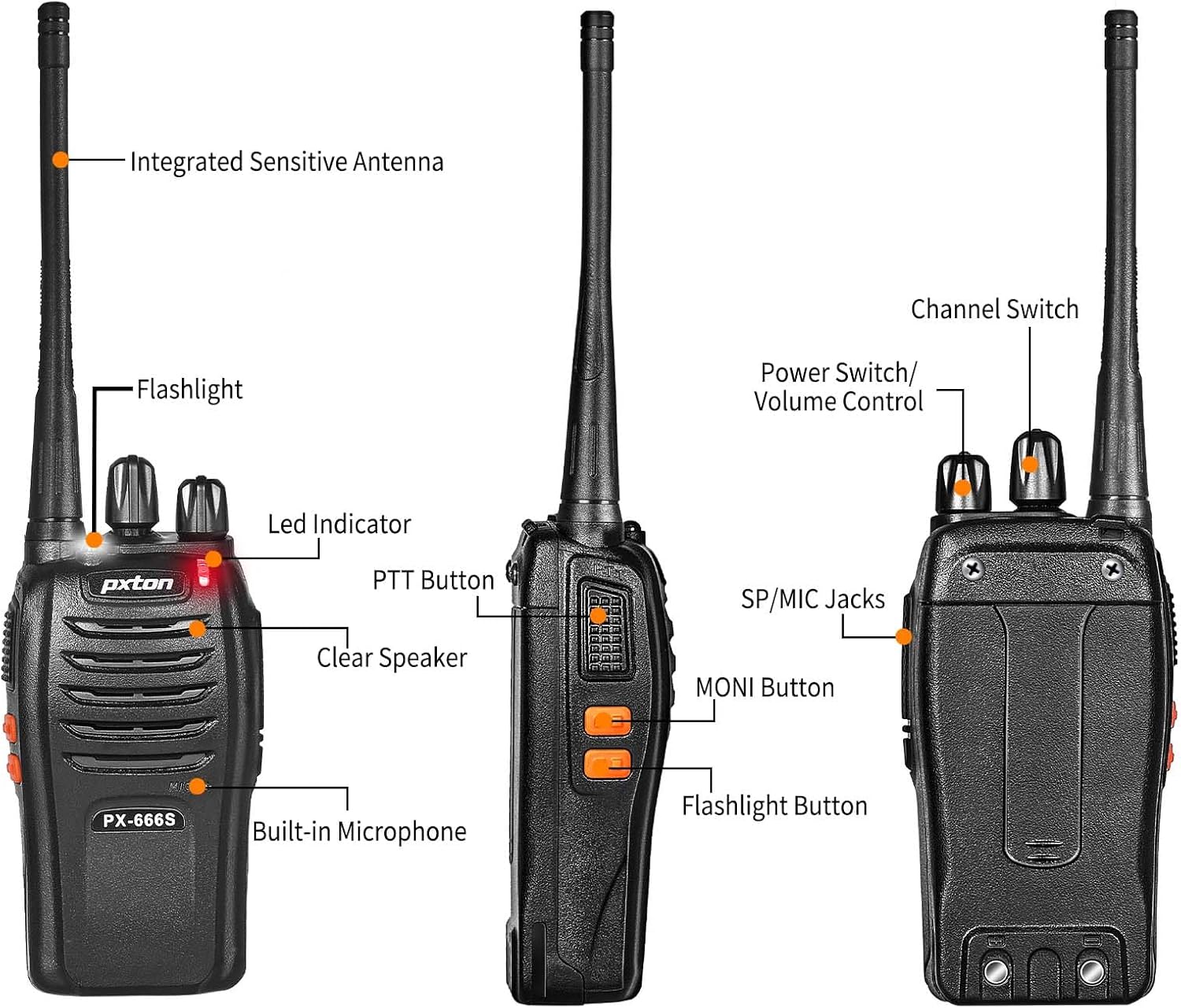
Image 3.1: Detailed diagram labeling the external components of the pxton 666S radio, including the integrated sensitive antenna, flashlight, LED indicator, PTT button, clear speaker, built-in microphone, SP/MIC jacks, MONI button, flashlight button, channel switch, and power switch/volume control.
- Integrated Sensitive Antenna: Okokudlulisa nokwamukela amasignali.
- I-Flashlight: Inikeza ukukhanya.
- Inkomba ye-LED: Displays status (e.g., transmitting, receiving, low battery).
- Inkinobho ye-PTT (Push-to-Talk): Press to transmit, release to receive.
- Clear Speaker: Okokukhipha umsindo.
- Imakrofoni eyakhelwe ngaphakathi: Okokufaka komsindo.
- SP/MIC Jacks: For connecting external earphones or microphones.
- MONI Button (Monitor): Temporarily disables squelch to hear weak signals.
- Inkinobho Yethoshi: Activates the LED flashlight.
- Ukushintsha Isiteshi: Rotates to select desired communication channel.
- Ukushintsha Amandla/Ukulawula Ivolumu: Iyazungeza ukuze ivule/ivale umsakazo futhi ilungise ivolumu.

Image 3.2: The pxton 666S radio resting on rocks, emphasizing its rugged PC+ABS durable material, anti-fall, and anti-vibration design for extended service life.
4. Setha
4.1 Ukufakwa kwebhethri
- Qondanisa iphakethe lebhethri nemigqa engemuva komsakazo.
- Slayida ibhethri phezulu kuze kube yilapho lingena endaweni yalo.
- To remove, press the release latch (if present) and slide the battery downwards.
4.2 Ukushaja Ibhethri
The pxton 666S uses a 1500mAh Li-ion battery. A full charge takes approximately 3-4 hours.
- Connect the USB charging dock to a power source.
- Place the radio (with battery installed) into the charging dock.
- The LED indicator on the radio or charger will show charging status (e.g., red for charging, green for fully charged).

Image 4.1: Two pxton 666S radios placed in their respective charging docks, with earphones connected, demonstrating the charging setup.
4.3 Ukunamathisela Isiqeshana Sebhande
Secure the belt clip to the back of the radio using the provided screws for convenient carrying.
4.4 Ukuxhumanisa Ama-Earphone
Insert the earphone plug into the SP/MIC jacks on the side of the radio. Ensure it is fully inserted for proper audio transmission and reception.
5. Iziqondiso Zokusebenza
5.1 Ukuvula/Ukuvala nokuvala ivolumu
- Ukuze uvule umsakazo, jikelezisa i- Ukushintsha Amandla/Ukulawula Ivolumu knob clockwise. You will hear a "click" and a tone.
- To turn off the radio, rotate the knob counter-clockwise until you hear a "click".
- To adjust the volume, rotate the Ukushintsha Amandla/Ukulawula Ivolumu i-knob ngokwewashi ukuze ukhuphule ivolumu nangokuphikisana newashi ukuze wehlise.
5.2 Ukukhethwa Kwesiteshi
Zungezisa i- Ukushintsha Isiteshi knob to select one of the 16 available channels. Ensure all radios in your group are set to the same channel for communication.
5.3 Ukudlulisa nokwamukela
- Ukudlulisa, cindezela bese ubamba i Inkinobho ye-PTT. Speak clearly into the microphone. The LED indicator will typically glow red.
- To receive, release the Inkinobho ye-PTT. The LED indicator will typically glow green when receiving a signal.
5.4 Umsebenzi we-VOX (Ukudluliselwa Okusetshenziswa Ngezwi)
The VOX function allows hands-free operation. When activated, the radio will automatically transmit when it detects your voice, without needing to press the PTT button. The pxton 666S offers 5 levels of VOX sensitivity adjustment.

Image 5.1: A security guard using the pxton 666S radio, illustrating the VOX/Handsfree function for clear and bright sound quality, allowing hands-free communication.
5.5 Flashlight
Cindezela inkinobho Inkinobho Yethoshi to turn the LED flashlight on or off. This feature is useful in low-light conditions.

Image 5.2: The pxton 666S radio's flashlight feature in use, illuminating a campsite at night, demonstrating its utility in dark environments.
5.6 Monitoring Function
Cindezela bese ubamba i MONI Button to temporarily disable the squelch function. This allows you to hear very weak signals that might otherwise be blocked by the squelch, or to check if a channel is clear before transmitting.
5.7 Umsebenzi Wokuskena
The scanning function allows the radio to automatically scan through all programmed channels to detect activity. Refer to the full user manual (if provided separately) for specific instructions on activating and managing the scanning feature.
5.8 Ezinye Izici
- Ukunciphisa Umsindo: Enhances audio clarity by reducing background noise.
- I-alamu Yesimo Esiphuthumayo: Activates an audible alarm to signal for help.
- Isikhathi Sokuvala (TOT): Prevents accidental prolonged transmissions by limiting the duration of each transmission.
- Imodi yokonga amandla: Automatically reduces power consumption when no activity is detected, extending battery life.
- Isexwayiso Sebhethri Eliphansi: Provides an audible or visual warning when the battery level is low, indicating it's time to recharge.
6. Uhla Lokuxhumana
The actual communication range of the pxton 666S can vary significantly based on environmental factors, terrain, and obstructions. General estimates are:
- Open Areas (flat terrain, mountain peaks): Up to 3 miles.
- Suburban/Countryside Areas: Approximately 1.2 miles.
- City Limits (with buildings and obstructions): Around 0.6 miles.

Image 6.1: Visual representation of the pxton 666S communication range, indicating up to 1-3 miles in open areas, 1.2 miles in rural settings, and 0.6 miles in urban environments.
7. Ulwazi Lwebhethri
The pxton 666S is powered by a rechargeable 1500mAh Lithium-Ion battery (Model: BL-1, 5.55Wh, Voltage: 3.7v).
- Ukusetshenziswa Okuvamile: Up to 12 hours of continuous talk time.
- Isikhathi sokulinda: Up to 120 hours (5-7 days).
- Isikhathi sokushaja esigcwele: Cishe amahora angu-3-4.
Important Battery Safety Information:
- Ungaliqeqeshi ibhethri.
- Ungalahli emlilweni.
- Sebenzisa kuphela ishaja eshiwo.
- Ungawafinyezi amatheminali.
- Gcina endaweni epholile, eyomile.

Image 7.1: The pxton 666S radio alongside its 1500mAh Li-ion battery, detailing battery model (BL-1), capacity (1500mAh), voltage (3.7V), and safety warnings.
8. Imininingwane
| Isici | Ukucaciswa |
|---|---|
| Inombolo Yemodeli | PX-666S-0004 |
| Ibhrendi | pxton |
| Inombolo Yeziteshi | 16 |
| I-Frequency Range | I-UHF |
| Talking Range Maximum | 3 Miles (line of sight) |
| Uhlobo Lwebhethri | I-1500mAh Lithium Ion (ifakiwe) |
| Voltage | 3.7 volts |
| Isisindo sento | 7.05 amakhilogremu (ngamaphekhi angu-10) |
| Ubukhulu bomkhiqizo | 9.9 x 11 x 6.9 amayintshi (ubukhulu bephakheji) |
| Izinga Lokumelana Namanzi | Ukumelana Namanzi |
| Izici ezikhethekile | Automatic Squelch, Battery Saver Mode, Long Range, Rechargeable, Voice Operated Transmission (VOX) |

Image 8.1: A size comparison of the pxton 666S radio next to a smartphone (iPhone 14 Pro), illustrating its compact dimensions for portability.
9. Ukuxazulula izinkinga
If you encounter issues with your pxton 666S radio, please refer to the following common problems and solutions:
| Inkinga | Imbangela Engenzeka | Isixazululo |
|---|---|---|
| Awekho amandla | Ibhethri ayifakiwe kahle noma ayishajwanga. | Qinisekisa ukuthi ibhethri lihlezi kahle. Shaja ibhethri ngokugcwele. |
| Ayikwazi ukudlulisa noma ukwamukela | Incorrect channel, out of range, low battery, squelch too high. | Verify all radios are on the same channel. Move closer to other radios. Recharge battery. Press MONI button to check for weak signals. |
| Ikhwalithi yomsindo ephansi / Engaguquki | Weak signal, interference, radio too far apart. | Move to an area with fewer obstructions. Adjust volume. Ensure antenna is clear. |
| I-VOX ayisebenzi | VOX sensitivity too low, feature disabled. | Adjust VOX sensitivity to a higher level. Ensure VOX is enabled (refer to full manual for programming). |
| Impilo yebhethri yimfushane | Frequent transmission, battery degradation, power-saving mode off. | Reduce transmission time. Ensure power-saving mode is active. Consider replacing old batteries. |
For further assistance, please contact pxton customer support.
10. Isondlo
- Ukuhlanza: Sebenzisa okuthambile, damp indwangu yokuhlanza ingaphandle lomsakazo. Ungasebenzisi amakhemikhali anamandla noma izihlanzi ezihudulayo.
- Isitoreji: When not in use for extended periods, remove the battery and store the radio in a cool, dry place.
- Ukunakekelwa kwebhethri: Fully charge batteries before long-term storage and recharge them every 3-6 months to maintain optimal performance.
- I-Antenna: Do not bend or modify the antenna, as this can affect performance.
- Ukumelana Namanzi: While water-resistant, avoid submerging the radio in water. Ensure all covers (e.g., earphone jack cover) are securely closed.
11. Iwaranti kanye Nokusekela
pxton offers a 30-day no-questions-asked replacement and refund policy from the date of purchase. Additionally, the product comes with isevisi yangemva kokuthengisa impilo yonke.
If you encounter any issues or require support, please contact pxton customer service. They are committed to assisting you with any concerns.
Inothi Lokuhambisana: The pxton 666S walkie talkie is compatible with PX-888S, PX-777S, and PX-888S Pro models. They can utilize the same programming tools and cables (programming cable sold separately).