
1. Isingeniso
Thank you for choosing the Hama DR2002BT Digital Radio. This device offers a comprehensive audio experience with FM, DAB/DAB+ digital radio reception, and Bluetooth connectivity. Its user-friendly design, featuring large buttons and a clear 4.3-inch TFT color display, makes it suitable for all users. This manual will guide you through the setup, operation, and maintenance of your new digital radio.
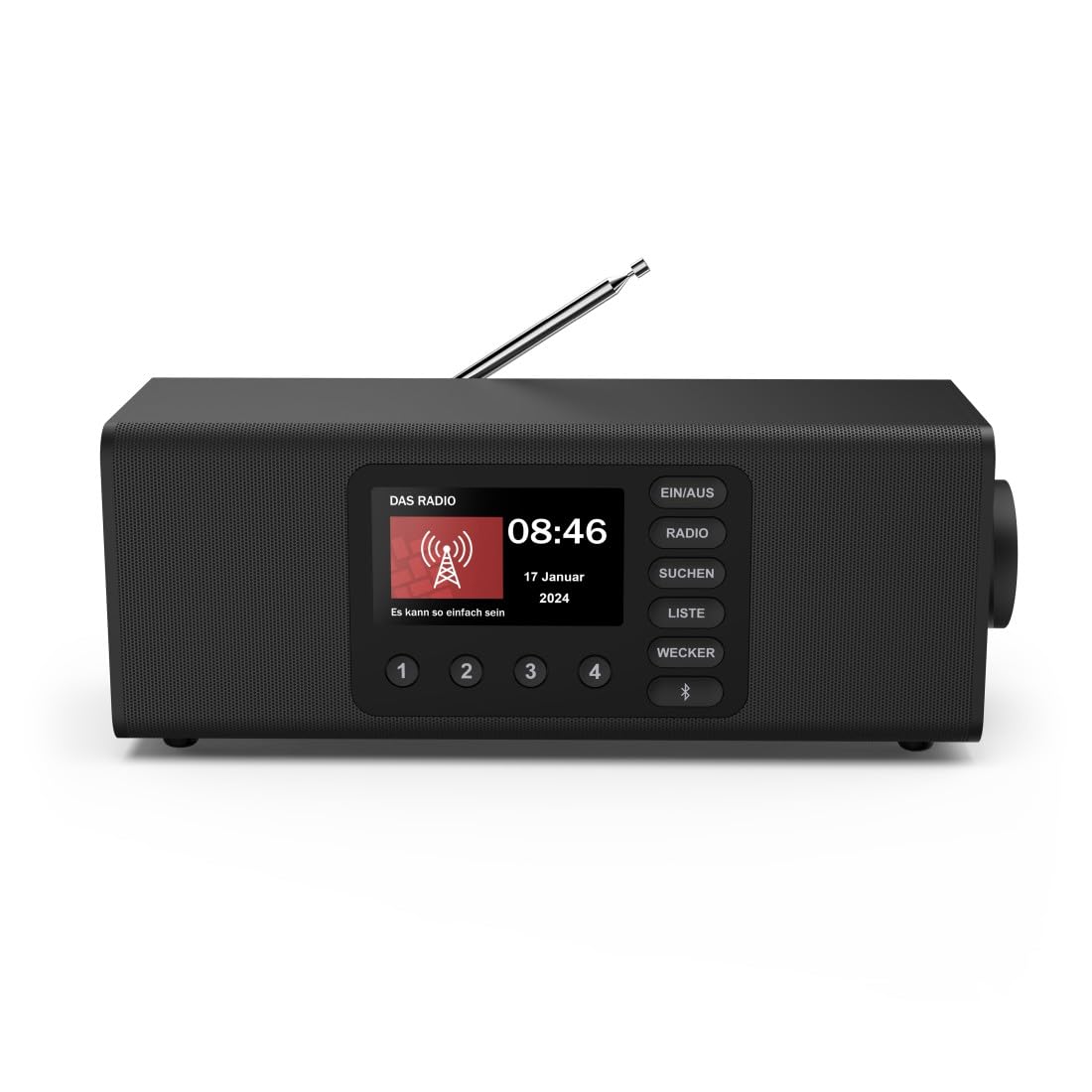
Isithombe: Ngaphambili view of the Hama DR2002BT Digital Radio, showcasing its display and control buttons.
2. Ulwazi Lokuphepha
Sicela ufunde le miyalelo yokuphepha ngokucophelela ngaphambi kokusebenzisa idivayisi. Gcina le ncwadi ukuze uyibhekisele esikhathini esizayo.
- Ungabeki idivayisi emswakama, emvuleni, noma emazingeni okushisa aphezulu.
- Gwema ukubeka idivayisi eduze kwemithombo yokushisa noma elangeni eliqondile.
- Ungaluvuli ucingo casing. Ukulungisa kufanele kwenziwe kuphela izisebenzi eziqeqeshiwe.
- Sebenzisa kuphela i-adaptha yamandla enikeziwe.
- Qinisekisa ukuthi kungena umoya ofanele eduze kocingo.
3. Okuqukethwe Kwephakheji
Qinisekisa ukuthi zonke izinto zikhona lapho kukhishwa:
- Hama DR2002BT Digital Radio
- I-adaptha yamandla
- Imaniwali yosebenzisayo
4. Umkhiqizo Uphelileview
4.1 Izilawuli zephaneli yangaphambili nesibonisi

Image: Front panel of the radio highlighting the display and control buttons, with icons for Bluetooth, DAB+, and Alarm functions.
The front panel features a 4.3-inch TFT color display, large control buttons, and a rotary knob for easy navigation and selection. Key buttons include:
- EIN/AUS (ON/OFF): Ivula noma ivale idivayisi.
- UMSAKAZO: Switches between FM and DAB/DAB+ modes.
- SUCHEN (SEARCH): Initiates station scanning.
- LISTE (LIST): Accesses the list of available stations.
- WECKER (ALARM): Configures alarm settings.
- Inkinobho ye-Bluetooth: Yenza kusebenze imodi yokumatanisa ye-Bluetooth.
- Izinkinobho Zokusetha Ngaphambili (1-4): Ukufinyelela okusheshayo eziteshini eziyintandokazi ezigciniwe.
- Rotary Knob (LAUTSTÄRKE/NAVIGIEREN): Controls volume and navigates menus.
4.2 Izixhumi zephaneli yangemuva
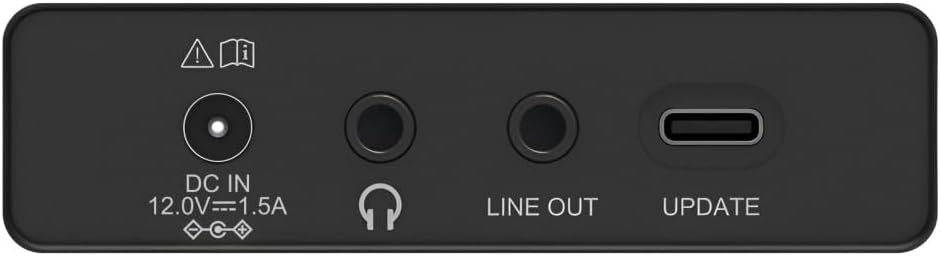
Image: Close-up of the rear panel showing the DC IN, Headphone, Line Out, and UPDATE (USB-C) ports.
The rear panel provides essential connectivity options:
- DC IN 12.0V --- 1.5A: Power input for the external adapter.
- I-Headphone Jack (3.5mm): Okokulalela kwangasese.
- UMUGQA OUT: Umsindo ophumayo wokuxhuma kwangaphandle ampama-lifiers noma izipikha.
- UPDATE (USB-C): Ukuze uthole izibuyekezo ze-firmware.
- I-Telescopic Antenna: For FM and DAB/DAB+ reception.

Isithombe: Emuva view of the Hama DR2002BT Digital Radio with its telescopic antenna extended for optimal signal reception.
5. Setha
5.1 Ukuxhuma Amandla
- Xhuma i-adaptha yamandla enikeziwe ku- DC IN ichweba ngemuva komsakazo.
- Xhuma i-adaptha yamandla endaweni yamandla efanelekile.
- The radio will power on automatically or enter standby mode.
5.2 Antenna Positioning
For optimal FM and DAB/DAB+ reception, fully extend the telescopic antenna. Position the radio near a window if reception is poor.
5.3 Initial Setup (First Use)
Upon first power-on, the radio may guide you through an initial setup process, including language selection and an automatic DAB station scan. Follow the on-screen prompts.
6. Iziqondiso Zokusebenza
6.1 Vula/Vala amandla
Cindezela inkinobho EIN/AUS inkinobho yokuvula noma ukuvala umsakazo.
6.2 DAB/DAB+ Radio Mode
- Cindezela inkinobho UMSAKAZO inkinobho yokukhetha imodi ye-DAB.
- If this is the first time in DAB mode or if you want to rescan, press SUCHEN to perform a full scan for available stations.
- Use the rotary knob to navigate through the station list. Press the knob to select a station.
- Kuya view the station list, press the LALELA inkinobho.
6.3 Imodi yomsakazo we-FM
- Cindezela inkinobho UMSAKAZO inkinobho yokukhetha imodi ye-FM.
- Cindezela SUCHEN to automatically scan for the next available FM station.
- Alternatively, use the rotary knob to manually tune to a frequency.
6.4 Storing and Recalling Presets
The radio allows you to store up to 4 favorite stations using the dedicated preset buttons (1-4).
- Tune to the desired station (DAB or FM).
- Press and hold one of the preset buttons (1-4) until the display confirms the station has been saved.
- To recall a preset station, simply press the corresponding preset button (1-4).
6.5 Ukusebenza kwe-Bluetooth

Isithombe: Ngaphambili view of the radio with Bluetooth and stereo speaker icons, indicating its wireless audio streaming capability.
The Hama DR2002BT can stream audio from your smartphone, tablet, or laptop via Bluetooth 5.0.
- Press the Bluetooth button on the front panel to enter Bluetooth pairing mode. The display will show a pairing indicator.
- On your external device (smartphone, tablet), enable Bluetooth and search for available devices.
- Select "Hama DR2002BT" from the list of devices to pair.
- Once paired, you can play audio from your device, and it will be output through the radio's speakers.
6.6 Umsebenzi Wewashi Le-alamu

Image: A person waking up with the Hama DR2002BT Digital Radio placed on a bedside table, illustrating its alarm clock functionality.
The radio features two independent alarm settings.
- Cindezela inkinobho WECKER button to access alarm settings.
- Use the rotary knob to select Alarm 1 or Alarm 2.
- Configure the alarm time, source (buzzer or radio station), and repetition (once, daily, weekdays, weekends, or specific days).
- Press the rotary knob to confirm each setting.
- To quickly activate/deactivate an alarm, press the WECKER button and use the rotary knob to toggle the alarm status.

Image: A person interacting with the Hama DR2002BT Digital Radio, demonstrating its ease of use for setting functions like alarms or tuning stations.
7. Isondlo
To ensure the longevity and optimal performance of your Hama DR2002BT Digital Radio, follow these maintenance guidelines:
- Ukuhlanza: Use a soft, dry, lint-free cloth to clean the exterior of the radio. Do not use abrasive cleaners, waxes, or solvents.
- Uthuli: Regularly dust the device to prevent accumulation in vents and ports.
- Isitoreji: If storing the radio for an extended period, disconnect it from the power supply and store it in a cool, dry place.
- I-Antenna: Handle the telescopic antenna carefully to avoid bending or breaking.
8. Ukuxazulula izinkinga
Uma uhlangabezana nezinkinga ngomsakazo wakho, bheka izinkinga nezixazululo ezilandelayo ezivamile:
| Inkinga | Imbangela Engenzeka | Isixazululo |
|---|---|---|
| Awekho amandla | Power adapter not connected; Power outlet faulty | Check power adapter connection; Try a different power outlet. |
| Umsakazo awusamukelwa kahle (DAB/FM) | Antenna not extended; Weak signal area; Interference | Fully extend the telescopic antenna; Reposition the radio (e.g., near a window); Perform a new station scan. |
| Ukumataniswa kwe-Bluetooth kwehlulekile | Bluetooth not enabled on external device; Radio not in pairing mode; Device too far | Ensure Bluetooth is on and visible on your device; Press the Bluetooth button on the radio; Move devices closer (within 10m). |
| Awukho umsindo | Volume too low; Mute activated; Incorrect source selected | Increase volume using the rotary knob; Check if mute is active; Ensure the correct mode (DAB, FM, Bluetooth) is selected. |
| I-alamu ayizwakali | Alarm not activated; Incorrect alarm time/day set | Verify alarm is enabled in settings; Check alarm time and repetition settings. |
9. Imininingwane

Image: Diagram showing the dimensions of the Hama DR2002BT Digital Radio: 35 cm (width), 12.5 cm (depth), and 13 cm (height).
| Isici | Imininingwane |
|---|---|
| Inombolo Yemodeli | DR2002BT (00054298) |
| Ukwamukela | DAB, DAB+, FM |
| Inguqulo ye-Bluetooth | 5.0 |
| Amandla Okukhipha (RMS) | 10 W (Stereo) |
| Bonisa | 4.3" isibonisi sombala we-TFT |
| Ukuxhumana | 3.5mm Jack (Headphone), USB-C (Update), Line Out, DC IN |
| Ukunikezwa kwamandla kagesi | I-adaptha yamandla yangaphandle |
| Ubukhulu (W x D x H) | 35 x 12.5 x 13 cm |
| Isisindo | 1788 amagremu |
| Okubalulekile | Ipulasitiki |
| Umbala | Mnyama |
| Izici Ezengeziwe | Alarm Function (2 alarms), Direct Selection Keys |
10. Iwaranti kanye Nokusekela
Hama GmbH & Co KG provides a warranty for this product. Please refer to the warranty card included in your package or visit the official Hama webindawo ngemigomo nemibandela yewaranti enemininingwane.
For technical support, troubleshooting assistance, or spare parts, please contact Hama customer service or visit their website. The availability of spare parts in the EU is guaranteed for 7 years.
- Umkhiqizi: Hama GmbH & Co KG
- Izwe azalelwe kulo: EJalimane
- EU Spare Parts Availability: 7 Iminyaka