
1. Isingeniso
Thank you for choosing the MECHEN H1-Pro Bluetooth MP3 Player with WiFi. This device is designed to provide a versatile and enjoyable audio and video experience. Featuring a 4-inch touchscreen and running on Android 9.0, it supports various applications and connectivity options. This manual provides essential information for setting up, operating, and maintaining your device.
2. Okuqukethwe Kwephakheji
Qinisekisa ukuthi zonke izinto ezibalwe ngezansi zifakiwe kuphakheji yakho. Uma kukhona izinto ezingekho noma ezilimele, sicela uxhumane nokwesekwa kwamakhasimende.
- MECHEN H1-Pro MP3 Player
- Ikhebula le-USB
- Ama-headphone
- Ifilimu Evikelayo
- Ikesi Lokuvikela
- Imaniwali yosebenzisayo

Image: The MECHEN H1-Pro MP3 Player displayed with its accessories, including a USB cable, headphones, protective film, and a clear protective case.
3. Idivayisi Ngaphezuluview
Familiarize yourself with the physical components and controls of your MECHEN H1-Pro MP3 Player.
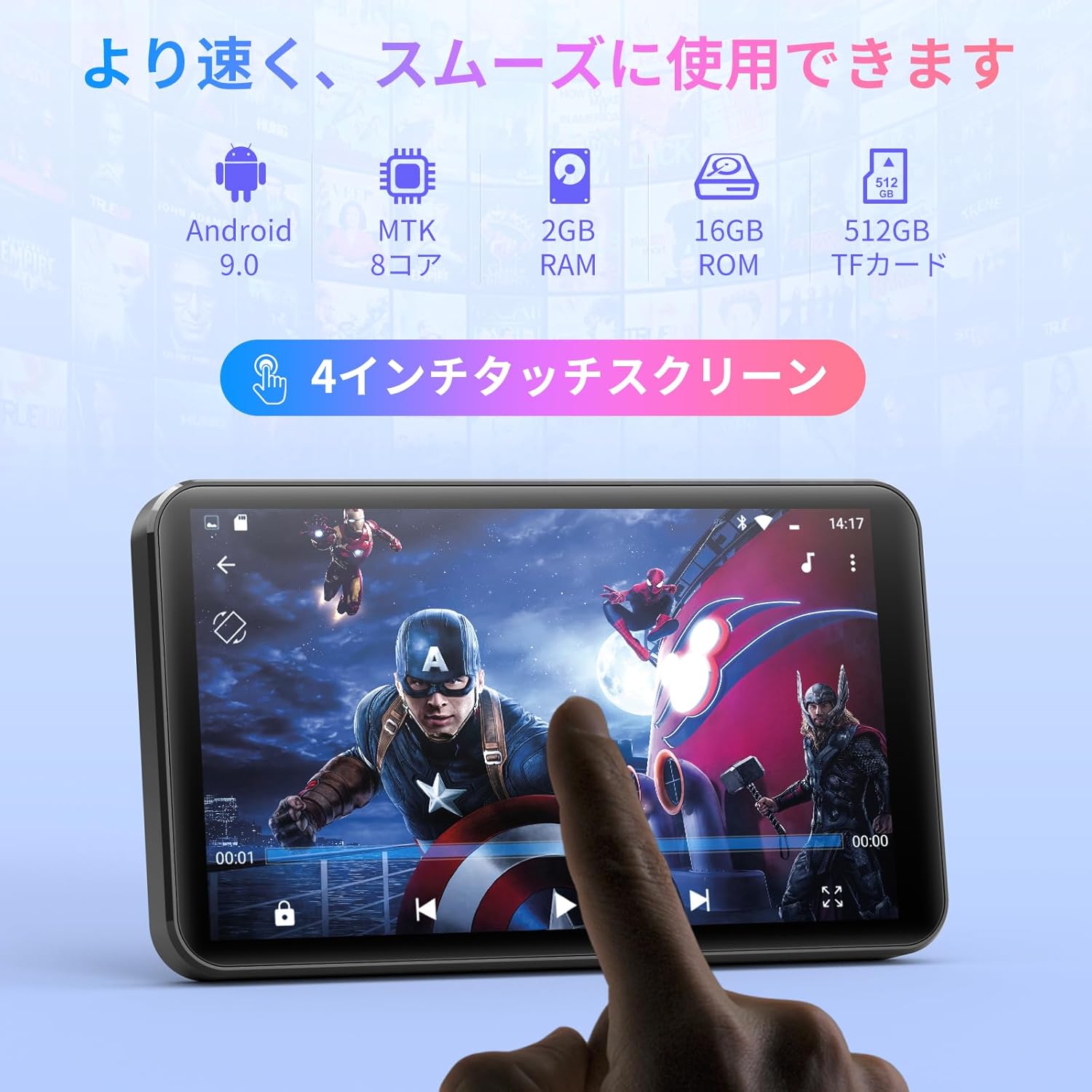
Isithombe: Ngaphambili view of the MECHEN H1-Pro MP3 Player, showcasing isikrini sayo sesikrini sokuthinta esingu-4 intshi.

Isithombe: Side view of the MECHEN H1-Pro MP3 Player, highlighting the power button and volume controls.

Isithombe: Phezulu nangaphansi views of the MECHEN H1-Pro MP3 Player, illustrating the USB-C charging port, headphone jack, and Micro SD card slot.
4. Setha
4.1 Ukushaja Kwasekuqaleni
Before first use, fully charge the device. Connect the provided USB cable to the player's USB-C port and the other end to a USB power adapter (not included) or a computer's USB port. The charging indicator will show the charging status.
4.2 Vula/Vala amandla
- Ukuvula: Press and hold the Power button on the side of the device until the screen lights up.
- Ukucisha: Press and hold the Power button until a power-off menu appears on the screen. Select 'Power Off' to shut down the device.
4.3 Ukuxhuma ku-Wi-Fi
To access online features and download apps, connect your device to a Wi-Fi network.
- Iya ku Izilungiselelo > Inethiwekhi ne-inthanethi > I-Wi-Fi.
- Guqula i-Wi-Fi On.
- Khetha inethiwekhi yakho ye-Wi-Fi oyifunayo ohlwini.
- Enter the password if prompted and tap Xhuma.

Image: The MECHEN H1-Pro MP3 Player screen showing Wi-Fi settings and available networks.
4.4 Ukufaka Ikhadi Le-Micro SD
The device supports Micro SD cards for expanded storage. Locate the Micro SD card slot on the side of the device. Gently insert the card with the gold contacts facing down until it clicks into place.
5. Iziqondiso Zokusebenza
5.1 Basic Navigation (Touchscreen)
The MECHEN H1-Pro features a responsive 4-inch touchscreen. Use standard touch gestures:
- Thepha: Ukukhetha into noma ukuvula uhlelo lokusebenza.
- Swayipha: To scroll through lists or switch between screens.
- Ncinza: To zoom in or out (in supported applications).
5.2 Ukudlala Umculo
The device supports various audio formats including MP3, WAV, WMA, APE, OGG, and FLAC for high-fidelity music playback.
- Vula i- Umculo isicelo.
- Dlulisa amehlo kulabhulali yakho yomculo ngomculi, i-albhamu, ingoma, noma uhlu lokudlalayo.
- Tap on a song to begin playback.
- Use the on-screen controls for play/pause, skip tracks, and volume adjustment.

Image: The MECHEN H1-Pro MP3 Player screen showing a music playback interface with album art and controls.
5.3 Ukudlala ividiyo
Enjoy 720P/1080P full-format HD video playback without conversion. Supported formats include RM, RMVB, FLV, MP4, DAT, MKV, MPG, MOV, TS, etc.
- Vula i- Isidlali Sevidiyo isicelo.
- Khetha ividiyo file from your storage.
- Tap to play. Use on-screen controls for playback options.

Image: The MECHEN H1-Pro MP3 Player screen showing a video playing in full-screen mode.
5.4 Ukuxhumana kwe-Bluetooth
Connect to Bluetooth headphones, speakers, or other compatible devices.
- Iya ku Izilungiselelo > Amadivayisi axhunyiwe > I-Bluetooth.
- Guqula i-Bluetooth On.
- Ensure your Bluetooth accessory is in pairing mode.
- Select the accessory from the list of available devices to pair.

Image: The MECHEN H1-Pro MP3 Player shown alongside a pair of wireless headphones, indicating Bluetooth connectivity.
5.5 Wi-Fi Connectivity & App Downloads
With Android 9.0 and Wi-Fi, you can download and install various applications from the Google Play Store.
- Ensure the device is connected to Wi-Fi (see Section 4.3).
- Vula i- I-Google Play Isitolo isicelo.
- Ngena ngemvume nge-akhawunti yakho ye-Google.
- Cinga and download desired applications (e.g., Spotify, Amazon Music, Audible).

Image: The MECHEN H1-Pro MP3 Player screen showing a variety of installed applications, including music streaming services and web iziphequluli.
5.6 Umsakazo we-FM
Lalela iziteshi zakho zomsakazo ze-FM ozithandayo.
- Connect wired headphones to the 3.5mm audio jack; they act as the antenna.
- Vula i- Umsakazo we-FM isicelo.
- Use the on-screen controls to scan for stations or tune manually.
5.7 File Abaphathi
Sebenzisa eyakhelwe ngaphakathi file umphathi ukuhlela eyakho files on internal storage and the Micro SD card.
- Vula i- File Umphathi isicelo.
- Navigate through folders to view, copy, move, or delete files.
6. Isondlo
6.1 Ukuhlanza
Wipe the device with a soft, dry, lint-free cloth. Do not use liquid cleaners or abrasive materials.
6.2 Isitoreji
Gcina idivayisi endaweni epholile, eyomile kude nokukhanya kwelanga okuqondile kanye namazinga okushisa aphezulu. Uma igcinwa isikhathi eside, qiniseka ukuthi ibhethri lishajwe kancane (cishe u-50%) ukuze yandise isikhathi sayo sokuphila.
6.3 Ukunakekelwa Kwebhethri
To maximize battery life, avoid fully discharging the battery frequently. Use the original charging cable for optimal performance.
7. Ukuxazulula izinkinga
| Inkinga | Isixazululo Esingenzeka |
|---|---|
| Idivayisi ayivuli. | Ensure the battery is charged. Connect to a charger for at least 30 minutes. If unresponsive, perform a hard reset by holding the power button for 10-15 seconds. |
| Ayikwazi ukuxhuma ku-Wi-Fi. | Check if Wi-Fi is enabled. Verify the Wi-Fi password. Restart your router and the MP3 player. |
| Idivayisi ye-Bluetooth ayibhangqi. | Ensure Bluetooth is enabled on both devices and the accessory is in pairing mode. Move devices closer together. |
| Izinhlelo zokusebenza ziyanensa noma ziyaphahlazeka. | Close unnecessary background apps. Clear app cache (Settings > Apps > [App Name] > Storage > Clear Cache). Restart the device. Too many apps can lead to slowdowns. |
| Akukho msindo ovela kuma-headphone. | Check headphone connection. Ensure volume is not muted or too low. Test with different headphones. |
8. Imininingwane
| Isici | Imininingwane |
|---|---|
| Ibhrendi | MECHEN |
| Igama Lemodeli | H1-Pro (EU-H11) |
| Isistimu esebenzayo | I-Android 9.0 |
| Iphrosesa | MTK 8-core |
| RAM | 2 GB |
| Isitoreji Sangaphakathi | 16 GB |
| Isitoreji Esinwebekayo | I-Micro SD (kufika ku-512GB) |
| Usayizi Wesikrini | 4 amayintshi |
| Ubuchwepheshe Besikrini | I-LCD |
| Ukuxhumana | I-Bluetooth, i-USB, i-Wi-Fi |
| Izici ezikhethekile | FM Radio, Equalizer, Video Playback |
| Amafomethi omsindo asekelwe | MP3, WAV, WMA, APE, OGG, FLAC |
| Amafomethi wevidiyo asekelwe | RM, RMVB, FLV, MP4, DAT, MKV, MPG, MOV, TS, etc. |
| Amandla ebhethri | 2000 mAh |
| Impilo Yebhethri (Umculo) | Kufika emahoreni angu-50 |
| Impilo Yebhethri (Ividiyo) | Kufika emahoreni angu-8 |
| Ubukhulu (D x W x H) | 10.5 x 6.2 x 1.2 cm (4.14 x 2.44 x 0.46 amayintshi) |
| Isisindo sento | 97.5 amagremu (3.45 oz) |

Image: The MECHEN H1-Pro MP3 Player shown with its physical dimensions and weight specifications.
9. Iwaranti kanye Nokusekela
For warranty information and technical support, please refer to the warranty card included in your package or visit the official MECHEN webindawo. Gcina irisidi lakho lokuthenga njengobufakazi bokuthenga izimangalo zewaranti.