
1. Isingeniso
This manual provides essential information for the safe and efficient operation of your BITMAIN Antminer S19 86TH/S Bitcoin ASIC Miner. Please read this document thoroughly before setting up and operating the device. Proper installation and maintenance are crucial for optimal performance and longevity.
The Antminer S19 is designed for high-performance cryptocurrency mining using the SHA256 algorithm, supporting currencies such as Bitcoin (BTC), Bitcoin Cash (BCH), and Bitcoin SV (BSV). It features an air-cooling system and is optimized for energy efficiency.
2. Setha
2.1. Unboxing kanye Ukuhlolwa
Carefully remove the Antminer S19 from its packaging. Inspect the device for any visible damage that may have occurred during transit. Ensure all components are present.

Umfanekiso 1: Ngaphambili view of the Antminer S19.
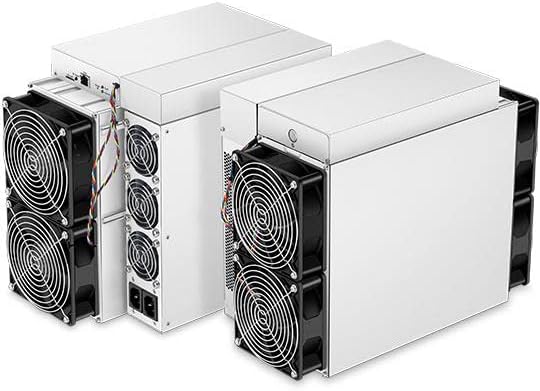
Figure 2: Multiple Antminer S19 units, illustrating their compact design.
2.2. Ukuxhunywa kwamandla
The Antminer S19 requires a 200-240V AC input voltage. A power cord is AKUHLANGANISIWE with the unit. Use an appropriate power cord and ensure the voltage supply is within the specified range. Incorrect voltage can cause severe damage to the miner.

Figure 3: Rear panel of the Antminer S19, highlighting power input ports and the RJ45 Ethernet port.
2.3. Uxhumano Lwenethiwekhi
Connect the miner to your network using an Intambo ye-Ethernet ye-RJ45. The device supports 10/100M Ethernet connections. Ensure a stable internet connection for continuous mining operations.
2.4. Ukucushwa Kwasekuqaleni
Once powered on and connected to the network, the miner will typically acquire an IP address via DHCP. Access the miner's web interface using its IP address to configure mining pool settings, worker names, and other parameters. Refer to the BITMAIN official website for detailed software configuration guides.
3. Operating the Antminer S19
3.1. Ukusebenza Kuphelileview
The Antminer S19 delivers a hashrate of 86 TH/S ± 3%, with a power efficiency of 34.5 J/TH ± 5%. It operates on approximately 2967 W ± 5% at 77°F (25°C) ambient temperature. These figures are crucial for calculating potential profitability and ensuring your electrical infrastructure can support the load.
3.2. Izidingo Zemvelo
To ensure stable and long-term operation, adhere to the following environmental conditions:
- Izinga lokushisa lokusebenza: 32°F ukuya ku-113°F (0°C ukuya ku-45°C)
- Izinga Lokushisa Lesitoreji: -4°F ukuya ku-158°F (-20°C kuya ku-70°C)
- Umswakamo Wokusebenza (okungafinyeleli): 10% kuya ku-90% i-RH
- Ukusebenza kwe-Altitude: ≤ 2000 amamitha
Operating outside these ranges may lead to reduced performance, instability, or permanent damage to the unit.
4. Isondlo
4.1. Air Filter and Fan Cleaning
The Antminer S19 utilizes an air-cooling system. Regular cleaning of the air intake and exhaust fans is essential to prevent dust buildup, which can impede airflow and lead to overheating. Use compressed air to gently clear dust from the fan blades and heatsinks. Ensure the device is powered off and disconnected from the power source before performing any cleaning.

Umfanekiso 4: Ngaphambili view of the Antminer S19, highlighting the air-cooling fans.
4.2. Ukuqapha Imvelo
Continuously monitor the operating temperature and humidity of the mining environment. Maintaining optimal conditions will extend the lifespan of your miner and ensure consistent performance.
5. Ukuxazulula izinkinga
5.1. Izinkinga Ezivamile
- Awekho Amandla: Verify the power cord is securely connected and the power supply is receiving adequate voltage (200-240V).
- Alukho Uxhumo Lwenethiwekhi: Check the Ethernet cable connection and ensure your network is operational. Confirm the miner has obtained an IP address.
- Low Hashrate: This can be caused by poor network connectivity, incorrect mining pool settings, or environmental factors such as high temperatures.
- Ukushisa ngokweqile: Ensure proper ventilation and clean the fans. Check ambient room temperature.
5.2. Important Note on Voltage
Using an incorrect input voltage (e.g., 110V instead of 220-240V) will likely cause irreversible damage to the miner. Always confirm your power source meets the specified requirements before connecting the device.
6. Imininingwane
| Isici | Ukucaciswa |
|---|---|
| Imodeli | S19 |
| Algorithm | Cryptocurrency | SHA256 | I-BTC/BCH/BSV |
| I-Hashrate | 86 TH/S ± 3% |
| Power on wall @77°F(25°C) | 2967 W ± 5% |
| Power efficiency on wall @77°F(25°C) | 34.5 J/TH ± 5% |
| Ukunikezwa kwamandla kwe-AC Input voltage | 200 ~ 240 V |
| Power supply AC Input Frequency Range | 47-63 Hz |
| Ukunikezwa kwamandla kwe-AC Input yamanje | 20 Amp |
| Imodi yokuxhumeka kwenethiwekhi | I-RJ45 Ethernet 10/100M |
| Miner Size (Length*Width*Height, w/o package) | 15.75 x 7.68 x 11.42 amayintshi |
| Miner Size (Length*Width*Height, with package) | 22.45 x 12.45 x 16.93 amayintshi |
| Isisindo sengqikithi | 33.96 lbs |
| Isisindo esikhulu | 37.92 lbs |
| Izinga lokushisa lokusebenza | 32~113°F (0~45°C) |
| Izinga lokushisa lesitoreji | -4~158°F (-20~70°C) |
| Operation humidity (non-condensing) | 10~90% RH |
| Ukuphakama komsebenzi | ≤2000m |
7. Iwaranti kanye Nokusekela
7.1. Iwaranti Yokumbozwa
Brand new BITMAIN Antminer units are covered by a warranty provided directly by BITMAIN. The seller is not responsible for warranty claims. Customers are required to contact BITMAIN's official website for warranty service and support. Dedicated personnel at BITMAIN will assist you with any warranty-related inquiries.
7.2. Inqubomgomo Yokubuyisela
For brand new BITMAIN Antminer units, if a return is not due to product malfunction, a 40% restocking fee will be applied. Please consider your purchase carefully before proceeding.
7.3. Ukusekelwa Kwezobuchwepheshe
For technical assistance, troubleshooting beyond this manual, or any operational questions, please refer to the official BITMAIN support channels. Their website typically provides comprehensive FAQs, forums, and direct contact options for technical support.