
BlitzWolf BW-VT2EU
Incwadi Yomsebenzisi Yephrojektha Encane ye-BlitzWolf BW-VT2
Your comprehensive guide to setting up, operating, and maintaining your BlitzWolf BW-VT2 Mini Projector.
1. Umkhiqizo Uphelileview
1.1 Okuqukethwe Kwephakheji
Sicela uqinisekise ukuthi zonke izinto zikhona ephaketheni lakho:
- BlitzWolf BW-VT2 Mini Projector
- Isilawuli kude
- I-adaptha yamandla
- Ikhebula le-HDMI
- Incwadi Yomsebenzisi (le dokhumenti)
1.2 Isakhiwo Sedivayisi
Familiarize yourself with the various parts and ports of your projector.
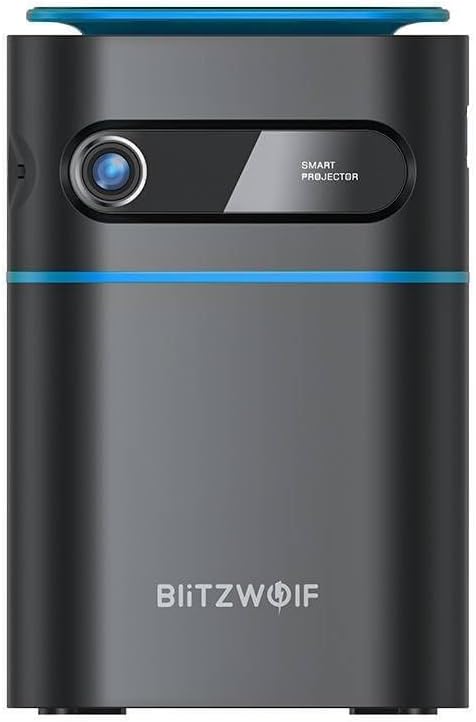
Umfanekiso 1.1: Ngaphambili View. This image displays the front of the BlitzWolf BW-VT2 Mini Projector, highlighting the projection lens and the 'SMART PROJECTOR' branding.

Figure 1.2: Projector with Remote Control. This image shows the BlitzWolf BW-VT2 Mini Projector alongside its dedicated remote control, illustrating the compact size of both devices.
Umfanekiso 1.3: Ngemuva View. The rear of the projector is shown, featuring ventilation grilles and various input/output ports.

Umfanekiso 1.4: Uhlangothi View. This image highlights the side of the projector where additional connectivity options such as USB and HDMI ports are located.

Umfanekiso 1.5: Phezulu View. The top surface of the projector is visible, featuring the integrated touch control panel for direct interaction.
1.3 Izimbobo nezilawuli
- Imbobo ye-HDMI: Connect to laptops, game consoles, Blu-ray players, etc.
- Imbobo ye-USB: Xhuma amadrayivu e-USB flash ukuze udlale imidiya.
- Audio Out (3.5mm) Port: Xhuma izipikha zangaphandle noma ama-headphone.
- I-DC IN Port: Xhuma i-adaptha yamandla.
- Inkinobho yamandla: Ivula/ivale iprojektha.
- Isondo Lokugxilisa: Ilungisa ukucaca kwesithombe.
- Iphaneli yokulawula yokuthinta: Navigate menus and control playback directly on the device.
2. Umhlahlandlela wokusetha
2.1 Iyavula
- Connect the power adapter to the DC IN port on the projector.
- Xhuma i-adaptha yamandla odongeni.
- Press and hold the Power Button on the projector or the remote control until the device powers on.
2.2 Ukubekwa Kwasekuqaleni
Ngokufanelekile viewing experience, consider the following:
- Beka iprojektha endaweni ezinzile, eyisicaba.
- Ensure there is adequate ventilation around the projector to prevent overheating.
- Position the projector perpendicular to the projection surface (wall or screen) for a rectangular image.
- Adjust the distance to achieve your desired screen size.
2.3 Ukulungisa Okugxilile
After powering on, adjust the focus to ensure a clear image:
- Rotate the focus wheel located near the lens until the projected image appears sharp and clear.
2.4 Isethaphu yesilawuli kude
Insert batteries into the remote control before first use:
- Vula ikhava yegumbi lebhethri ngemuva kwerimothi.
- Insert two AAA batteries (not included), ensuring correct polarity (+/-).
- Vala ikhava yengxenye yebhethri.
3. Iziqondiso Zokusebenza
3.1 Ukuzulazula
You can navigate the projector's interface using either the remote control or the touch control panel on top of the device.
- Isilawuli kude: Use the directional buttons (up, down, left, right) to move through menus and the 'OK' button to select.
- Iphaneli yokulawula yokuthinta: Swipe and tap on the touch-sensitive surface to navigate.
3.2 Ukuxhumanisa Amadivayisi
The BW-VT2 supports various input sources:
- Okokufaka kwe-HDMI: Connect your laptop, game console, or other HDMI-enabled devices using an HDMI cable. Select the HDMI input source from the projector's menu.
- Okokufaka kwe-USB: Insert a USB flash drive into the USB port. The projector's media player will typically detect the drive automatically, allowing you to browse and play supported media files (videos, photos, music).
- Ukuxhumana kwe-Wi-Fi: Navigate to the 'Settings' menu, then 'Network' or 'Wi-Fi'. Select your Wi-Fi network and enter the password to connect the projector to the internet. This enables access to online streaming apps and updates.
Izici ze-Android OS ezingu-3.3
As an Android-powered projector, the BW-VT2 offers smart functionalities:
- Ukufinyelela Uhlelo Lokusebenza: Download and install various streaming apps (e.g., Netflix, YouTube) directly from the pre-installed app store or by sideloading APKs.
- Izilungiselelo: Customize display settings, audio output, network configurations, and system preferences through the Android settings menu.
- I-Screen Mirroring: Utilize built-in screen mirroring features (e.g., Miracast, AirPlay compatible apps) to project content from your smartphone or tablet wirelessly.
3.4 Okukhipha umsindo
The projector has built-in speakers, but you can also connect external audio devices:
- 3.5mm Ukukhipha Umsindo: Connect headphones or external speakers via the 3.5mm audio jack for enhanced sound.
4. Isondlo
Ukugcinwa kahle kuqinisekisa ukuthi iphrojektha yakho ihlala isikhathi eside futhi isebenza kahle.
4.1 Ukuhlanzwa Kwelensi
To maintain clear image quality, clean the projector lens regularly:
- Sebenzisa indwangu ethambile, engenabo uboya eklanyelwe ngqo amalensi okukhanya.
- Gently wipe the lens in a circular motion.
- Avoid using abrasive cleaners or excessive force, which can scratch the lens.
4.2 Ukupholisa umoya
Ensure proper airflow to prevent overheating:
- Do not block the ventilation vents on the projector.
- Operate the projector in a well-ventilated area.
- Periodically clean dust from the vents using a soft brush or compressed air.
4.3 Isitoreji
When not in use, store your projector properly:
- Store the projector in a cool, dry place, away from direct sunlight and extreme temperatures.
- Use the original packaging or a protective case to prevent dust accumulation and physical damage.
5. Ukuxazulula izinkinga
Bheka lesi sigaba ngezinkinga ezivamile nezisombululo zazo.
| Inkinga | Imbangela Engenzeka | Isixazululo |
|---|---|---|
| Projector does not power on. | Alukho uxhumano lwamandla; i-adaptha yamandla engalungile. | Ensure power adapter is securely connected to both projector and outlet. Try a different outlet. |
| Akukho sithombe esiveziwe. | Incorrect input source selected; loose HDMI/USB cable. | Verify the correct input source is selected in the menu. Check cable connections. |
| Isithombe asicacile. | Focus not adjusted; projector too close/far. | Rotate the focus wheel until the image is clear. Adjust projection distance if necessary. |
| Awukho umsindo. | Volume too low; external audio device not connected properly. | Increase volume. Check connections to external speakers/headphones. Ensure audio output is set correctly in settings. |
| Izinkinga zokuxhumeka kwe-Wi-Fi. | Incorrect password; router issues; signal interference. | Re-enter Wi-Fi password. Restart router. Move projector closer to router. |
| Isilawuli kude asisebenzi. | Amabhethri afile; ukuphazamiseka; isilawuli kude asibhanqiwe. | Replace batteries. Ensure no obstruction between remote and projector. |
6. Imininingwane Yezobuchwepheshe
Key specifications of the BlitzWolf BW-VT2 Mini Projector:
| Isici | Ukucaciswa |
|---|---|
| Ibhrendi | I-BlitzWolf |
| Inombolo Yemodeli | BW-VT2EU |
| Umbala | Mnyama |
| Ubuchwepheshe bokuxhumana | HDMI, USB, VGA, Wi-Fi |
| Bonisa Ukulungiswa | 1920 x 1080 (I-HD Egcwele) |
| Uhlobo lokubonisa | I-LCD, i-LED |
| I-Form Factor | Iyaphatheka |
| Izici ezikhethekile | Portable, Android OS, Wi-Fi, HDMI, USB, VGA |
| Amadivayisi Ahambisanayo | Laptops, Smartphones, Game Consoles, Blu-ray Players, Media Players, Wi-Fi enabled devices |
| Ukusetshenziswa Okunconyiwe | Ikhaya Cinema |
7. Iwaranti kanye Nokusekela
7.1 Iwaranti yomkhiqizi
The BlitzWolf BW-VT2 Mini Projector comes with a Iwaranti yomkhiqizi yonyaka ongu-2. Lesi siqinisekiso sihlanganisa amaphutha ezintweni zokwakha kanye nokusebenza ngaphansi kokusetshenziswa okuvamile. Sicela ugcine ubufakazi bakho bokuthenga izimangalo zewaranti.
7.2 Ukwesekwa Kwamakhasimende
If you encounter issues not covered in the troubleshooting section or require further assistance, please contact BlitzWolf customer support. Refer to the product packaging or the official BlitzWolf webindawo yolwazi lokuxhumana lwamanje kakhulu.
Ask a question about this manual
Ask about setup, troubleshooting, compatibility, parts, safety, or missing instructions. Manuals+ will review the question and use this page’s manual context to help answer it.