
1. Isingeniso
The HIKMICRO ECO-V Handheld Thermography Camera is a versatile thermal imaging device designed for various professional applications. It offers thermal, bi-spectrum image fusion, and visible light modes to meet diverse business needs. This manual provides essential information for the safe and effective operation of your ECO-V camera.
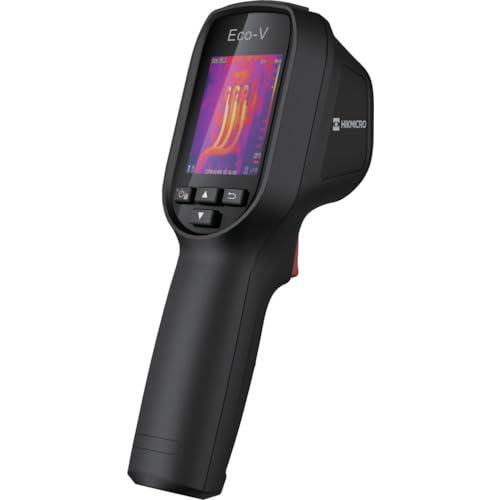
Figure 1: HIKMICRO ECO-V Handheld Thermography Camera
2. Ulwazi Lokuphepha
Sicela ufunde futhi uqonde zonke izixwayiso zokuphepha kanye nemiyalelo ngaphambi kokusebenzisa lo mkhiqizo. Ukwehluleka ukulandela le miyalelo kungabangela ukushaqeka kukagesi, umlilo, noma ukulimala okukhulu.
Izinyathelo Zokuphepha Ezijwayelekile
- Ungalusebenzisi ucingo ezindaweni eziqhumayo, njengalapho kunoketshezi oluvuthayo, amagesi, noma uthuli.
- Gcina idivayisi ikude namanzi nolunye uketshezi.
- Ungazami ukuvula noma ukuguqula idivayisi. Thumela konke ukusevisa kubasebenzi abafanelekayo.
- Use only HIKMICRO-approved accessories.
- Avoid direct exposure of the thermal lens to strong light sources (e.g., sun, laser) as this may damage the detector.
Ukuphepha Kwebhethri
- The device contains a built-in Lithium-ion battery. Do not expose the battery to excessive heat, direct sunlight, or fire.
- Do not puncture, open, or disassemble the battery.
- Charge the battery only with the provided USB cable and a compatible power adapter.
- Lahla amabhethri ngokwemithetho yendawo.
3. Okuqukethwe Kwephakheji
The HIKMICRO ECO-V package includes the following items:
- HIKMICRO Handheld Thermography Camera ECO-V
- Cable Type-C Cable
- Quick Start Guide (not explicitly mentioned but standard)
- Calibration Certificate (not explicitly mentioned but standard)
Video 3.1: Unboxing the HIKMICRO M-Series (similar to ECO-V, showing typical package contents and device appearance).
4. Idivayisi Ngaphezuluview
Familiarize yourself with the physical components and interface of your HIKMICRO ECO-V camera.
Ukubukeka kanye Interface
The ECO-V features a compact, ergonomic design for comfortable handheld use. Key components include the thermal lens, optical lens, laser indicator, white light, trigger button, navigation buttons, and a 2.4-inch display.
Video 4.1: This video demonstrates the physical appearance and interface of a HIKMICRO M-Series camera, which shares similar design elements and interface components with the ECO-V.
5. Setha
5.1 Ukushaja Idivayisi
Before initial use, fully charge the device's built-in Lithium-ion battery.
- Connect the provided USB Type-C cable to the device's USB port.
- Connect the other end of the USB cable to a compatible power adapter (5V2A recommended) and plug it into a power outlet.
- The charging indicator will show red during charging and turn green when fully charged.
Video 5.1: This HIKMICRO ECO operation video demonstrates the charging process for the device.
5.2 Vula/Vala amandla
To power on the device, press and hold the power button for more than 6 seconds. To power off, press and hold the power button again until the device shuts down.
Video 5.2: This HIKMICRO ECO operation video demonstrates how to power on the device.
6. Iziqondiso Zokusebenza
This section covers the basic and advanced operational features of your ECO-V camera.
6.1 Image Capture and Display
To capture a thermal image, aim the camera at the target and press the trigger button. The captured image will be saved to the internal EMMC storage. To view saved images, navigate to the 'Albums' section in the menu.
Video 6.1: This HIKMICRO ECO operation video demonstrates image capture and viewing saved snapshots.
6.2 Amathuluzi okulinganisa
The ECO-V provides various measurement tools to analyze thermal images:
- Hot Spot: Automatically identifies and displays the highest temperature point.
- Cold Spot: Automatically identifies and displays the lowest temperature point.
- Indawo emaphakathi: Displays the temperature at the center of the screen.
Video 6.2: This HIKMICRO ECO operation video demonstrates the use of measurement tools like hot, cold, and center spots.
6.3 SuperIR Image Enhancement
SuperIR technology enhances the thermal image resolution, providing more detail for analysis. You can enable or disable this feature in the settings menu.
Video 6.3: This HIKMICRO ECO operation video demonstrates how to enable and use the SuperIR image enhancement feature.
6.4 Amamodi Wezithombe
The ECO-V supports multiple image modes for different inspection needs:
- Okushisayo: Displays only the thermal image.
- I-Fusion: Blends the thermal and visible light images for enhanced detail.
- I-PIP (Isithombe-Esithombeni): Overlays a smaller thermal image on a visible light image.
- I-Optical: Displays only the visible light image.
Video 6.4: This HIKMICRO B10S product video demonstrates switching between different image modes, including Thermal, Fusion, PIP, and Optical.
6.5 Parallax Correction
When using fusion modes, adjust the parallax correction based on the distance to the target to ensure accurate alignment between thermal and visible images.
Video 6.5: This HIKMICRO B10S product video demonstrates how to adjust parallax correction for accurate image fusion.
6.6 Palette Adjustment
Select from various color palettes (e.g., White Hot, Black Hot, Rainbow, Ironbow) to visualize temperature differences more effectively. This can be adjusted in the settings menu.
Video 6.6: This HIKMICRO B10S product video demonstrates how to adjust color palettes.
6.7 Emissivity and Distance Settings
For accurate temperature measurements, it is crucial to set the correct emissivity value for the target material and the distance to the target. Refer to the general emissivity reference table in the specifications section.
Video 6.7: This HIKMICRO ECO operation video demonstrates setting emissivity and distance for accurate temperature readings.
6.8 Isikhombi seLaser
The built-in laser pointer helps to precisely identify the measurement target. It can be enabled or disabled in the settings menu.
Video 6.8: This HIKMICRO ECO operation video demonstrates how to enable and use the laser pointer.
6.9 I-alamu Yezinga Lokushisa Ephakeme
Set a high temperature alarm threshold to be notified when temperatures exceed a predefined limit. This feature is useful for identifying potential overheating issues.
Video 6.9: This HIKMICRO B10S product video demonstrates how to set a high temperature alarm.
6.10 Hotspot Connection
The ECO-V can connect to a mobile device via Wi-Fi hotspot for live viewing and data transfer. Enable the Wi-Fi hotspot function in the device settings and connect your mobile device.
Video 6.10: This HIKMICRO M-Series video demonstrates how to establish a hotspot connection with a mobile device.
6.11 HIKMICRO Viewer App Connection
Download the HIKMICRO Viewer app on your mobile device to access live view, manage images and videos, and generate reports. Connect the device to your phone via Wi-Fi.
Video 6.11: This HIKMICRO Pocket series video demonstrates connecting the device to the HIKMICRO Viewer app for various functions.
7. Isondlo
7.1 Ukuhlanza
- Sula umzimba wedivayisi ngomshini othambile, damp indwangu. Ungasebenzisi izinto zokuhlanza abrasive noma izincibilikisi.
- Gently clean the lenses with a lens cleaning cloth. Avoid touching the lens surface with bare hands.
7.2 Isitoreji
- Gcina idivayisi endaweni epholile, eyomile, kude nelanga eliqondile namazinga okushisa aphezulu.
- Uma ugcina isikhathi eside, qiniseka ukuthi ibhethri lishajwe kancane (cishe u-50%) bese ulishaja njalo ezinyangeni ezimbalwa ukuze ulondoloze impilo yebhethri.
8. Ukuxazulula izinkinga
If you encounter issues with your HIKMICRO ECO-V, refer to the following common problems and solutions:
| Inkinga | Imbangela Engenzeka | Isixazululo |
|---|---|---|
| Idivayisi ayivuli | Ibhethri liphansi; Ukungasebenzi kahle kwedivayisi | Charge the battery; Contact support |
| Ukufundwa kwezinga lokushisa okungalungile | Incorrect emissivity/distance settings; Dirty lens | Adjust emissivity/distance; Clean the lens |
| Cannot connect to Wi-Fi hotspot | Incorrect password; Hotspot not enabled | Verify password; Enable hotspot in settings |
9. Imininingwane
Detailed technical specifications for the HIKMICRO ECO-V camera:
| Isici | Ukucaciswa |
|---|---|
| Imodeli | I-ECO-V |
| Measurement Temperature Range | -20°C kuya ku-550°C |
| Minimum Temperature Display | 0.1°C |
| Inkambu ye View (FOV) | 50° × 50° |
| I-Spatial Resolution (IFOV) | awu 8.89m |
| I-Operating Temperature Range | -10°C kuya ku-50°C |
| Ibanga Lokushisa Lesitoreji | -40°C kuya ku-70°C |
| Usayizi Wokubonisa | 2.4 amayintshi |
| Umthombo wamandla | Ibhethri le-Lithium-ion elakhelwe ngaphakathi |
| Isikhathi sokusebenza kwebhethri | 8 amahora |
| I-Wi-Fi | Akutholakali |
| Izinga Lokuvikela | IP54 |
| Isixhumi esibonakalayo | I-USB Type-C |
| I-Pixel Pitch | 12μm |
| Measuring Wavelength | I-7.5-14μm |
| I-NETD | < 40 mK (@ 25°C, F#=1.0) |
| Ubude bokugxila | 1.35 mm |
| Imbobo | F1.0 |
| Ubuncane bokugxila ebangeni | 0.1m (0.33ft) |
| Ukukalwa kwe fulemu | 25Hz |
| Uhlelo Lokugxila | Akugxilile |
| Irekhoda imidiya | EMMC (4GB) |
| Amandla Wesitoreji Sesithombe | 30,000 izithombe |
| Isithombe File Ifomethi | BMP (includes measurement data) |
| Ukulungiswa Kwesithombe Esishisayo | 96×96 (9,216 pixels) |
| Visible Image Resolution | 640×480 |
| Ukunemba | ±2°C or ±2% (whichever is greater), when ambient temperature is 15°C to 35°C and target temperature is 0°C or above. |
| Izinto zokwakha | I-Polycarbonate, i-ABS resin |
| Isisindo | 360g |
General Emissivity Reference
| Okubalulekile | Ubumnandi |
|---|---|
| Isikhumba Somuntu | 0.98 |
| PCB | 0.91 |
| Ikhonkrithi kakhonkolo | 0.95 |
| I-Ceramics | 0.92 |
| Irabha | 0.95 |
| Penda | 0.93 |
| Izinkuni | 0.85 |
| Isitini | 0.96 |
| Isihlabathi | 0.90 |
| Umhlabathi | 0.92 |
| Ukotini | 0.98 |
| Ikhadibhodi | 0.90 |
| Iphepha Elimhlophe | 0.96 |
| Amanzi | 0.96 |
10. Iwaranti kanye Nokusekela
HIKMICRO products are covered by a limited warranty. For detailed warranty terms and conditions, please refer to the official HIKMICRO webisayithi noma uthinte umsabalalisi wangakini.
Ukwesekwa Kwamakhasimende
If you require technical assistance, troubleshooting, or have questions about your ECO-V camera, please contact HIKMICRO customer support through their official webisayithi noma imininingwane yokuxhumana enikezwe emaphaketheni omkhiqizo wakho.