
Isingeniso
This manual provides essential information for the installation, operation, maintenance, and troubleshooting of the Cisco Catalyst C9300L-24P-4X-E Network Essentials Switch. This device is designed for enterprise-grade access, offering 24 Gigabit PoE+ ports and four 10 Gbps SFP+ uplinks for robust network connectivity.
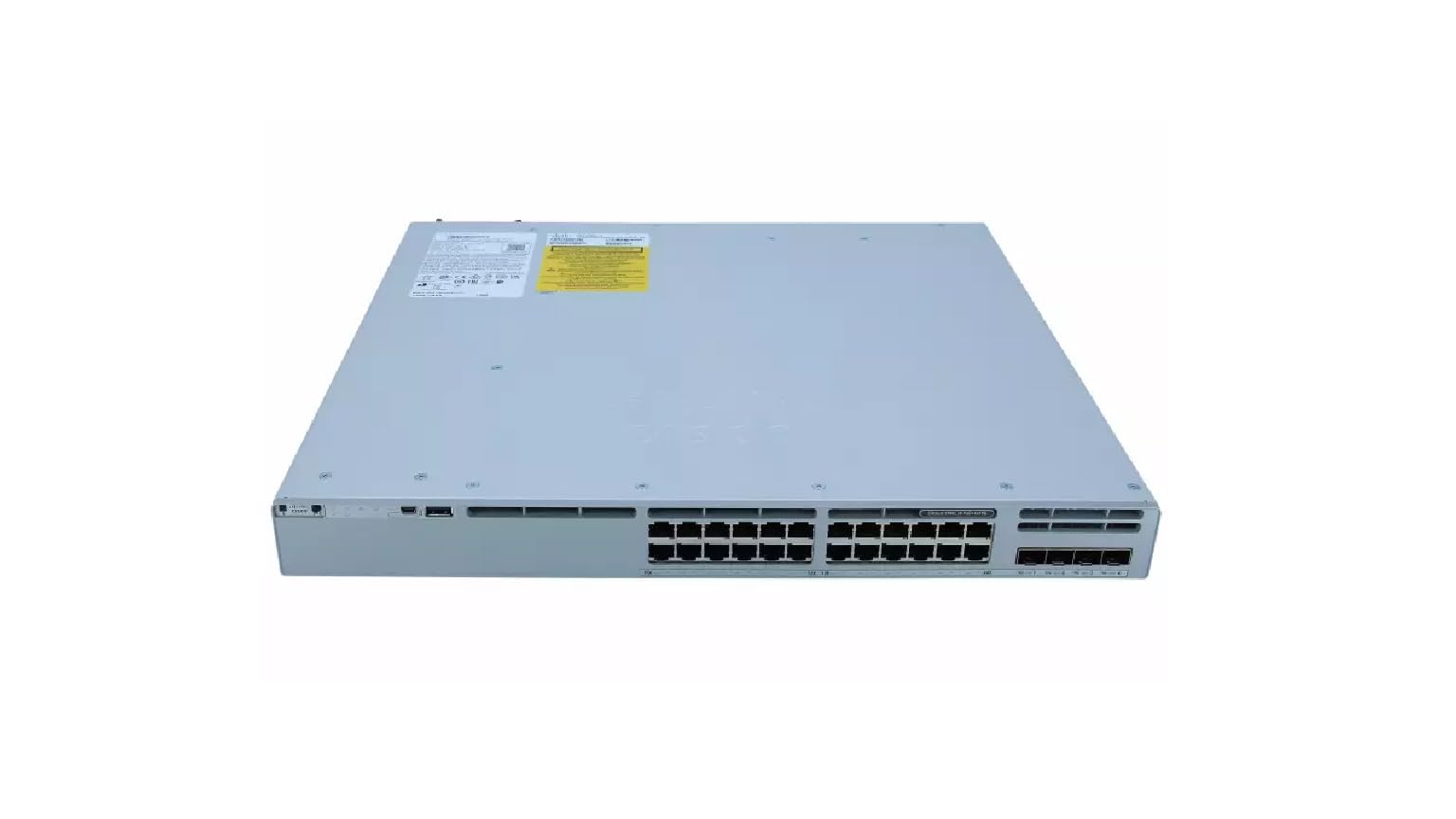
This image displays the rear panel of the Cisco Catalyst C9300L-24P-4X-E switch, highlighting the various ports, cooling fans, and the power supply unit.
Ulwazi Lokuphepha
Qaphela izinyathelo zokuphepha ezilandelayo ukuze uvimbele ukulimala kanye nomonakalo emishinini:
- Qinisekisa ukuthi isisekelo siqinile kahle ngaphambi kokuxhuma ugesi.
- Do not operate the switch in wet or excessively humid environments.
- Use only approved power cords and accessories.
- Qinisekisa ukuthi kungena umoya owanele ukuvimbela ukushisa ngokweqile.
- Disconnect power before performing any maintenance or installation procedures.
Okuqukethwe Kwephakheji
Qinisekisa ukuthi iphakheji yakho iqukethe izinto ezilandelayo:
- Cisco Catalyst C9300L-24P-4X-E Switch
- Intambo Yamandla
- Ikhithi ye-Rack-mount (uma ikhona)
- Ikhebula le-Console (RJ-45 ukuya ku-DB-9)
- Amadokhumenti (Umhlahlandlela Wokuqala Ngokushesha, Ulwazi Lokuphepha)
Incazelo Yomzimba
The Cisco Catalyst C9300L-24P-4X-E switch features a robust design for network deployments. The rear panel includes:
- 24 Gigabit Ethernet PoE+ Ports: For connecting network devices and providing power over Ethernet.
- 4x 10Gbps SFP+ Uplink Ports: For high-speed connections to the distribution or core layer.
- Imbobo yekhonsoli: For command-line interface access.
- Izimbobo ze-USB: Ngoba file management and system configuration.
- Modular Power Supply Bay: For installing power supply units.
- Ukupholisa Abalandeli: For thermal management.
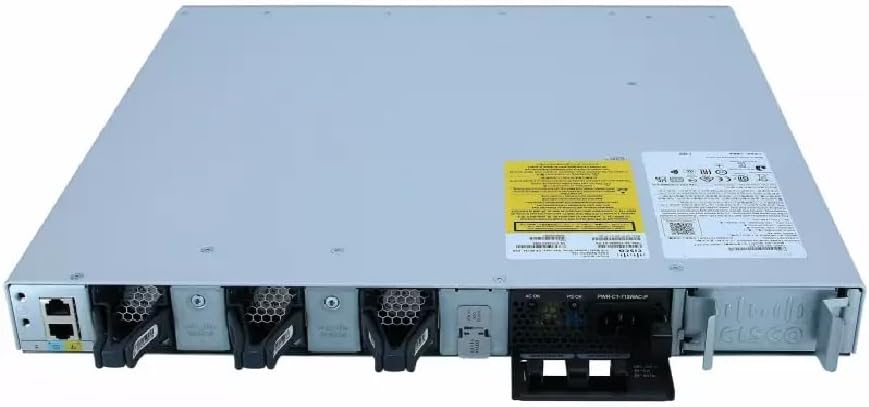
A enemininingwane view of the rear panel of the Cisco Catalyst C9300L-24P-4X-E switch, illustrating the 24 Gigabit PoE+ ports, four 10Gbps SFP+ uplink ports, and the modular power supply bay.
Setha
1. Ukuqaqa kanye Nokuhlola
Carefully remove the switch from its packaging. Inspect the device for any signs of physical damage. If damage is found, contact your supplier immediately.
2. Ukukhweza Iswishi
The switch can be mounted in a standard 19-inch equipment rack or placed on a desktop.
- Rack-Mount Installation: Attach the provided rack-mount brackets to the sides of the switch using the screws. Secure the switch into the rack using appropriate rack screws.
- Ukufakwa kwedeskithophu: Ensure the surface is flat, stable, and allows for adequate ventilation around the switch. Attach the rubber feet (if provided) to the bottom of the switch.
3. Amandla okuxhuma
Insert the power cord into the AC power connector on the rear of the switch. Connect the other end of the power cord to a grounded electrical outlet. Ensure the power supply is properly seated in its bay.
4. Ukuxhumana Kwenethiwekhi
- I-PoE+ Ports: Connect Ethernet cables from your network devices (e.g., IP phones, access points, surveillance cameras) to the 24 Gigabit PoE+ ports. These ports will provide both data connectivity and power.
- SFP+ Uplink Ports: Insert compatible SFP+ transceivers into the four 10Gbps SFP+ uplink ports. Connect fiber optic cables from these transceivers to your distribution or core network devices.
- Imbobo yekhonsoli: For initial configuration or troubleshooting, connect a console cable from your management workstation to the console port on the switch.
Isebenzisa I-switch
1. Amandla Okuqala Avuliwe
After connecting power, the switch will automatically power on. Observe the system LED indicators for boot status. The system LED should turn green once the boot process is complete.
2. Ukucushwa Okuyisisekelo
The Cisco Catalyst C9300L-24P-4X-E runs on Cisco IOS XE. Initial configuration can be performed via the console port using a command-line interface (CLI) or through a web-based graphical user interface (GUI) if enabled. Refer to Cisco's official documentation for detailed configuration guides.
3. Izinkomba ze-LED
The switch features various LED indicators to provide status information:
- Isistimu ye-LED: Indicates overall system status (e.g., green for normal operation, amber for warning).
- I-PoE LED: Indicates Power over Ethernet status for the ports.
- Ama-LED Wesimo Sembobo: Indicate link status and activity for each network port.
Isondlo
Regular maintenance ensures optimal performance and longevity of your switch:
- Ukuhlanza: Periodically clean the exterior of the switch with a soft, dry cloth. Ensure ventilation openings are free from dust and debris. Do not use liquid cleaners directly on the device.
- Ukuvuselelwa kwe-Firmware: Keep the switch firmware updated to the latest version provided by Cisco. This ensures access to new features, security patches, and performance improvements.
- Ukulawulwa Kwemvelo: Maintain the operating environment within specified temperature and humidity ranges to prevent hardware failure.
- Ukuphathwa Kwekhebula: Ensure all cables are neatly organized and properly secured to prevent accidental disconnections or damage.
Ukuxazulula inkinga
If you encounter issues with your switch, consider the following troubleshooting steps:
- Awekho Amandla: Verify the power cord is securely connected to both the switch and the power outlet. Check the power source and any circuit breakers. Ensure the power supply unit is correctly installed.
- Akukho Ukuxhumana Kwenethiwekhi: Check the link status LEDs on the affected ports. Ensure Ethernet cables are properly connected and undamaged. Verify connected devices are powered on and functioning correctly.
- Idivayisi ye-PoE Ayivuliwe: Confirm the PoE+ port is enabled and the device is PoE compatible. Check the PoE budget and ensure it's not exceeded.
- Ukusebenza Kanensa: Check for network congestion, duplex mismatches, or errors on ports. Ensure uplink bandwidth is sufficient.
- Accessing the Switch: If unable to access via network, try connecting directly to the console port for CLI access.
Imininingwane
| Isici | Imininingwane |
|---|---|
| Ibhrendi | Cisco |
| Inombolo Yemodeli | C9300L-24P-4X-E |
| Inani lamachweba | 24 Gigabit PoE+ ports, 4x 10Gbps SFP+ uplinks |
| Isixhumi esibonakalayo | PoE, SFP+ |
| Isilinganiso Sokudluliswa Kwedatha | 1 Gigabits Per Second (Gigabit Ethernet), 10 Gigabits Per Second (Uplinks) |
| Voltage | 240 Volts (AC) |
| Shintsha Uhlobo | Managed, Fixed, PoE+, Layer 2 |
| Uhlobo Lwezinto Zekesi | Ipulasitiki |
| Amadivayisi Ahambisanayo | Desktop, Laptop, Printer (and other network devices) |
Ulwazi Lwewaranti
Lo mkhiqizo uza ne-a Iwaranti ekhawulelwe yezinsuku ezingama-90. Please refer to the warranty documentation provided with your purchase for specific terms and conditions. For warranty claims, contact your reseller or the manufacturer's support channels.
Ukusekela kwezobuchwepheshe
For further assistance, technical support, or advanced configuration guidance, please refer to the official Cisco documentation available on their website. You may also contact your authorized Cisco reseller or support provider for specialized assistance.
Ukusekelwa kweCisco Webindawo: https://www.cisco.com/c/en/us/support/index.html