
1. Umkhiqizo Uphelileview
The Xiaomi Redmi Note 13 Pro+ 5G is a high-performance smartphone featuring a 200MP OIS camera, a 6.67-inch 1.5K curved AMOLED display, and MediaTek Dimensity 7200-Ultra processor. It supports fast charging and offers dual SIM capabilities. This manual provides essential information for setting up, operating, maintaining, and troubleshooting your device.

Image 1.1: Xiaomi Redmi Note 13 Pro+ 5G in Aurora Purple, showcasing its design and camera system.
2. Setha
2.1. Ukufakwa kweSIM khadi
The device supports dual SIM cards (nano SIM + nano SIM or nano SIM + eSIM). Ensure your SIM cards are activated by your carrier before installation.
- Thola ithreyi ye-SIM khadi eceleni kwefoni yakho.
- Faka ithuluzi lokukhipa ithreyi le-SIM embotsheni encane eduze kwethreyi bese uliphusha kancane kuze kuvele ithreyi.
- Place your nano SIM card(s) into the designated slots on the tray. If using eSIM, follow your carrier's instructions for activation.
- Faka kabusha ngokucophelela ithreyi le-SIM ocingweni ize ichofoze endaweni.

Isithombe 2.1: I-Side profile of the Redmi Note 13 Pro+ 5G, illustrating button placement.
2.2. Ukuvula Nokucushwa Kokuqala
- Cindezela bese ubamba inkinobho ethi Power (etholakala ngakwesokudla kwedivayisi) kuze kuvele ilogo ye-Xiaomi.
- Landela imiyalo esesikrinini ukuze ukhethe ulimi lwakho, isifunda, futhi uxhume kunethiwekhi ye-Wi-Fi.
- Ngena ngemvume nge-akhawunti yakho ye-Google noma dala entsha ukuze ufinyelele izinsiza ze-Google kanye ne-Google Play Isitolo.
- Complete the setup process, including setting up screen lock, fingerprint, and face unlock.
2.3. Ukushaja Idivayisi
Use the included 120W Wall Adapter and USB Cable for optimal charging performance.
- Connect the USB cable to the Wall Adapter.
- Plug the Wall Adapter into a power outlet.
- Xhuma ingxenye yekhebula le-USB-C embobeni yokushaja engezansi kwefoni yakho.
- Inkomba yokushaja izovela esikrinini.
3. Iziqondiso Zokusebenza
3.1. Izici zokubonisa
The Redmi Note 13 Pro+ 5G features a 6.67-inch CrystalRes AMOLED display with a 120Hz adaptive refresh rate for smooth visuals. It offers 1800 nits peak brightness and 12-bit color depth. The display is protected by Corning Gorilla Glass Victus and includes eye protection features like 1920Hz PWM dimming and TÜV Rheinland certifications for low blue light and circadian friendliness.
3.2. Ukusetshenziswa kwekhamera
Your device is equipped with a versatile triple camera system:
- 200MP Ikhamera Eyinhloko: Features OIS (Optical Image Stabilization) and an f/1.65 aperture for detailed photos, especially in low light. Supports 16-in-1 binning for larger 2.24µm pixels.
- Ikhamera engu-8MP Ultra-Wide: Ukuze uthwebule izigcawu ezibanzi.
- 2MP Macro Ikhamera: Ukuze uthole izithombe eziseduze.
The camera supports 4K video recording at 24/30fps and 1080p at 30/60fps. OIS+EIS dual-stabilization helps in capturing clear photos and stable videos.
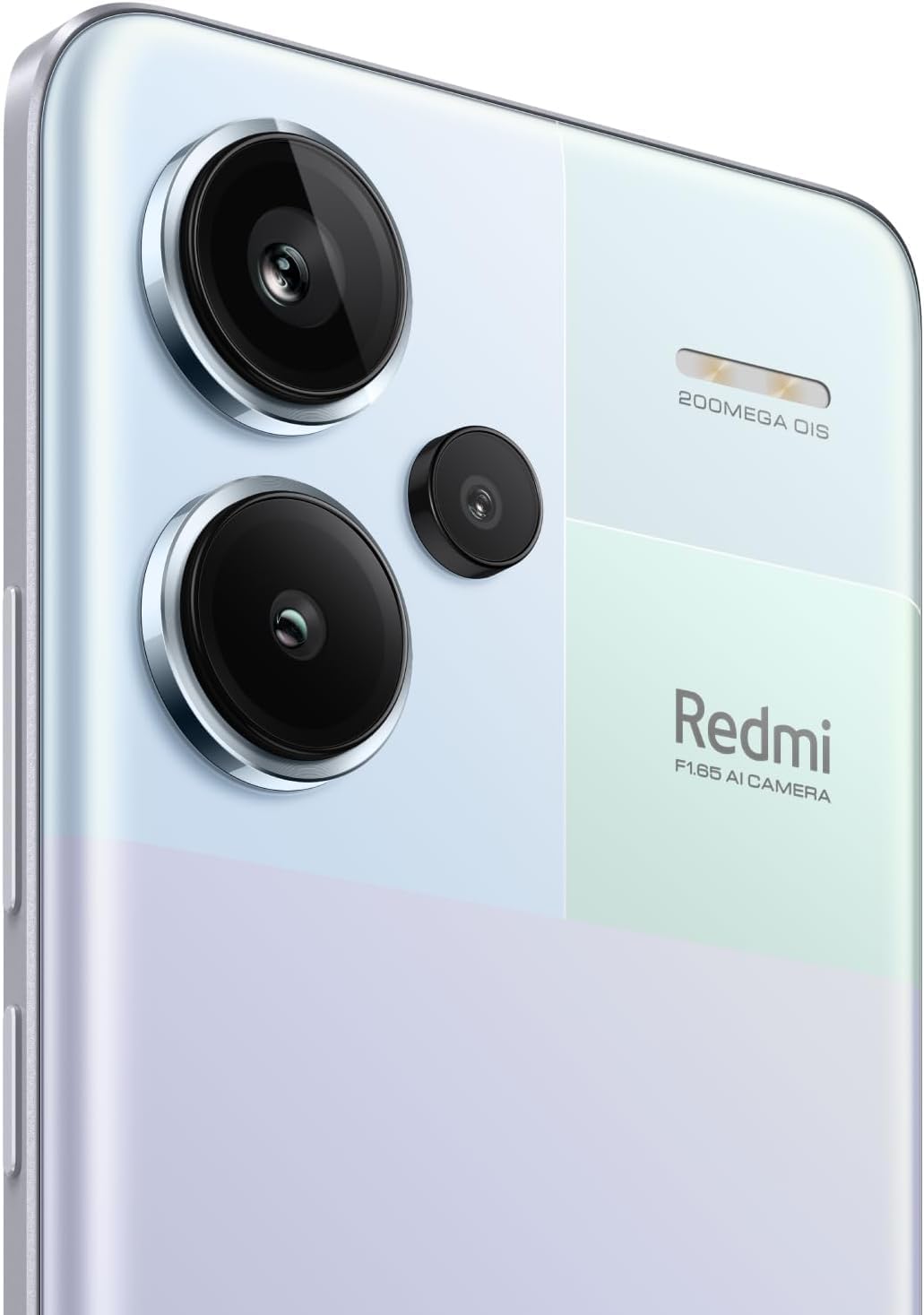
Isithombe 3.1: Okuningiliziwe view of the 200MP OIS triple camera system.
3.3. Ukuphepha kwe-Biometric
- Inzwa Yeminwe Esikrinini: Register your fingerprints for quick and secure unlocking. Access this feature in Settings > Security & privacy > Fingerprint unlock.
- I-AI Face Unlock: Set up face recognition for convenient unlocking. Access this feature in Settings > Security & privacy > Face unlock.
3.4. Ukuxhumana
- Inethiwekhi ye-5G: Supports various 5G bands for high-speed mobile data.
- I-Wi-Fi: Compatible with Wi-Fi 6/5/4 and 802.11a/b/g standards, supporting 2.4GHz and 5GHz bands with 2x2 MIMO.
- I-Bluetooth 5.3: Okokuxhuma izinsiza ezingenantambo.
- I-GPS: Supports Beidou, GPS, Galileo, GLONASS, and QZSS for accurate positioning.
4. Isondlo
4.1. Ukunakekelwa Kwebhethri
The device is powered by a 5020 mAh Lithium-Polymer battery. To maximize battery life:
- Gwema amazinga okushisa aphezulu.
- Sebenzisa ishaja nekhebula langempela.
- Gwema ukukhipha ibhethri ngokuphelele njalo.
- Optimize power settings in the device's settings menu.
4.2. Ukuvuselelwa Kwesoftware
Regularly check for and install software updates to ensure optimal performance, security, and access to new features. Go to Settings > About phone > MIUI version to check for updates.
4.3. Ukuhlanza Idivayisi Yakho
To clean your phone, use a soft, lint-free cloth. Avoid using harsh chemicals or abrasive materials. For the screen, a screen cleaner specifically designed for electronics can be used. Ensure all ports are dry before charging.
5. Ukuxazulula izinkinga
If you encounter issues with your Redmi Note 13 Pro+ 5G, consider the following common solutions:
- Idivayisi ayivuli: Qinisekisa ukuthi ibhethri ishajiwe. Xhuma ishaja bese ulinda imizuzu embalwa ngaphambi kokuzama ukuyivula futhi.
- Izinhlelo zokusebenza ziyaphahlazeka noma ziyaqandisa: Close the problematic app and reopen it. If the issue persists, clear the app's cache or reinstall it.
- Ukuxhumana kwenethiwekhi okungekuhle: Check if your SIM card is properly inserted. Restart the device. Verify network settings and ensure mobile data or Wi-Fi is enabled.
- Inzwa yezigxivizo zeminwe ayisebenzi: Ensure your finger is clean and dry. Re-register your fingerprints if necessary.
- Ukushisa ngokweqile: Avoid using the phone in direct sunlight or while charging for extended periods during heavy usage. Close background applications.
- Ukusebenza kancane: Sula ngokungadingekile files and cache. Uninstall unused apps. Restart your device regularly.
Uma unezinkinga eziqhubekayo, bheka usekelo olusemthethweni lwe-Xiaomi webisayithi noma xhumana nesevisi yamakhasimende.
6. Imininingwane
| Isici | Imininingwane |
|---|---|
| Ibhrendi | XIAOMI |
| Igama Lemodeli | Inothi 13 Pro+ 5G |
| Isistimu esebenzayo | I-Android 13.0 |
| Inkumbulo ye-RAM | 8 GB |
| Amandla Okugcina Inkumbulo | 256 GB |
| Usayizi Wesikrini | 6.67 amayintshi |
| Uhlobo lokubonisa | I-AMOLED |
| Isixazululo | 2712x1220 (446 PPI) |
| Isilinganiso Sokuvuselela | Kufika ku-120Hz |
| Imodeli ye-CPU | MediaTek Dimensity 7200-Ultra (Octa-core, up to 2.8GHz) |
| Ukulungiswa Kwekhamera Yangemuva | 200 MP (Main) + 8 MP (Ultra-wide) + 2 MP (Macro) |
| Ukulungiswa Kwekhamera Yangaphambili | 16 MP |
| Amandla ebhethri | 5020 millionamp Hours (Lithium-Polymer) |
| Iyashaja | 120W Ukushaja Ngokushesha |
| I-SIM Card Slot Bala | I-Dual SIM (nano SIM + nano SIM noma nano SIM + eSIM) |
| Ubuchwepheshe Beselula | 5G |
| I-Wireless Network Technology | Wi-Fi 6, Bluetooth 5.3, GSM |
| Ukuphepha kwe-Biometric | In-screen Fingerprint Recognition, AI Face Unlock |
| Izinga Lokumelana Namanzi | Ingangeni manzi |
| Isisindo sento | 199 amagremu |
| Umbala | Aurora Purple |
7. Ulwazi Lwewaranti
This product comes with a 30-day warranty. For specific terms and conditions, please refer to the Xiaomi Warranty Europe policy or contact your point of purchase.
8. Ukusekela
For further assistance, technical support, or detailed product information, please visit the official Xiaomi webnoma xhumana nomnyango wabo wesevisi yamakhasimende. Gcina irisidi lakho lokuthenga kanye nenombolo yomkhiqizo iseduze uma ufuna ukwesekwa.