
Isingeniso
This manual provides detailed instructions for the installation, operation, and maintenance of your ASHATA H511 VD4 Motherboard. Please read this manual thoroughly before proceeding with installation to ensure correct setup and optimal performance. Keep this manual for future reference.
Ulwazi Lokuphepha
Ngaso sonke isikhathi qaphela izinyathelo zokuphepha ezilandelayo:
- Disconnect power from your computer before installing or removing any components.
- Gqoka ibhande lesihlakala eliphikisana ne-static ukuze uvimbele ukulimala kwe-electrostatic discharge (ESD) ezingxenyeni.
- Phatha ibhodi lomama ngemiphetho yalo ukuze ugweme ukuthinta izingxenye ezibucayi.
- Qinisekisa ukuthi umoya ungena kahle ngaphakathi kwesikhwama se-PC yakho ukuze uvimbele ukushisa ngokweqile.
- Ungabeki ibhodi lomama emswakama noma emazingeni okushisa aphezulu.
Okuqukethwe Kwephakheji
Verify that all items are present in your ASHATA H511 VD4 Motherboard package:
- ASHATA H511 VD4 Motherboard
- I-O Shield
- SATA Data Cables (2x)
- Incwadi Yomsebenzisi (le dokhumenti)
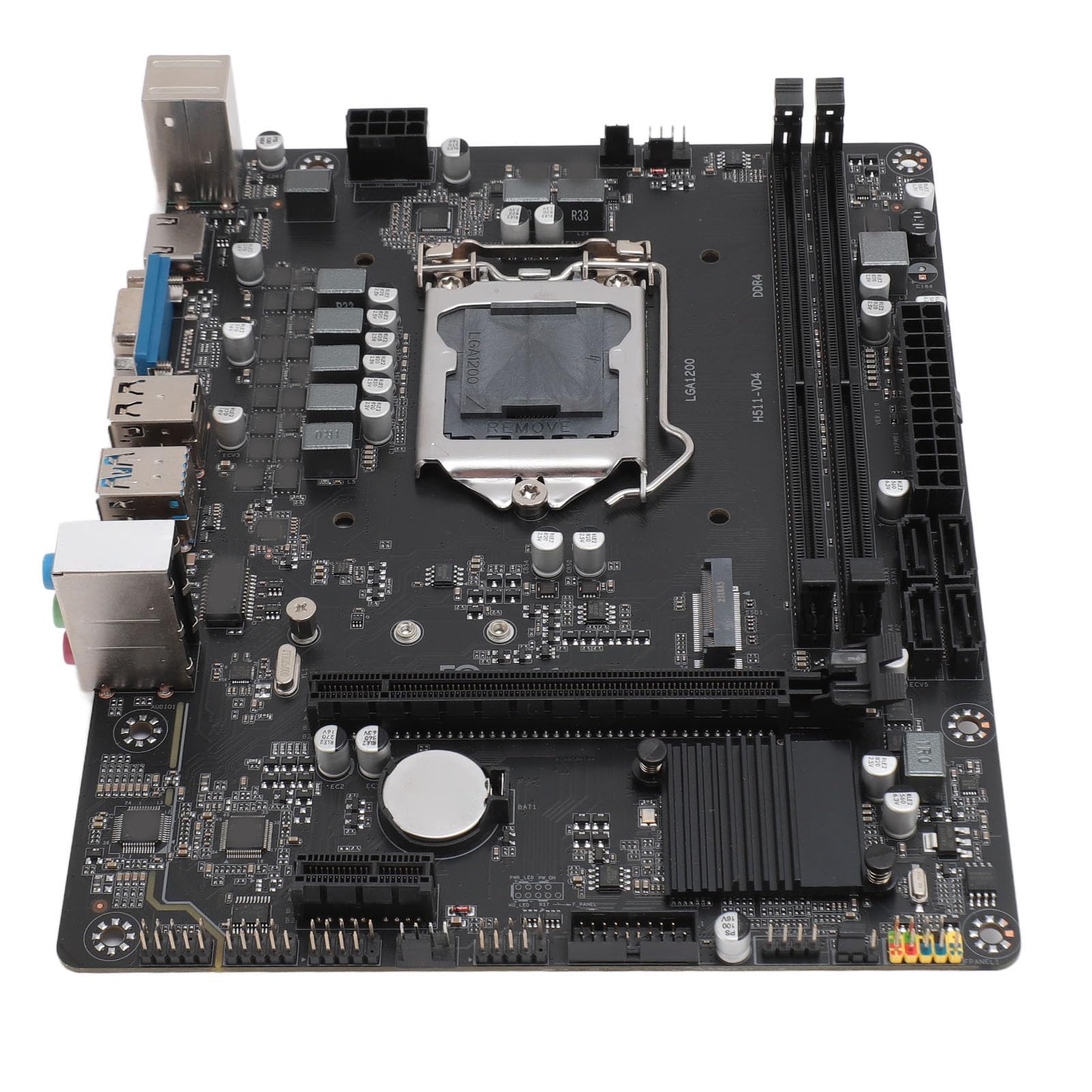
Image: ASHATA H511 VD4 Motherboard, including the I/O shield and two SATA data cables, as typically found in the product package.
Umkhiqizo Uphelileview
The ASHATA H511 VD4 Motherboard is designed for desktop PCs, supporting 10th/11th generation Intel CPUs with an LGA1200 socket. It features dual-channel DDR4 memory slots and multiple expansion interfaces.

Isithombe: Phezulu phansi view of the ASHATA H511 VD4 Motherboard, showing the LGA1200 CPU socket, DDR4 memory slots, PCIe slots, and various headers.

Isithombe: Engela view of the ASHATA H511 VD4 Motherboard, highlighting the rear I/O panel with USB ports, video outputs, and audio jacks.
Izingxenye Ezibalulekile:
- LGA1200 CPU Socket: Supports 10th and 11th Generation Intel Core processors.
- DDR4 Memory Slots: Dual-channel support for DDR4 SDRAM.
- PCIe x16 Slot: For graphics cards.
- PCIe x1 Slots: For expansion cards.
- I-M.2 Slot: High-speed storage interface.
- Izimbobo ze-SATA: For connecting storage devices.
- Izimbobo ze-I/O zangemuva: USB ports, LAN, audio jacks, video outputs (VGA, HDMI if integrated graphics are used).
Ukusetha nokufaka
1. Preparing the Case:
Install the I/O shield into the rear opening of your PC case. Ensure it is securely snapped into place.
2. Ukufaka i-Motherboard:
- Hlanganisa ibhodi lomama neziphazamiso ebhokisini le-PC yakho.
- Carefully lower the motherboard onto the standoffs, ensuring the I/O ports align with the I/O shield.
- Secure the motherboard with screws into the standoffs. Do not overtighten.
3. Installing the CPU:
- Vula i-lever yesokhethi ye-CPU.
- Carefully place the CPU into the socket, aligning the golden triangle on the CPU with the triangle on the socket. Do not force it.
- Vala i-lever yesokhethi ye-CPU ukuze uvikele i-CPU.
- Faka i-thermal paste bese ufaka i-CPU cooler ngokwemiyalelo yomenzi wayo.
4. Installing Memory (RAM):
- Vula iziqeshana kuzo zombili izinhlangothi zesikhala sememori ye-DDR4.
- Align the notch on the RAM module with the notch in the memory slot.
- Cindezela phansi ngokuqinile kuzo zombili izinhlangothi ze-RAM module kuze kube yilapho ama-clip efika endaweni yawo.
- For dual-channel performance, install modules in matching slots (refer to motherboard diagram for specific slot pairing).
5. Ukufaka Amadivayisi Esitoreji:
- M.2 SSD: Insert the M.2 SSD into the M.2 slot at an angle, then push it down and secure it with the provided screw.
- Amadrayivu e-SATA: Connect SATA data cables from the motherboard's SATA ports to your SSDs/HDDs. Connect power cables from your power supply to the drives.
6. Installing Graphics Card (Optional):
- Vula isiqeshana sokugcina ku-PCIe x16 slot.
- Qondanisa ikhadi lehluzo nesikhala bese ucindezela phansi ngokuqinile kuze kube yilapho lichofoza endaweni yalo.
- Bopha ikhadi ebhokisini ngesikulufu.
- Xhuma izintambo zikagesi ze-PCIe kusuka kugesi wakho ziye ekhadini lehluzo uma kudingeka.
7. Ukuxhumanisa Ukunikezwa kwamandla:
- Xhuma isixhumi samandla se-ATX esingu-24-pin kusuka kugesi wakho siye kubhodi lomama.
- Connect the 8-pin (or 4-pin) CPU power connector to the motherboard.
8. Connecting Front Panel Headers:
Connect the front panel connectors (Power SW, Reset SW, HDD LED, Power LED, USB, Audio) to their respective headers on the motherboard. Refer to the motherboard's silkscreen labels for correct orientation.
Imiyalelo yokusebenza
I-Boot yokuqala:
- Ngemva kokuba zonke izingxenye sezifakiwe futhi zixhunyiwe, xhuma isikrini sakho, ikhibhodi, kanye negundane.
- Turn on the power supply and then press the power button on your PC case.
- The system should boot to the BIOS/UEFI interface or begin the operating system installation process.
Ukusethwa kwe-BIOS/UEFI:
During boot-up, press the designated key (usually Del or F2) to enter the BIOS/UEFI setup. Here you can configure boot order, system time, fan speeds, and other advanced settings. Save changes before exiting.
Ukufakwa komshayeli:
After installing your operating system, install the necessary drivers for the motherboard chipset, LAN, audio, and any integrated graphics. These drivers are typically available on the manufacturer's website or included on a driver CD/USB (if provided).
Isondlo
- Ukususa Uthuli: Regularly clean dust from inside your PC case, especially from fans and heatsinks, using compressed air. Ensure the system is powered off and unplugged before cleaning.
- Izibuyekezo ze-BIOS/UEFI: Periodically check the ASHATA webisayithi lezibuyekezo ze-BIOS/UEFI. Izibuyekezo zingathuthukisa ukuzinza, ukuhambisana, kanye nokusebenza. Landela imiyalelo yokubuyekeza ngokucophelela ukuze ugweme ukulimala kohlelo.
- Izibuyekezo Zomshayeli: Gcina abashayeli besistimu yakho bevuselelwe ukuqinisekisa ukusebenza kahle kanye nokuhambisana nesofthiwe nehadiwe entsha.
- Ukuphathwa Kwekhebula: Ensure internal cables are neatly managed to improve airflow and prevent interference.
Ukuxazulula inkinga
- Awekho Amandla:
- Check if the power supply is switched on and properly connected to the motherboard (24-pin and 8-pin/4-pin CPU power).
- Qinisekisa ukuthi ikhebula lokushintsha amandla lephaneli engaphambili lixhunywe kahle ku-header yebhodi lomama.
- Hlola ukunikezwa kwamandla ngolunye uhlelo noma ngomshini wokuhlola ukunikezwa kwamandla.
- Akukho Ukuboniswa:
- Verify that the monitor is connected to the correct video output (either integrated graphics or dedicated graphics card).
- Hlela kabusha amamojula ekhadi lehluzo kanye ne-RAM.
- Zama ukuqala ngenduku eyodwa kuphela ye-RAM.
- Check if the CPU power cable is securely connected.
- Ukungazinzi Kwesistimu/Ukuphahlazeka:
- Check for overheating. Ensure CPU cooler is properly installed and fans are working.
- Sebenzisa amathuluzi okuxilonga inkumbulo ukuze uhlole i-RAM enephutha.
- Qinisekisa ukuthi bonke abashayeli banolwazi lwakamuva.
- Check for loose cables or connections.
- I-Peripheral Ayitholakalanga:
- Ensure the peripheral is properly connected to the correct port.
- Faka abashayeli bamuva be-peripheral.
- Test the peripheral on another port or another computer.
Imininingwane
| Isici | Ukucaciswa |
|---|---|
| Ibhrendi | ASHATA |
| Imodeli | H511 VD4 |
| CPU Socket | LGA1200 (Supports 10th/11th Gen Intel Core) |
| Ubuchwepheshe Benkumbulo | I-DDR4 SDRAM |
| Isivinini sewashi lememori | 2833 MHz (Ubukhulu) |
| Iziteshi Zenkumbulo | Isiteshi Esikabili |
| I-Interface Yekhadi Lezithombe | Integrated, PCI, PCI-Express x16 |
| I-Storage Interface | M.2, SATA |
| Ukunikezwa kwamandla kagesi | 6-Isigaba Power Supply |
| ASIN | B0CS6QDQ35 |
| Idethi Yokuqala Etholakalayo | Februwari 18, 2025 |
Iwaranti kanye Nokusekela
For warranty information and technical support, please refer to the documentation provided with your purchase or visit the official ASHATA webindawo. Gcina ubufakazi bakho bokuthenga ngezimangalo zewaranti.
Umkhiqizi: ASHATA
Webindawo: www.ashata.com (Qaphela: Lesi isimeli URL. Please refer to your product packaging or official documentation for the correct support webindawo.)