
awei A897BL
AWEI A897BL Air Conduction Bluetooth Headphones
Imaniwali yosebenzisayo
Isingeniso
Thank you for choosing the AWEI A897BL Air Conduction Bluetooth Headphones. These headphones are designed to provide a comfortable and safe listening experience, especially during outdoor activities, by allowing you to remain aware of your surroundings. This manual will guide you through the setup, operation, and maintenance of your new headphones.
Ulwazi Lokuphepha
- Ungabeki ama-headphone endaweni eshisa kakhulu, emswakama, noma ezintweni ezibolile.
- Gwema ukuwisa noma ukufaka ama-headphones emithonjeni enamandla.
- Ungawaqaqi noma ushintshe ama-headphone. Lokhu kuzosusa iwaranti.
- Hlanza ama-headphone ngendwangu ethambile neyomile. Ungasebenzisi amakhemikhali aqinile noma izinto ezihudulayo.
- Gcina endaweni lapho izingane nezilwane ezifuywayo zingafinyeleleki khona.
- Sebenzisa kuphela ikhebuli yokushaja enikeziwe noma okulinganayo okuqinisekisiwe.
- While air conduction allows for environmental awareness, always exercise caution in traffic or dangerous situations.
Okuqukethwe Kwephakheji
Sicela uhlole iphakheji ngezinto ezilandelayo:
- AWEI A897BL Air Conduction Bluetooth Headphones
- Ikhebula lokushaja le-USB
- Incwadi Yomsebenzisi (le dokhumenti)
Umkhiqizo Uphelileview
Familiarize yourself with the components of your AWEI A897BL headphones.

Isithombe: Ngaphambili view of the AWEI A897BL Air Conduction Bluetooth Headphones, showcasing their lightweight, open-ear design with a flexible neckband and integrated controls on the earpieces.
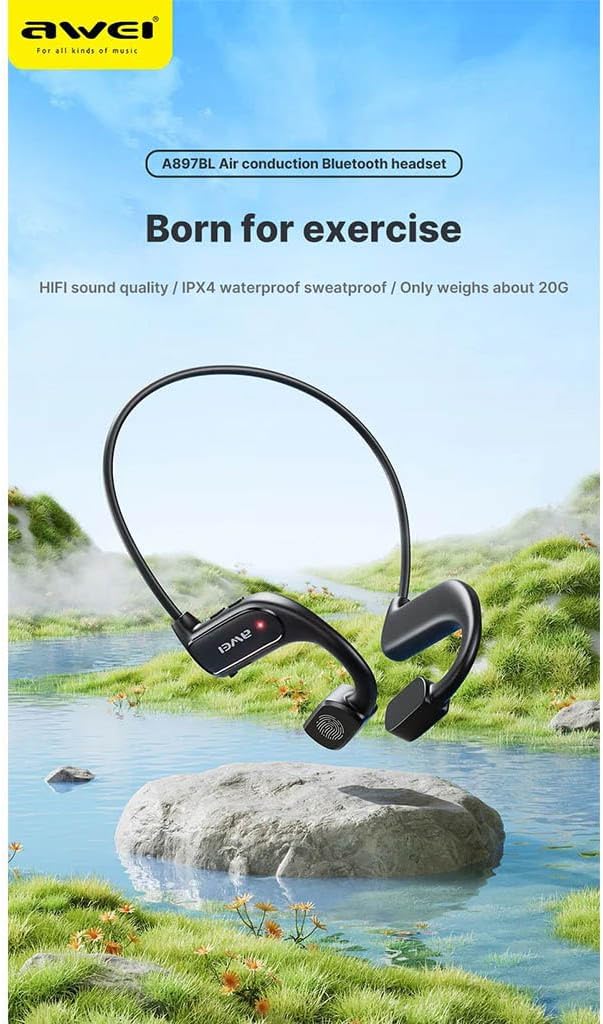
Image: AWEI A897BL headphones displayed in a serene outdoor environment, emphasizing their suitability for exercise and outdoor activities. The image highlights the sleek design and the brand logo.
- Flexible Neckband: Provides a secure and comfortable fit around the back of the head.
- Air Conduction Transducers: Deliver sound without blocking the ear canal.
- Izinkinobho Zokulawula: (Specific button functions will be detailed in the Operating section)
- Imbobo yokushaja: Ukushaja kabusha ibhethri langaphakathi.
Setha
1. Ukushaja ama-headphones
Before first use, fully charge your AWEI A897BL headphones.
- Xhuma ingxenye encane yekhebula lokushaja le-USB embobeni yokushaja kuma-headphone.
- Xhuma ingxenye enkulu yekhebula lokushaja le-USB ku-adaptha yamandla ye-USB (engafakiwe) noma imbobo ye-USB yekhompyutha.
- Isikhombisi se-LED sizobonisa isimo sokushaja (isb., obomvu wokushaja, oluhlaza okwesibhakabhaka/oluvaliwe uma ushaja ngokugcwele).
- Ukushaja ngokuvamile kuthatha cishe amahora ama-1.5-2 ukuze kushajwe ngokugcwele.
2. Ukubhanqa kwe-Bluetooth
Hlanganisa ama-headphone akho nedivayisi yakho esebenzisa i-Bluetooth (i-smartphone, ithebhulethi, ikhompyutha).
- Qinisekisa ukuthi ama-headphone avaliwe.
- Press and hold the Power button (usually a multi-function button) for approximately 3-5 seconds until the LED indicator flashes red and blue alternately, indicating pairing mode.
- Kudivayisi yakho, iya kuzilungiselelo ze-Bluetooth bese uvula i-Bluetooth.
- Cinga available devices. You should see "AWEI A897BL" or a similar name appear in the list.
- Select "AWEI A897BL" to connect. Once connected, the LED indicator on the headphones will typically turn solid blue or stop flashing.
- Uma ucelwa iphasiwedi, faka "0000" (oziro abane).
The headphones will automatically attempt to reconnect to the last paired device when turned on.

Image: A graphic representation of Bluetooth version 5.3 technology, highlighting its advanced capabilities for stable, low-power, and high-quality wireless audio transmission, ensuring an unimpeded listening experience.
Imiyalelo yokusebenza
Efake ama-headphones
The A897BL headphones are designed for air conduction, meaning they rest outside your ear canal.
- Place the flexible neckband around the back of your head.
- Position the sound transducers (the parts that deliver sound) just in front of your ears, resting on your cheekbones.
- Adjust for a comfortable and secure fit.

Image: A woman wearing the AWEI A897BL headphones while running outdoors, illustrating the open-ear design that allows ambient sounds to be heard, enhancing safety during sports activities.
Izilawuli Eziyisisekelo
| Inkinobho/Isenzo | Umsebenzi |
|---|---|
| Inkinobho yamandla (Cindezela isikhathi eside) | Vula/Vala |
| Power Button (Short Press) | Dlala/Misa kancane Umculo, Phendula/Phelisa ucingo |
| Ivolumu + Inkinobho (Cindezela Kafushane) | Nyusa Ivolumu |
| Inkinobho Yevolumu (Cindezela Kafushane) | Yehlisa Ivolumu |
| Ivolumu + Inkinobho (Cindezela Isikhathi Eside) | Ithrekhi Elandelayo |
| Inkinobho Yevolumu (Cindezela Isikhathi Eside) | Ithrekhi Edlule |
| Power Button (Double Press) | Yenza kusebenze i-Voice Assistant (i-Siri, i-Google Assistant) |
Isondlo
- Ukuhlanza: Wipe the headphones regularly with a soft, slightly damp cloth. Do not use alcohol, benzene, or other chemical cleaners. Ensure the charging port is dry before charging.
- Isitoreji: Gcina ama-headphone endaweni epholile, eyomile ekude nelanga eliqondile namazinga okushisa aphezulu.
- Ukunakekelwa kwebhethri: Ukuze welule isikhathi sokuphila kwebhethri, gwema ukukhipha ama-headphone ngokugcwele njalo. Washaje njalo, noma ngabe awasetshenziswa isikhathi eside.
Ukuxazulula inkinga
| Inkinga | Isixazululo Esingenzeka |
|---|---|
| Ama-headphone ngeke avuleke. | Charge the headphones fully. Ensure the power button is pressed and held long enough. |
| Ayikwazi ukubhanqa nedivayisi. |
|
| Awukho umsindo noma ivolumu ephansi. |
|
| Umsindo ungena/uphuma. |
|
Imininingwane
| Isici | Imininingwane |
|---|---|
| Inombolo Yemodeli | AWE000159 (A897BL) |
| Ubuchwepheshe bokuxhumana | Okungenantambo (Bluetooth) |
| Inguqulo ye-Bluetooth | V5.3 |
| Uhlobo Lomklamo | Air Conduction, Open-Ear |
| Okubalulekile | Faux Leather, Plastic |
| Isisindo sento | Approx. 20 Grams |
| Umbala | Multicoloured (typically black) |
| Ibanga lobudala | Umuntu omdala |
Iwaranti kanye Nokusekela
AWEI products are manufactured to the highest quality standards. For warranty information, technical support, or customer service inquiries, please refer to the warranty card included with your purchase or visit the official AWEI webindawo. Sicela ugcine ubufakazi bakho bokuthenga izimangalo zewaranti.
Ask a question about this manual
Ask about setup, troubleshooting, compatibility, parts, safety, or missing instructions. Manuals+ will review the question and use this page’s manual context to help answer it.