
1. Isingeniso
This manual provides detailed instructions for the installation, operation, and maintenance of your EVTSCAN Digital Thermoregulator. This device is designed to precisely control heating equipment, such as wall-mounted boilers and gas boilers, ensuring a stable and energy-efficient temperature environment. Please read this manual thoroughly before installation and use to ensure proper function and safety.
2. Ulwazi Lokuphepha
Always observe the following safety precautions to prevent damage to the device or personal injury:
- Qinisekisa ukuthi ugesi unqanyuliwe ngaphambi kokufaka noma ukulungiswa.
- Installation should be performed by a qualified professional if you are unsure about electrical wiring.
- Ungalivezi ucingo emanzini noma kumswakama oweqile.
- Use only the specified battery type (2 AA batteries) and ensure correct polarity.
- Gcina idivayisi kude nezinto ezivuthayo.
3. Umkhiqizo Uphelileview
The EVTSCAN Digital Thermoregulator features a clear LCD display for easy monitoring and a simple interface for temperature control. Its compact design allows for discreet integration into your living space.

Umfanekiso 3.1: Ngaphambili view of the Digital Thermoregulator. The LCD screen displays current settings and room temperature, with a rotary knob below for adjustments.
Izingxenye Ezibalulekile:
- Isibonisi se-LCD: Shows set temperature, room temperature, time, and operational icons.
- Control Knob/Button: Isetshenziselwa ukuzulazula kumamenyu nokulungisa izilungiselelo.
- Igumbi Lebhethri: Located on the rear or side for 2 AA batteries.
- Amatheminali ezintambo: For connection to the heating system.
4. Imininingwane
| Isici | Ukucaciswa |
|---|---|
| Imodeli | EVTSCANok0g9ct2zq |
| Imodi yamandla | Amabhethri angu-2 AA (awafakiwe) |
| Screen Accuracy | 0.5 ℃ |
| Inzwa ye-Probe | I-NTC (10k) 1% |
| Thinta ikhono | Greater than 30-230 V DC working voltage, lower current. Reference: 5 A 30 V (HF relay) or 2 A 30 V (NEC relay) |
| Ibanga Lokubonisa Izinga lokushisa | 1 kuya ku-40 ℃ |
| Default Temperature Adjustment Range | 5 kuya ku-35 ℃ |
| I-Operating Temperature Range | 0 kuya ku-50 ℃ |
| Uhlelo olusebenzayo | Set once a week |
| Okukhiphayo | Ishintsha i-relay |
| Okubalulekile | I-polycarbonate evutha amalangabi |
| Isisindo | 170 g |
5. Ukusetha nokufakwa
The EVTSCAN Digital Thermoregulator is designed for simple installation. Follow these steps carefully:
5.1. Ukuqaqa kanye Nokuhlola
Susa ngokucophelela zonke izingxenye ephaketheni. Qinisekisa ukuthi zonke izinto ezisohlwini lokuqukethwe kwephakheji zikhona futhi azilimele.
- 1 Digital Temperature Controller
- 2 Izikulufu
5.2. Ukufakwa kwebhethri
The device requires 2 AA batteries for operation. These are not included in the package.
- Locate the battery compartment on the back of the thermoregulator.
- Vula ikhava yengxenye yebhethri.
- Faka amabhethri angu-2 AA, uqinisekise i-polarity elungile (+/-).
- Vala ikhava yengxenye yebhethri ngokuphephile.

Umfanekiso 5.1: I-engeli view of the thermoregulator, illustrating its compact size and potential location for battery access or mounting points.
5.3. Ukukhweza kanye Nezintambo
The thermoregulator is designed for wall mounting. Ensure the power to your heating system is turned off before proceeding with wiring.
- Choose a suitable location on an interior wall, away from direct sunlight, drafts, or heat sources that could affect temperature readings.
- Mount the backplate (if detachable) to the wall using the provided screws.
- Connect the thermoregulator to your boiler or heating system according to the wiring diagram provided with your boiler and the thermoregulator's terminal markings. This typically involves connecting the switching relay output to the boiler's control input.
- Secure the thermoregulator onto the mounted backplate.
Qaphela: For wiring, consult a qualified electrician if you are unfamiliar with electrical installations.
6. Iziqondiso Zokusebenza
The EVTSCAN Digital Thermoregulator uses a microcomputer control technology to maintain your desired temperature efficiently.
6.1. Powering On and Initial Display
Once batteries are installed, the LCD display will illuminate, showing the current room temperature, set temperature, and time.
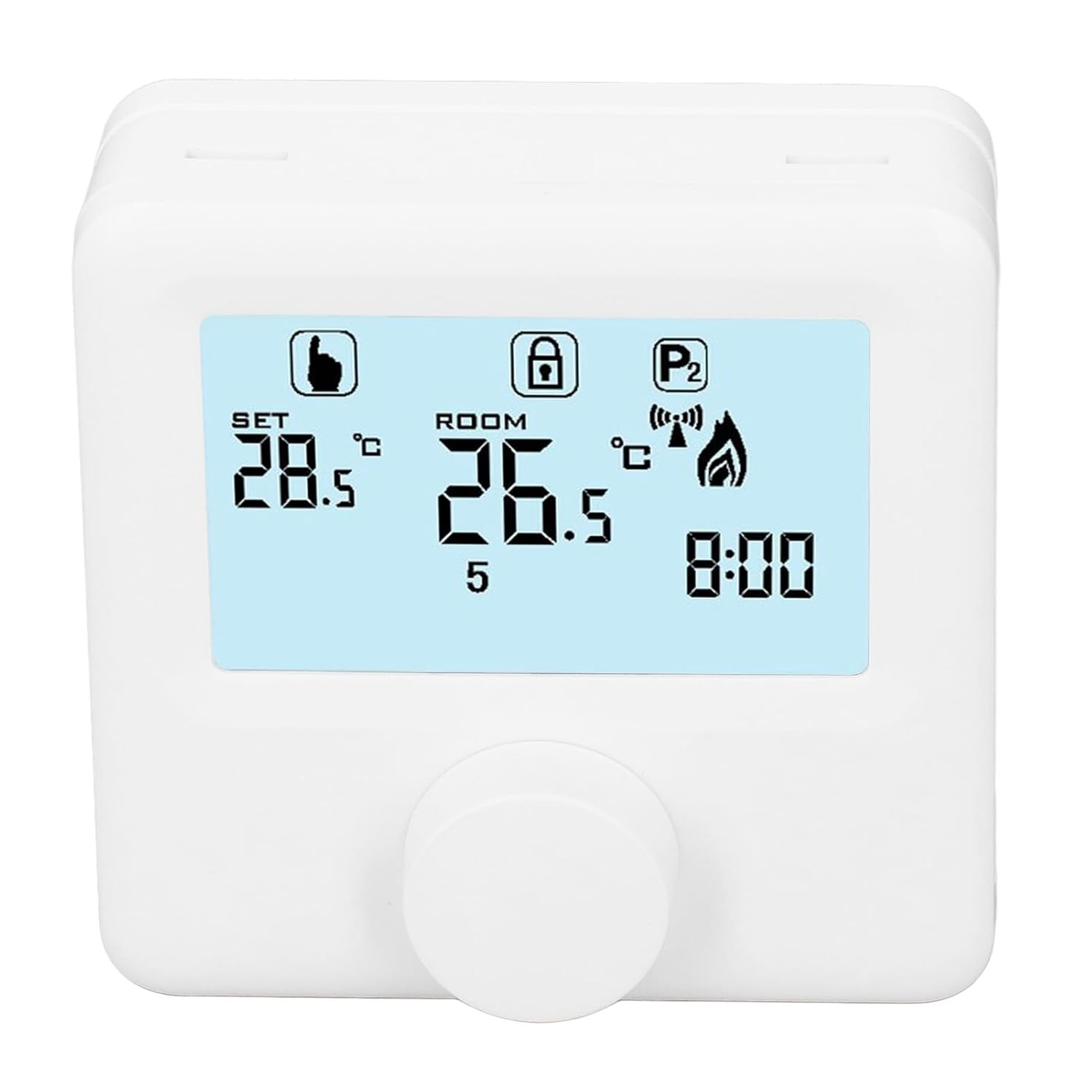
Umfanekiso 6.1: Okuningiliziwe view of the LCD display. It shows the set temperature (SET), room temperature (ROOM), a lock icon, a program icon (P2), a signal icon, a flame icon indicating heating, and the current time.
6.2. Ukusetha izinga lokushisa
Ukulungisa izinga lokushisa olifunayo:
- Rotate the control knob to increase or decrease the set temperature. The "SET" value on the display will change accordingly.
- The device will automatically activate or deactivate the heating system to maintain the set temperature within the range of 1 to 40 ℃. The default adjustment range is 5 to 35 ℃.
6.3. Programming Weekly Schedule
The thermoregulator supports a weekly programming schedule. This allows you to set different temperatures for various times of the day across the week.
- Press and hold the control knob (or a designated button, if available) to enter programming mode.
- Use the control knob to navigate through days of the week and time slots.
- Adjust the desired temperature for each programmed period.
- Confirm your settings to save the weekly program. The device will then operate according to this schedule.
6.4. Understanding Display Icons
- SETHA: Indicates the target temperature you have set.
- IGUMBI: Displays the current ambient room temperature.
- Isithonjana selangabi: Ikhanyisa uma isistimu yokushisisa isebenza.
- Khiya Isithonjana: May indicate a keypad lock feature to prevent accidental changes.
- P1/P2 Icon: Indicates the current program mode (e.g., P1 for comfort, P2 for economy, or specific weekly program segments).
- Isithonjana Sesiginali: May indicate wireless communication status if applicable.
7. Isondlo
Regular maintenance ensures the longevity and optimal performance of your thermoregulator.
- Ukuhlanza: Sula idivayisi ngendwangu ethambile, eyomile. Ungasebenzisi izinto zokuhlanza abrasive noma izincibilikisi.
- Ukushintshwa Kwebhethri: Replace batteries when the low battery indicator appears on the display. Always replace both batteries simultaneously with new AA batteries.
- Indawo yenzwa: Ensure the temperature sensor area (usually a small vent on the device) is free from dust and obstructions for accurate readings.
8. Ukuxazulula izinkinga
If you encounter issues with your EVTSCAN Digital Thermoregulator, refer to the following common problems and solutions:
- Isibonisi asinalutho:
- Hlola ukuthi amabhethri afakwe kahle yini.
- Shintsha amabhethri amadala ufake amasha.
- Heating system not responding:
- Ensure the thermoregulator is powered on and the flame icon is displayed when heating is expected.
- Verify wiring connections to the boiler are secure and correct.
- Check the boiler's power supply and status.
- Ensure the set temperature is higher than the current room temperature.
- Ukufundwa kwezinga lokushisa okunganembile:
- Ensure the device is not exposed to direct sunlight, drafts, or heat sources.
- Clean any dust or debris from the sensor area.
- Cannot change settings:
- Check if the lock icon is displayed. If so, refer to the operating instructions to unlock the keypad.
Uma inkinga iqhubeka, xhumana nokwesekwa kwamakhasimende.
9. Iwaranti kanye Nokusekela
Specific warranty information for this product is not provided in the available data. Please refer to the product packaging or the retailer's webindawo yemininingwane yewaranti.
For technical support or further assistance, please contact EVTSCAN customer service through their official channels or the retailer from whom you purchased the product.
You can visit the EVTSCAN store on Amazon for more information: EVTSCAN Store