
I-TecTake 404950
Incwadi Yomsebenzisi Yebhayisikili Yokuzivocavoca Egoqekayo ye-tectake®
Uhlobo: I-TecTake | Imodeli: 404950
1. Ulwazi Lokuphepha
Please read this entire manual before assembling and using the exercise bike. Keep this manual for future reference.
- Xhumana nodokotela wakho ngaphambi kokuqala noma yiluphi uhlelo lokuzivocavoca, ikakhulukazi uma unezinkinga zempilo ezikhona kakade.
- This product is designed for home use only. Do not use it in a commercial or institutional setting.
- The maximum user weight capacity for this exercise bike is 100 kg (220 lbs)Ungadluli lo mkhawulo.
- Keep children and pets away from the exercise bike during use.
- Place the exercise bike on a flat, stable surface. Ensure there is adequate clear space around the bike for safe operation.
- Gqoka izingubo zokuzivocavoca ezifanele kanye nezicathulo. Gwema izingubo ezikhululekile ezingase zibambeke ezingxenyeni ezinyakazayo.
- Inspect the bike before each use for any loose or worn parts. Do not use if any damage is found.
- Yeka ukujima ngokushesha uma uzizwa uphelelwa amandla, unesiyezi, noma uzwa ubuhlungu.
2. Umkhiqizo Uphelileview
The tectake® Foldable Exercise Bike is a compact and efficient fitness solution designed for effective leg, waist, and glute training. Its robust steel tube construction ensures stability and durability, while its foldable design allows for space-saving storage.
Izici Eziyinhloko:
- Quiet operation with a foldable design.
- Robust X-shaped frame made of powder-coated steel.
- Flywheel with belt system and wear-resistant magnetic brake.
- Eight adjustable resistance levels via a rotary knob.
- Seven-position height-adjustable saddle.
- Padded handlebars with integrated pulse measurement.
- Non-slip pedal surface with adjustable foot straps.
- Rubber end caps for secure footing.
- Training computer with clear LCD display.

3. Ukusetha nokuhlanganisa
The tectake exercise bike is designed for quick and easy assembly. All necessary mounting materials are included.
3.1 Okuqukethwe Kwephakheji:
- Exercise Bike main frame and components
- Iziyalezo Zomhlangano
- Mounting Material (screws, nuts, tools)
3.2 Izinyathelo Zokuhlanganisa:
- Carefully unpack all components and verify against the parts list in the included assembly instructions.
- Attach the front and rear stabilizers to the main frame using the provided bolts and nuts.
- Secure the pedals to the crank arms. Note that the left pedal is reverse-threaded.
- Install the seat post and saddle, ensuring it is securely fastened.
- Attach the handlebars to the main frame, connecting any necessary sensor cables for the computer.
- Insert 2 x AA 1.5V batteries into the training computer (batteries not included).
- Connect the pulse sensor cables from the handlebars to the computer.
- Ensure all connections are tight and secure before first use.
4. Iziqondiso Zokusebenza
4.1 Adjusting Seat Height:
The saddle can be adjusted to seven different height positions to accommodate users up to 180 cm (5'11").
- Khulula inkinobho yokulungisa etholakala esigxotsheni sesihlalo.
- Raise or lower the saddle to your desired height. Ensure your leg has a slight bend at the knee when the pedal is at its lowest point.
- Tighten the adjustment knob securely to lock the saddle in place.
4.2 Adjusting Resistance:
The bike features eight levels of magnetic resistance, allowing you to customize your workout intensity.

- Locate the rotary knob on the main frame, typically below the handlebars.
- Turn the knob clockwise to increase resistance (higher numbers for more challenging workouts).
- Turn the knob counter-clockwise to decrease resistance (lower numbers for easier workouts).
4.3 Using the Training Computer:
The LCD training computer tracks important workout data.


- Khombisa Imisebenzi: The computer typically displays Time, Speed, Distance, Calories, and Pulse (heart rate). Some models may have a 'Scan' mode that cycles through these metrics automatically.
- Ukukalwa kwePulse: Grip the padded handlebars firmly with both hands. Ensure your palms are in contact with the metal sensors. Your pulse will be displayed on the screen after a few seconds.
- Inkinobho yemodi: Press the 'Mode' button to cycle through the different display functions or to select a specific function to view.
- Setha kabusha Inkinobho: Press and hold the 'Reset' button to clear all current workout data.


5. Isondlo
5.1 Ukuhlanza:
- Sula ibhayisikili ngesikhangisoamp indwangu ngemva kokusetshenziswa ngakunye ukususa umjuluko nothuli.
- Do not use abrasive cleaners or solvents, as these may damage the finish or electronic components.
- Keep the LCD display clean and dry.
5.2 Isitoreji:
Thanks to its practical foldable function, the exercise bike can be stored compactly when not in use.
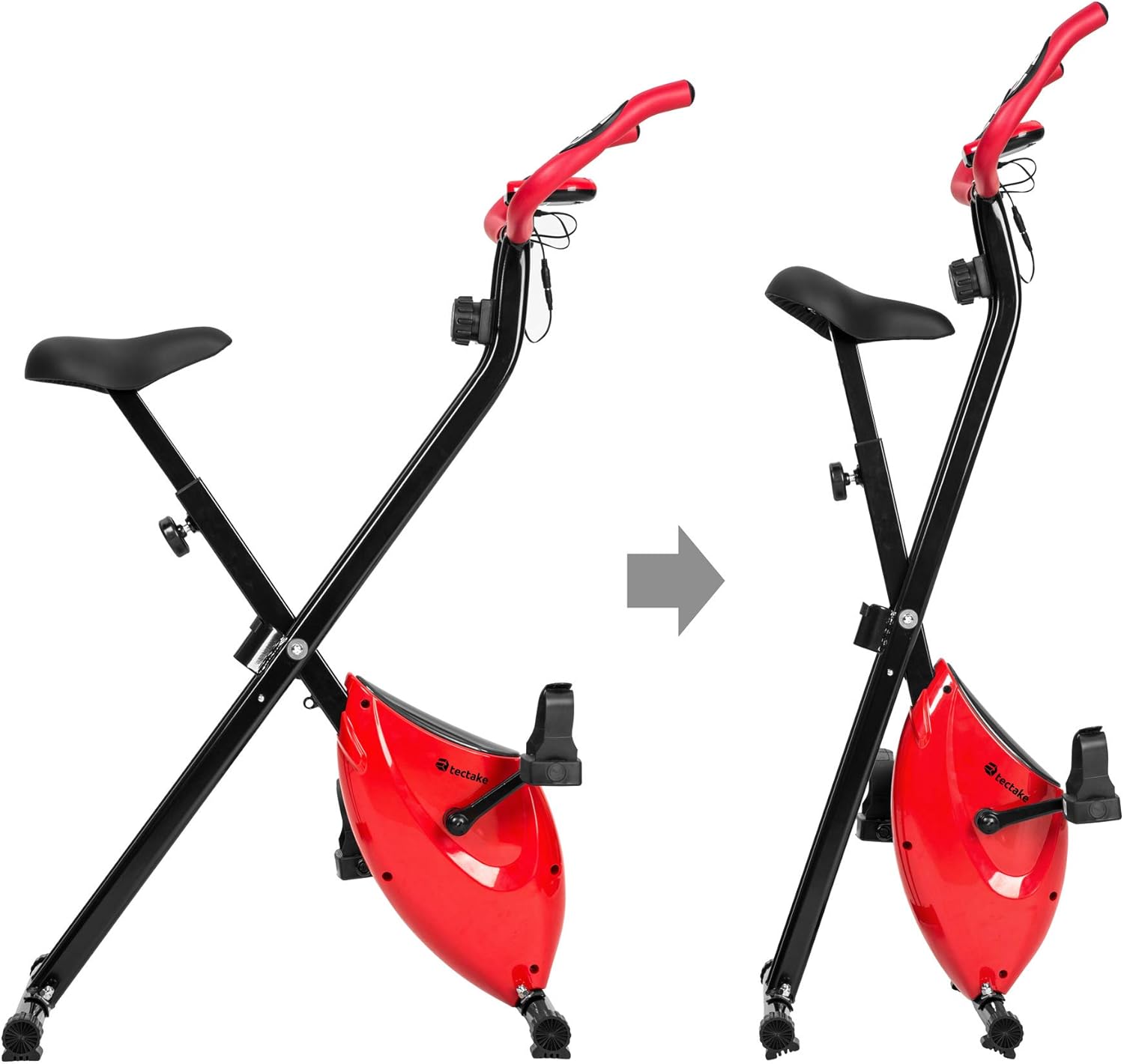
- To fold the bike, follow the instructions in the assembly manual or reverse the setup steps for folding.
- Store the bike in a dry, cool place, away from direct sunlight and extreme temperatures.
- Ensure the bike is stable and secure in its folded position to prevent accidental tipping.
6. Ukuxazulula izinkinga
If you encounter any issues with your tectake exercise bike, please refer to the following common troubleshooting tips:
- Computer Display Not Working:
- Check if the batteries (2 x AA 1.5V) are correctly installed and not depleted. Replace if necessary.
- Ensure all cable connections to the computer are secure.
- No Pulse Reading:
- Ensure your hands are firmly gripping both metal sensors on the handlebars.
- Make sure the pulse sensor cables are properly connected to the computer.
- Imisindo Engavamile Ngesikhathi Sokusebenza:
- Check all bolts and nuts, especially on the frame and pedals, to ensure they are tight.
- Ensure the bike is on a flat and stable surface.
- Ukumelana Akuguquki:
- Verify that the resistance knob is turning freely and engaging with the internal mechanism.
- Uma inkinga iqhubeka, xhumana nokwesekwa kwamakhasimende.
For issues not covered here, please refer to the detailed assembly instructions or contact TecTake customer support.
7. Imininingwane
| Isici | Ukucaciswa |
|---|---|
| Inombolo Yemodeli | 404950 |
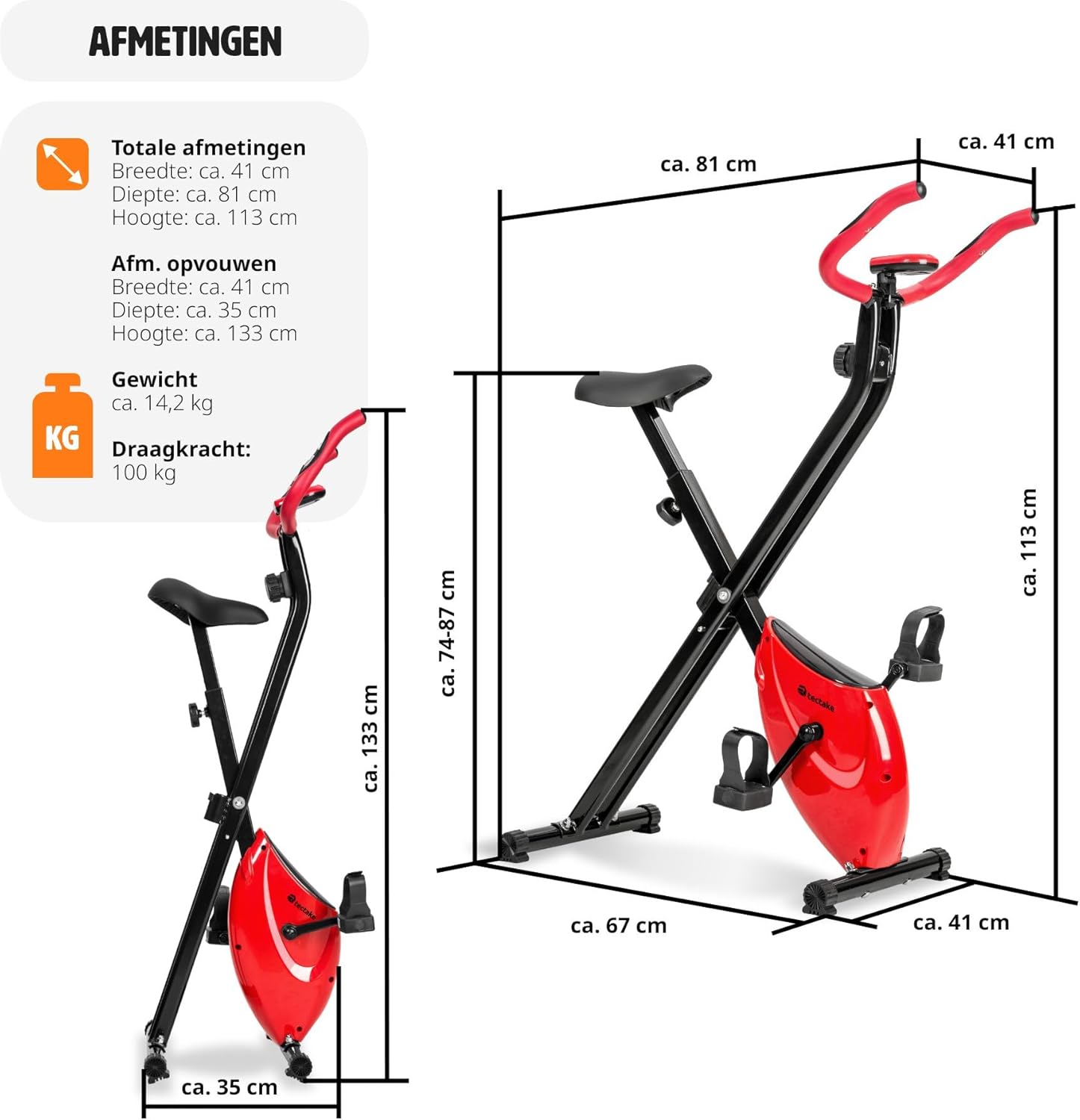
| Ubukhulu Sebonke (L x W x H) | Cishe. 81 x 41 x 113 cm (31.9 x 16.1 x 44.5 amayintshi) |
| Ubukhulu obugoqiwe (L x W x H) | Cishe. 41 x 35 x 133 cm (16.1 x 13.8 x 52.4 amayintshi) |
| Isisindo | Cishe. 14.2 kg (31.3 lbs) |
| Isisindo Esiphezulu Somsebenzisi | 100 kg (220 lbs) |
| Recommended Max User Height | Up to 180 cm (5'11") |
| Ukulungiswa KweSaddle Height | 7 positions (approx. 68-81 cm / 26.8-31.9 inches) |
| Ukumelana System | Umagnetic, amazinga angu-8 |
| Training Computer Power | 2 x AA 1.5V amabhethri (awafakiwe) |
| Indaba Eyinhloko | Powder-coated steel, ABS plastic, Polypropylene, NBR rubber, Polyurethane |
| Umbala | Okubomvu / Okumnyama |
8. Iwaranti kanye Nokusekela
For warranty information, technical support, or to order replacement parts, please contact TecTake customer service. Refer to the contact details provided with your purchase documentation or visit the official TecTake webindawo.
Sicela ube nenombolo yakho yemodeli (404950) kanye nobufakazi bokuthenga bulungile lapho uxhumana nosekelo.
Ask a question about this manual
Ask about setup, troubleshooting, compatibility, parts, safety, or missing instructions. Manuals+ will review the question and use this page’s manual context to help answer it.