
WISUALARM C03
WISUALARM Carbon Monoxide Detector User Manual
Imodeli: C03
Umkhiqizo: I-WISUALARM
1. Isingeniso
Thank you for choosing the WISUALARM Carbon Monoxide (CO) Detector. This device is designed to provide reliable and accurate detection of carbon monoxide gas in your home, ensuring the safety of your family. Carbon monoxide is a colorless, odorless, and tasteless gas that can be fatal. This manual provides essential information for the proper installation, operation, and maintenance of your CO detector.
This detector is equipped with a 10-year lifespan sensor and battery, offering long-term protection. It features clear LED indicators and a loud 85dB alarm to alert you to potential CO hazards. Please read this manual thoroughly before use and keep it for future reference.
2. Ulwazi Olubalulekile Lokuphepha
ISEXWAYISO: This carbon monoxide alarm is designed to detect carbon monoxide gas from ANY source of combustion. It is NOT designed to detect smoke or fire. This alarm is NOT a substitute for a smoke alarm.
- Never ignore the alarm. Ignoring the alarm may result in serious injury or death.
- Hlola i-alamu masonto onke ukuze uqinisekise ukusebenza kahle.
- Do not paint the alarm. Paint can clog the openings and interfere with the sensor's ability to detect CO.
- Ungafaki ezindaweni ezinomswakama ophezulu, amazinga okushisa aphezulu, noma uthuli oluningi.
- Keep out of reach of children unless supervised.
- Le divayisi ngeyokusetshenziswa endlini kuphela.
3. Umkhiqizo Uphelileview
The WISUALARM Carbon Monoxide Detector is a compact and efficient device designed for easy use and reliable performance.


4. Ukusetha nokufakwa
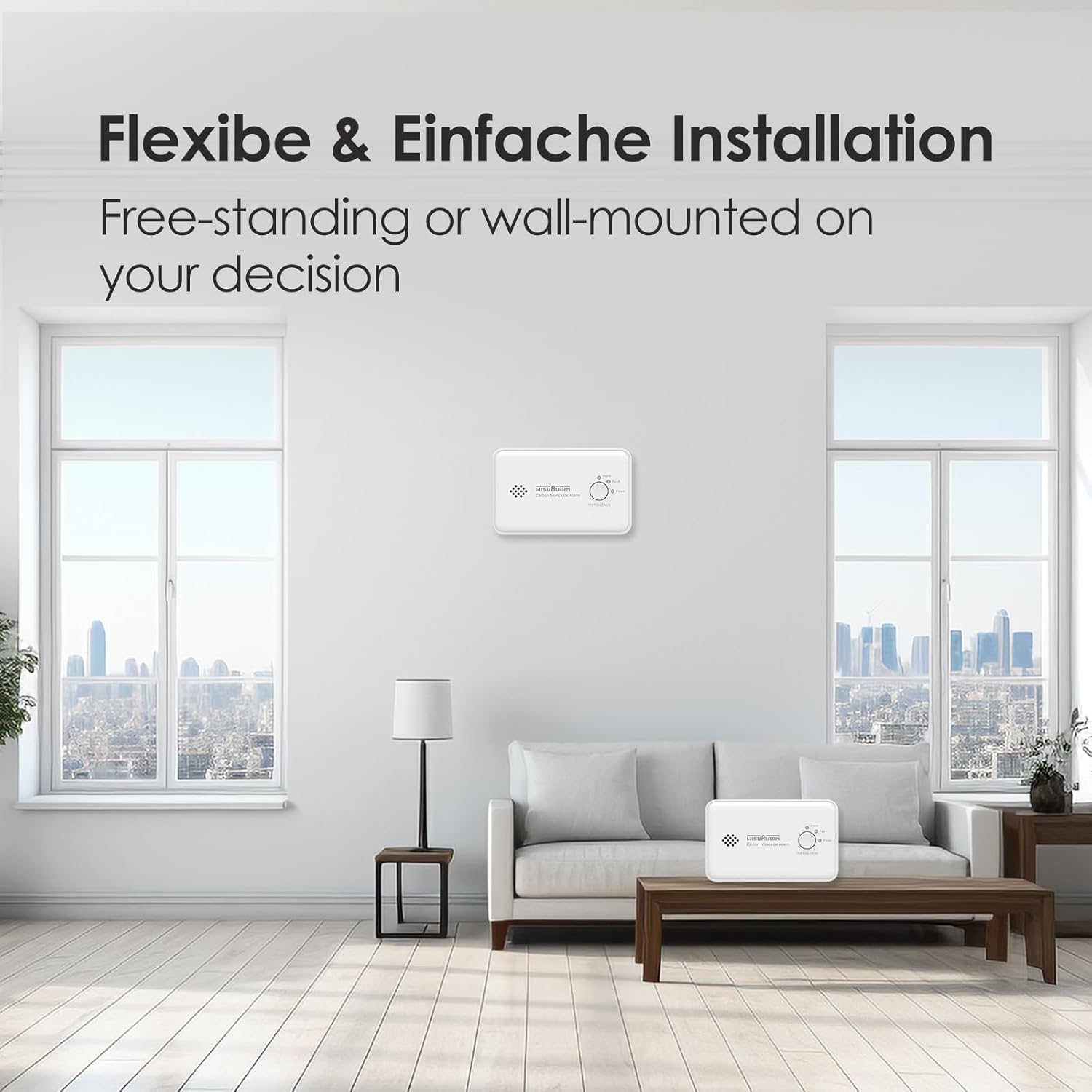
The WISUALARM CO detector is designed for easy setup and can be either free-standing or wall-mounted.
4.1. Ukufakwa kwebhethri
Your detector comes with a pre-installed 10-year lithium battery. To activate the device, simply remove the battery tab (if present) or follow the instructions on the device packaging to ensure the battery is properly connected. The device will typically emit a short beep and the green Power LED will illuminate to indicate it is active.
4.2. Ukukhetha Indawo
For optimal protection, install CO alarms in central locations on every level of your home and outside of sleeping areas. Consider placing an alarm in or near each sleeping area. Avoid placing the detector:
- Directly above or next to fuel-burning appliances.
- Elangeni eliqondile noma eduze kwemithombo yokushisa.
- In areas with high air movement (e.g., near vents, fans, or open windows).
- In dusty, dirty, or greasy areas.
- In areas where the temperature can drop below 0°C (32°F) or exceed 40°C (104°F).

4.3. Ukufaka i-Detector
The detector can be placed on a flat surface or mounted on a wall.
4.3.1. Ukukhweza Udonga (Ongakukhetha)
- Choose a suitable wall location, away from corners and obstructions.
- Use the provided screws and anchors (if applicable) to secure the mounting bracket to the wall.
- Attach the detector to the mounting bracket by twisting it clockwise until it locks into place.
- Ensure the detector is securely fastened and does not wobble.
5. Iziqondiso Zokusebenza
5.1. Vula amandla
Once the battery is correctly installed, the detector will automatically power on. The green "Power" LED will flash periodically (e.g., every 30-60 seconds) to indicate normal operation.
5.2. Ukuhlola i-alamu
It is recommended to test your CO detector weekly to ensure it is functioning correctly.
- Press and hold the "TEST/SILENCE" button for approximately 3 seconds.
- The alarm will sound a loud, pulsating tone (85dB) and the red "Alarm" LED will flash.
- Release the button. The alarm will stop, and the detector will return to normal monitoring mode.
- Uma i-alamu ingakhali ngesikhathi sokuhlolwa, bheka isigaba sokuxazulula izinkinga.
5.3. Understanding LED Indicators
- Green LED (Power): Flashes approximately every 30-60 seconds, indicating normal operation and sufficient power.
- Yellow LED (Fault): Illuminates or flashes to indicate a fault or low battery condition. Refer to the Troubleshooting section.
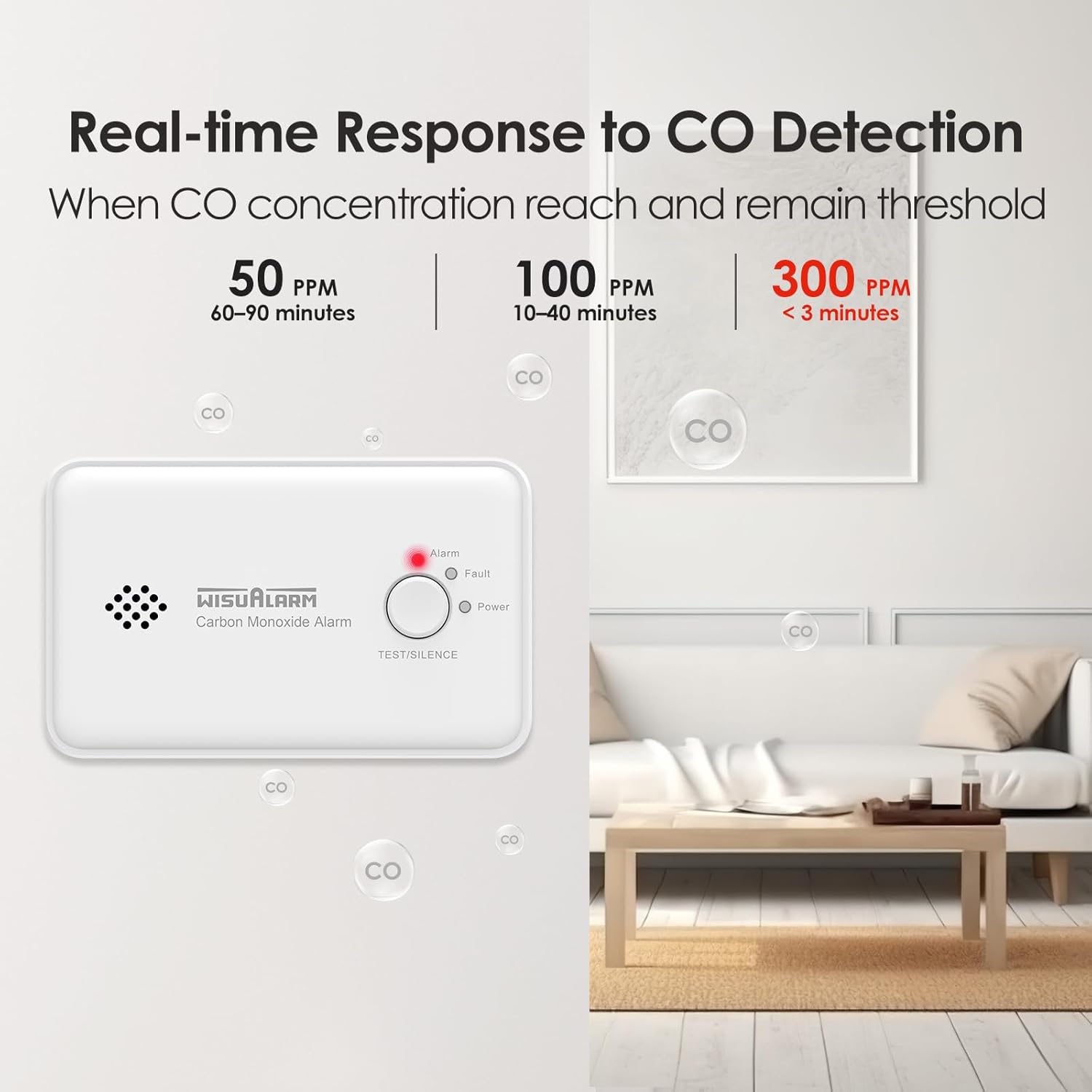
- Red LED (Alarm): Flashes rapidly along with the audible alarm when carbon monoxide is detected at dangerous levels.
5.4. Alarm Conditions and Response
When the detector senses a dangerous level of carbon monoxide, it will activate a loud audible alarm (85dB) and the red "Alarm" LED will flash rapidly.
Uma i-alamu ikhala:
- Immediately move to fresh air outdoors or open all doors and windows to ventilate the area.
- Do a head count to check that all persons are accounted for.
- Do not re-enter the premises until the alarm has stopped and the area has been thoroughly ventilated.
- Call your emergency services or fire department.
- Identify and correct the source of carbon monoxide.
5.5. Silence Function
In case of a nuisance alarm (e.g., from temporary high CO levels during appliance startup), you can temporarily silence the alarm by pressing the "TEST/SILENCE" button. The alarm will silence for a short period (e.g., 5-10 minutes) and then re-evaluate the CO levels. If CO levels remain high, the alarm will reactivate.
6. Isondlo
Regular maintenance ensures the continued reliable operation of your CO detector.
6.1. Weekly Testing
Test the alarm weekly as described in Section 5.2 to confirm the sensor and alarm circuitry are functioning.
6.2. Cleaning Your Detector
Dust and debris can affect the detector's performance. Clean your detector at least once a month.
- Gently vacuum the detector cover using the soft brush attachment of your vacuum cleaner.
- Do NOT use cleaning solvents or sprays directly on the detector.
- Do NOT paint the detector.
6.3. Ukushintshwa Kwebhethri
The detector is equipped with a 10-year sealed lithium battery designed to last the lifetime of the unit. If the yellow "Fault" LED flashes and the unit chirps periodically, it may indicate a low battery warning. In this case, the entire unit should be replaced as the battery is not user-replaceable.
7. Ukuxazulula izinkinga
If your CO detector is not operating as expected, refer to the following table for common issues and solutions.
| Inkinga | Imbangela Engenzeka | Isixazululo |
|---|---|---|
| I-alamu ayizwakali ngesikhathi sokuhlolwa. | Battery not properly activated or unit malfunction. | Ensure battery tab is removed. If still no sound, the unit may be faulty and needs replacement. |
| Yellow "Fault" LED flashes/chirps. | Low battery or internal fault. | The battery is sealed and not user-replaceable. If this occurs, the unit has reached the end of its life or has an internal fault and must be replaced immediately. |
| Alarm sounds frequently without apparent CO source. | Nuisance alarm, detector placed in an unsuitable location, or actual low-level CO presence. | Ventilate the area. Relocate the detector if it's near combustion sources or high airflow. If alarms persist, have your home inspected for CO sources. |
| Green "Power" LED not flashing. | Unit not powered on or battery depleted. | Ensure battery is activated. If the unit is old or the yellow fault light is on, the battery may be depleted, and the unit needs replacement. |
8. Imininingwane
Detailed technical specifications for the WISUALARM Carbon Monoxide Detector.
| Isici | Imininingwane |
|---|---|
| Inombolo Yemodeli | C03 |
| Ubukhulu (D x W x H) | 3.9 x 12.1 x 7.6 cm (1.54 x 4.76 x 2.99 amayintshi) |
| Isisindo | Amagremu angu-130 (0.29 lbs) |
| Umthombo wamandla | Battery Powered (1 CR123A Lithium battery, included and sealed) |
| Impilo Yebhethri | Approximately 10 years (sealed, non-replaceable) |
| Uhlobo lwenzwa | Ugesi |
| I-Alarm Loudness | 85dB ku-3 amamitha |
| Izinga Lokushisa Lokusebenza | 0°C ukuya ku-40°C (32°F ukuya ku-104°F) |
| Umswakama Osebenzayo | 10% kuya ku-95% RH (okungafinyeleli) |
| Indlela Yokufaka | Free-standing or Wall-mounted |
| Izitifiketi | EN50291 (as per product title) |
9. Ulwazi Lwewaranti
Specific warranty details for this product are not provided in the available information. Please refer to the product packaging or contact the manufacturer directly for warranty terms and conditions.
10. Ukusekela
For technical support, questions, or assistance with your WISUALARM Carbon Monoxide Detector, please contact the manufacturer or seller through the platform where you purchased the product. You may also visit the official WISUALARM website for further resources.
Manufacturer: Zhejiang Huaxiao Technology Co., Ltd