
1. Isingeniso
This manual provides detailed instructions for the installation, operation, and maintenance of your Diamond Audio DMD600.4D 4-Channel Digital Amplifier. Please read this manual thoroughly before attempting installation or operation to ensure proper use and to prevent damage to the unit or connected components. Keep this manual for future reference.
2. Iziyalezo Zokuphepha
Qaphela lezi zinyathelo zokuphepha ezilandelayo ukuze uvimbele ukulimala noma ukulimala:
- Umthombo wamandla: Xhuma i- ampi-lififier kuphela ohlelweni lukagesi oluphansi oluyi-12V DC olungasebenzi.
- Izintambo: Ensure all wiring is correctly connected and insulated to prevent short circuits. Use appropriate gauge wires for power and ground connections.
- Ukukhweza: Khuphuka i- amplifier securely in a location that allows for adequate ventilation and is protected from moisture and excessive heat.
- Amazinga Evolumu: Ukuchayeka isikhathi eside emazingeni evolumu ephezulu kungabangela ukulimala kokuzwa. Lungisa ivolumu ngokuzibophezela.
- Ukufakwa Kochwepheshe: Uma ungaqiniseki nganoma yisiphi isici sokufakwa, xhumana nochwepheshe ofanelekayo.
3. Okuqukethwe Kwephakheji
Qinisekisa ukuthi zonke izinto zikhona kuphakheji:
- Diamond Audio DMD600.4D Ampokokuphila
- Ihadiwe Yokufaka (izikulufo, amawasha)
- Incwadi Yomsebenzisi (le dokhumenti)
4. Izici zomkhiqizo
The Diamond Audio DMD600.4D ampI-lifier inikeza izici ezilandelayo ezibalulekile:
- 800W RMS power output.
- 4-channel configuration, suitable for various audio setups.
- Waterproof design for marine and motorsport applications.
- Usayizi omncane wokufakwa okuguquguqukayo.
- Ukwakhiwa okuhlala isikhathi eside kokusebenza okuhlala isikhathi eside.
5. Ukusetha nokufakwa
Ukufakwa okufanele kubalulekile ukuze kusebenze kahle futhi kuphephe. Landela lezi zinyathelo ngokucophelela.
5.1 Ukufaka i- Ampokokuphila
- Choose a mounting location that is dry, well-ventilated, and secure. Avoid areas exposed to direct sunlight or excessive heat.
- Sebenzisa i- amplifier as a template to mark the mounting screw locations.
- Drill pilot holes if necessary, ensuring not to damage any vehicle components behind the mounting surface.
- Vikela i- ampi-lifier isebenzisa ihadiwe yokufaka enikeziwe.
5.2 Ukuxhunywa kwezintambo
Refer to the diagrams below for proper wiring connections. Ensure the vehicle's battery is disconnected before making any power connections.
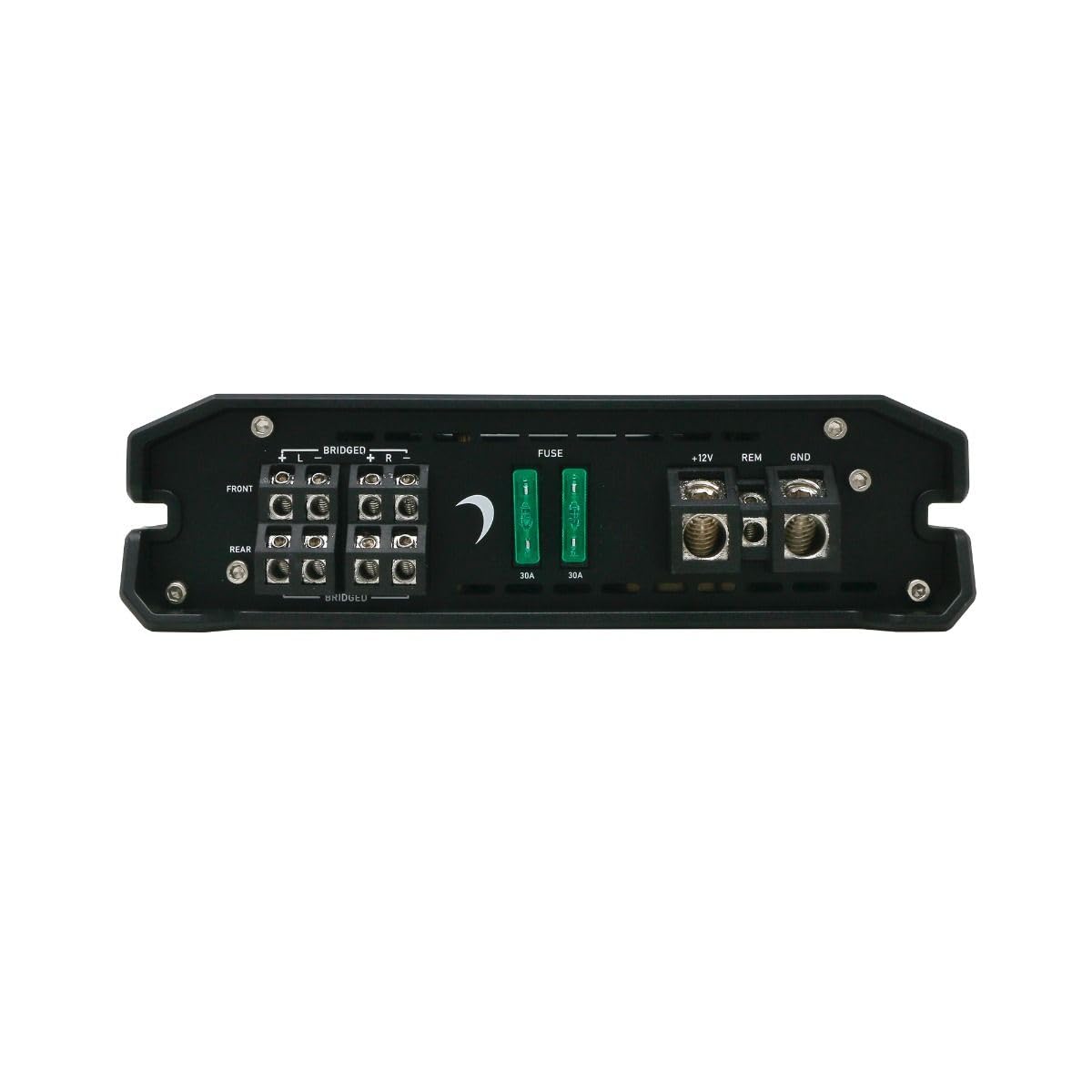
Umfanekiso 1: Rear panel connections for power, ground, remote, and speaker outputs.
- Power (B+ / +12V): Connect a suitable gauge power cable directly from the positive terminal of the vehicle's battery to the +12V terminal on the amplifier. Install an in-line fuse (not supplied) within 18 inches of the battery.
- Indawo (GND): Connect a suitable gauge ground cable from the GND terminal on the amplifier to a clean, unpainted metal surface of the vehicle chassis. Ensure a solid, low-resistance connection.
- Isilawuli kude (REM): Xhuma ucingo olusebenzisa i-remote turn-on oluvela ku-remote output yeyunithi yakho yekhanda uye ku-REM terminal ku- amplifier. This wire turns the ampi-lififier ivuliwe futhi ivaliwe ngeyunithi yakho yekhanda.
- Imiphumela Yesipikha: Connect your speakers to the designated speaker terminals (FRONT L/R, REAR L/R). Observe correct polarity (+ to + and - to -). For bridged mode, refer to the specific bridging instructions on the amplifier or in the specifications section.
- Okokufaka kwe-RCA: Xhuma izintambo ze-RCA kusuka ku-pre- yeyunithi yakho yekhandaamp outputs to the FRONT and REAR RCA input jacks on the ampokokuphila.

Umfanekiso 2: Front panel with RCA inputs and audio control adjustments.
6. Iziqondiso Zokusebenza
Uma usufakiwe, lungisa ampizilungiselelo ze-lififier zokusebenza kahle komsindo.
6.1 Initial Setup and Adjustments
The DMD600.4D features various controls for fine-tuning your audio system:
- I-GAIN Control: Ilungisa ukuzwela okokufaka kwe- amplifier to match the output of your head unit. Start with the gain at minimum and slowly increase until desired volume is achieved without distortion.
- X-OVER (Crossover) Control: Allows you to set the frequency range that the amplifier sends to your speakers.
- I-HPF (Isihlungi Se-High Pass): Allows frequencies above the set point to pass through. Useful for full-range speakers to prevent low-frequency distortion.
- I-LPF (Isihlungi Se-Low Pass): Allows frequencies below the set point to pass through. Typically used for subwoofers.
- I-MODE Switch: Selects the operating mode (e.g., 2-channel, 4-channel, bridged). Refer to the specific markings on the amplifier for available modes.
Okubalulekile: Make adjustments incrementally and listen for clarity. Over-driving the amplifier or speakers can cause damage.
7. Isondlo
The Diamond Audio DMD600.4D ampI-lifier idinga ukulungiswa okuncane ukuqinisekisa ukusebenza kwesikhathi eside.
- Ukuhlanza: Sula i- ampingaphandle le-lifier ngendwangu ethambile neyomile. Ungasebenzisi amakhemikhali anamandla noma izihlanzi ezihudulayo.
- Ukungenisa umoya: Qinisekisa ukuthi i- ampAmaphini okupholisa e-lififier awanalo uthuli kanye nemfucumfucu ukuze agcine ukushisa kuhlanzekile kahle.
- Izixhumanisi: Hlola ngezikhathi ezithile zonke izintambo zokuxhuma ukuze ziqine futhi zigqwale. Izintambo ezixegayo zingaholela ekusebenzeni kabi noma ekulimaleni.
8. Ukuxazulula izinkinga
Uma uhlangabezana nezinkinga ngeyakho amplifier, consult the following table before seeking professional service.
| Inkinga | Imbangela Engenzeka | Isixazululo |
|---|---|---|
| Awekho Amandla/ Ampi-lififier ayivuli | Blown fuse; Loose power/ground/remote wire; Faulty remote turn-on signal. | Check in-line fuse and amplifier fuses; Verify all power, ground, and remote connections are secure; Test remote wire for 12V signal. |
| Akukho okukhipha umsindo | Loose RCA cables; Incorrect gain setting; Speaker wires disconnected; Ampi-lifier kumodi yokuvikela. | Check RCA connections; Adjust gain; Verify speaker wiring; Check for short circuits in speaker wiring. |
| Umsindo Ohlanekezelwe | Gain set too high; Incorrect crossover settings; Damaged speakers. | Reduce gain; Adjust crossover settings; Inspect speakers for damage. |
| Ampi-lififier Ukushisa Okudlulele | Insufficient ventilation; Impedance too low; Prolonged high volume. | Ensure adequate airflow around amplifier; Verify speaker impedance matches amplifier specifications; Reduce volume. |
9. Imininingwane
Technical specifications for the Diamond Audio DMD600.4D Ampophilayo:
| Isici | Imininingwane |
|---|---|
| Inombolo Yemodeli | I-DMD600.4D |
| Ibhrendi | I-Diamond Audio |
| Inombolo Yeziteshi | 4 |
| Amandla Okukhiphayo | Ama-Watts ayi-800 (i-RMS) |
| Uhlobo Lokukhweza | INtaba Engaphezulu |
| Ubukhulu bephakheji | 9 x 9 x 4 amayintshi |
| Isisindo | 4 Amakhilogremu |
10. Iwaranti kanye Nokusekela
Diamond Audio products are designed and manufactured to the highest quality standards. This product is covered by a limited warranty against defects in materials and workmanship. For specific warranty terms, duration, and claim procedures, please refer to the warranty card included with your product or visit the official Diamond Audio webindawo.
For technical support or service inquiries, please contact Diamond Audio customer service through their official channels. Do not attempt to repair the amplifier yourself, as this may void your warranty.