
1. Isingeniso
This manual provides essential information for the setup, operation, maintenance, and troubleshooting of your DELTACO GAMING WM87 Gaming Mouse. Please read these instructions carefully to ensure proper use and to maximize your gaming experience.
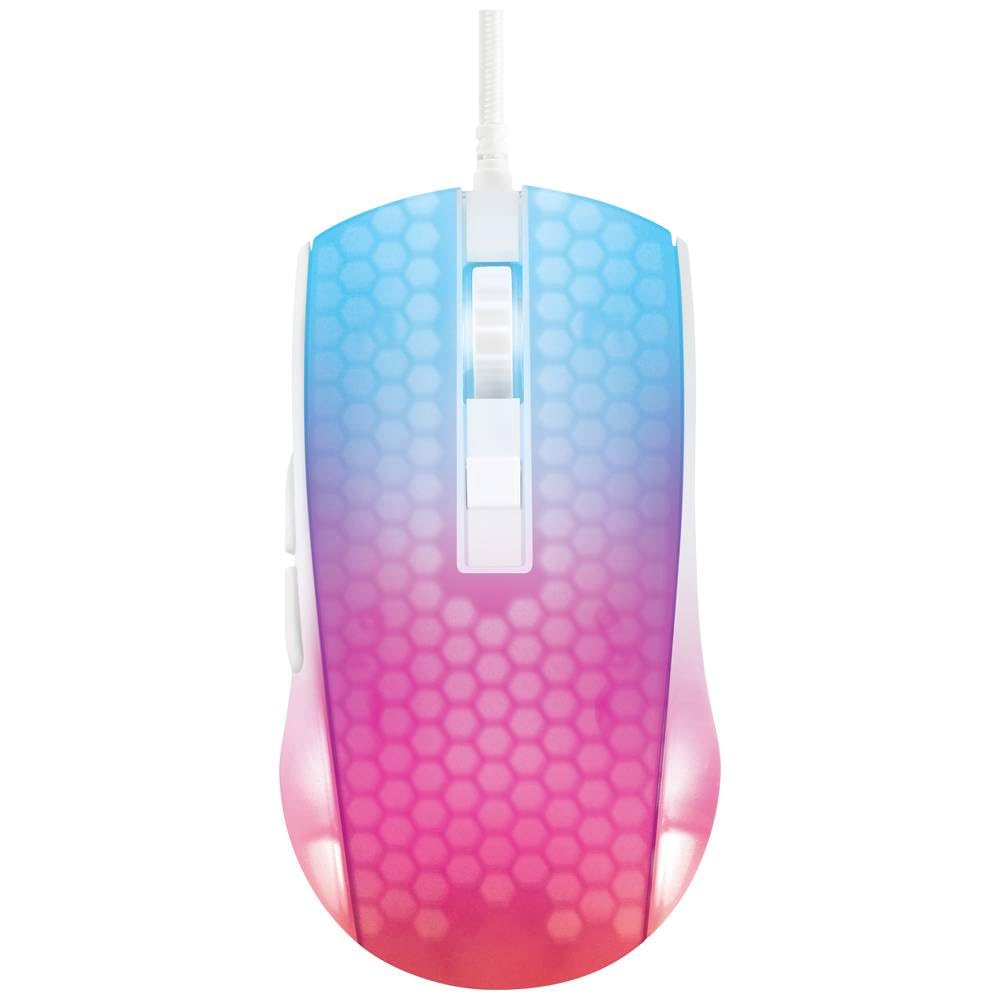
I-overhead view of the DELTACO GAMING WM87 Gaming Mouse. The mouse features a translucent white body with an illuminated honeycomb pattern that transitions from blue at the front to pink and red at the rear. It has a scroll wheel and two main buttons, along with two side buttons visible on the left.
2. Umkhiqizo Uphelileview
The DELTACO GAMING WM87 is a high-performance gaming mouse designed for precision and comfort. It features a transparent design with integrated illumination, a high-accuracy optical sensor, and six programmable buttons.
Izici Eziyinhloko:
- Ukuxhumana: Intambo ye-USB
- Inzwa: Optical, up to 6200 DPI
- Izinkinobho: 6 (Left, Right, Scroll Click, DPI Cycle, Forward, Back)
- Idizayini: Transparent shell with illuminated honeycomb pattern
- Ukuhambisana: Ikhompyutha Yomuntu Siqu, I-Laptop
3. Sethaphu Imiyalelo
- Khipha igundane: Carefully remove the DELTACO GAMING WM87 mouse from its packaging.
- Xhuma Kukhompyutha: Locate an available USB port on your personal computer or laptop. Insert the USB connector of the mouse firmly into the USB port.
- Ukufakwa komshayeli: The mouse is plug-and-play. Your operating system should automatically detect and install the necessary drivers. No additional software installation is typically required for basic functionality.
- Qinisekisa Ukusebenza: Once connected, move the mouse and click the buttons to ensure it is working correctly. The integrated illumination should light up.
4. Iziqondiso Zokusebenza
Imisebenzi Eyisisekelo:
- Chofoza kwesokunxele: Isenzo esiyinhloko, ukukhetha.
- Chofoza kwesokudla: Imenyu yokuqukethwe, isenzo sesibili.
- Isondo Lokuskrola: Scroll up/down pages. Pressing the scroll wheel typically acts as a middle click.
- Izinkinobho Zokudlulisela/Zangemuva: Located on the left side of the mouse, these buttons are commonly used for navigation in web iziphequluli noma file abahloli bamazwe.
Ukulungiswa kwe-DPI:
The DELTACO GAMING WM87 mouse features adjustable DPI (Dots Per Inch) settings, allowing you to change the cursor sensitivity on the fly. A dedicated DPI button (often located behind the scroll wheel) cycles through preset DPI levels up to 6200 DPI. Press this button to adjust the sensitivity to your preference.
Ukukhanyisa:
The mouse features integrated illumination. The lighting pattern and colors are typically pre-programmed and may change based on DPI settings or automatically cycle through colors. Refer to any potential software for advanced customization, if available.
5. Isondlo
- Ukuhlanza: Use a soft, dry, lint-free cloth to clean the exterior of the mouse. For stubborn dirt, slightly dampen the cloth with water. Avoid using harsh chemicals, solvents, or abrasive materials.
- Ukuhlanza izinzwa: Occasionally, dust or debris may accumulate around the optical sensor on the underside of the mouse. Use a cotton swab or compressed air to gently clean the sensor area.
- Isitoreji: Uma ingasetshenziswa, gcina igundane endaweni ehlanzekile, eyomile ekude nezinga lokushisa elidlulele kanye nokukhanya kwelanga okuqondile.
- Ukunakekelwa Kwekhebula: Gwema ukugoba noma ukusonta ikhebula le-USB ngokweqile ukuze uvimbele umonakalo.
6. Ukuxazulula izinkinga
- Igundane aliphenduli:
- Qinisekisa ukuthi ikhebula le-USB lixhunywe ngokuvikelekile embobeni ye-USB esebenzayo.
- Zama ukuxhuma igundane kwelinye ichweba le-USB kukhompyutha yakho.
- Qala kabusha ikhompuyutha yakho.
- I-Erratic Cursor Movement:
- Hlanza inzwa yokubona ngaphansi kwegundane.
- Qinisekisa ukuthi usebenzisa igundane endaweni efanele (isb., iphedi yegundane). Gwema izindawo ezikhanyayo kakhulu noma ezisobala.
- Illumination Not Working:
- Hlola uxhumano lwe-USB.
- If the mouse has a dedicated lighting control button or software, ensure it is enabled.
7. Imininingwane
| Isici | Imininingwane |
|---|---|
| Ibhrendi | I-DELTACO GAMING |
| Inombolo Yemodeli | GAM-144-W (WM87) |
| Ubuchwepheshe bokuxhumana | I-USB |
| Ubuchwepheshe bokutholwa kokunyakaza | I-Optical |
| Inombolo yezinkinobho | 6 |
| I-DPI | Kufika ku-6200 |
| Ukuma kwezandla | Kulungile |
| Ukusetshenziswa Komkhiqizo Okunconyiwe | Amageyimu |
| Amadivayisi Ahambisanayo | I-Laptop, Ikhompyutha yomuntu siqu |
| Ubukhulu bomkhiqizo | 180 x 0.07 x 0.12 cm (Note: These dimensions appear to be for the cable or packaging, not the mouse itself. Please refer to product packaging for accurate mouse dimensions.) |
| Isisindo | Approximately 65 Grams (Lithium battery weight, likely referring to overall mouse weight if no battery is present) |
| Idethi Yokuqala Etholakalayo | Septhemba 16, 2023 |
8. Iwaranti kanye Nokusekela
For warranty information, technical support, or service inquiries regarding your DELTACO GAMING WM87 Gaming Mouse, please refer to the warranty card included with your product or visit the official DELTACO GAMING webindawo. Gcina ubufakazi bakho bokuthenga ngezimangalo zewaranti.