1. Isingeniso
Thank you for choosing the TONGOU TO-Q-SY1-ZigBee 25A Smart ZigBee Switch. This device is designed to transform your conventional appliances into smart, connected devices, offering remote control, voice control, energy monitoring, and advanced timing functions. For optimal performance and safety, please read this manual thoroughly before installation and use.
2. Umkhiqizo Uphelileview
The TONGOU TO-Q-SY1-ZigBee Smart Switch integrates seamlessly into your smart home ecosystem, provided you have a compatible TUYA ZigBee hub. It allows for intelligent control and monitoring of connected devices.
Izici Eziyinhloko:
- Iphrothokholi ye-ZigBee 3.0: Requires a TUYA ZigBee hub/gateway for connectivity.
- Universal Connected Home DIY Module: Easily convert small home appliances (lamps, fans, heaters) to smart devices in under 10 minutes.
- Isilawuli kude se-APP: Control appliances via the "Smart Life" or "TUYA" APP from anywhere, anytime.
- Electricity Consumption Monitoring: Real-time and historical analysis of energy consumption, displaying current, voltage, and power, with data recording (hours, days, months, years).
- Ukulawulwa Kwezwi: Ihambisana ne-Amazon Alexa kanye ne-Google Assistant ekusebenzeni kwezandla.
- Imisebenzi Yesikhathi: Features timing modes to prevent energy waste and optimize device operation.
- Ukufakwa Nokusetshenziswa Okulula: Simple wiring process with push-in terminals and screw tightening/loosening.
- I-Premium Material: Constructed with high-quality, flame-retardant PA66 material and good conductivity copper for enhanced safety and durability.
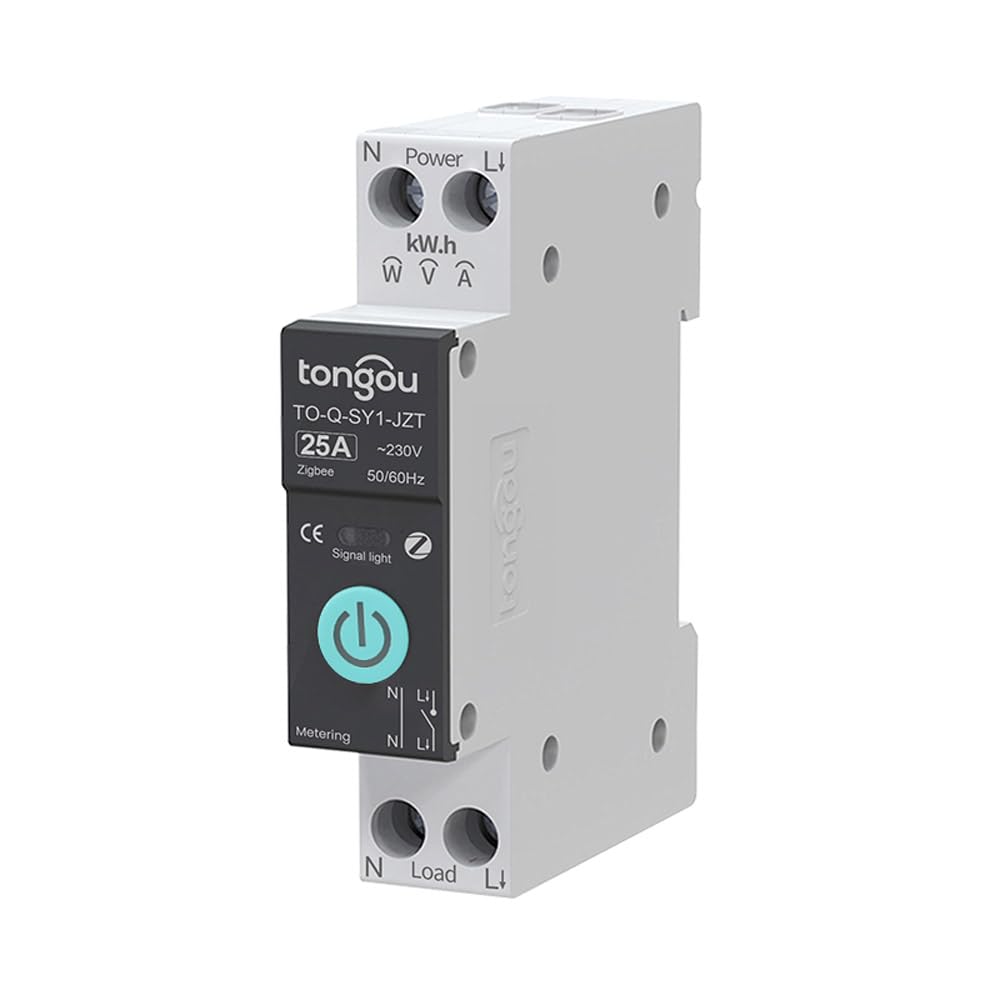
Image 2.1: TONGOU TO-Q-SY1-ZigBee Smart Switch highlighting its features like timer, countdown, circulate, and metering.
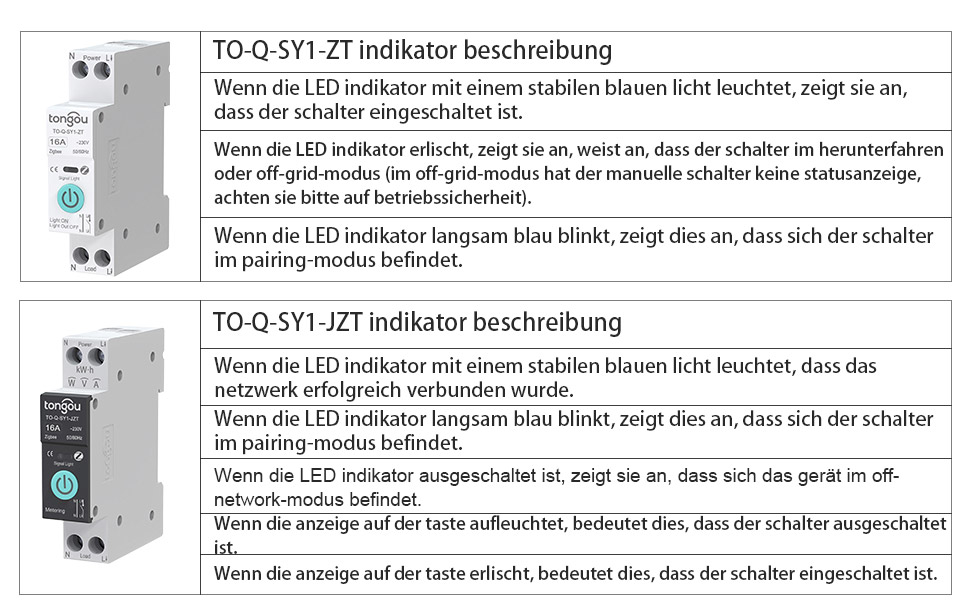
Image 2.2: Diagram illustrating the TONGOU TO-Q-SY1-ZigBee Smart Switch's connectivity and control options.
3. Ulwazi Lokuphepha
WARNING: Electrical shock hazard. Installation should only be performed by a qualified electrician.
- Always disconnect power at the circuit breaker before installing or servicing the switch.
- Ensure the switch's voltage and current ratings match your electrical system.
- Do not operate the switch with wet hands or in damp izimo.
- Gcina endaweni lapho izingane zingafinyeleleki khona.
- Do not attempt to repair or modify the device. Contact customer support for assistance.
4. Ukufakwa
The TONGOU TO-Q-SY1-ZigBee Smart Switch is designed for DIN rail mounting. Follow these steps for safe and correct installation:
- Cisha ugesi: Turn off the main power supply at your circuit breaker to prevent electrical shock.
- Ukukhweza: Securely mount the switch onto a standard 35mm DIN rail in your electrical box.
- Izintambo: Connect the live (L) and neutral (N) wires to the input terminals (Power L and Power N) of the switch. Connect the load wires to the output terminals (Load L and Load N). Ensure all connections are tight and secure. The switch supports simple push-in cable insertion and screw tightening.
- Vula: Once all wiring is complete and secure, restore power at the circuit breaker.

Isithombe 4.1: Eksample wiring diagram for the TONGOU TO-Q-SY1-ZigBee Smart Switch with a light bulb and a Tuya ZigBee hub.

Image 4.2: Dimensions of the TONGOU TO-Q-SY1-ZigBee DIN Rail Switch for installation planning.
5. Setup (App Pairing)
To enable smart features, the switch must be paired with a TUYA ZigBee 3.0 hub and the Smart Life/TUYA app.
- Landa uhlelo lokusebenza: Download the "Smart Life" or "TUYA" app from the App Store (iOS) or Google Play (Android).
- Engeza i-Hub: Open the app and add your TUYA ZigBee 3.0 hub if you haven't already.
- Faka imodi yokumatanisa: On the TONGOU Smart Switch, press and hold the button for 5 seconds until the indicator light blinks blue. This indicates pairing mode.
- Zitholele Idivayisi: In the Smart Life/TUYA app, navigate to your ZigBee hub and select "Add sub-device" or "Cinga device." The app will discover the switch.
- Qinisekisa ukumatanisa: Follow the on-screen prompts to confirm pairing. Once successfully paired, the indicator light on the switch will stop blinking and remain solid blue.
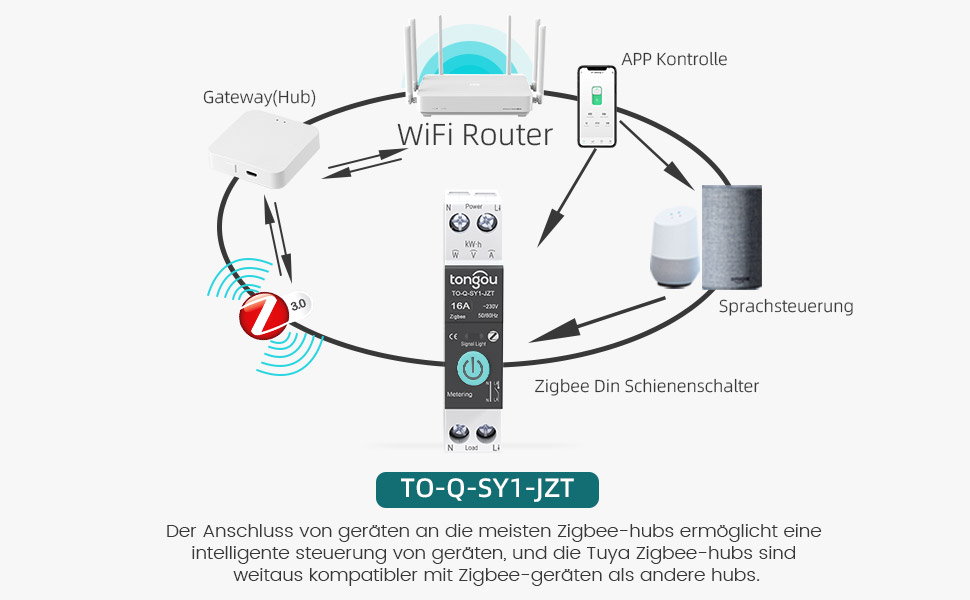
Image 5.1: Diagram showing the connection of the TONGOU TO-Q-SY1-ZigBee Smart Switch to a WiFi router via a ZigBee hub for app and voice control.
Video 5.1: This video demonstrates the pairing process of the TONGOU TO-Q-SY1-ZigBee Smart Switch with a Tuya ZigBee hub and the Smart Life app, including initial setup and basic control functions.
6. Ukusebenza
6.1. Ukulawulwa Kwezandla
The switch can be operated manually by pressing the physical button on the device. Press once to turn ON, press again to turn OFF.
6.2. APP Remote Control
After successful pairing, open the Smart Life/TUYA app. You will see the added switch. Tap the switch icon to toggle power ON/OFF. The app also provides real-time status updates.
6.3. Electricity Consumption Monitoring
Within the app, navigate to the switch's details page. Here you can view real-time data for current, voltage, and power. Historical data for energy consumption (kWh) is also available, broken down by day, month, and year.
6.4. Ukulawula Izwi
Integrate the Smart Life/TUYA app with Amazon Alexa or Google Assistant. Once linked, you can use voice commands to control your connected appliances. For example, "Alexa, turn on the living room light" or "Hey Google, turn off the fan."
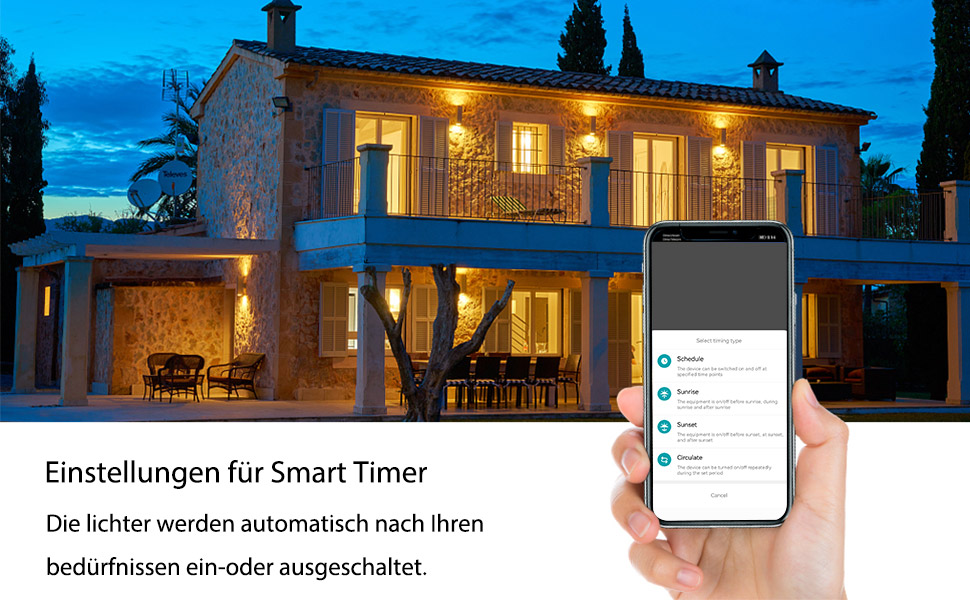
Image 6.1: Screenshot showing smart timer settings within the app, allowing users to schedule device operation.
6.5. Timing Functions
The app offers various timing options:
- Ishejuli: Set specific ON/OFF times for your devices on selected days.
- Ukubala phansi: Set a timer for the device to turn ON or OFF after a specified duration.
- Zungeza: Program the device to cycle ON and OFF repeatedly for set intervals.
7. Isondlo
- Ukuhlanza: Sula idivayisi ngobumnene ngendwangu eyomile nethambile. Ungasebenzisi amakhemikhali anamandla noma izihlanzi ezihudulayo.
- Ukuhlola Ukuxhumana: Hlola njalo ukuxhumeka kwezintambo ukuqinisekisa ukuthi kuhlala kuphephile.
- Ukuvuselelwa kwe-Firmware: Keep the Smart Life/TUYA app updated to receive the latest firmware for your switch, which may include performance improvements and new features.
8. Ukuxazulula izinkinga
- Idivayisi ayimatanisi:
- Ensure your TUYA ZigBee hub is powered on and connected to your network.
- Verify the switch is in pairing mode (blinking blue indicator light).
- Move the switch closer to the ZigBee hub.
- Reset the switch by holding the button for 10 seconds until the light turns off, then try pairing again.
- No remote control:
- Check your internet connection and the ZigBee hub's connection.
- Ensure the Smart Life/TUYA app is up to date.
- Verify the switch is still connected to the ZigBee network in the app.
- Ukulawulwa kwezwi akusebenzi:
- Confirm that your Alexa or Google Assistant device is properly linked to your Smart Life/TUYA account.
- Check if the device name in the app matches the name you are using in voice commands.
- Inaccurate energy monitoring:
- Ensure the switch is correctly wired and the load is within its rated capacity.
- Xhumana nokwesekwa kwamakhasimende uma inkinga iqhubeka.
9. Imininingwane
| Umkhiqizi | TONGOU |
| Inombolo Yemodeli | TO-Q-SY1-ZigBee |
| Okubalulekile | With measurement 25A (PA66 flame-retardant) |
| Voltage | 240 volts |
| Amandla | 6000 Watts |
| Isilinganiso samanje | 25 A |
| Shintsha Uhlobo | Single-phase, Touchpad |
| Uhlobo Lokukhweza | I-DIN Rail Mount |
| Imodi yokusebenza | KHANYISA CISHA |
| Ukuxhumana | ZigBee 3.0 (requires Tuya ZigBee Hub) |
| Izitifiketi | CE |
| Ubukhulu bephakheji | 8.5 x 7.1 x 2.2 cm; 110 amagremu |
| Izwe azalelwe kulo | China |
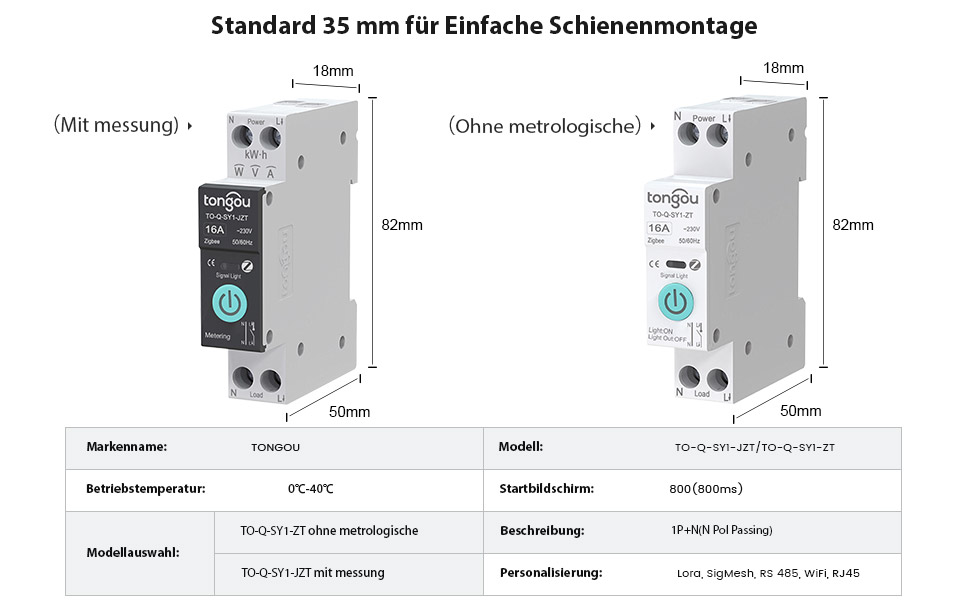
Image 9.1: Detailed product parameters for the TONGOU TO-Q-SY1-ZigBee Smart Switch.
10. Iwaranti kanye Nokusekela
This TONGOU Smart ZigBee Switch comes with a iwaranti yeminyaka emibili kusukela ngedethi yokuthenga. Lesi siqinisekiso sihlanganisa amaphutha ezintweni zokwakha kanye nokusebenza ngaphansi kokusetshenziswa okuvamile.
For technical support, warranty claims, or any questions regarding your product, please contact TONGOU customer service through your retailer or the official TONGOU website. Please have your purchase receipt and product model number (TO-Q-SY1-ZigBee) ready when contacting support.
Spare parts availability information is currently unavailable.