
1. Isingeniso
This manual provides essential information for the safe and efficient installation, operation, and maintenance of your ebm-papst K3G250-AI27-05 Axial Cabinet Fan. Please read this manual thoroughly before using the product and retain it for future reference. This fan is designed for ventilation and heat dissipation in various industrial and electronic applications.
2. Ulwazi Lokuphepha
Imiyalelo Yezokuphepha Ebalulekile:
- Nqamula ugesi njalo ngaphambi kokufaka, ukulungisa, noma ukuhlanza.
- Qinisekisa ukubeka phansi ngendlela efanele ukuze uvimbele ukushaqeka kukagesi.
- Do not operate the fan with damaged wiring or if the housing is compromised.
- Keep fingers and other objects away from rotating blades.
- Install the fan in a location with adequate ventilation and away from flammable materials.
- This product is intended for professional installation and use. If you are unsure about any aspect of installation or operation, consult a qualified electrician or technician.
- Qinisekisa ukuthi unikezwa amandla ngevolthitage and frequency match the fan's specifications (220-240VAC, 50/60Hz).
3. Okuqukethwe Kwephakheji
Verify that all items are present and undamaged upon opening the package. If any components are missing or damaged, contact your supplier immediately.
- 1 x ebm-papst K3G250-AI27-05 Axial Cabinet Fan
- 1 x Incwadi Yomsebenzisi (le dokhumenti)
4. Ukusetha nokufakwa
Proper installation is crucial for the fan's performance and longevity. Follow these steps carefully.
- Ukukhweza: Securely mount the fan to a stable surface within the cabinet or enclosure using appropriate fasteners. Ensure there is sufficient clearance for airflow on both intake and exhaust sides.
- Uxhumano lukagesi:
- Qinisekisa ukuthi ugesi unqanyuliwe ngaphambi kokwenza noma yikuphi ukuxhumana kukagesi.
- Connect the fan's power connector (SATA/Molex type) to a compatible power source.
- Qinisekisa ukuthi i-voltage (220-240VAC) and frequency (50/60Hz) of the power supply match the fan's requirements.
- Qinisekisa ukuthi zonke izixhumanisi ziqinile futhi ziphephile ukuvimbela ukuxhumana okuxekethile kanye nezingozi ezingaba khona.
- Isikhombisi-ndlela sokugeleza komoya: Observe the arrows on the fan housing, if present, to ensure correct airflow direction for your application. Typically, axial fans are designed to draw air from one side and expel it from the other.
- Ukuhlola Kokugcina: Before restoring power, double-check all connections and mounting points. Ensure no wires are obstructing the fan blades.
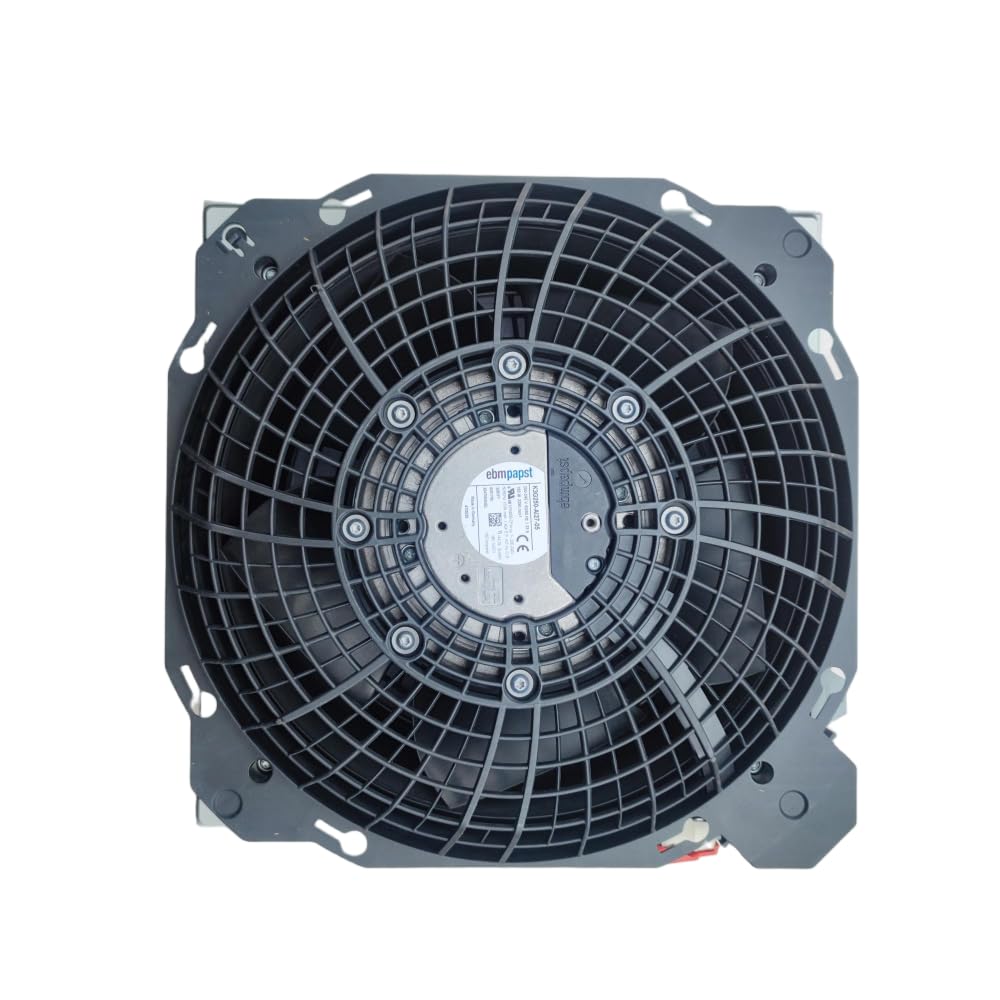
Figure 1: ebm-papst K3G250-AI27-05 Axial Cabinet Fan. This image shows the overall design of the fan, including its housing and blades, ready for installation.
5. Iziqondiso Zokusebenza
Once installed and connected, the fan operates automatically when power is supplied.
- Vula: Apply power to the circuit the fan is connected to. The fan should start rotating immediately.
- Ukuqinisekisa: Observe the fan to ensure it is rotating smoothly and quietly. Check for proper airflow in the intended direction.
- Cisha ugesi: Disconnect power from the circuit to stop the fan.
The fan is designed for continuous operation within its specified parameters. Avoid frequent power cycling if not necessary for your application.
6. Isondlo
Ukunakekelwa okuvamile kuqinisekisa ukusebenza okuphezulu futhi kwandisa ubude bempilo yefeni yakho.
- Ukuhlanza: Periodically inspect the fan blades and housing for dust and debris accumulation. Disconnect power before cleaning. Use a soft brush or compressed air to gently remove dust. Do not use liquids or abrasive cleaners.
- Ukuhlola: Regularly check for any signs of wear, such as unusual noises, vibrations, or visible damage to the blades or wiring.
- Ukuthambisa: This fan is designed with maintenance-free bearings. No additional lubrication is required.
- Izimo Zemvelo: Ensure the operating environment remains within the specified temperature and humidity ranges to prevent premature wear.
7. Ukuxazulula izinkinga
Uma uhlangabezana nezinkinga ngomlandeli wakho, bheka izinkinga ezilandelayo nezisombululo:
| Inkinga | Imbangela Engenzeka | Isixazululo |
|---|---|---|
| Umlandeli akaqali | No power supply; Incorrect wiring; Damaged fan motor | Check power connection and source; Verify wiring according to installation instructions; If motor is damaged, replace the fan. |
| Umsindo ongajwayelekile noma ukudlidliza | Loose mounting; Obstruction in fan blades; Worn bearings | Tighten mounting screws; Disconnect power and remove any obstructions; If bearings are worn, replace the fan. |
| Ukugeleza komoya okwehlisiwe | Dust accumulation on blades/grille; Obstruction in airflow path | Disconnect power and clean fan blades and grille; Remove any obstructions from the intake or exhaust. |
| Ukushisa ngokweqile | Insufficient ventilation; Fan operating outside specified parameters | Ensure adequate space for airflow; Verify operating conditions match specifications. |
Uma inkinga iqhubeka ngemva kokuzama lezi zixazululo, xhumana nokwesekwa kwamakhasimende.
8. Imininingwane
| Ipharamitha | Inani |
|---|---|
| Imodeli | K3G250-AI27-05 |
| Ibhrendi | ebm-paps |
| Uhlobo | Axial Cabinet Fan |
| Imoto | M3G055-CF |
| Okuzenzakalelayo Voltage | 220-240VAC |
| Imvamisa | 50/60Hz |
| I-Draw Yamanje | 1.33A |
| Amandla | 165W |
| Isivinini | 3290 RPM |
| I-Insulation Class | B |
| Uhlobo Lwesixhumi Samandla | I-SATA/Molex |
| Indlela Yokupholisa | Umoya |
| Okubalulekile | Ithusi |
| Izinga Lomsindo | 165 Decibel (Note: This value seems unusually high for a fan and might be a data entry error. Please refer to official ebm-papst documentation for precise noise levels.) |
| I-UPC | 761241577118 |
9. Iwaranti kanye Nokusekela
For warranty information and technical support, please contact your point of purchase or the official ebm-papst distributor in your region. Keep your purchase receipt as proof of purchase.
For further assistance, you may also refer to the official ebm-papst website for product documentation and contact details.