
Isingeniso
Thank you for choosing the ROCAM Digital Projection Alarm Clock, Model CR1024. This device combines a digital alarm clock with a 270° rotatable projection feature, FM radio, dual alarm settings, and a USB charging port. Please read this manual carefully to ensure proper use and to fully enjoy all its features.

Image: The ROCAM Digital Projection Alarm Clock displaying time, date, temperature, and humidity, positioned on a bedside table next to a cup of coffee and a notebook.
Izici Zomkhiqizo
- 270° Rotatable Projection: Project time onto your wall or ceiling with adjustable angle and focus.
- 5-Level Dimmable LED Display: Adjust the brightness of the main display to your preference.
- FM Radio & Sleep Timer: Enjoy your favorite radio stations and set a sleep timer for automatic shutdown.
- Dual Alarm with Weekend/Weekday Mode: Set two independent alarms with customizable schedules (Mon-Sun, Mon-Fri, Sat-Sun, One-Time).
- USB-C Power Input & USB-A Charging Output: Power the clock via USB-C and charge external devices like smartphones via USB-A.
- Isipele Sebhethri: Igcina izilungiselelo zesikhathi kanye ne-alamu ngesikhathi sogesitages (batteries not included).
- Isibonisi Sezinga lokushisa Nokuswakama: Shows indoor temperature (°C/°F) and humidity.
- Umsebenzi Wokukhanya Kwasebusuku: Integrated night light for soft illumination.
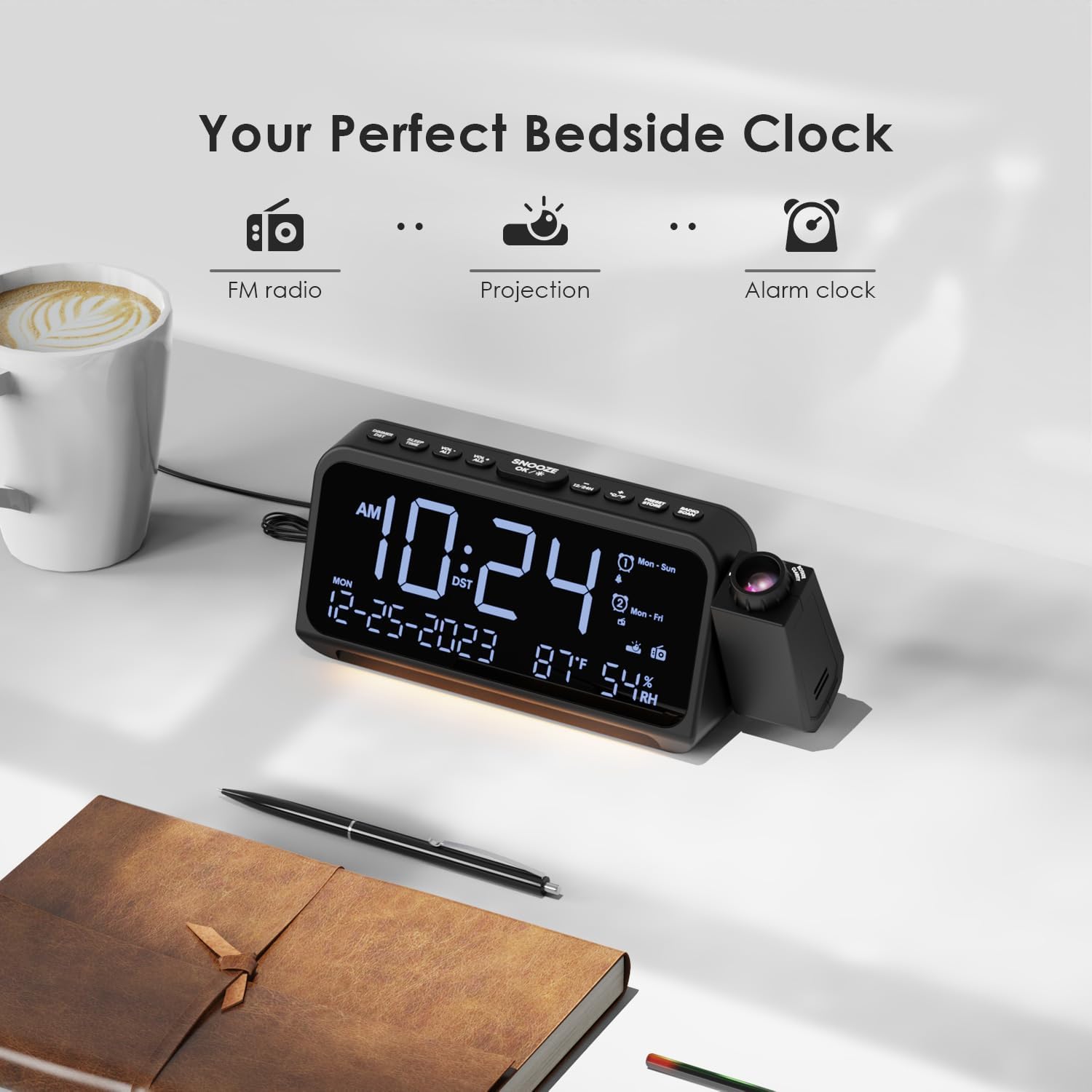
Image: Visual representation of the clock's main functions: FM radio, projection, and alarm clock.
Okuqukethwe Kwephakheji
Sicela uhlole iphakheji ngezinto ezilandelayo:
- ROCAM Digital Projection Alarm Clock (CR1024)
- Ikhebula Lamandla le-USB Type-C
- I-adaptha yamandla
- Imaniwali yosebenzisayo
Note: 1 CR2 battery is required for backup functionality and is not included in the package.

Image: The alarm clock, USB-C cable, power adapter, and user manual laid out, with product dimensions (20cm x 8.7cm x 3.81cm) and weight (240g) indicated.
Umkhiqizo Uphelileview
Izinkinobho Zephaneli Eziphezulu:
- SNOOZE/OK/*: Snooze alarm, confirm settings, or activate night light.
- VOL-/AL1: Decrease volume, set Alarm 1.
- VOL+/AL2: Increase volume, set Alarm 2.
- 12/24H: Shintsha phakathi kwefomethi yesikhathi yamahora angu-12 namahora angu-24.
- °C/°F: Switch between Celsius and Fahrenheit temperature display.
- PRESET/STORE: Save FM radio presets.
- RADIO/SCAN: Turn FM radio on/off, scan for stations.
- ISIKHATHI SESIKHATHI: Faka imodi yokusetha isikhathi.
- I-ALMU SET: Faka imodi yokusetha i-alamu.
Side Panel & Rear:
- I-Projection Lens: Iphrojekthi ithatha isikhathi endaweni ethile.
- Isondo Lokugxilisa: Ilungisa ukucaca kwesithombe esibonisiwe.
- I-Projection Rotation: Allows 270° adjustment of the projection angle.
- Inkinobho ye-DIM: Adjusts projection brightness.
- Inkinobho yamandla: Turns the projection on/off.
- Type-C Input (5V-2A): Main power connection.
- USB-A Output (5V-1A): Ukushaja izisetshenziswa zangaphandle.
- I-FM Antenna: Extend for better radio reception.
- Igumbi Lebhethri: For CR2 backup batteries.

Isithombe: Ngemininingwane view of the top control buttons and the projection unit, highlighting the dual alarm settings.

Image: The back of the alarm clock, illustrating the Type-C power input and the USB-A output port for charging other devices.
Setha
1. Ukuxhunywa kwamandla:
- Connect the provided USB Type-C cable to the Type-C input port on the back of the alarm clock.
- Plug the other end of the USB cable into the power adapter, then plug the adapter into a standard wall outlet.
- Isibonisi sizokhanya, okubonisa ukuthi iwashi livuliwe.

Image: The alarm clock is shown connected to a wall outlet via its USB-C power cable and adapter.
2. Battery Backup Installation:
- Locate the battery compartment on the bottom of the clock.
- Vula ikhava yegumbi.
- Insert 1 CR2 battery (not included) according to the polarity markings (+/-).
- Close the battery compartment cover. This battery will preserve time and alarm settings during a power outage.

Image: The bottom of the alarm clock with the battery compartment open, showing where to insert CR2 batteries.
Imiyalelo yokusebenza
1. Ukusetha Isikhathi Nosuku:
- Cindezela bese ubamba i ISIKHATHI ESIBEKILE button. The hour digits will start flashing.
- Sebenzisa I-VOL+ or I-VOL- izinkinobho zokulungisa ihora. Cindezela ISIKHATHI ESIBEKILE futhi ukuze uqinisekise.
- Phinda le nqubo imizuzu, unyaka, inyanga, kanye nosuku.
- Cindezela 12/24H to switch between 12-hour and 24-hour format.
- Cindezela ° C / ° F to switch between Celsius and Fahrenheit for temperature display.
2. Setting Alarms (Alarm 1 & Alarm 2):
- Cindezela bese ubamba i ISILUNGISELELO SE-ALMU button. The Alarm 1 icon and hour digits will flash.
- Sebenzisa I-VOL+ or I-VOL- to set the desired alarm hour. Press ISILUNGISELELO SE-ALMU ukuqinisekisa.
- Phinda imizuzu.
- Select alarm mode (Mon-Sun, Mon-Fri, Sat-Sun, One-Time) using I-VOL+ or I-VOL-. Cindezela ISILUNGISELELO SE-ALMU ukuqinisekisa.
- Choose alarm sound: buzzer or FM radio. Use I-VOL+ or I-VOL- ukukhetha. Cindezela ISILUNGISELELO SE-ALMU ukuqinisekisa.
- To set Alarm 2, briefly press ISILUNGISELELO SE-ALMU again and repeat the steps.
- To activate/deactivate an alarm, briefly press AL1 or AL2. The alarm icon will appear/disappear on the display.
Image: The clock display showing options for setting two alarms with different ringtone choices and day modes (Mon-Sun, Mon-Fri, Sat-Sun, One-Time).
3. Snuza Umsebenzi:
Uma i-alamu ikhala, cindezela inkinobho SNOOZE/OK/* button to temporarily silence it for 9 minutes. The alarm will sound again after the snooze period.
4. Display Brightness (Dimmer):
Cindezela inkinobho SNOOZE/OK/* button repeatedly to cycle through 5 levels of display brightness (L-1 to L-5) or turn the display off.

Image: The clock display showing five different brightness levels (L-1 to L-5) for the main LED screen.
5. Projection Settings:
- Vula/Vala: Cindezela inkinobho Inkinobho Yamandla on the side of the projection unit to turn the projection on or off.
- Lungisa Ukukhanya: Cindezela inkinobho I-DIM button on the side of the projection unit to cycle through 5 levels of projection brightness.
- Lungisa i-engeli: Rotate the projection unit up to 270° to direct the time onto your desired surface (wall or ceiling).
- Lungisa Ukugxila: Zungezisa i- Gxila Wheel on the projection unit to sharpen the projected image.

Image: The digital time '10:24' projected in red onto a dark wall, demonstrating the projection feature.

Image: The projection unit rotating 270 degrees, showing how the projected time can be adjusted for optimal viewing.

Image: The projected time showing five distinct brightness levels, from level 1 (dimmest) to level 5 (brightest).
6. FM Radio Operation:
- Nweba i-antenna ye-FM ukuze uthole ukwamukelwa okungcono.
- Cindezela inkinobho RADIO/SCAN button to turn the FM radio on.
- Cindezela bese ubamba RADIO/SCAN to automatically scan and save available stations.
- Sebenzisa I-VOL+ or I-VOL- to manually tune to a station or cycle through saved presets.
- Cindezela PRESET/STORE to save the current station as a preset.
- Cindezela RADIO/SCAN again to turn the FM radio off.

Image: The clock displaying an FM radio frequency (108.0 MHz) and options for a sleep timer (OFF, 15, 30, 60, 90 minutes).
7. Isikhathi Sokulala:
When the FM radio is on, press the SNOOZE/OK/* button repeatedly to set a sleep timer (15, 30, 60, 90 minutes, or OFF). The radio will automatically turn off after the selected duration.

Image: A hand pressing a button on the clock, with sleep timer options (P01, P06, P12, P15, P20) displayed, indicating timed radio playback.
8. USB Charging Output:
Connect your smartphone or other USB-powered device to the USB-A output port (5V-1A) on the back of the clock to charge it. Ensure the alarm clock is powered via its USB-C input.
Isondlo
- Ukuhlanza: Sula iwashi ngendwangu ethambile neyomile. Ungasebenzisi izihlanzi ezikhuhlayo noma izinyibilikisi.
- Ukushintshwa Kwebhethri: Uma iwashi lilahlekelwa isikhathi ngesikhathi sogesitage, replace the CR2 backup battery.
- Ukubekwa: Avoid placing the clock in direct sunlight, high temperatures, or high humidity.
Ukuxazulula inkinga
| Inkinga | Isixazululo |
|---|---|
| Isibonisi sewashi asinalutho. | Ensure the USB-C power cable is securely connected to both the clock and a working power outlet. Check if the display brightness is set to OFF. |
| I-alamu ayizwakali. | Verify that the alarm is activated (alarm icon visible). Check the alarm volume. Ensure the alarm mode (Mon-Sun, Mon-Fri, etc.) is correctly set for the current day. |
| Projection is blurry. | Zungezisa i- Gxila Wheel on the projection unit until the image is clear. Ensure the projection surface is within optimal range. |
| Ukwemukelwa kahle komsakazo we-FM. | Fully extend the FM antenna. Try repositioning the clock to improve signal. Perform an auto-scan to find stronger stations. |
| Imbobo yokushaja i-USB ayisebenzi. | Ensure the alarm clock is powered by the USB-C input. Check the charging cable and the device being charged. |
Imininingwane
- Inombolo Yemodeli: CR1024
- Ubukhulu: 20 x 3.81 x 8.7 cm (L x W x H)
- Isisindo: 240 g
- Okokufaka kwamandla: I-USB Type-C, 5V-2A
- Okokukhiphayo kwe-USB: USB Type-A, 5V-1A
- Isipele Sebhethri: 1 x CR2 battery (not included)
- Uhla Lweziqu Zamakhozi FM: 87.5 - 108 MHz
Iwaranti kanye Nokusekela
ROCAM products are designed for reliability and performance. This product comes with a standard manufacturer's warranty. For specific warranty details, please refer to the warranty card included in your package or contact ROCAM customer support.
If you encounter any issues or have questions regarding your ROCAM Digital Projection Alarm Clock, please contact our customer support team. Contact information can typically be found on our official webindawo noma emaphaketheni omkhiqizo.