
Vorago BSP-500-V2
Vorago BSP-500-V2 Bluetooth Speaker User Manual
Imodeli: BSP-500-V2
Igama Brand: Vorago
1. Umkhiqizo Uphelileview
The Vorago BSP-500-V2 is a portable Bluetooth speaker designed for robust performance and durability. It features IPX5 water resistance, making it suitable for various environments, including outdoor adventures and parties. This manual provides detailed instructions for setting up, operating, and maintaining your speaker.
Izici Eziyinhloko:
- True Wireless Stereo (TWS) Connectivity: Connect two BSP-500-V2 speakers for an immersive stereo sound experience.
- Impilo Yebhethri Enwetshiwe: Enjoy up to 7 hours of music playback at 70% volume, thanks to its 2000 mAh battery.
- Ukushaja kohlobo C lwe-USB: Convenient and modern USB-C port for charging.
- Ukuxhumana Okuhlukahlukene: Supports Bluetooth for wireless streaming and a 3.5mm auxiliary input for wired connections.
- I-IPX5 Ukumelana Namanzi: Ivikelwe kumajethi wamanzi anengcindezi ephansi ukusuka kunoma iyiphi indlela.
Okuqukethwe Kwephakheji:
- I-Vorago BSP-500-V2 Bluetooth Isipikha
- Ikhebula lokushaja le-USB Type-C
- Ikhebula Lomsindo elingu-3.5mm
- Incwadi Yomsebenzisi (le dokhumenti)
Umdwebo Womkhiqizo:

Umfanekiso 1.1: Ngaphambili view of the Vorago BSP-500-V2 Bluetooth speaker, showcasing its mesh grille and central Vorago logo.

Umfanekiso 1.2: I-engeli view of the speaker, highlighting its robust, rectangular design and integrated carrying strap.

Umfanekiso 1.3: Phezulu view showing the control panel with power, volume down, play/pause, and volume up buttons.
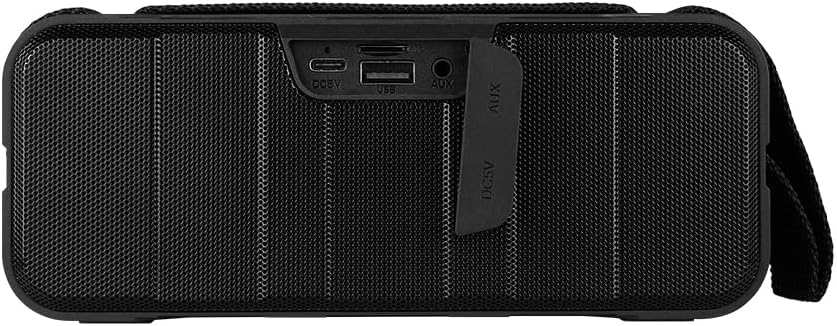
Umfanekiso 1.4: Ngemuva view of the speaker, showing the protective flap covering the input ports.

Figure 1.5: Close-up of the input ports, including DC 5V (USB-C), USB-A, and AUX (3.5mm) inputs, protected by a rubber cover.
2. Ulwazi Lokuphepha
- Do not expose the speaker to extreme temperatures (hot or cold).
- Gwema ukuwisa noma ukubeka isikhulumi kuthonya elinamandla.
- Keep the speaker away from direct sunlight and heat sources.
- Do not disassemble, repair, or modify the speaker yourself. This will void the warranty.
- Ensure the port cover is securely closed when using the speaker near water to maintain IPX5 water resistance.
- Do not immerse the speaker in water. IPX5 rating protects against splashes and light rain, not submersion.
- Sebenzisa kuphela ikhebula lokushaja elinikeziwe noma ikhebula le-USB Type-C eliqinisekisiwe ukuze ushaje.
- Hlanza isipikha ngendwangu ethambile, eyomile. Ungasebenzisi izinto zokuhlanza abrasive noma izincibilikisi.
3. Setha
3.1 Ukushaja uSomlomo
- Open the protective rubber cover on the rear of the speaker to access the charging port.
- Connect the USB Type-C end of the charging cable to the speaker's DC 5V port.
- Xhuma olunye uhlangothi lwekhebula le-USB ku-adaptha yamandla ye-USB (engafakiwe) noma imbobo ye-USB yekhompyutha.
- Isibani senkomba yokushaja sizokhanyisa ngesikhathi sokushaja futhi sicishe lapho sishajwe ngokugcwele.
- Once charging is complete, securely close the protective rubber cover to maintain water resistance.
3.2 Ukuvula / Ukuvula
- Ukuvula: Cindezela bese ubamba i Inkinobho yamandla on the top panel for approximately 3 seconds until you hear an audible prompt.
- Ukucisha: Cindezela bese ubamba i Inkinobho yamandla for approximately 3 seconds until you hear an audible prompt.
3.3 Ukumatanisa kwe-Bluetooth
- Qinisekisa ukuthi isipikha sivuliwe. Sizongena ngokuzenzakalelayo kumodi yokubhanqa ye-Bluetooth, ekhonjiswa yisibani se-LED esikhanyayo.
- Edivayisini yakho (i-smartphone, ithebhulethi, ikhompuyutha ephathekayo), vula i-Bluetooth bese usesha amadivaysi atholakalayo.
- Select "BSP-500-V2" from the list of found devices.
- Uma isihlanganiswe ngempumelelo, isipikha sizokhipha isiqinisekiso esizwakalayo, futhi isibani se-LED sizoyeka ukukhanya futhi sihlale siqinile.
- Isipikha sizoxhuma kabusha ngokuzenzakalelayo kudivayisi yokugcina ebhangqiwe uma ivuliwe, uma idivayisi ingaphakathi kwebanga futhi i-Bluetooth ivuliwe.
3.4 Ukubhanqa kwe-True Wireless Stereo (TWS).
TWS allows you to connect two BSP-500-V2 speakers together for a true stereo sound experience.
- Ensure both BSP-500-V2 speakers are powered on and not connected to any other Bluetooth device.
- Kwesinye sezipikha (lesi kuzoba yisikhulumi esiyinhloko), cindezela kabili Inkinobho Dlala/Misa kancane. The speaker will enter TWS pairing mode.
- The two speakers will automatically search for and connect to each other. You will hear an audible confirmation once they are successfully paired.
- Once TWS is established, connect your device to the primary speaker via Bluetooth as described in Section 3.3.
- To disconnect TWS, double-press the Inkinobho Dlala/Misa kancane kuzipikha zombili.
3.5 Auxiliary (AUX) Connection
For devices without Bluetooth, you can use the 3.5mm audio cable.
- Open the protective rubber cover on the rear of the speaker.
- Connect one end of the 3.5mm audio cable to the speaker's AUX port.
- Xhuma enye ingxenye yekhebula kujeke ophumayo womsindo wedivayisi yakho.
- Isipika sizoshintshela kumodi ye-AUX ngokuzenzakalelayo.
- Once disconnected, securely close the protective rubber cover.
4. Iziqondiso Zokusebenza
4.1 Imisebenzi Yezinkinobho:
| Inkinobho | Umsebenzi (Ukucindezela iDemo) | Umsebenzi (Cindezela isikhathi eside) |
|---|---|---|
| Inkinobho yamandla | N/A | Vula/Vala |
| Inkinobho Yevolumu Phansi | Yehlisa Ivolumu | Ithrekhi Edlule |
| Inkinobho Dlala/Misa kancane | Dlala/Misa kancane Umculo, Phendula/Phelisa ucingo | Reject Call, Double-press for TWS Pairing |
| Inkinobho yevolumu ephezulu | Nyusa Ivolumu | Ithrekhi Elandelayo |
5. Isondlo
- Ukuhlanza: Use a soft, dry, lint-free cloth to clean the speaker's surface. For stubborn dirt, slightly dampfaka indwangu ngamanzi. Ungasebenzisi amakhemikhali anamandla, izinyibilikisi zokuhlanza, noma insipho enamandla.
- Ukunakekela Ukumelana Namanzi: Always ensure the rubber port cover on the back of the speaker is fully and securely sealed when using the speaker outdoors or near water. This maintains its IPX5 water resistance. After exposure to water, wipe the speaker dry before opening the port cover for charging or auxiliary connections.
- Isitoreji: When not in use for extended periods, store the speaker in a cool, dry place, away from direct sunlight and extreme temperatures. It is recommended to charge the speaker fully before storing and to recharge it every few months to maintain battery health.
- Ukunakekelwa kwebhethri: To prolong battery life, avoid fully discharging the battery frequently. Charge the speaker when the low battery indicator is active.
6. Ukuxazulula izinkinga
| Inkinga | Imbangela Engenzeka | Isixazululo |
|---|---|---|
| Isipikha asikhanyisi. | Ibhethri eliphansi. | Charge the speaker fully using the provided USB Type-C cable. |
| Ayikwazi ukubhanqa nge-Bluetooth. | Speaker is not in pairing mode; Device's Bluetooth is off; Speaker is already connected to another device; Device is too far from speaker. | Ensure speaker is powered on and flashing (pairing mode). Turn on Bluetooth on your device. Disconnect from other devices. Move device closer to speaker (within 10 meters). |
| Awukho umsindo noma ivolumu ephansi. | Volume too low on speaker or device; Incorrect input mode; Speaker not connected. | Increase volume on both speaker and connected device. Ensure correct mode (Bluetooth or AUX) is active. Verify successful Bluetooth pairing or AUX cable connection. |
| Ukuhlanekezelwa komsindo. | Volume too high; Device too far from speaker; Interference. | Reduce volume on speaker and/or device. Move device closer to speaker. Avoid obstacles between speaker and device. |
| Ukumatanisa kwe-TWS kwehlulekile. | Speakers are already paired to a device; Speakers are too far apart. | Ensure both speakers are disconnected from any Bluetooth devices. Place speakers close to each other during TWS pairing. |
7. Imininingwane
| Isici | Imininingwane |
|---|---|
| Igama Lemodeli | I-BSP-500-V2 |
| Uhlobo lwesipika | Multimedia |
| Isici Esikhethekile | I-Bluetooth |
| Ukusetshenziswa Okunconyiwe | Kwabadlali bomculo |
| Amadivayisi Ahambisanayo | Ikhompyutha Ephathwayo, Isidlali se-MP3, I-Smartphone, Ithebhulethi |
| Uhlobo lwesilawuli | Inkinobho |
| Ukucushwa Kwesiteshi Somsindo Esizungezile | 5.0 |
| Impilo Yebhethri | Amahora angu-7 |
| Izingxenye Zihlanganisiwe | Somlomo |
| Ubukhulu bomkhiqizo | 5D x 15W x 18H amasentimitha |
| Isisindo Somkhiqizo | 1 Ikhilogremu |
| Ingangeni manzi | Yebo (IPX5) |
| Amandla ebhethri | 2000 mAh |
| AmpUhlobo lwe-lifier | Iyasebenza |
| Umthombo wamandla | Ibhethri |
| Impendulo Yemvamisa | 180 Hz |
| Ubuchwepheshe bokuxhumana | I-Bluetooth |
| Imodi Yokukhipha Umsindo | Isitiriyo |
| Uhlobo Lokukhweza | I-Tabletop Mount |
8. Iwaranti kanye Nokusekela
The Vorago BSP-500-V2 Bluetooth Speaker comes with a limited warranty. Please refer to the warranty card included with your product for specific terms and conditions, or visit the official Vorago webisayithi ukuze uthole imininingwane eyengeziwe.
For technical support, troubleshooting assistance, or warranty claims, please contact Vorago customer service through their official channels. You can find more information and contact details on the Vorago Brand Store on Amazon noma isikhulu sabo webindawo.
Sicela ugcine ubufakazi bakho bokuthenga ngezinjongo zewaranti.
Ask a question about this manual
Ask about setup, troubleshooting, compatibility, parts, safety, or missing instructions. Manuals+ will review the question and use this page’s manual context to help answer it.