
1. Isingeniso
This manual provides detailed instructions for the proper use and maintenance of your Arlec Remote SS3136. This remote control is specifically designed to operate the Arlec Wall Fan AWDC001HA, offering convenient and effortless control over your fan's functions. Please read this manual thoroughly before first use to ensure optimal performance and longevity of your device.
2. Izici zomkhiqizo
- Ukulawula Okulula: Utilizes Infrared technology for seamless communication with your Arlec Wall Fan AWDC001HA from up to 10 meters away.
- Amandla Ahlala Isikhathi Eside: Requires 3 alkaline batteries for extended use.
- Idizayini Eshelelekile: Finished in a sophisticated black color.
- Ukuhambisana Okuhlukahlukene: Designed to control Arlec Wall Fans, specifically model AWDC001HA.
- Ukusebenza Okulula: Features 3 intuitive buttons for easy fan control.
3. Okuqukethwe Kwephakheji
Qinisekisa ukuthi zonke izinto zikhona kuphakheji:
- 1 x Arlec Remote SS3136
- 1 x Wall Mount Holder
- 2 x Izikulufa zokukhweza
- 2 x Amapulangwe e-Wall
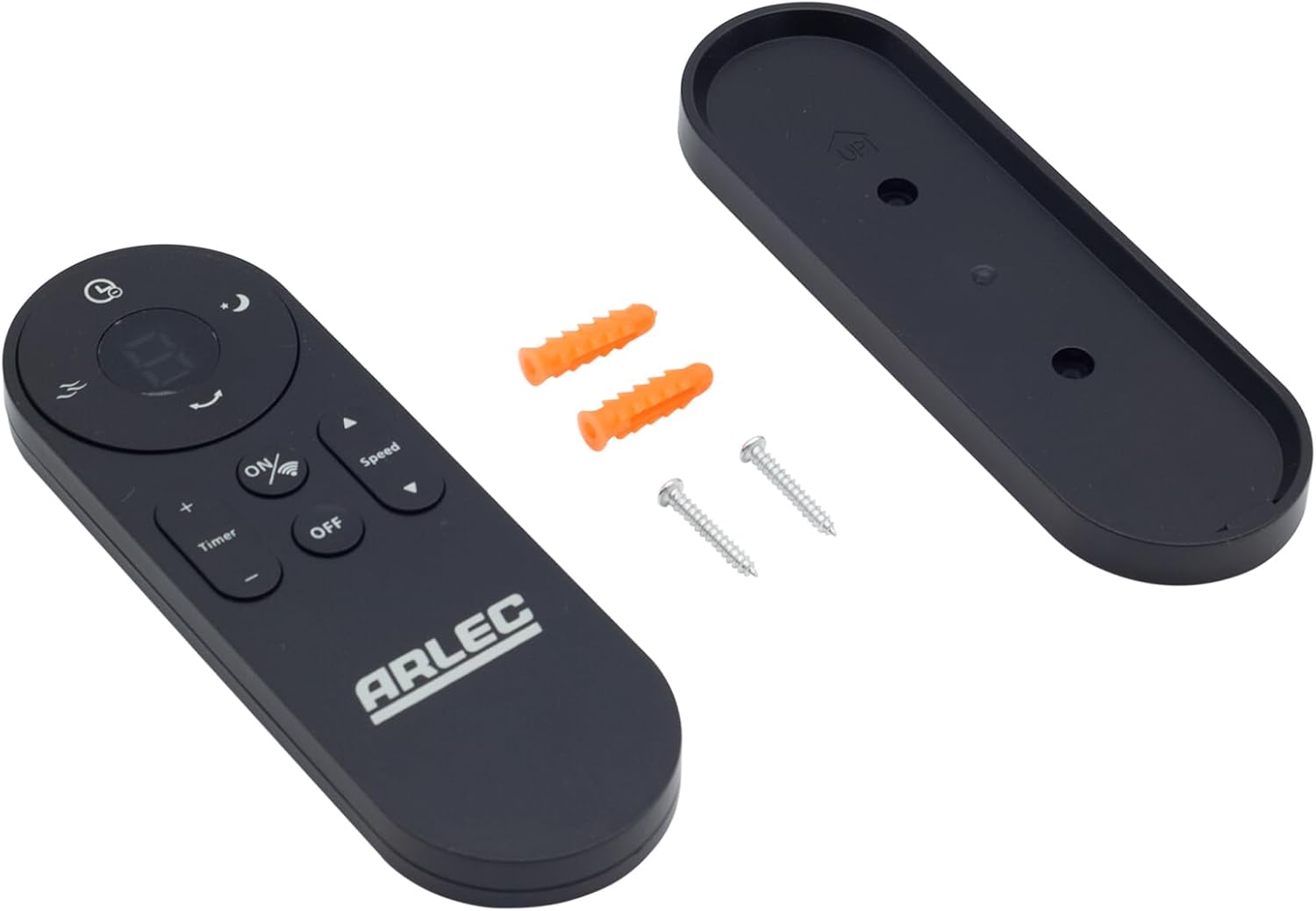
Image: Arlec Remote SS3136 shown with its included wall mount holder, two mounting screws, and two wall plugs, indicating the complete package contents.
4. Setha
4.1 Ukufakwa kwebhethri
- Thola indawo yebhethri ngemuva kwesilawuli kude.
- Vula ikhava yengxenye yebhethri.
- Insert 3 Alkaline batteries (not included) into the compartment, ensuring the correct polarity (+ and -) as indicated inside the compartment. The remote requires 3 Volts (DC).
- Vala ikhava yengxenye yebhethri ngokuphephile.
4.2 Wall Mount Installation (Optional)
- Choose a suitable location on a wall for the remote holder.
- Mark the positions for the two mounting screws using the holder as a template.
- Drill pilot holes at the marked positions. Insert the wall plugs if drilling into drywall or masonry.
- Secure the wall mount holder to the wall using the provided screws.
- Place the remote control into the installed holder for convenient storage.
5. Iziqondiso Zokusebenza
The Arlec Remote SS3136 features a simple 3-button layout for controlling your Arlec Wall Fan AWDC001HA. Ensure there is a clear line of sight between the remote and the fan's infrared receiver for optimal performance.

Isithombe: Eduze view of the Arlec Remote SS3136, highlighting its three main control buttons: ON/OFF, Speed, and Timer.
- VULA/VULA Inkinobho: Cindezela le nkinobho ukuze uvule noma uvale ifeni.
- Inkinobho Yesivinini: Use this button to cycle through the available fan speed settings (e.g., Low, Medium, High).
- Inkinobho Yesibali sikhathi: Press this button to set or adjust the fan's timer function. Refer to your Arlec Wall Fan AWDC001HA manual for specific timer intervals.
The remote operates using Infrared (IR) technology. Point the remote directly towards the fan's IR receiver. The effective operating range is up to 10 meters (approximately 33 feet).
6. Isondlo
- Ukuhlanza: Sula isilawuli kude ngendwangu ethambile neyomile. Ungasebenzisi izihlanzi ezikhuhlayo noma izinyibilikisi.
- Ukushintshwa Kwebhethri: Replace batteries when the remote's performance degrades or it stops responding. Always replace all 3 batteries at the same time with new alkaline batteries.
- Isitoreji: Uma i-remote ingeke isetshenziswe isikhathi eside, susa amabhethri ukuze uvimbele ukuvuza. Gcina endaweni epholile, eyomile.
7. Ukuxazulula izinkinga
| Inkinga | Imbangela Engenzeka | Isixazululo |
|---|---|---|
| Remote not responding to fan. |
|
|
| Izinkinobho ziyanamathela noma aziphenduli. | Ukungcola noma imfucumfucu ngaphansi kwezinkinobho. | Clean the remote surface with a soft, dry cloth. Avoid liquids. |
8. Imininingwane
| Isibaluli | Imininingwane |
|---|---|
| Imodeli | SS3136 |
| Umkhiqizi | Arlec |
| Amadivayisi Ahambisanayo | Arlec Wall Fan AWDC001HA |
| Ubuchwepheshe bokuxhumana | I-infrared (IR) |
| Inombolo yezinkinobho | 3 |
| Uhlobo lwesilawuli | Inkinobho Yokulawula |
| Uhlobo Lwebhethri | Alkaline (3 required) |
| Voltage | 3 Volts (DC) |
| Ibanga Lokusebenza | Kufika kumamitha angu-10 |
9. Iwaranti kanye Nokusekela
For warranty information and technical support, please refer to the documentation provided with your Arlec Wall Fan AWDC001HA or contact Arlec customer service directly. Keep your purchase receipt as proof of purchase.
Ukuze uthole usizo olwengeziwe, sicela uvakashele isikhulu somkhiqizi webisayithi noma uxhumane nolayini wabo wosekelo lwamakhasimende.