
1. Ngaphezuluview
The TOMASHI Portable AM/FM Radio Model 6107 is a compact and lightweight device designed for convenient audio listening. It features a digital display, a built-in speaker, and a headphone jack for personal use. This manual provides essential information for setting up, operating, and maintaining your radio.
- Idizayini Ehlangene: Small and lightweight, ideal for portability.
- Enhanced Reception: Equipped with a DSP chip for improved signal clarity.
- Okukhipha Umsindo: Features a loud speaker and a 3.5mm headphone jack.
- Iziteshi ezimisiwe: Allows saving up to 5 favorite radio stations for quick access.
- Isebenza Ibhethri: Isebenza ngamabhethri angu-2 AAA (awafakiwe).

Ngaphambili view of the TOMASHI Portable AM/FM Radio, highlighting the digital display and controls.
2. Setha
2.1 Ukufakwa kwebhethri
- Thola ikhava yengxenye yebhethri ngemuva komsakazo.
- Shelelezisa ikhava ivuleke.
- Faka amabhethri amabili (2) e-AAA, uqinisekise ukuthi i-polarity (+ kanye ne--) ilungile njengoba kuboniswe ngaphakathi kwegumbi.
- Vala ikhava yengxenye yebhethri ngokuphephile.
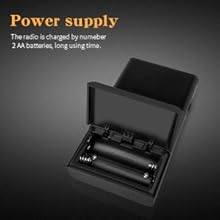
Illustration of the battery compartment for AAA battery installation.
2.2 Ukulungiswa Kwe-Antenna
- Ngokufanelekile Ukwamukelwa kwe-FM, fully extend the telescopic antenna.
- Ngoba Ukwamukelwa kwe-AM, the radio uses an internal antenna. Rotating the radio may improve signal strength.
3. Iziqondiso Zokusebenza
3.1 Vula/Vala amandla
Shelelezisa i- ON/OFF iswishi located on the side of the radio to power it on or off.
3.2 Ukukhethwa kwebhendi
Cindezela inkinobho FM or AM button on the front panel to switch between the FM and AM frequency bands.
3.3 Ukushuna
- Ukulungisa mathupha: Sebenzisa i- Shuna + or Shuna - buttons to adjust the frequency incrementally.
- Automatic Scan (ATS): Cindezela bese ubamba i I-ATS button. The radio will automatically scan for and save available stations to the preset memory slots (P01, P02, etc.).

Okuningiliziwe view of the radio's control panel, including ATS, band selection, and tuning buttons.
3.4 Preset Stations (M1-M5)
- Ilondoloza Okusethiwe: Tune to your desired station. Press and hold one of the preset buttons (M1, M2, M3, M4, or M5) until the display confirms the station is saved (e.g., "P01").
- Ukukhumbula ukusethwa kusengaphambili: Briefly press one of the preset buttons (M1-M5) to quickly switch to a saved station.
3.5 Ukulawula ivolumu
Lungisa izinga lokukhipha umsindo usebenzisa i- ukudayela ivolumu itholakala ohlangothini lomsakazo.
3.6 Ukusetshenziswa Kwezindlebe
Insert standard 3.5mm headphones into the i-headphone jack on the top of the radio for private listening. The internal speaker will automatically mute when headphones are connected.

The radio features a 3.5mm headphone jack for personal audio enjoyment.
4. Isondlo
- Ukuhlanza: Wipe the radio's exterior with a soft, dry cloth. Do not use liquid cleaners, aerosols, or abrasive solvents.
- Ukunakekelwa kwebhethri: Remove batteries if the radio will not be used for an extended period to prevent potential battery leakage and damage. Replace batteries promptly when the low battery indicator appears.
- Isitoreji: Store the radio in a cool, dry environment, away from direct sunlight, high temperatures, and humidity.
5. Ukuxazulula izinkinga
| Inkinga | Imbangela Engenzeka | Isixazululo |
|---|---|---|
| Irediyo ayivuli | Batteries incorrectly inserted or depleted | Check battery polarity; replace with fresh AAA batteries. |
| Ukwamukela umsakazo okungekuhle | Antenna not extended (FM) or radio orientation (AM) | Fully extend FM antenna. Rotate radio for better AM signal. Move away from interference sources. |
| Awukho umsindo ovela kusipika/kuma-headphone | Volume too low or headphones not fully inserted | Increase volume. Ensure headphones are securely plugged in. |
| Cannot save preset stations | Preset button not held long enough | Press and hold the desired preset button until the display confirms saving. |
6. Imininingwane
| Isici | Imininingwane |
|---|---|
| Ubukhulu bomkhiqizo | 2.2"Ububanzi x 0.79"Ububanzi x 3.9"Ububanzi (5.59 cm Ububanzi x 2.01 cm Ububanzi x 9.91 cm Ububanzi) |
| Isisindo sento | 2.78 ama-ounces (78.8 amagremu) |
| I-FM Band | 64/87 - 108 MHz |
| Iqembu le-AM | 520/522 - 1710 KHz |
| Umthombo wamandla | 2 x AAA amabhethri (awafakiwe) |
| I-headphone Jack | 3.5 mm |
| Isici Esikhethekile | Iyaphatheka |
| I-Tuner Technology | AM/FM |
| Inombolo Yemodeli | 6107 |
7. Iwaranti kanye Nokusekela
For detailed warranty information, product registration, or technical support, please refer to the documentation included with your purchase or visit the official TOMASHI webindawo. Gcina irisidi lakho lokuthenga njengobufakazi bokuthenga izimangalo zewaranti.