
1. Isingeniso
Thank you for choosing BUGANI Open Ear Headphones, Model MH22109. These headphones are designed to provide a comfortable, open-ear listening experience with advanced Bluetooth 5.3 technology, immersive stereo sound, and clear call functionality. This manual will guide you through the setup, operation, and maintenance of your new headphones.
2. Ulwazi Lokuphepha
- Do not expose the headphones or charging case to extreme temperatures, direct sunlight, or fire.
- Gwema ukusebenzisa ama-headphone ngamavolumu aphezulu kakhulu isikhathi eside ukuze uvimbele ukulimala kokuzwa.
- Keep the device away from water and liquids, although it is IPX5 rated for sweat and light splashes, it is not designed for submersion.
- Ungazami ukuqaqa noma ukuguqula idivayisi. Lokhu kuzosusa iwaranti.
- Sebenzisa kuphela ikhebula lokushaja elinikeziwe noma ikhebula le-Type-C eliqinisekisiwe ukuze ushaje.
- Be aware of your surroundings when using open-ear headphones, especially in traffic or hazardous environments.
3. Okuqukethwe Kwephakheji
The BUGANI Open Ear Headphones package includes the following items:
- BUGANI Open Ear Headphones (Left and Right)
- Ikesi lokushaja
- USB Type-C Charging Cable (not explicitly listed but standard)
- Incwadi Yomsebenzisi (le dokhumenti)

Image: The BUGANI Open Ear Headphones and their transparent charging case.
4. Umkhiqizo Uphelileview
The BUGANI Open Ear Headphones feature a unique design that rests gently on your ears without entering the ear canal, providing comfort and situational awareness. The charging case protects the earbuds and provides extended battery life.

Image: A woman wearing the BUGANI Open Ear Headphones, illustrating the open-ear design and comfortable fit.

Image: A man relaxing and listening to music with the headphones, highlighting the immersive stereo sound.
5. Setha
5.1 Ukushaja Omakhanda Nekesi
Ngaphambi kokusebenzisa okokuqala, shaja ama-headphone ngokugcwele kanye nebhokisi lokushaja.
- Faka ama-earbud ekesini lokushaja. Qinisekisa ukuthi zihlezi kahle.
- Connect the Type-C charging cable to the charging port on the case and plug the other end into a USB power adapter (not included) or a computer's USB port.
- The LED indicator on the charging case will show the charging status. A full charge for the case typically takes 1-2 hours.
- The earbuds provide up to 6 hours of playtime on a single charge, and the charging case extends total playtime to approximately 30 hours.

Image: The charging case with earbuds, displaying the battery level, next to a smartphone playing music, illustrating the 30-hour playtime.
5.2 Ukumatanisa kwe-Bluetooth
The headphones feature one-step auto-pairing for convenience.
- Vula ikesi lokushaja. Ama-earbud azovula ngokuzenzakalelayo futhi angene kumodi yokumatanisa.
- Kudivayisi yakho (i-smartphone, ithebhulethi, ikhompuyutha), vula i-Bluetooth.
- Cinga available Bluetooth devices and select "BUGANI OpenFit" from the list.
- Once connected, you will hear an audible confirmation, and the device will show "Connected".
- Ama-headphone azophinde axhumeke ngokuzenzakalela kudivayisi yokugcina ebhanqiwe lapho ekhishwa kukesi, uma i-Bluetooth inikwe amandla kudivayisi.

Image: A smartphone screen displaying the Bluetooth settings, with "BUGANI OpenFit" listed as a connected device, demonstrating the one-step auto-pairing process.
6. Iziqondiso Zokusebenza
6.1 Ukugqoka Izindlebe
The open-ear design ensures a secure and comfortable fit without blocking your ear canal.
- Khomba ama-earbud angakwesokunxele (L) kanye Nesokudla (R).
- Gently hook the earbud over your ear, ensuring the speaker portion is positioned near your ear canal without entering it.
- Adjust for a snug and comfortable fit.
6.2 I-Smart Touch Controls
The headphones feature touch-sensitive areas for controlling various functions:
| Isenzo | I-Earbud | Umsebenzi |
|---|---|---|
| Thepha x1 | R/L | Play/Pause Music, Answer Call |
| Thepha x2 | R | Ivolumu phezulu |
| Thepha x2 | L | Ivolumu Phansi |
| Thepha x3 | R | Ithrekhi Elandelayo |
| Thepha x3 | L | Ithrekhi Edlule |
| Cindezela bese Ubamba (2s) | R/L | Qeda Ucingo, Yenqaba Ucingo |
| Cindezela bese Ubamba (2s) | L | Vula Umsizi Wezwi |
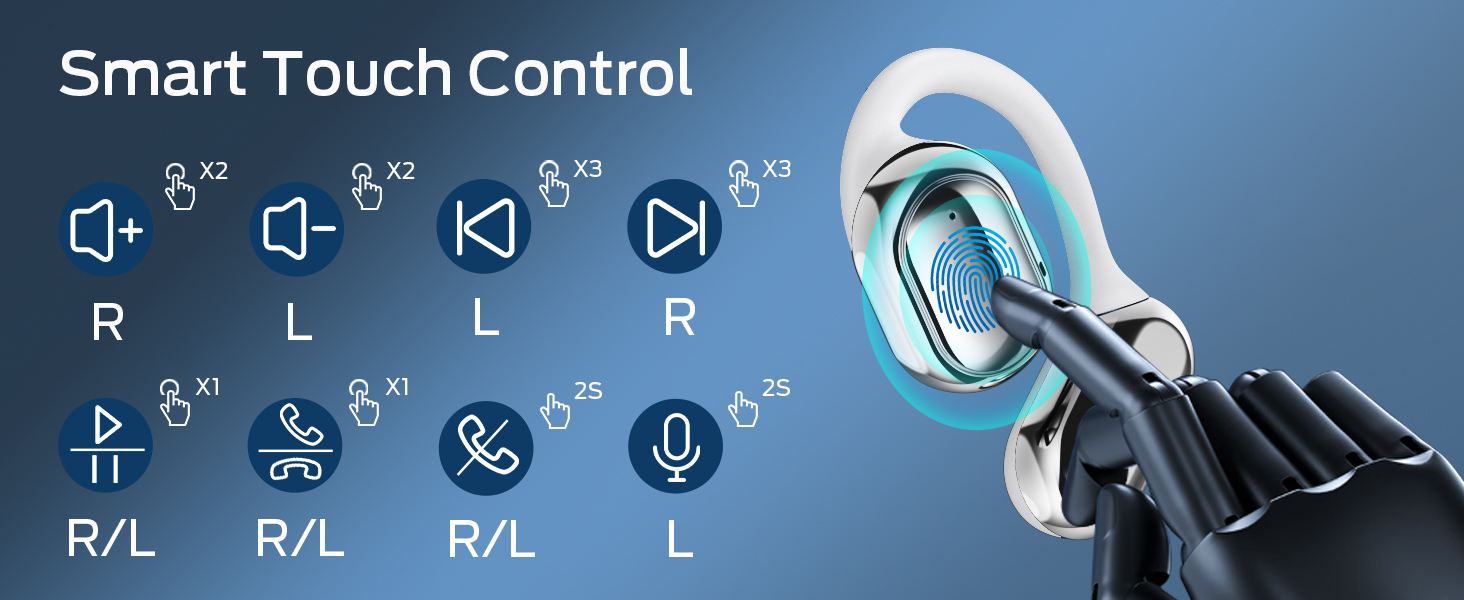
Image: A visual guide to the smart touch controls on the BUGANI Open Ear Headphones, detailing single, double, triple taps, and long presses for various functions.
6.3 Ukushaya nokwamukela izingcingo
The built-in dual microphones with environmental noise reduction technology ensure clear calls.
- Phendula Ucingo: Thepha noma iyiphi i-earbud kanye.
- Qeda ikholi: Cindezela futhi ubambe noma iyiphi i-earbud imizuzwana emi-2.
- Yenqaba Ucingo: Cindezela futhi ubambe noma iyiphi i-earbud imizuzwana emi-2.

Image: A man using the BUGANI Open Ear Headphones to make a phone call, emphasizing the clear call feature.
7. Isondlo
7.1 Ukuhlanza
- Sula ama-earbud nekesi lokushaja ngendwangu ethambile, eyomile, engena-lint.
- Ungasebenzisi izinto zokuhlanza abrasive, utshwala, noma izincibilikisi zamakhemikhali.
- Qinisekisa ukuthi oxhumana nabo bokushaja bahlanzekile futhi bomile.
7.2 Isitoreji
- Gcina ama-headphone esikhwameni sawo sokushaja uma engasetshenziswa ukuwavikela futhi uwagcine eshajiwe.
- Gcina endaweni epholile, eyomile, kude namazinga okushisa aphezulu.
7.3 Ukumelana Namanzi (IPX5)
The headphones are rated IPX5, meaning they are protected against low-pressure water jets from any direction. This makes them suitable for sports and running, protecting against sweat and light rain. They are not designed for swimming or submersion in water.
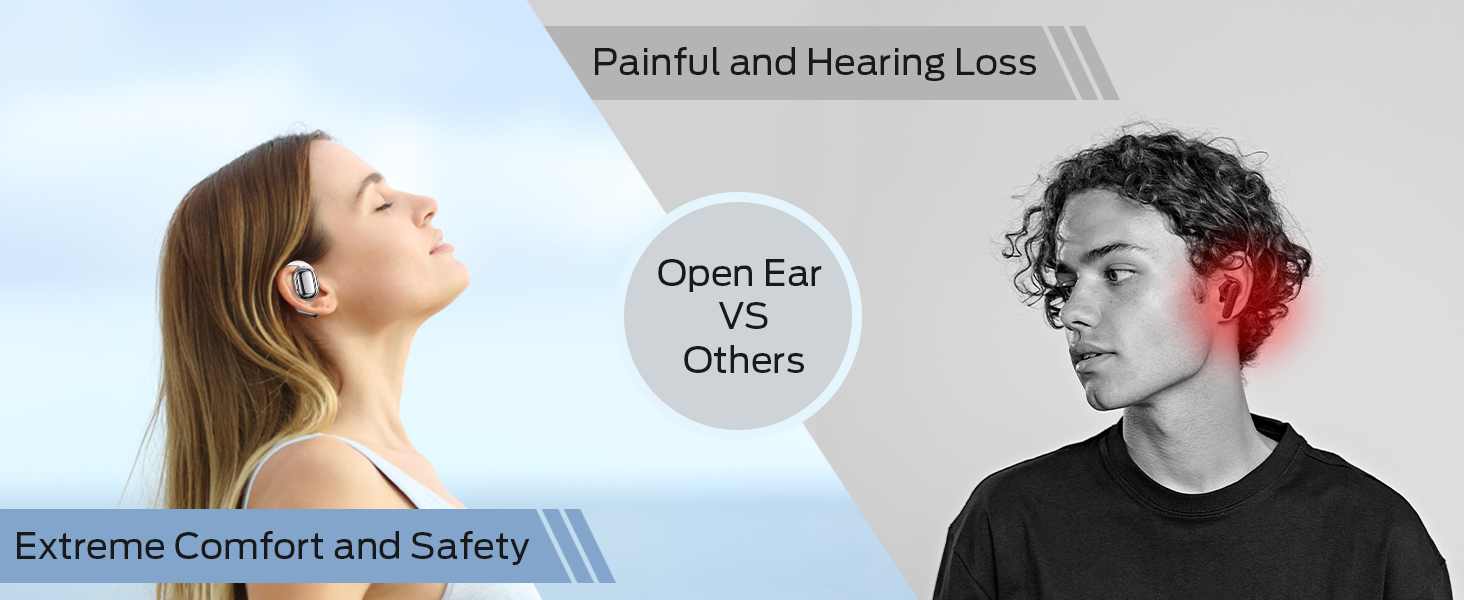
Image: A man running with water splashing on him, demonstrating the IPX5 waterproof feature of the headphones, suitable for active use.
8. Ukuxazulula izinkinga
If you encounter issues with your BUGANI Open Ear Headphones, please refer to the following common solutions:
- Awukho Umsindo: Ensure the headphones are charged, paired correctly, and the volume on both the headphones and your device is turned up.
- Izinkinga zokumatanisa: Turn off Bluetooth on your device, then turn it back on. Place the earbuds back in the case, close it, then open it again to re-enter pairing mode. Try pairing again.
- Ukuxhumana Kwesikhashana: Ensure you are within the Bluetooth range (up to 10 meters) and there are no significant obstacles between the headphones and your device. Avoid strong electromagnetic interference.
- Ama-Earbud Awashaji: Check that the charging cable is securely connected and the charging contacts on the earbuds and case are clean. Ensure the charging case itself has power.
- I-Earbud eyodwa ayisebenzi: Try placing both earbuds back in the case, closing it, and then taking them out again to reset the connection. If the issue persists, try re-pairing.
9. Imininingwane
| Isici | Ukucaciswa |
|---|---|
| Igama Lemodeli | BUGANI OpenFit |
| Inombolo Yemodeli | I-MH22109 |
| Ubuchwepheshe bokuxhumana | Okungenantambo (Bluetooth) |
| Inguqulo ye-Bluetooth | 5.3 |
| I-Bluetooth Range | 10 Amamitha |
| Ukubekwa Kwendlebe | Vula Indlebe |
| Usayizi Womshayeli | 16mm (Dual Large Driver) |
| Impilo Yebhethri (Ukushaja Okukodwa) | Kufika emahoreni angu-6 |
| Isikhathi sokudlala esiphelele (nekesi lokushaja) | Kufika emahoreni angu-30 |
| Imbobo yokushaja | Uhlobo C |
| Isilinganiso Sokumelana Namanzi | IPX5 |
| Imakrofoni | Built-in Dual Microphones with Environmental Noise Reduction |
| Amadivayisi Ahambisanayo | Bluetooth-enabled devices (smartphones, computers, TVs) |
| Okubalulekile | Ipulasitiki |
| Isisindo sento | 6.4 amakhilogremu |
10. Iwaranti kanye Nokusekela
BUGANI products are designed for reliability and performance. For warranty information, please refer to the warranty card included with your purchase or visit the official BUGANI website. If you require technical support or have questions not covered in this manual, please contact BUGANI customer service through their official channels.
You can often find support contact information on the BUGANI brand store page: BUGANI Store on Amazon