
Isingeniso
This manual provides instructions for the setup, operation, and maintenance of your OttLite Wake Up Light with White Noise Sound Machine. This device combines a sunrise simulation alarm clock, a white noise sound machine, and a versatile color-changing light to enhance your daily routine.
Ulwazi Lokuphepha
- Funda yonke imiyalelo ngaphambi kokusebenzisa.
- Lo mkhiqizo uklanyelwe ukusetshenziswa endlini kuphela.
- Sebenzisa kuphela i-adaptha yamandla enikeziwe.
- Ungalibeki ucingo emanzini noma emswakameni ngokweqile.
- Gcina endaweni lapho izingane zingafinyeleleki khona.
- Ungazami ukuqaqa noma ukulungisa iyunithi ngokwakho. Xhumana nabasebenzi benkonzo abafanelekayo.
Okuqukethwe Kwephakheji
- OttLite Wake Up Light with White Noise Sound Machine
- Ikhebula le-USB Power
- Imaniwali yosebenzisayo
Umkhiqizo Uphelileview
Familiarize yourself with the components of your OttLite Wake Up Light.

Isithombe: Ngaphambili view of the OttLite Wake Up Light, displaying the time and connected to a USB charging pad.

Isithombe: Side view of the OttLite Wake Up Light, showing the various control buttons and the USB port.
Key Controls:
- Isibonisi Sesikhathi: Isibonisi sewashi ledijithali.
- Iphaneli yokukhanya: Provides white and color-changing illumination.
- Izinkinobho Zokulawula: Located on the side for setting time, alarms, light modes, and sounds.
- I-Port yokushaja ye-USB: Ukushaja izisetshenziswa zangaphandle.
Setha
- Khipha: Susa ngokucophelela zonke izingxenye ephaketheni.
- Ukuxhuma kwamandla: Connect the provided USB power cable to the device and plug the adapter into a standard wall outlet. The device will power on and the time display will activate.
- Ukubekwa: Place the Wake Up Light on a stable, flat surface, such as a bedside table, ensuring it is within reach of a power outlet.
Imiyalelo yokusebenza
1. Ukubeka i-Clock
- Press the 'Time Set' button (often indicated by a clock icon).
- Sebenzisa izinkinobho '+' kanye '-' ukuze ulungise ihora nomzuzu.
- Press 'Time Set' again to confirm each setting.
- Toggle between 12-hour and 24-hour format using the dedicated button or by cycling through time settings.
2. Wake-Up Light & Alarm Function
The sunrise simulation gradually increases light intensity before your set alarm time.

Image: A user interacting with the Wake Up Light as it emits a warm, sunrise-like glow.
- Setha i-alamu: Press the 'Alarm Set' button (bell icon). Use '+' and '-' to set the desired wake-up time.
- Ukulingisa ukuphuma kwelanga: The light will begin to brighten 30 minutes before the set alarm time, gradually increasing to full brightness.
- Wake-Up Sounds: Choose from 7 pre-set sounds (nature sounds, FM radio, traditional alarm) by pressing the 'Sound' button. Adjust volume with '+' and '-'.
- Umsebenzi wokusnuza: Press the 'Snooze' button (often a large button on top or front) to temporarily pause the alarm for a few minutes.
3. Sleep Aid & Sunset Simulation
Utilize the white noise and sunset simulation for a calming environment.
- Umsindo Omhlophe: Activate the white noise sound machine by pressing the 'White Noise' button. Adjust volume as needed.
- Ukulingisa Ukushona kwelanga: Set the light to gradually dim over 15, 30, or 60 minutes. Refer to the specific button for 'Sunset' or 'Sleep Timer' and cycle through options.
4. Imisebenzi Yokukhanyisa
The device offers various lighting options for ambiance and utility.
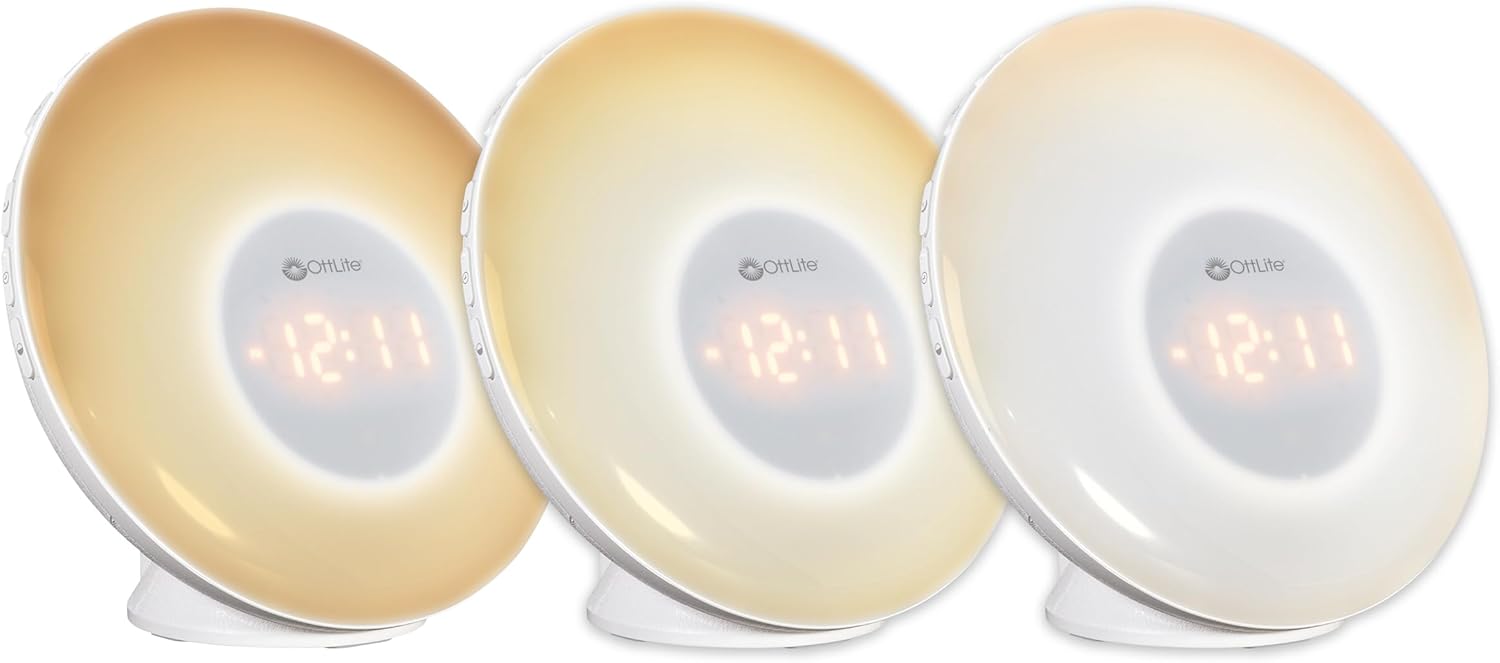
Image: Three units demonstrating the adjustable white light temperatures.

Image: Multiple units showcasing the range of color-changing options.
- Ukukhanya Okumhlophe: Press the 'Light' button to activate soft white light. Adjust brightness using '+' and '-' buttons (three brightness levels available).
- Ukushintsha Umbala: Press the 'RGB' button to cycle through a spectrum of colors.
- Fixed Color: While in color-changing mode, press the 'RGB' button again to pause on your desired color.
5. Imbobo yokushaja i-USB
A convenient USB port is integrated for charging your devices.

Image: A smartphone being charged via the USB port on the Wake Up Light.
- Locate the USB port (5V, 1A output) on the side or back of the unit.
- Connect your device's USB charging cable to this port.
- Ensure the Wake Up Light is powered on for the USB port to function.
Isondlo
- Ukuhlanza: Disconnect the power before cleaning. Wipe the device with a soft, dry cloth. Do not use abrasive cleaners or solvents.
- Isitoreji: Uma ingasetshenziswa isikhathi eside, gcina idivayisi endaweni epholile, neyomile kude nelanga eliqondile.
Ukuxazulula inkinga
| Inkinga | Imbangela Engenzeka | Isixazululo |
|---|---|---|
| Idivayisi ayivuli. | Power cable not connected properly or power outlet is not active. | Ensure the power cable is securely connected to the device and the wall outlet. Test the outlet with another device. |
| Alarm does not sound or light does not activate. | I-alamu ayisethiwe noma ivolumu iphansi kakhulu. | Verify alarm settings and ensure the alarm is activated. Increase alarm volume. |
| High-pitched buzzing sound when light is on. | Potential internal component noise at certain brightness levels. | Try adjusting the brightness level. If the issue persists and is disruptive, contact customer support. |
| Difficulty setting the alarm or other functions. | Unfamiliarity with button layout or sequence. | Refer to the 'Operating Instructions' section carefully. Practice setting functions when not under time pressure. |
| Imbobo yokushaja i-USB ayisebenzi. | Device not powered on or cable issue. | Ensure the Wake Up Light is powered on. Try a different USB cable or device to rule out cable/device issues. |
Imininingwane
| Isici | Imininingwane |
|---|---|
| Inombolo Yemodeli | WU300Z-SHPR |
| Ubukhulu bomkhiqizo | 4"D x 6.75"W x 6.7"H |
| Isisindo sento | 1.23 amakhilogremu |
| Umthombo wamandla | I-Corded Electric (120 Volts AC) |
| Uhlobo Lomthombo Wokukhanya | I-LED |
| Izici ezikhethekile | Color Changing, Dimmable, Sunrise Simulation, Sunset Simulation, White Noise, USB Charging Port |
| Okukhiphayo kwe-USB | 5v, 1a |
| Okubalulekile | Ipulasitiki |
| Ukusetshenziswa Kwangaphakathi/Kwangaphandle | Ukusetshenziswa kwangaphakathi kuphela |
Iwaranti kanye Nokusekela
OttLite products are designed for quality and durability. For warranty information or technical support, please refer to the warranty card included with your purchase or visit the official OttLite webindawo. Gcina irisidi yakho yokuthenga ukuze uthole izimangalo zewaranti.
Ukuze uthole usizo olwengeziwe, sicela uxhumane nesevisi yamakhasimende ye-OttLite.