
Isingeniso
This manual provides essential information for the safe and effective operation, maintenance, and troubleshooting of your DEWALT DCD794 20V Cordless 1/2" Drill Driver. The DCD794 is a compact and lightweight tool designed for drilling and fastening applications, delivering up to 1,650 RPMs with a 1/2" ratcheting chuck and an integrated LED work light.

Isithombe: Ngaphambili view of the DEWALT DCD794 20V Cordless 1/2" Drill Driver.
Ulwazi Olujwayelekile Lokuphepha
Always observe basic safety precautions to reduce the risk of fire, electric shock, and personal injury. Keep your work area clean and well-lit. Do not operate power tools in explosive atmospheres, such as in the presence of flammable liquids, gases, or dust. Keep children and bystanders away while operating a power tool. Wear appropriate personal protective equipment, including eye protection, hearing protection, and gloves. Ensure the tool is switched off before making any adjustments, changing accessories, or storing it.
Umkhiqizo Uphelileview
The DEWALT DCD794 Drill Driver is engineered for performance and durability. Key features include:
- 1/2" Ratcheting Chuck: Provides high bit retention for secure accessory gripping.
- 2-Speed Transmission: Allows for versatile drilling and fastening applications.
- 15 Izilungiselelo ze-Clutch: Offers precise control for various torque requirements.
- Isibani Somsebenzi We-LED: Ikhanyisa indawo yokusebenza ukuze ibonakale ngcono.
- I-Compact and Lightweight Design: Enhances user comfort and maneuverability.
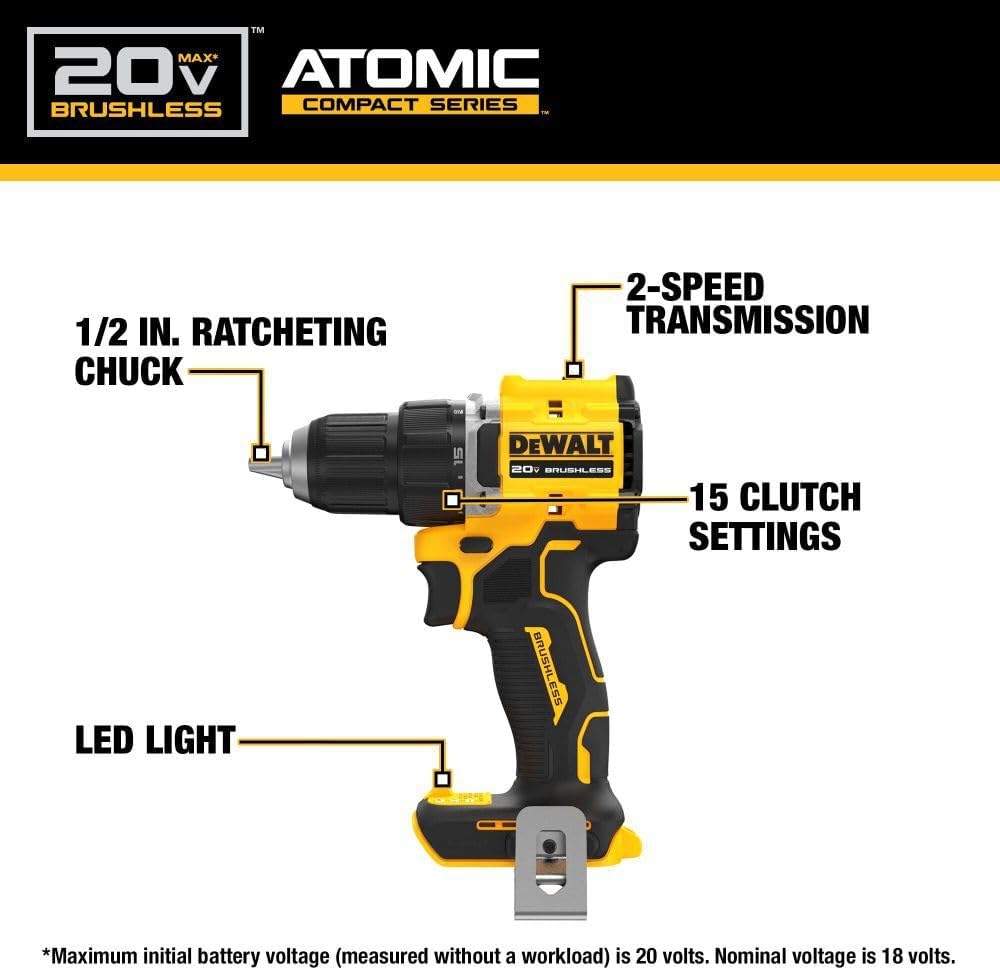
Image: Diagram highlighting the 1/2 inch ratcheting chuck, 2-speed transmission, 15 clutch settings, and LED light on the DEWALT DCD794 Drill Driver.
Setha
Ukufakwa kwebhethri nokususwa
- To install the battery, align the battery pack with the rails inside the tool's handle. Slide the pack firmly into the tool until it locks into place.
- To remove the battery, press the release button on the battery pack and pull the pack out of the handle.

Image: The DEWALT DCD794 Drill Driver with a 20V battery pack attached to the base.
Ukufakwa kancane kanye nokususwa
- To install a drill bit or driver accessory, grasp the rear half of the chuck and rotate the front half counter-clockwise until the chuck jaws open wide enough to accept the accessory.
- Insert the accessory fully into the chuck.
- Grasp the rear half of the chuck and rotate the front half clockwise until the accessory is firmly clamped.
- Ukuze ususe, hlehlisa inqubo.
Imiyalelo yokusebenza
Ukukhetha Isivinini
The drill driver features a 2-speed transmission for optimal performance across different applications. Use the speed selector switch located on top of the tool:
- Isikhundla 1 (Ijubane Eliphansi): For high torque applications, such as driving screws or drilling large diameter holes.
- Isikhundla 2 (Isivinini esikhulu): For faster drilling with smaller bits.

Image: The DEWALT DCD794 Drill Driver being used to drill into wood, illustrating its 2-speed transmission capability.
Izilungiselelo ze-Clutch
The adjustable clutch ring allows you to select the appropriate torque setting for your task. Rotate the ring to align the desired number with the indicator mark. Lower numbers are for driving small screws or into soft materials, while higher numbers are for driving larger screws or into harder materials. The drill symbol setting provides maximum torque for drilling applications.
Trigger Switch and LED Light
The variable speed trigger switch controls the tool's speed. Press the trigger to start the tool and vary the pressure to adjust the speed. The integrated LED work light activates when the trigger is pressed, illuminating the work surface. The light remains on for a short period after the trigger is released.
Isondlo
Ukunakekelwa okuvamile kuqinisekisa ukusebenza kahle futhi kwelula impilo yethuluzi lakho.
- Ukuhlanza: Sebenzisa okuthambile, damp cloth to clean the exterior of the tool. Do not use harsh chemicals or abrasive cleaners. Keep the ventilation slots clear of dust and debris.
- I-Chuck Maintenance: Periodically clean the chuck jaws to ensure proper gripping.
- Ukunakekelwa kwebhethri: Gcina amabhethri endaweni epholile, eyomile ekude nelanga eliqondile. Ungawagcini amabhethri esesimweni sokushajwa isikhathi eside.
- Ukuhlola: Regularly inspect the tool for any damaged parts, loose screws, or worn components. Have any damaged parts repaired by a qualified service technician.
Ukuxazulula inkinga
| Inkinga | Imbangela Engenzeka | Isixazululo |
|---|---|---|
| Ithuluzi aliqali | Ibhethri alishajiwe noma alifakiwe ngendlela efanele | Charge battery fully; ensure battery is securely inserted. |
| Ukuphelelwa amandla ngesikhathi sokusebenza | Ishaja yebhethri iphansi | Shaja kabusha ibhethri. |
| I-Bit ingena ku-chuck | Chuck not tightened sufficiently or jaws are dirty | Tighten chuck firmly; clean chuck jaws. |
| Ukudlidliza okweqile | Bent drill bit or accessory | Replace with a straight, undamaged accessory. |
Imininingwane
| Isici | Ukucaciswa |
|---|---|
| Ibhrendi | I-DEWALT |
| Inombolo Yemodeli | DCD794B-NBX |
| Umthombo wamandla | Ibhethri lisebenza (20 Volts) |
| Isivinini esikhulu sokuzungeza | 1650 RPM |
| Ubukhulu be-Chuck Size | 0.5 amayintshi |
| I-Torque enkulu | 1.5 Newton Amamitha |
| Amandla Aphezulu | 300 Watts |
| Uhlobo Lwezinto | Ipulasitiki |
| Ubukhulu bento (L x W x H) | 6"L x 3"W x 8"H |
| Isisindo sento | 2.54 Amakhilogremu |
Ulwazi Lwewaranti
DEWALT provides a limited warranty for its products. For specific details regarding the warranty period, coverage, and terms for your DCD794 Drill Driver, please refer to the warranty card included with your purchase or visit the official DEWALT webindawo. Gcina ubufakazi bakho bokuthenga ngezimangalo zewaranti.
Ukusekela
Ukuze uthole usizo olwengeziwe, ukwesekwa kobuchwepheshe, noma ukuthola izikhungo zesevisi ezigunyaziwe, sicela uvakashele i-DEWALT esemthethweni webnoma uxhumane nesevisi yabo yamakhasimende. Ungathola ulwazi olwengeziwe kanye nezinsiza ku- Isitolo se-DEWALT ku-Amazon or the main DEWALT corporate webindawo.