
Isingeniso
This manual provides detailed instructions for the installation, operation, and maintenance of the Supermicro PDB-PT826-S8824 Power Distributor Board (PDB). This PDB is specifically designed with shorter 24-pin and 8-pin cables for use with Supermicro SC826 series chassis, ensuring optimal cable management and power distribution within compatible server systems.
Please read this manual thoroughly before proceeding with installation to ensure proper setup and to prevent damage to the component or system.
Ulwazi Lokuphepha
WARNING: Always disconnect the system from the power source before installing or removing any components to prevent electric shock or damage to the system.
- Ensure proper grounding to avoid electrostatic discharge (ESD) which can damage sensitive electronic components. Use an anti-static wrist strap.
- Handle the PDB by its edges to avoid touching components directly.
- Verify that the power supply unit (PSU) is compatible with the PDB and the chassis.
- Do not force connectors. Ensure correct orientation before applying pressure.
Ukusetha nokufaka
1. Ukuqaqa kanye Nokuhlola
Carefully remove the PDB from its packaging. Inspect the board for any visible signs of damage, such as bent pins, cracked components, or loose connections. If any damage is found, do not proceed with installation and contact your vendor.
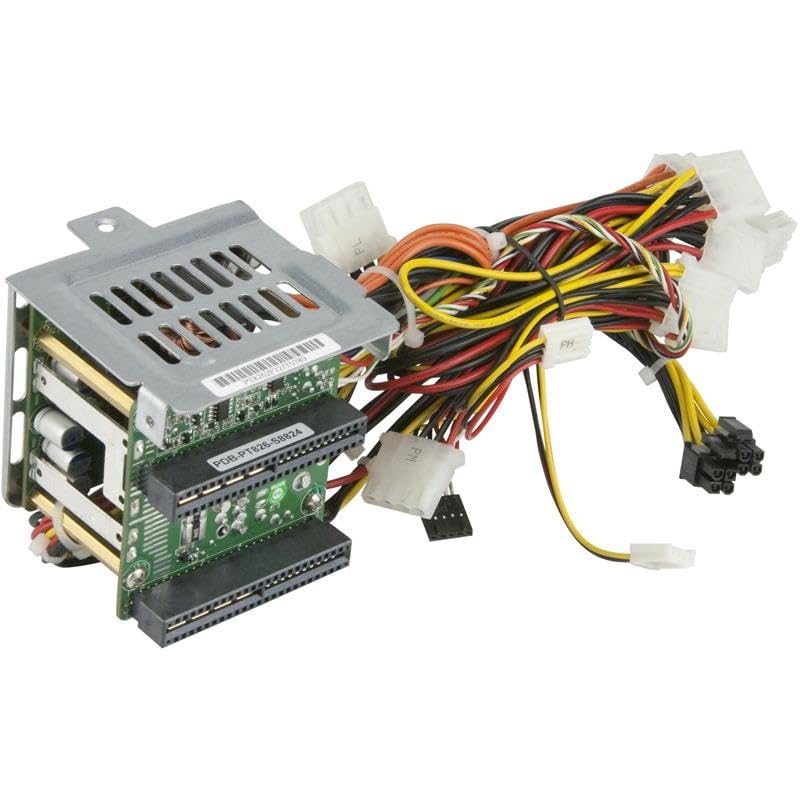
Figure 1: Supermicro PDB-PT826-S8824 Power Distributor Board. This image shows the PDB with its various connectors, including the 24-pin and 8-pin power connectors, designed for internal power distribution within a server chassis.
2. Ukuhlonza Izingxenye
The PDB-PT826-S8824 includes:
- Main PDB unit
- Shorter 24-pin ATX power cable (for motherboard)
- Shorter 8-pin EPS12V power cable (for CPU)
- Additional power connectors for drives and other peripherals (e.g., SATA, Molex)
3. Izinyathelo Zokufaka
- Lungiselela i-Chassis: Ensure the Supermicro SC826 series chassis is open and accessible. Identify the designated mounting area for the PDB.
- Mount the PDB: Carefully align the PDB with the standoffs and screw holes in the chassis. Secure the PDB using the appropriate screws provided with your chassis. Do not overtighten.
- Xhuma Iyunithi Yokunikezela Ngamandla (PSU): Connect the main power cables from your compatible Supermicro power supply unit(s) to the input connectors on the PDB. Ensure a firm connection.
- Xhuma Amandla e-Motherboard: Attach the shorter 24-pin ATX power cable from the PDB to the 24-pin connector on your motherboard. Then, connect the shorter 8-pin EPS12V power cable from the PDB to the 8-pin CPU power connector on your motherboard.
- Xhuma Amapheripherals: Connect any necessary SATA, Molex, or other peripheral power cables from the PDB to your hard drives, SSDs, optical drives, or other components.
- Ukuphathwa Kwekhebula: Utilize the shorter cable lengths of this PDB to optimize cable routing within the SC826 chassis, improving airflow and system aesthetics.
- Ukuhlola Kokugcina: Double-check all connections to ensure they are secure and correctly oriented.
Ukusebenza kohlelo
Once the PDB and all other system components are correctly installed and connected, you can proceed to power on your server system. The PDB acts as an intermediary for power distribution, ensuring stable and efficient power delivery from the PSU to the motherboard and other components.
- Ensure the power supply unit is switched on.
- Initiate system startup via the chassis power button.
- Monitor system POST (Power-On Self-Test) for any error messages related to power.
Isondlo
The Supermicro PDB-PT826-S8824 is a passive component and requires minimal maintenance. Regular inspection and cleaning are recommended to ensure optimal performance and longevity.
- Ukususa Uthuli: Periodically open the server chassis and use compressed air to gently remove dust accumulation from the PDB and surrounding components. Dust can impede heat dissipation and lead to component failure.
- Ukuhlola Ukuxhumana: During dust removal, visually inspect all power connections to ensure they remain firmly seated. Loose connections can cause intermittent power issues or system instability.
- Ukulawulwa Kwemvelo: Operate the server in a clean, temperature-controlled environment to minimize dust and prevent overheating.
Ukuxazulula inkinga
If you encounter issues after installing the PDB, consider the following troubleshooting steps:
| Inkinga | Imbangela Engenzeka | Isixazululo |
|---|---|---|
| Isistimu ayivuli amandla | Loose power connections, incompatible PSU, faulty PSU, PDB not seated correctly. | Verify all 24-pin, 8-pin, and PSU input connections are secure. Test PSU independently if possible. Re-seat the PDB. Ensure PSU is compatible. |
| Intermittent power or system crashes | Loose connections, insufficient power from PSU, PDB fault. | Check all power connections. Ensure PSU wattage is sufficient for all components. If issues persist, test with a known good PDB or PSU. |
| Peripheral devices (drives) not receiving power | Loose peripheral power cables, faulty device. | Ensure SATA/Molex power cables are firmly connected to both the PDB and the device. Test the device with a different power cable or in another system. |
If troubleshooting steps do not resolve the issue, contact Supermicro technical support for further assistance.
Imininingwane
Key specifications for the Supermicro PDB-PT826-S8824 PDB:
- Inombolo Yemodeli: PDB-PT826-S8824
- Ibhrendi: I-Supermicro
- I-Form Factor: ATX
- System Bus Connector Type: 24 Pin + 8 Pin (shorter cables)
- Connector Type Used on Cable: ATX
- Ubuningi bokufaka Umqtage: 240 Volts (AC)
- Indlela Yokupholisa: Air (passive component)
- Compatible Devices/Chassis:
- SSG-6027R-E1CR12L, SSG-6027R-E1CR12N, SSG-6028R-E1CR12H, SSG-6028R-E1CR12L, SSG-6028R-E1CR12N, SSG-6028R-E1CR12T, SYS-6027R-CDNRT+, SYS-6028R-TDWNR, SYS-6029P-WTRT
- CSE-826BA-R1K28WB, CSE-826BA-R920UB, CSE-826BA-R920WB, CSE-826BAC4-R1K23WB, CSE-826BAC4-R920WB, CSE-826BE1C-R920WB, CSE-826BE2C-R920WB, CSE-826BE16-R1K28WB, CSE-826BE16-R920UB, CSE-826BE16-R920WB, CSE-826BE26-R1K28WB, CSE-826BE26-R920UB, CSE-826BE26-R920WB
Iwaranti kanye Nokusekela
For information regarding the warranty period and terms for your Supermicro PDB-PT826-S8824, please refer to the warranty documentation provided with your purchase or visit the official Supermicro webindawo.
If you require technical assistance, have questions about installation, or need to report a defective product, please contact Supermicro customer support directly. Have your product model number (PDB-PT826-S8824) and purchase information ready when contacting support.
You can typically find support contact information on the official Supermicro webindawo: www.supermicro.com/support