
1. Isingeniso
This manual provides detailed instructions for the installation, operation, and maintenance of the EVURU Digital Single Phase Energy Meter. This device is designed to measure active energy (kWh), voltage, current, and power consumption in single-phase AC circuits. Please read this manual thoroughly before installation and use to ensure safe and correct operation.
2. Ulwazi Lokuphepha
- Ukufaka nokunakekela kufanele kwenziwe kuphela izisebenzi eziqeqeshiwe.
- Ensure the power supply is disconnected before any installation or wiring work.
- Do not operate the meter in environments with excessive moisture, dust, or corrosive gases.
- Verify all connections are secure and correct according to the wiring diagrams to prevent damage to the meter or electrical system.
- The meter is designed for indoor use only.
3. Umkhiqizo Uphelileview kanye Izici
The EVURU Digital Single Phase Energy Meter is a compact device for DIN rail installation, offering precise measurement of electrical parameters. Key features include:
- LCD display with backlight for clear readings.
- Measures total Energy (kWh), temporary Energy (kWh), real Voltage (V), real Current (A), and real Power (W).
- Pulse LED indicator for active energy measurement.
- 35mm DIN rail mounting.
- Temporary kWh can be reset to zero. Total kWh is non-resettable.

Umdwebo 1: Ngaphezuluview of DDS662, DDS667, and DDS668 models.

Figure 2: Feature comparison table for DDS662, DDS667, and DDS668 models.
4. Imininingwane
| Ipharamitha | Inani |
|---|---|
| Ubuningi Bamanje | 80A |
| I-Pulse Frequency | 1000imp / kWh |
| Okuzenzakalelayo Voltage | 220V AC |
| Ukufakwa | Isitimela se-35mm DIN |
| Uhlobo lokubonisa | I-LCD ene-Backlight |
| Amapharamitha alinganisiwe | Total kWh, Temporary kWh, Voltage, Yamanje, Amandla |
| Temporary kWh Reset | Yes (hold button for 6 seconds) |
| Total kWh Reset | Cha |
| Wiring Modes | Upper input lower output, Lower input upper output |
| Isisindo sento | Ama-ounces angu-0.035 (cishe igremu eli-1) |
5. Ukufakwa (Ukusethwa)
5.1 Ubukhulu
Before installation, ensure adequate space for the meter. The dimensions are suitable for standard DIN rail enclosures.

Figure 3: Meter dimensions (example shown for DDS668).
5.2 I-DIN Rail Mounting
The meter is designed for 35mm DIN rail installation. Simply clip the meter onto the DIN rail in your electrical panel.
5.3 Imidwebo Yezintambo
Ensure all power is OFF before proceeding with wiring. Connect the meter according to the appropriate diagram for your model and desired wiring mode.
5.3.1 DDS662 Wiring
The DDS662 model typically uses a direct connection for single-phase two-wire systems.

Figure 4: Wiring diagram for DDS662 model.
5.3.2 DDS667 Wiring
The DDS667 model can be integrated with circuit breakers for protection.

Figure 5: Wiring diagram for DDS667 model, showing integration with circuit breakers.
5.3.3 DDS668 Wiring Modes
The DDS668 model supports two wiring configurations: upper input/lower output and lower input/upper output.
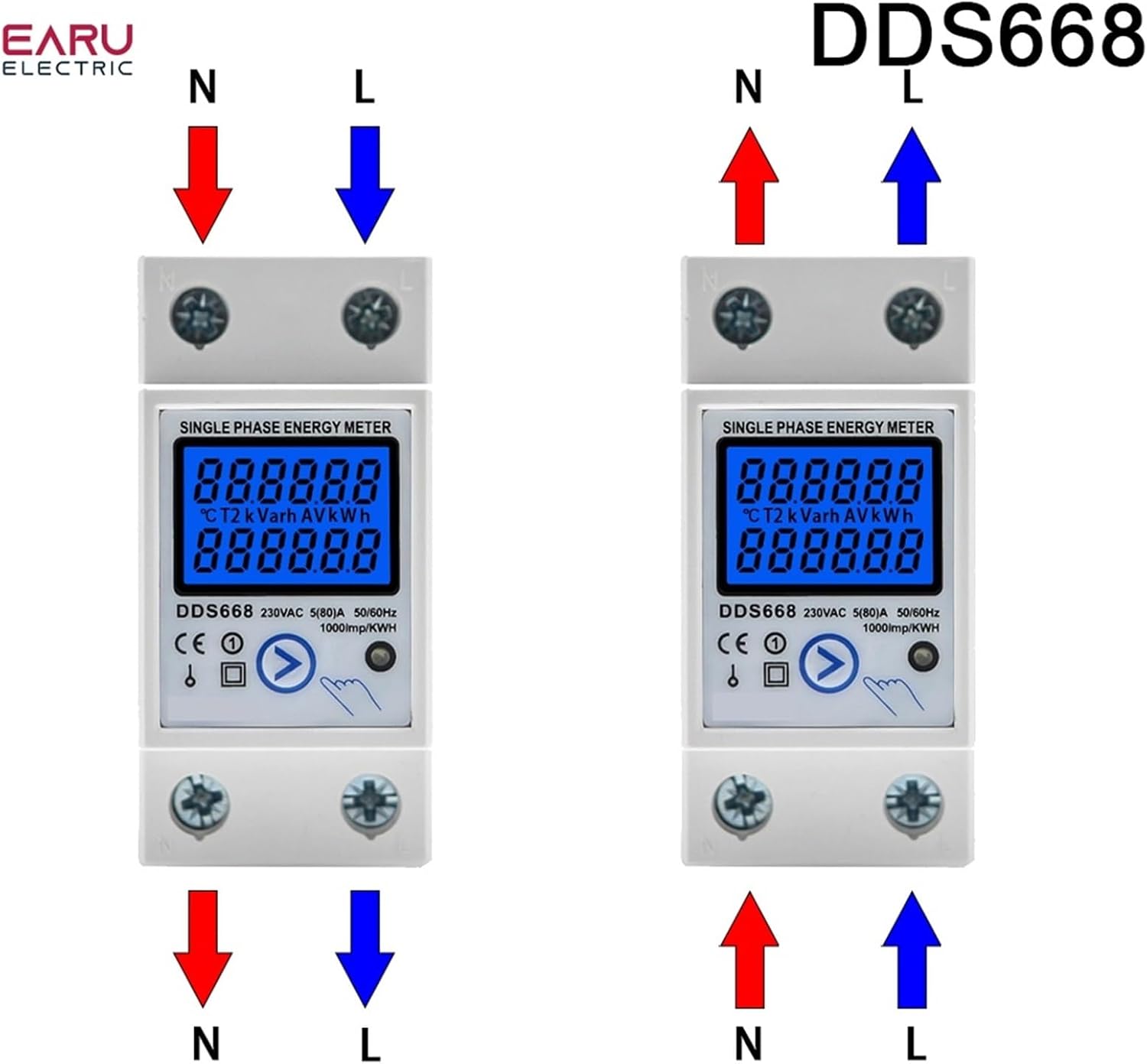
Figure 6: Wiring diagrams for DDS668 model, illustrating upper input/lower output and lower input/upper output modes.
6. Ukusebenza
6.1 Amandla Kuvuliwe
Once correctly wired and mounted, restore power to the circuit. The LCD display will illuminate, showing the current readings.
6.2 Reading Displayed Values
The meter cycles through various parameters on its LCD display. You can manually press the button (if available on your model, e.g., DDS667, DDS668) to cycle through:
- Amandla Aphelele (kWh)
- Temporary Energy (kWh)
- Real Voltage (V)
- Real Current (A)
- Amandla Angempela (W)
The pulse LED will flash to indicate active energy measurement.
6.3 Resetting Temporary kWh
To reset the temporary kWh reading to zero, press and hold the button on the front of the meter for approximately 6 seconds. Note that the total kWh reading cannot be reset.
7. Isondlo
The EVURU Digital Single Phase Energy Meter requires minimal maintenance.
- Keep the meter clean and free from dust. Use a soft, dry cloth for cleaning.
- Ungasebenzisi izinto zokuhlanza abrasive noma izincibilikisi.
- Hlola njalo ukuxhumeka kwezintambo ukuze ubone ukuthi ziqinile yini futhi zinophawu lokuguguleka noma umonakalo.
- Ensure the operating environment remains within specified conditions (temperature, humidity).
8. Ukuxazulula izinkinga
- No Display / Meter Not Powering On:
- Check the power supply to the circuit.
- Verify all wiring connections are secure and correct according to the diagrams.
- Ukufundwa Okungalungile:
- Ensure the meter is correctly wired for the load. Incorrect wiring can lead to inaccurate measurements.
- Qinisekisa ivolumutage and current are within the meter's specified range (e.g., 220V AC, max 80A).
- Temporary kWh Not Resetting:
- Ensure you are holding the reset button for the full 6 seconds.
- Note that the total kWh cannot be reset.
- Pulse LED Not Flashing:
- Verify there is an active load connected and drawing power through the meter.
- Check wiring for proper current flow.
9. Iwaranti kanye Nokusekela
For warranty information or technical support, please refer to the product packaging or contact your retailer. Keep your purchase receipt as proof of purchase.