
Isingeniso
Thank you for choosing the Shadowhawk S9322 Rechargeable Tactical LED Flashlight. This manual provides essential information for the safe and efficient operation, maintenance, and troubleshooting of your device. Please read it thoroughly before use and retain it for future reference.
The Shadowhawk S9322 is a high-performance tactical flashlight featuring an advanced XHP70.2 LED chip, delivering up to 250,000 lumens of brightness. It offers 5 light modes, adjustable focus, USB input and output for charging and power bank functionality, and an IP67 waterproof rating, making it suitable for various outdoor activities and emergency situations.
Izingxenye Zomkhiqizo
The Shadowhawk S9322 flashlight package includes the following items:
- Shadowhawk S9322 Rechargeable Flashlight
- Ibhethri Le-Lithium-Ion Elishajwa kabusha
- Ikhebuli yokushaja ye-USB-C
- Lanyard
- Imiyalelo yokusebenza (le manuwali)

Image: Contents of the Shadowhawk S9322 package, showing the flashlight, battery, USB-C cable, lanyard, and instruction manual.
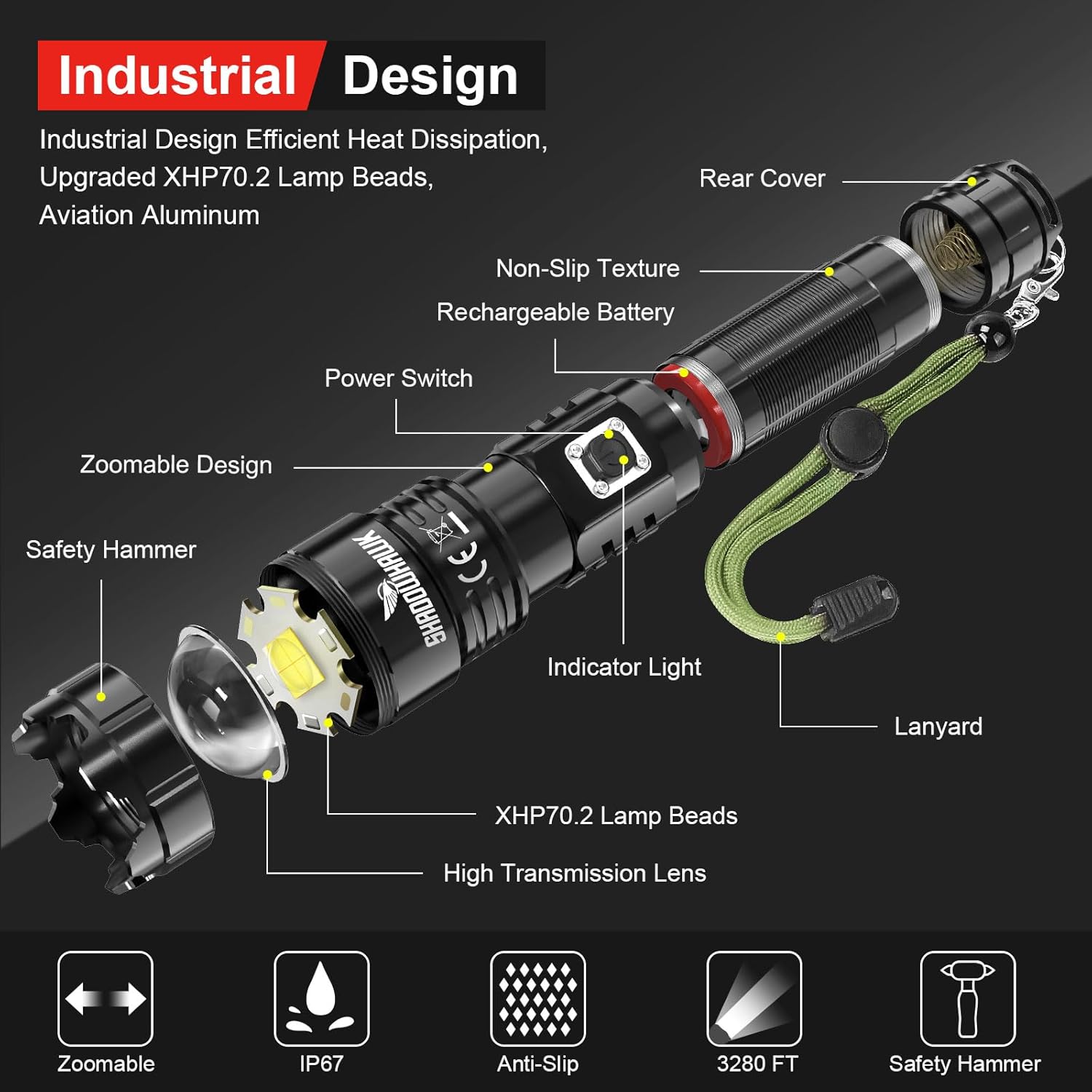
Image: Exploded diagram illustrating the internal and external components of the Shadowhawk S9322 flashlight, such as the XHP70.2 LED, lens, battery, and power switch.
Setha
1. Ukufakwa kwebhethri
- Susa Ifilimu Evikelayo: Before first use, locate the rechargeable battery and carefully remove the transparent plastic protective film from its outer layer. Do not remove the blue plastic casing of the battery itself.
- Open Rear Cover: Unscrew the rear cover of the flashlight by turning it counter-clockwise.
- Faka Ibhethri: Insert the battery into the flashlight body. Ensure correct polarity: the positive (+) side (protruding part) should face towards the flashlight head, and the negative (-) side (flat part) should face towards the tail cap.
- Ikhava evikelekile: Screw the rear cover back on clockwise until it is securely tightened.

Image: Step-by-step guide for installing the rechargeable battery, emphasizing the removal of the protective film and correct polarity.
2. Ukushaja Kwasekuqaleni
It is recommended to fully charge the flashlight before its first use to ensure optimal performance and battery life.
- Xhuma Ikhebula: Insert the USB-C end of the charging cable into the flashlight's charging port.
- Xhuma Amandla: Connect the USB-A end of the cable to a compatible USB power source (e.g., wall adapter, computer, power bank).
- Gada Inkomba: The indicator light on the flashlight will turn ebomvu during charging. It will turn eluhlaza uma ibhethri seligcwaliswe ngokuphelele.
- Isikhathi sokushaja: Ukushaja okugcwele ngokuvamile kuthatha cishe amahora angu-4.

Image: Visual guide for charging the flashlight and understanding the charging indicator lights (red for charging, green for fully charged).
Imiyalelo yokusebenza
1. Vula/Vala
- Ukuvula ithoshi ON, press and hold the power switch for approximately 3 seconds.
- Ukuvula ithoshi VALIWE, press and hold the power switch for approximately 3 seconds again.
Note: This 3-second press feature prevents accidental activation, conserving battery life.
2. Changing Light Modes
Once the flashlight is on, short press the power switch to cycle through the 5 available light modes:
- Phezulu: Ukukhanya okuphezulu kokukhanya okubanzi.
- Okumaphakathi: Ukukhanya okulinganiselayo kokusetshenziswa okuvamile.
- Phansi: Reduced brightness for extended runtime or close-range tasks.
- Isitebhisi: Flashing light for signaling or disorientation.
- I-SOS: International Morse code signal for emergencies.
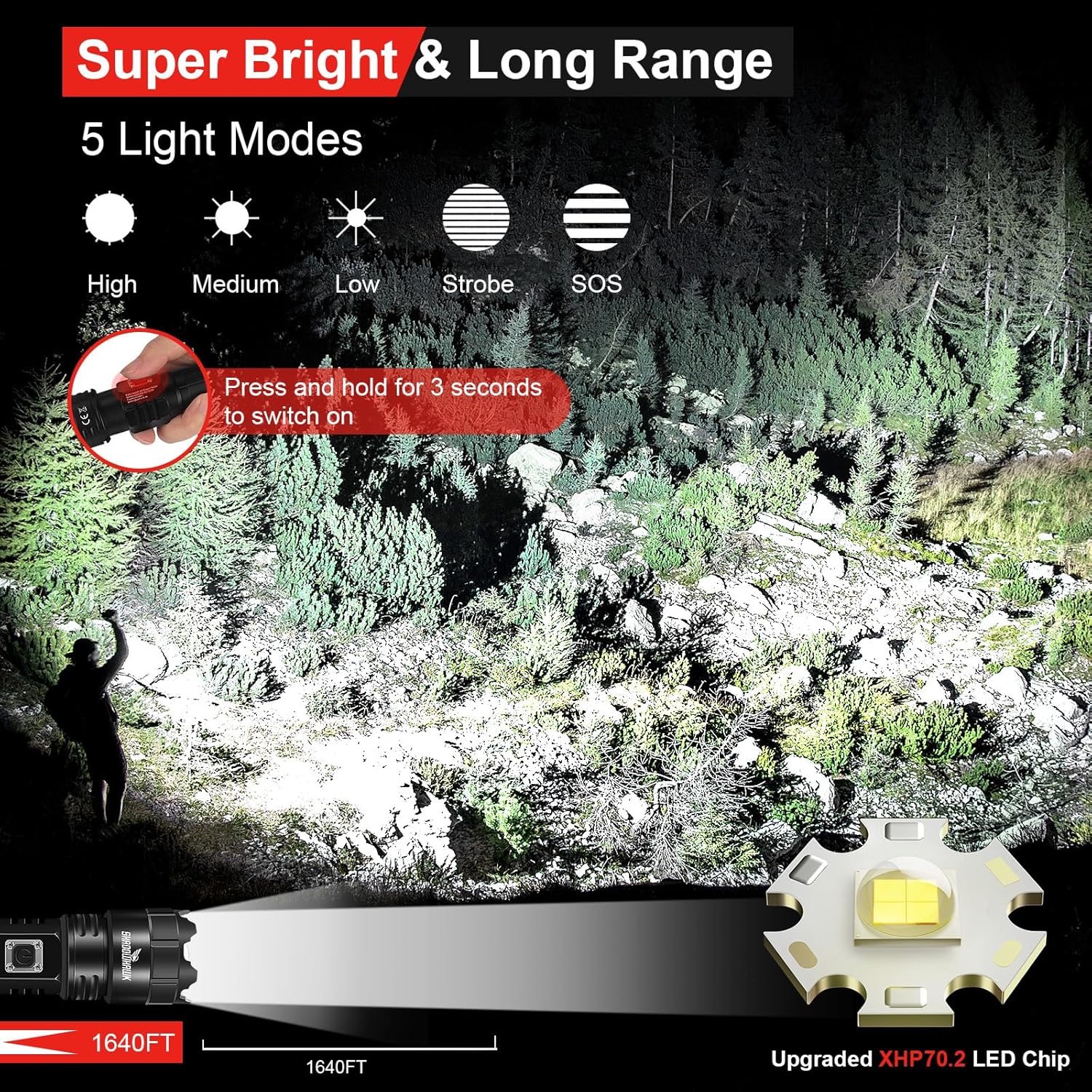
Image: Illustration of the five distinct light modes (High, Medium, Low, Strobe, SOS) and their visual effects, along with the 3-second press to activate the flashlight.
3. Adjustable Focus (Zoom Function)
The flashlight features an adjustable focus mechanism to switch between a wide floodlight and a concentrated spotlight beam.
- To adjust the focus, gently slide the head of the flashlight forward or backward.
- Sliding the head forward will narrow the beam into a focused ukukhanya.
- Sliding the head backward will widen the beam into a broad i-floodlight.

Image: Depiction of the flashlight's zoomable feature, illustrating the transition between a wide floodlight and a focused spotlight beam.
4. Umsebenzi weBhange Lamandla
The Shadowhawk S9322 can be used as a portable power bank to charge other electronic devices.
- Connect your device's charging cable to the USB-A output port on the flashlight.
- Ithoshi lizoqala ukushaja idivayisi yakho.
Note: Using the power bank function will consume the flashlight's battery. Monitor the battery indicator to ensure sufficient power for flashlight operation.
Isondlo
1. Iyashaja
- Charge the flashlight when the indicator light turns red.
- Always use the provided USB-C cable or a certified equivalent.
- Avoid over-discharging the battery.
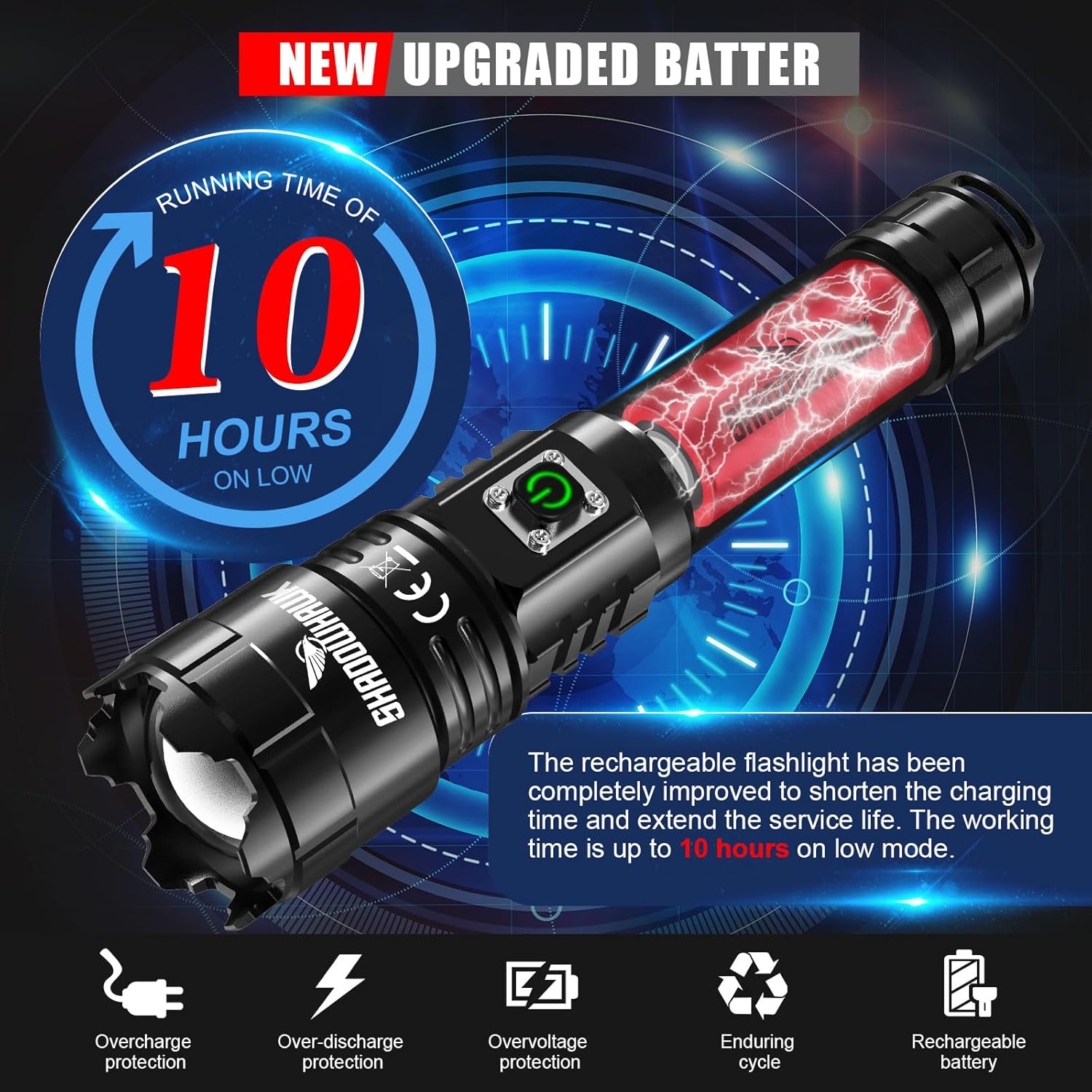
Image: Information on the upgraded battery's runtime and built-in protections (overcharge, over-discharge, overvoltagfuthi).
2. Ukuhlanza
- Sula umzimba wethoshi ngesithambile, damp indwangu.
- Ungasebenzisi izinto zokuhlanza abrasive noma izincibilikisi.
- Keep the lens clean for optimal light output. Use a lens cleaning cloth if necessary.
3. Isitoreji
- Gcina ithoshi endaweni epholile, eyomile ekude nelanga eliqondile namazinga okushisa aphezulu.
- If storing for an extended period, charge the battery to approximately 50% every 3-6 months to maintain battery health.
Ulwazi Lokuphepha
- Do not look directly into the LED beam, especially on high settings, as it can cause temporary vision impairment or permanent eye damage.
- Gcina endaweni lapho izingane zingafinyeleleki khona.
- Do not disassemble the flashlight head or LED assembly.
- Use only the specified rechargeable battery.
- Avoid exposing the flashlight to extreme heat or open flames.
- Although IP67 waterproof, avoid prolonged submersion in water. Ensure the charging port cover is securely closed before exposure to water.

Image: Visual representation of the flashlight's IP67 waterproof capability, showing it enduring water exposure.
Ukuxazulula inkinga
| Inkinga | Imbangela Engenzeka | Isixazululo |
|---|---|---|
| I-flashlight ayivuli. | Battery not installed correctly. Battery is depleted. Protective film still on battery. | Check battery polarity and ensure it's fully inserted. Charge the battery. Remove the transparent protective film from the battery. |
| Ukukhanya kufiphele noma kuyacwayiza. | Low battery charge. Loose connections. | Recharge the battery fully. Ensure the tail cap is tightly screwed on. |
| I-flashlight ayishaji. | Charging cable faulty. USB power source not working. Charging port dirty. | Try a different USB-C cable. Connect to a different USB power source. Gently clean the charging port. |
| Umsebenzi webhange lamandla awusebenzi. | Flashlight battery too low. Device cable faulty. | Ensure flashlight battery is sufficiently charged. Try a different charging cable for your device. |
Imininingwane
| Isici | Imininingwane |
|---|---|
| Ibhrendi | I-Shadowhawk |
| Imodeli | S9322 |
| Umthombo Wokukhanya | I-XHP70.2 LED |
| Ukukhanya | Kuze ku-250,000 Lumens |
| Ibanga le-Beam | Kufika kumamitha ayi-500 (1640 amafidi) |
| Amamodi Okukhanya | Phezulu, Medium, Phansi, Strobe, SOS |
| Gxila | Adjustable (Floodlight to Spotlight) |
| Uhlobo Lwebhethri | I-Lithium-Ion ephinda ikhokhelwe |
| Imbobo yokushaja | Okokufaka kwe-USB-C |
| Okuphumayo Port | USB-A Output (Power Bank Function) |
| Runtime (Low Mode) | Kufika emahoreni angu-10 |
| Isilinganiso Sokungangeni Manzi | IP67 |
| Okubalulekile | Ingxubevange ye-Aluminiyamu yebanga le-Aerospace |
| Ubukhulu | Cishe 21 x 9 x 4.5 cm |
| Isisindo | Approximately 40 g (without battery) |
Iwaranti kanye Nokusekela
Shadowhawk offers 7x24-hour customer service for any questions or concerns regarding your S9322 flashlight. Please do not hesitate to contact us if you encounter any issues or require assistance.
For warranty claims or technical support, please refer to the contact information provided with your purchase or visit the official Shadowhawk webindawo.