
1. Isingeniso
The SHIDU M500 is a compact and portable wired voice amplifier designed to project your voice clearly and powerfully. It is an ideal tool for teachers, presenters, tour guides, and anyone who needs to amplify their voice in various settings. This device also supports music playback from multiple sources.

Image 1.1: SHIDU M500 Wired Voice Amplifier. This image shows the front view of the compact, black and white voice ampokokuphila.
2. Umkhiqizo Uphelileview
2.1. Izingxenye nezilawuli
Familiarize yourself with the various parts and controls of your SHIDU M500 ampophilayo:

Image 2.1: SHIDU M500 Controls and Ports Diagram. This diagram illustrates the top panel controls including Play/Pause, Recording, Previous, Next, Mode Switch, LED Screen, and the Switch/Volume knob. It also shows the side ports: USB, TF card socket, DC 5V charging port, AUX-IN, and MIC-IN.
- Switch/Vol Knob: Jikelezisa ukuze uvule/uvale bese ulungisa ivolumu.
- Isikrini se-LED: Displays current mode, battery level, and track information.
- Inkinobho Dlala/Yemisa Isikhashana: Starts or pauses audio playback.
- Inkinobho Yokurekhoda: Initiates or stops audio recording.
- Inkinobho Yangaphambilini: Skips to the previous track or navigates menus.
- Inkinobho Elandelayo: Skips to the next track or navigates menus.
- Inkinobho Yokushintsha Imodi: Toggles between different input modes (e.g., USB, TF card, AUX).
- Imbobo ye-USB: For connecting USB flash drives for music playback.
- I-TF Card Socket: For inserting a TF (MicroSD) card for music playback.
- Imbobo ye-DC 5V: Power input for charging the ampokokuphila.
- Imbobo ye-AUX-IN: Ukuxhuma amadivayisi omsindo angaphandle ngekhebula lomsindo elingu-3.5mm.
- MIC-IN Port: Ukuxhuma imakrofoni enezintambo.
3. Setha
3.1. Ukushaja i Ampokokuphila
- Connect the provided charging cable to the I-DC 5V echwebeni ampokokuphila.
- Xhuma olunye uhlangothi lwekhebula ku-adaptha yamandla ye-USB ejwayelekile (engafakiwe) noma imbobo ye-USB yekhompyutha.
- The LED screen will indicate charging status. A full charge typically takes 3-5 hours.
- Qinisekisa ukuthi amplifier is fully charged before first use for optimal battery life.
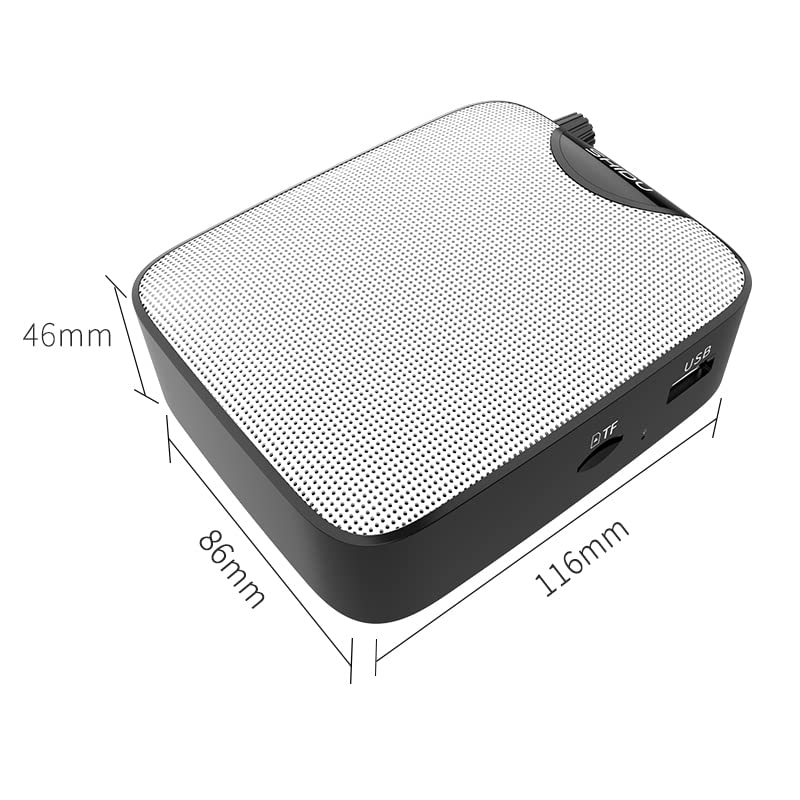
Image 3.1: SHIDU M500 Built-in 1800mAh Battery. This image highlights the amplifier's internal 1800mAh high-quality lithium battery, indicating long standby time and extended battery life.
3.2. Ukuxhuma imakrofoni
- Insert the 3.5mm plug of the wired microphone into the I-MIC-IN echwebeni ampokokuphila.
- Position the microphone headset comfortably on your head, ensuring the microphone is close to your mouth for best voice pickup.
3.3. Powering On/Off and Volume Adjustment
- Ukuze uvule, zungezisa Switch/Vol Knob clockwise until you hear a click and the LED screen illuminates.
- Qhubeka uphendukisa inkinobho ngokwewashi ukuze ukhuphule ivolumu. Zungezisa ngokuphambene newashi ukuze wehlise ivolumu.
- To power off, rotate the Switch/Vol Knob counter-clockwise until you hear a click and the LED screen turns off.
4. Iziqondiso Zokusebenza
4.1. Izwi Ampukuqinisa
- Ensure the microphone is connected and the ampi-lifier ivuliwe.
- Lungisa i- Switch/Vol Knob kokufisayo ampezingeni lification.
- Speak clearly into the microphone. Avoid placing the microphone too close to the amplifier to prevent feedback (a high-pitched squeal).
4.2. Music Playback (USB/TF Card/AUX-IN)
- USB/TF Card: Faka i-USB flash drive ku- Imbobo ye-USB or a TF card into the I-TF Card Socket. I amplifier will automatically switch to the corresponding mode and begin playback. If not, press the Inkinobho Yokushintsha Imodi.
- I-AUX-IN: Xhuma idivayisi yomsindo yangaphandle (isb., i-smartphone, isidlali se-MP3) ku- I-AUX-IN Port using a 3.5mm audio cable. Press the Inkinobho Yokushintsha Imodi until 'AUX' is displayed on the LED screen.
- Sebenzisa i- Dlala/Misa kancane, Ngaphambilini, futhi Olandelayo buttons to control music playback.
- Lungisa ivolumu usebenzisa ifayela le- Switch/Vol Knob.
4.3. Umsebenzi wokuqopha
- Ensure a USB flash drive or TF card is inserted to save recordings.
- Cindezela inkinobho Inkinobho Yokurekhoda to start recording. The LED screen will indicate recording status.
- Khuluma kumbhobho.
- Cindezela inkinobho Inkinobho Yokurekhoda again to stop recording. The recording will be saved to the inserted storage device.
5. Isondlo
5.1. Ukuhlanza
- Sula i- amplifier's exterior with a soft, dry cloth.
- Ungasebenzisi amakhemikhali anokhahlo, izincibilikisi, noma izihlanzi ezinamaqabunga.
- Gcina amachweba engenalo uthuli kanye nemfucumfucu.
5.2. Ukunakekelwa Kwebhethri
- Shaja i- amplifier regularly, even if not in frequent use, to maintain battery health.
- Gwema ukukhipha ngokuphelele ibhethri ngaphambi kokulishaja kabusha.
- Ungazivezi i ampi-lifier emazingeni okushisa aphezulu.
5.3. Isitoreji
- Gcina i ampi-lififier endaweni epholile, eyomile kude nokukhanya kwelanga okuqondile kanye nomswakama.
- When storing for extended periods, ensure the battery is partially charged (around 50%).
6. Ukuxazulula izinkinga
| Inkinga | Imbangela Engenzeka | Isixazululo |
|---|---|---|
| Awukho umsindo ovela ampokokuphila | Amplifier is off; Volume is too low; Microphone not connected properly; Incorrect mode selected. | Amandla ku- amplifier and increase volume; Ensure microphone is fully plugged into MIC-IN; Press Mode Switch to select correct input. |
| Umsindo ohlanekezelwe noma impendulo | Volume too high; Microphone too close to amplifier; Microphone damaged. | Decrease volume; Increase distance between microphone and amplifier; Try a different microphone if available. |
| Ibhethri ayishaji | Charging cable not connected properly; Faulty cable or adapter; Amplifier not powered off during charging. | Ensure cable is securely connected to DC 5V port and power source; Try a different USB cable or adapter; Power off the amplifier while charging. |
| Ukudlala umculo akusebenzi | USB/TF card not inserted correctly; Incorrect mode selected; Corrupt audio files. | Reinsert USB/TF card; Press Mode Switch to select USB/TF mode; Ensure audio files zikufomethi ehambisanayo. |
7. Imininingwane
- Imodeli: SHIDU M500
- Ubukhulu (L x W x H): 8.6 x 2.8 x 10.4 Amasentimitha
- Isisindo: 280 amagremu
- Ubuchwepheshe bokuxhuma: Inezintambo
- Okukhipha Amandla: 10W
- Ibhethri: Built-in 1800mAh High Quality Lithium Battery
- Amadivayisi Ahambisanayo: Laptop, MP3 Player, Smartphone (via AUX-IN)
- Izimbobo Zokufaka: MIC-IN (3.5mm), AUX-IN (3.5mm), USB, TF Card Slot, DC 5V (Charging)
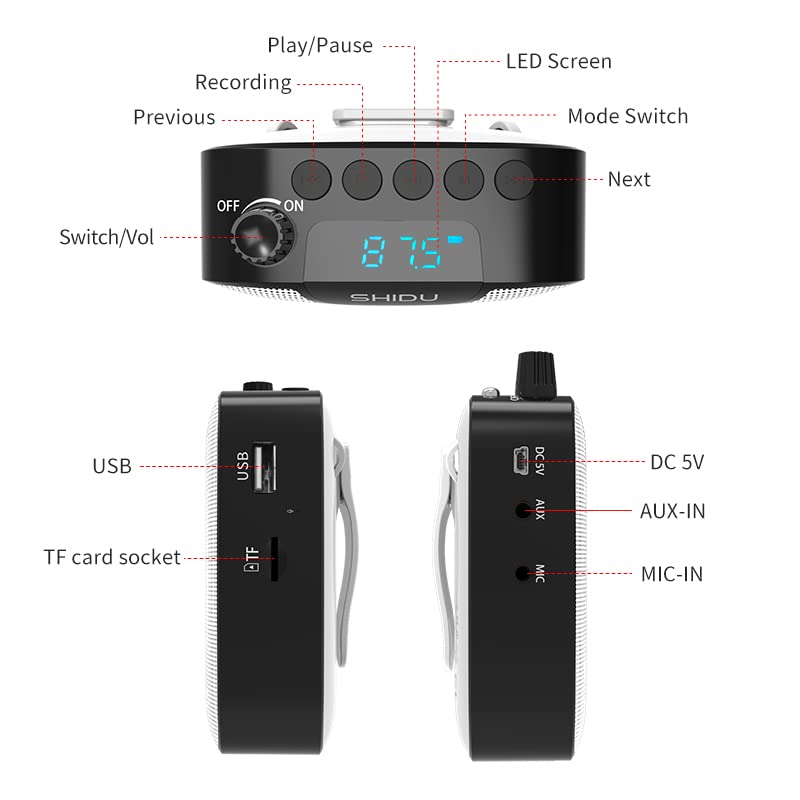
Image 7.1: SHIDU M500 Dimensions Diagram. This image shows the amplifier's dimensions: 116mm length, 86mm width, and 46mm height.

Image 7.2: SHIDU M500 10W High Power Acoustic Amplifier. This image illustrates the amplifier's 10W power output, capable of providing loud and clear sound in a standard 500m² space.

Image 7.3: SHIDU M500 Mini and Portable. This image emphasizes the amplifier's compact size and light weight of only 282g, comparable to the size of a mobile phone.

Image 7.4: SHIDU M500 High-Fidelity Dual Magnetic Speaker. This image highlights the advanced speaker technology for realistic vocal reproduction and powerful bass and treble.
8. Ulwazi Lwewaranti
SHIDU warrants its voice amplifier hardware products against defects in materials and workmanship for a period of unyaka owodwa from the date of original purchase, provided the purchase was made from an authorized SHIDU dealer. This warranty is void if the equipment is altered, misused, mishandled, suffers excessive wear, or is serviced by any parties not authorized by SHIDU.
9. Ukusekela
For further assistance, technical support, or warranty claims, please refer to the contact information provided with your purchase or visit the official SHIDU website. Ensure you have your product model number (M500) and proof of purchase ready when contacting support.