
1. Isingeniso
Thank you for choosing the COUGAR MX360 RGB Mid Tower Case. This manual provides essential information for the proper installation, operation, and maintenance of your new PC case. The MX360 RGB combines a sleek design with ARGB LED strips on the front panel, offering excellent cooling performance and support for a wide range of components, including up to a 360mm radiator, 315mm graphics cards, and 170mm CPU coolers. Its compact layout and full-length PSU shroud contribute to a clean and organized build.
2. Ulwazi Lokuphepha
- Nqamula njalo ugesi ophuma odongeni ngaphambi kokufaka noma ukususa noma yiziphi izingxenye.
- Handle components with care to avoid damage from static electricity. Consider using an anti-static wrist strap.
- Gcina izingxenye ezincane nezikulufu kude nezingane.
- Qinisekisa ukuthi umoya ungena kahle eduze kwekhava ukuze uvimbele ukushisa ngokweqile.
- Do not attempt to modify the case or its components, as this may void your warranty and pose safety risks.
3. Okuqukethwe Kwephakheji
Sicela uqinisekise ukuthi zonke izinto ezilandelayo zifakiwe kuphakheji yakho:
- Ikesi le-COUGAR MX360 RGB Mid Tower
- Accessory Box (containing screws, standoffs, cable ties, etc.)
- Incwadi Yomsebenzisi (le dokhumenti)
4. Umkhiqizo Uphelileview
The COUGAR MX360 RGB case features a minimalist design with integrated ARGB lighting and a tempered glass side panel for showcasing your build.

Umfanekiso 4.1: Uhlangothi lwangaphambili view of the COUGAR MX360 RGB case, showing the interior and active RGB lighting.
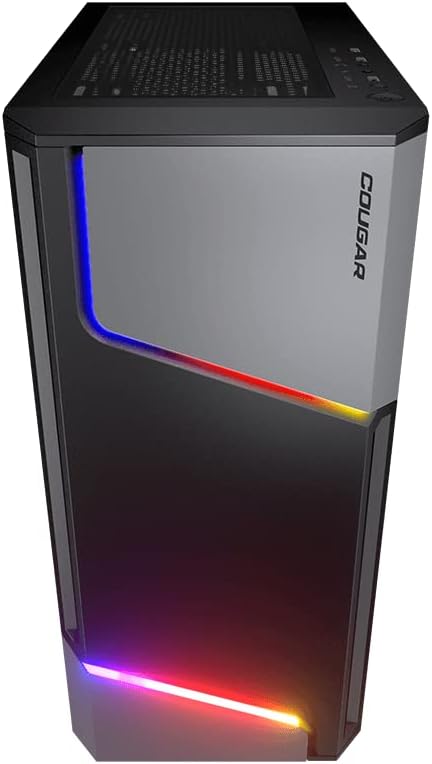
Umfanekiso 4.2: Ngaphambili view of the COUGAR MX360 RGB case, highlighting the integrated ARGB LED strips.
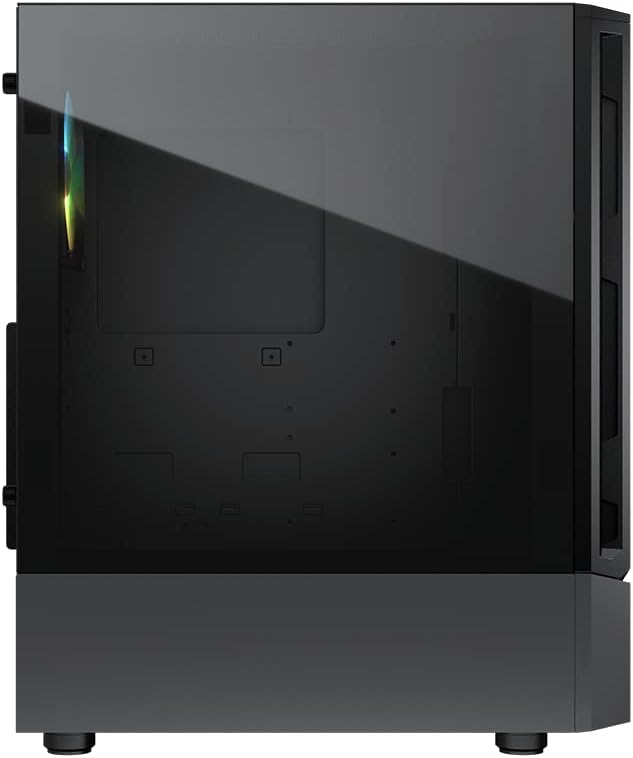
Umfanekiso 4.3: Uhlangothi view of the COUGAR MX360 RGB case, featuring the tempered glass panel.

Umfanekiso 4.4: Ingaphambili eline-engeli view of the COUGAR MX360 RGB case, showcasing its design and ARGB elements.
5. Ukusetha nokufakwa
Follow these steps to install your components into the COUGAR MX360 RGB case.
5.1 Ukulungiselela Icala
- Beka isikhwama endaweni eyisicaba, eqinile.
- Remove the tempered glass side panel by unscrewing the thumb screws at the rear of the case and carefully sliding the panel off.
- Remove the opposite metal side panel by unscrewing the thumb screws and sliding it off.
5.2 Ukufakwa Kwebhodi Yomama
- Install the I/O shield (if not pre-installed on your motherboard) into the rear opening of the case.
- Ensure the correct standoffs are installed for your motherboard form factor (ATX, Micro-ATX, Mini-ITX). Adjust or add standoffs as needed.
- Beka ngokucophelela i-motherboard yakho kuma-standoffs, uqondanise izimbobo zesikulufu.
- Vikela i-motherboard ngezikulufo ezinikeziwe.
Ukufakwa kwe-Power Supply Unit (PSU)
- Locate the PSU shroud at the bottom of the case.
- Slide your PSU into the designated compartment from the rear of the case.
- Vikela i-PSU ngezikulufo ngemuva kwekesi.
- Route necessary cables through the cutouts in the PSU shroud for cable management.
5.4 Ukufakwa Kwedrayivu Yesitoreji
The MX360 RGB supports various storage configurations.
- Ama-HDD angu-3.5": Install into the drive cage located under the PSU shroud.
- 2.5" SSDs/HDDs: Mount onto the dedicated trays or mounting points behind the motherboard tray.
5.5 Ukufakwa Kwekhadi Lezithombe (i-GPU)
- Susa amakhava we-PCIe slot adingekayo ngemuva kwekesi.
- Faka ikhadi lakho lehluzo endaweni efanele ye-PCIe kubhodi lomama.
- Secure the graphics card with screws. The case supports graphics cards up to 315mm in length.
5.6 Cooling System Installation (Fans/Radiators)
The case supports up to six fans and a 360mm water cooling radiator.
- Ngaphambili: Supports up to 3 x 120mm or 2 x 140mm fans, or a 240/280/360mm radiator.
- Phezulu: Supports up to 2 x 120mm or 2 x 140mm fans, or a 240/280mm radiator.
- Ngemuva: Supports 1 x 120mm fan.
Install fans or radiators using the provided screws, ensuring proper airflow direction.
5.7 Ukuxhumana Kwephaneli Yangaphambili
Connect the front panel cables (USB, Audio, Power, Reset, LED) to their corresponding headers on your motherboard. Refer to your motherboard manual for exact header locations.
5.8 ARGB Lighting Connection
The integrated ARGB LED strips on the front panel connect via a 5V/3Pin ARGB connector. Connect this cable to a compatible 5V/3Pin ARGB header on your motherboard to synchronize lighting effects with your system.
6. Ukusebenza Kwecala
Once all components are installed and connected, replace the side panels. Power on your system using the power button on the top I/O panel. The ARGB lighting will illuminate, controlled by your motherboard's software or a dedicated ARGB controller if you have one installed.
7. Isondlo
Ukugcinwa njalo kusiza ukuqinisekisa ukusebenza kahle kanye nobude besikhathi sezingxenye ze-PC yakho.
- Izihlungi Zothuli: The MX360 RGB includes removable dust filters (e.g., top, bottom). Periodically remove and clean these filters with compressed air or water (ensure they are completely dry before reinstallation).
- Ukuhlanzwa Kwangaphakathi: Use compressed air to remove dust from internal components like fans, heatsinks, and the motherboard.
- Ukuhlanza Ingaphandle: Sula ingaphandle ngethafa elithambile, damp indwangu. Gwema izinto zokuhlanza abrasive.
8. Ukuxazulula izinkinga
Uma uhlangabezana nezinkinga, bheka izinyathelo ezilandelayo ezivamile zokuxazulula izinkinga:
- Awekho Amandla: Ensure all power cables (24-pin ATX, 8-pin CPU, GPU power) are securely connected. Check the PSU switch is in the 'ON' position. Verify front panel power button connection to the motherboard.
- Ukukhanyisa kwe-ARGB Akusebenzi: Confirm the 5V/3Pin ARGB connector is correctly plugged into a compatible motherboard header. Check your motherboard's RGB software for control settings.
- Ukushisa ngokweqile: Ensure all case fans are spinning and oriented correctly for optimal airflow. Check for dust buildup on filters and components. Verify CPU cooler and GPU cooler are properly installed.
- Ukuxhumana Okuxekethile: Re-seat all components (RAM, GPU, storage drives) and check all power and data cables.
9. Imininingwane
| Isici | Ukucaciswa |
|---|---|
| Ibhrendi | COUGAR |
| Igama Lemodeli | MX360 RGB |
| Inombolo Yemodeli Yento | CGR-5CC6G-RGB |
| Uhlobo Lwekesi | Mid Mid |
| Ubukhulu (LxWxH) | 14.88 x 8.27 x 18.11 amayintshi (378 x 210 x 460 mm) |
| Isisindo sento | 10.56 pounds (4.8 kilograms) |
| Okubalulekile | Tempered Glass, Fine Metal |
| Umbala | Mnyama |
| Ukusekelwa Kwebhodi Lomama | I-Mini ITX / Micro ATX / ATX |
| Ubukhulu. Ubude Bekhadi Lezithombe | 315 mm |
| Ubukhulu. I-CPU Cooler Height | 170 mm |
| Ukusekelwa kwe-PSU | I-ATX PS2 ejwayelekile |
| Indlela Yokupholisa | Umoya / Amanzi |
| Ukusekelwa kweRadiator | Front: 360mm / 280mm / 240mm / 140mm / 120mm Top: 280mm / 240mm / 140mm / 120mm Ngemuva: 120mm |
| Ukusekela abalandeli | Ngaphambili: 3 x 120mm / 2 x 140mm Phezulu: 2 x 120mm / 2 x 140mm Ngemuva: 1 x 120mm |
| Drives Bays | 3.5" HDD: 2 2.5" SSD: 2+2 (converted from 3.5" drive bays) |
| I/O Iphaneli | USB 3.0 x 2, USB 2.0 x 1, Mic x 1, Audio x 1, RGB Button |
| Isici Esikhethekile | ARGB LED Strips, Full-length PSU Cover for Cable Hiding and Improved Airflow |
10. Iwaranti kanye Nokusekela
COUGAR products are designed and manufactured to the highest quality standards. For warranty information, please refer to the warranty card included with your product or visit the official COUGAR webindawo. Gcina ubufakazi bakho bokuthenga ngezimangalo zewaranti.
For technical support or further assistance, please visit the official COUGAR website or contact their customer service department. You can find more information and resources on the COUGAR Store on Amazon.