
1. Isingeniso
This user manual provides essential information for the safe and efficient operation of your HYCHIKA 3.6V Cordless Electric Rechargeable Screwdriver Drill Set. Please read this manual thoroughly before first use and keep it for future reference.
The HYCHIKA 3.6V Cordless Electric Screwdriver is designed for various screwing and light drilling tasks around the home. It features a maximum torque of 6 N-m, a 6.35 mm quick-change chuck, and a versatile design that allows for both pistol and straight grip configurations.
2. Iziyalezo Zokuphepha
Ngaso sonke isikhathi qaphela izinyathelo zokuphepha eziyisisekelo lapho usebenzisa amathuluzi kagesi ukunciphisa ingozi yomlilo, ukushaqeka kukagesi, nokulimala komuntu siqu.
- Ukuphepha kwendawo yokusebenza: Gcina indawo osebenzela kuyo ihlanzekile futhi ikhanyiswe kahle. Izindawo eziminyene noma ezimnyama zimema izingozi. Ungawasebenzisi amathuluzi kagesi endaweni eqhumayo, njengalapho kukhona uketshezi oluvuthayo, amagesi, noma uthuli.
- Ukuphepha Kagesi: Gwema ukuthintana komzimba nezindawo ezinobumba noma ezisekelwe phansi njengamapayipi, ama-radiator, ububanzi, neziqandisi. Ungawavezi amathuluzi kagesi emvuleni noma ezimeni ezimanzi.
- Ukuphepha Komuntu Siqu: Always wear eye protection. Use safety glasses, goggles, or a face shield. Wear hearing protection when operating noisy tools. Dress properly; avoid loose clothing or jewelry.
- Ukusetshenziswa Nokunakekelwa Kwamathuluzi: Ungaphoqi ithuluzi lamandla. Sebenzisa ithuluzi lamandla elilungile kuhlelo lwakho lokusebenza. Nqamula ipulaki emthonjeni wamandla kanye/noma khipha iphekhi yebhethri ngaphambi kokwenza noma yiziphi izinguquko, ukushintsha izinsiza, noma ukugcina amathuluzi wamandla.
- Ukusetshenziswa Nokunakekela Iphakethe Lebhethri: Recharge only with the charger specified by the manufacturer. Do not use battery packs with any other power tools. When battery pack is not in use, keep it away from other metal objects.
3. Okuqukethwe Kwephakheji
Qinisekisa ukuthi zonke izinto ezibalwe ngezansi zifakiwe kuphakheji yakho. Uma kukhona izinto ezingekho noma ezilimele, sicela uxhumane nokwesekwa kwamakhasimende.
- 1 x HYCHIKA 3.6V Cordless Screwdriver
- Ama-19 x Screwdriver Bits
- 1 x Ibha Yesandiso
- 1 x I-adaptha yokushaja
- 1 x Incwadi Yomsebenzisi

Figure 3.1: Contents of the HYCHIKA 3.6V Cordless Screwdriver package, including the screwdriver, various bits, and charging adapter.
4. Izici Zomkhiqizo Nezingxenye
Familiarize yourself with the different parts of your cordless screwdriver.

Figure 4.1: Key components of the screwdriver, including the magnetic chuck, PUSH button, front LED light, On/Off switch, LED charger indicator, 3.5mm charger port, and forward & reverse button.
- Magnetic Chuck: 1/4 inch (6.35mm) quick-change chuck for easy bit installation and removal.
- Ukukhanya kwe-LED yangaphambili: Illuminates the work area for improved visibility in dark environments.
- Vula/Vala Iswishi: Activates and deactivates the screwdriver.
- Forward & Reverse Button: Controls the rotation direction for screwing and unscrewing.
- LED Charger Indicator: Provides status of battery charging.
- 3.5mm Charger Port: Connection point for the charging adapter.
- Inkinobho ye-PUSH: Used to adjust the grip configuration from pistol to straight.
5. Setha
5.1 Ukushaja Ibhethri
The screwdriver is powered by a 3.6V 2000 mAh Lithium-Ion battery. Before first use, fully charge the battery.
- Connect the charging adapter to the 3.5mm charger port on the screwdriver.
- Plug the charging adapter into a standard electrical outlet.
- The LED charger indicator will illuminate during charging. Once fully charged, the indicator may change color or turn off depending on the model.
- Khipha ishaja uma ukushaja sekuqediwe.

Figure 5.1: The screwdriver connected to its charging adapter, indicating a full charge.
The screwdriver is designed to maintain full power output even when the battery is low, ensuring consistent performance until the battery is depleted.
5.2 Ukufaka ama-Screwdriver Bits
The screwdriver features a 1/4 inch (6.35mm) magnetic quick-change chuck for easy bit installation.
- Khetha i-screwdriver bit efanelekile yomsebenzi wakho.
- Insert the bit into the magnetic chuck until it is securely seated. The magnetic chuck will hold the bit firmly in place.
- To remove a bit, simply pull it out of the chuck. Bits with grooves are designed for easier removal.

Figure 5.2: Visual guide for inserting a bit into the magnetic chuck and removing it.
6. Iziqondiso Zokusebenza
6.1 Adjusting Grip Configuration
The screwdriver can be used in two grip configurations: pistol grip or straight grip, for enhanced versatility and comfort.
- To change the grip, press and hold the "PUSH" button located at the top of the screwdriver.
- While holding the button, rotate the handle ninety degrees to switch between pistol and straight configurations.
- Release the "PUSH" button once the desired configuration is achieved. The handle will lock into place.
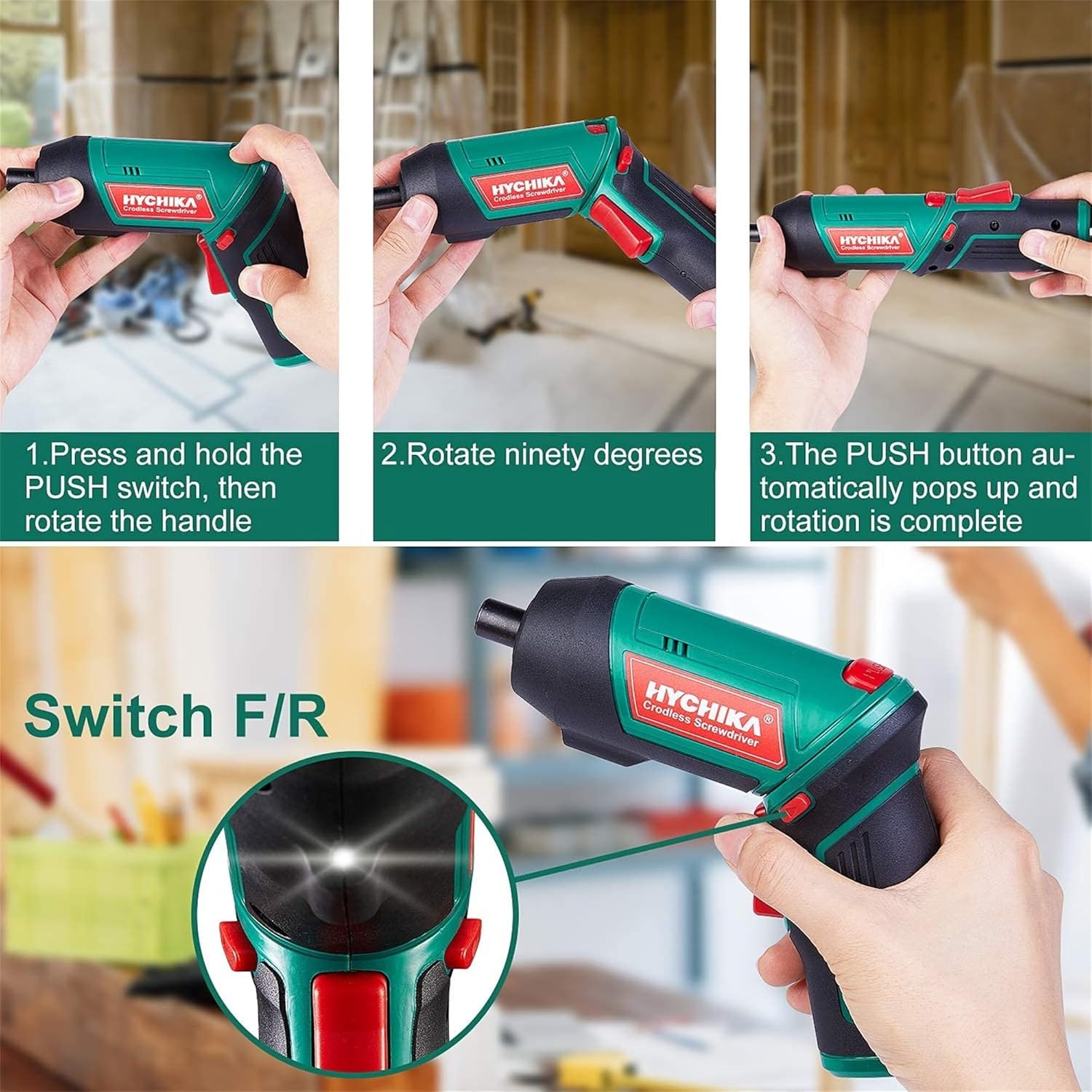
Figure 6.1: Demonstrates the process of transforming the screwdriver's grip by pressing the PUSH button and rotating the handle.
6.2 Ukusebenza Ngaphambili Nangemuva
The forward/reverse button controls the direction of rotation for screwing and unscrewing.
- To drive screws (forward rotation), push the forward/reverse button to the left (when viewed kusukela ngemuva kwethuluzi).
- To remove screws (reverse rotation), push the forward/reverse button to the right.
- When the button is in the center position, the tool is locked, preventing accidental activation.
6.3 Ukusebenzisa Isibani Sokusebenza se-LED
The built-in LED light automatically illuminates when the screwdriver is in operation, providing visibility in dimly lit areas.

Figure 6.2: The integrated LED light provides clear illumination for working in dark environments.
7. Isondlo
Regular maintenance ensures the longevity and optimal performance of your screwdriver.
- Ukuhlanza: Keep the ventilation openings clean and free from dust. Use a soft, damp indwangu yokuhlanza ithuluzi casing. Ungasebenzisi amakhemikhali anokhahlo noma izihlanzi ezilumayo.
- Ukunakekelwa kancane: Clean screwdriver bits after use. Store them in the provided case to prevent loss and damage.
- Isitoreji Sebhethri: If storing the tool for an extended period, ensure the battery is partially charged (around 50%) and store it in a cool, dry place. Recharge the battery every 3-6 months to maintain its health.
- Ukuhlola Okujwayelekile: Periodically check for any loose screws, damaged cords, or worn parts. Do not use the tool if any damage is observed.
8. Ukuxazulula izinkinga
This section addresses common issues you might encounter with your screwdriver.
| Inkinga | Imbangela Engenzeka | Isixazululo |
|---|---|---|
| I-Screwdriver ayivuli. | Ibhethri liphelile. Forward/Reverse switch is in the center (locked) position. | Shaja ibhethri ngokugcwele. Phusha iswishi eya phambili/ehlehla uye kwesokunxele noma kwesokudla. |
| I-Screwdriver iphelelwa amandla ngokushesha. | Ibhethri alishajiwe ngokugcwele. Battery life degraded. | Qinisekisa ukuthi ibhethri ishajwe ngokugcwele ngaphambi kokusebenzisa. If battery life is significantly reduced, contact customer support for replacement options. |
| Bits are not held securely in the chuck. | Bit is not fully inserted. Chuck is dirty or damaged. | Push the bit firmly into the chuck until it clicks into place. Clean the chuck area. If damage is visible, contact customer support. |
Uma inkinga iqhubeka ngemva kokuzama lezi zixazululo, sicela uxhumane nokwesekwa kwamakhasimende.
9. Imininingwane
| Isici | Ukucaciswa |
|---|---|
| Ibhrendi | Overstock (HYCHIKA) |
| Inombolo Yemodeli | c131a012-0da9-4306-aeab-b1d9ff5cd4b7 |
| Voltage | 3.6 volts |
| Umthombo wamandla | Isebenza Ibhethri |
| Isivinini | 180 RPM |
| Into ye-Torque | 6 Newton Meters (6 N-m) |
| Uhlobo Lwebhethri | I-Lithium ion |
| Amandla ebhethri | 2000 mAh |
| Chuck Size | 1/4 intshi (6.35mm) |
| Okubalulekile | Ipulasitiki, Irabha |
| Umbala | Okuhlaza |
| I-UPC | 616859793583 |
10. Iwaranti kanye Nokusekela
Overstock offers lifetime after-sales service for this product. For any questions, concerns, or technical assistance, please contact our customer support team.
Please have your model number (c131a012-0da9-4306-aeab-b1d9ff5cd4b7) and purchase information ready when contacting support.