
Isingeniso
This manual provides comprehensive instructions for the SENGBIRCH Keyboard Case, designed to enhance your iPad experience. Please read this manual thoroughly before using the product to ensure proper operation and longevity.
Ukuhambisana
The SENGBIRCH Keyboard Case is compatible with the following iPad models:
- iPad Air 13-inch (M3 2025, M2 2024)
- iPad Pro 12.9-inch 6th Generation (2022) - Models: A2436, A2437, A2764, A2766
- iPad Pro 12.9-inch 5th Generation (2021) - Models: A2378, A2379, A2461, A2462
- iPad Pro 12.9-inch 4th Generation (2020) - Models: A2229, A2069, A2232, A2233
- iPad Pro 12.9-inch 3rd Generation (2018) - Models: A1876, A2014, A1895, A1983
Isikhumbuzi esikhethekile: This keyboard case is not compatible with iPad Pro 13-inch tablets. Please verify your iPad model before use.
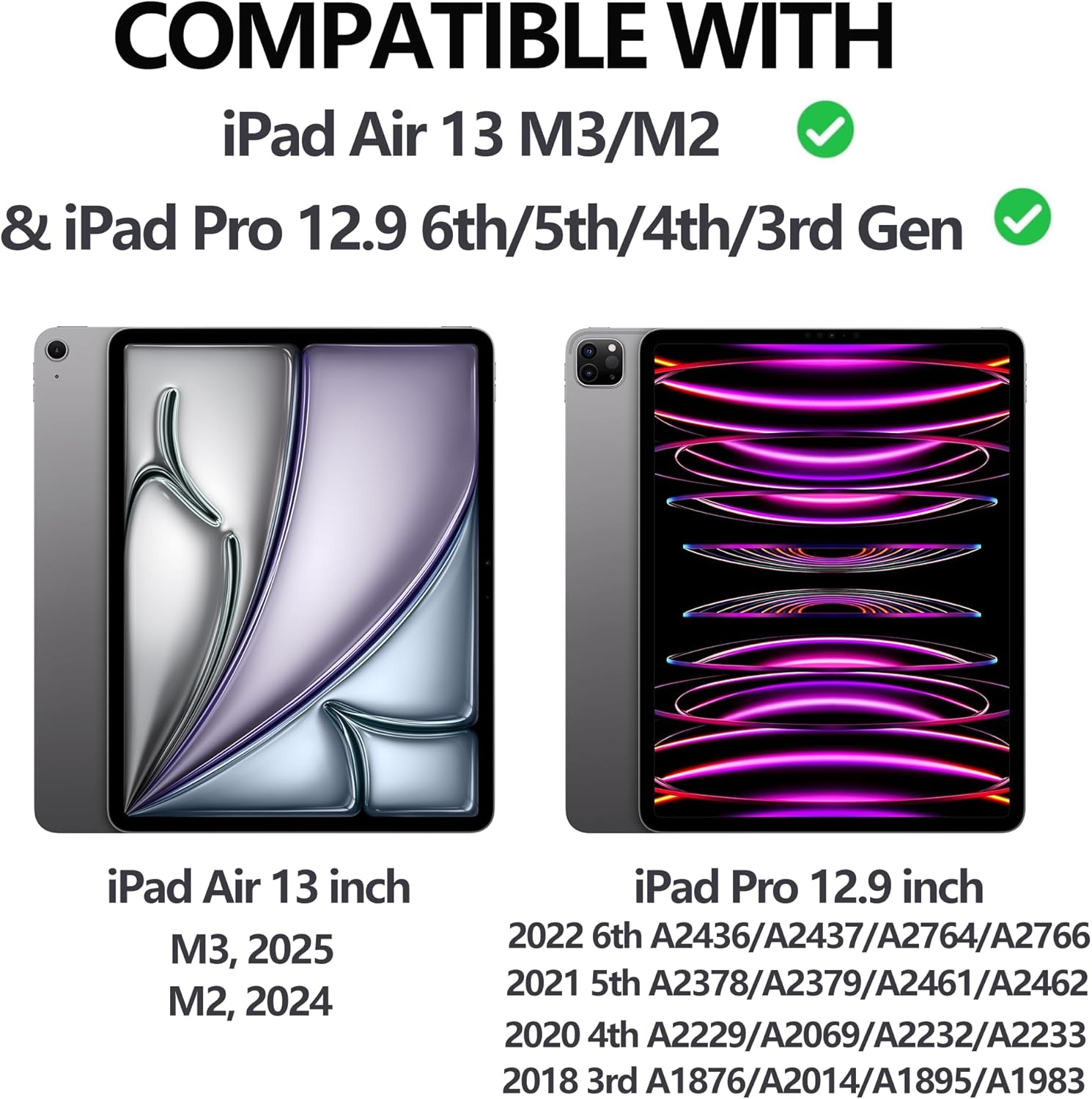
Figure 1: iPad Compatibility Chart
Yini EseBhokisini
Lapho ukhipha, sicela uqinisekise ukuthi zonke izinto ezilandelayo zikhona:
- 1 x Keyboard for iPad Pro 12.9 inch (3rd, 4th, 5th, 6th Generation)
- 1 x Case for iPad Pro 12.9 inch (6th, 5th, 4th, 3rd Generation)
- 1 x Ikhebula lokushaja le-USB-C
- 1 x Incwadi Yomsebenzisi
Qaphela: Tablet and Apple Pencil are not included.
Setha Imiyalelo
1. Attaching Your iPad to the Case
The case features a magnetic adsorption design for secure attachment of your iPad. Align the camera cutout of the case with your iPad's camera, and the iPad will magnetically snap into place.

Figure 2: Magnetic iPad Attachment and Detachable Keyboard
2. Ukushaja Ikhibhodi
Before first use, fully charge the keyboard using the provided USB-C cable. Connect the USB-C end to the keyboard's charging port and the other end to a compatible USB power adapter (not included).
- Isikhathi sokushaja: Cishe amahora ama-2.5 ukushaja okuphelele.
- Battery Life: Up to 70 hours of continuous work on a single charge.

Figure 3: Keyboard Charging and Battery Information
3. Connecting the Keyboard via Bluetooth
Follow these steps to pair your keyboard with your iPad:
- Switch the keyboard's ON/OFF switch to the "ON" position (located on the top right of the keyboard).
- Press the "Connect" button on the keyboard.
- Ku-iPad yakho, yiya ku Izilungiselelo > I-Bluetooth.
- Ensure Bluetooth is enabled and select "Bluetooth 3.0 Keyboard" from the list of available devices to pair.

Umfanekiso 4: Izinyathelo Zokuxhumanisa i-Bluetooth
Imiyalelo yokusebenza
Iyalungisa Viewama-engeli
The case allows for adjustable viewing angles (115°, 120°, 130°) to suit your needs for typing, viewing, or drawing.
Ikhibhodi ekhiphekayo
The keyboard is magnetically attached to the case and can be easily detached if you prefer to use your iPad without the keyboard, offering flexibility for various tasks.
Umsebenzi we-Backlight
The keyboard features 7 colors of backlight and 3 levels of brightness adjustment. This allows for comfortable typing in low-light conditions.

Figure 5: 7-Color Backlit Keyboard

Figure 6: Keyboard Backlight in Use
Umnikazi Wepensela
The case includes a dedicated pencil holder that supports Apple Pencil charging, ensuring your stylus is always ready and secure.

Figure 7: Pencil Holder and Key Features
Auto Wake/Sleep Function
The smart cover utilizes a magnetic switch to automatically wake your iPad when opened and put it to sleep when closed, conserving battery life.

Figure 8: Auto Wake/Sleep Smart Cover
Izinqamuleli zekhibhodi
The keyboard supports various iOS shortcuts for efficient operation. Refer to your iPad's settings for a full list of available shortcuts. For example, ucindezela Umyalo + Ithebhu allows you to switch between open applications.
Isondlo
To ensure the longevity and optimal performance of your keyboard case, follow these maintenance guidelines:
- Ukuhlanza: Sebenzisa okuthambile, damp indwangu yokusula ingaphandle lebhokisi kanye nekhibhodi. Gwema amakhemikhali anamandla noma izinto ezihudulayo.
- Isitoreji: Uma ingasetshenziswa, gcina ibhokisi lekhibhodi endaweni epholile, eyomile kude nokukhanya kwelanga okuqondile kanye namazinga okushisa aphezulu.
- Ukuvikelwa: The case is made of premium PU leather and a silicone inner shell, providing all-round protection against scratches, bumps, and dents. However, avoid dropping the device from significant heights.
- Ukukhipha Ukushisa: The honeycomb grid pattern inner padding is designed to improve heat dissipation. Ensure the vents are not obstructed during use.
Ukuxazulula inkinga
If you encounter any issues with your SENGBIRCH Keyboard Case, please refer to the following common solutions:
- Keyboard not connecting to iPad: If the keyboard fails to connect, press Fn + Q simultaneously to switch the keyboard to iOS system mode. Then, attempt to re-pair via Bluetooth.
- Ikhibhodi ayiphenduli: Ensure the keyboard is charged. If the battery is low, connect it to a power source using the USB-C cable.
- Ukukhanya kwangemuva akusebenzi: Check if the backlight function is enabled and adjust the brightness levels.
- iPad not waking/sleeping automatically: Ensure the iPad is correctly seated in the case and the cover is fully closed.
For further assistance, please contact SENGBIRCH customer support.
Imininingwane
| Ibhrendi | SENGBIRCH |
| Inombolo Yemodeli | Air13 (M3/M2) & Pro 6th/5th/4th/3rd Gen |
| Ubukhulu bomkhiqizo | 11.34 x 9.45 x 0.59 amayintshi |
| Isisindo sento | 2.16 amakhilogremu |
| Amabhethri | Ibhethri ye-Lithium Polymer (ifakiwe) |
| Ubuchwepheshe bokuxhumana | I-Bluetooth, i-USB-C |
| Incazelo Yekhibhodi | Wireless / Rechargeable / Detachable / Backlight |
| Izici ezikhethekile | Backlit, Ergonomic, Hotkeys and Media Keys, Lightweight, Rechargeable |
| Umbala | Black (Keyboard backlighting color support: RGB) |
Iwaranti kanye Nokusekela
For warranty information or technical support, please contact SENGBIRCH customer service through the retailer where the product was purchased or visit the official SENGBIRCH webindawo.
Gcina irisidi lakho lokuthenga njengobufakazi bokuthenga kwanoma yiziphi izimangalo zewaranti.