
1. Isingeniso
This manual provides detailed instructions for the installation, operation, and maintenance of your darkFlash Aquarius Mesh Computer Case. Please read this manual thoroughly before beginning installation to ensure proper setup and safe use of your new computer chassis.
2. Ulwazi Lokuphepha
Ngaso sonke isikhathi qaphela izinyathelo zokuphepha ezilandelayo:
- Nqamula yonke imithombo yamandla ngaphambi kokufaka noma ukususa noma yiziphi izingxenye.
- Gqoka ibhande lesihlakala eliphikisana ne-static ukuze uvimbele ukulimala kwe-electrostatic discharge (ESD) ezingxenyeni.
- Handle components carefully to avoid physical damage.
- Gcina izingxenye ezincane namathuluzi kude nezingane.
- Ensure proper ventilation around the computer case.
3. Okuqukethwe Kwephakheji
Qinisekisa ukuthi zonke izinto zikhona kuphakheji yakho:
- darkFlash Aquarius Mesh Computer Case
- Ibhokisi Lezesekeli (izikulufo, izikhonkwane zokuma, izibopho zekhebula, njll.)
- Incwadi Yomsebenzisi (le dokhumenti)
4. Ukusetha nokufakwa
Follow these steps for proper component installation.
4.1. Ukulungisa Icala
Before installing components, remove the side panels. The Aquarius Mesh case typically features a tempered glass side panel and a solid metal panel.
- Locate the thumbscrews on the rear of the case securing the side panels.
- Unscrew the thumbscrews and carefully slide the panels backward, then lift them off.

Umfanekiso 1: Ngaphambili nangaseceleni view of the darkFlash Aquarius Mesh case. Note the mesh front panel and tempered glass side panel.

Umfanekiso 2: Ngemuva view of the darkFlash Aquarius Mesh case, showing expansion slots and rear fan mount.
4.2. Ukufakwa kwe-Motherboard
The Aquarius Mesh supports ATX, Micro-ATX, and Mini-ITX motherboards.
- Faka isivikelo se-I/O endaweni yokusika ngemuva kwekesi.
- Align your motherboard with the pre-installed standoffs. Ensure the I/O ports align with the I/O shield.
- Vikela i-motherboard ngezikulufo ezifanele ezivela ebhokisini lezisekeli.
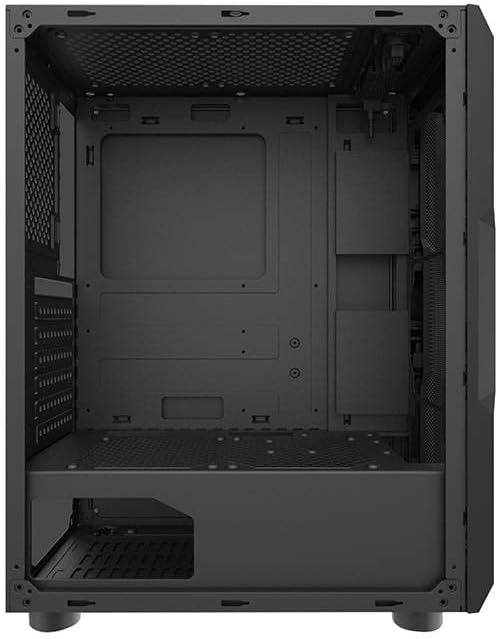
Umfanekiso 3: Ingaphakathi view of the darkFlash Aquarius Mesh case, highlighting the motherboard tray and cable routing options.
4.3. Ukufakwa Kweyunithi Yokunikezela Ngamandla (i-PSU).
The PSU mounts at the bottom rear of the case.
- Slide the PSU into its designated compartment from the rear of the case.
- Align the screw holes and secure the PSU with screws.
4.4. Ukufakwa Kwedrayivu Yesitoreji
The case provides mounting options for 3.5-inch HDDs and 2.5-inch SSDs.
- Ama-HDD angu-3.5": Locate the drive cage usually beneath the PSU shroud or behind the motherboard tray. Slide the HDD into the bay and secure it with screws.
- 2.5" ama-SSD: Mount SSDs to dedicated brackets behind the motherboard tray or on the PSU shroud. Secure with screws.
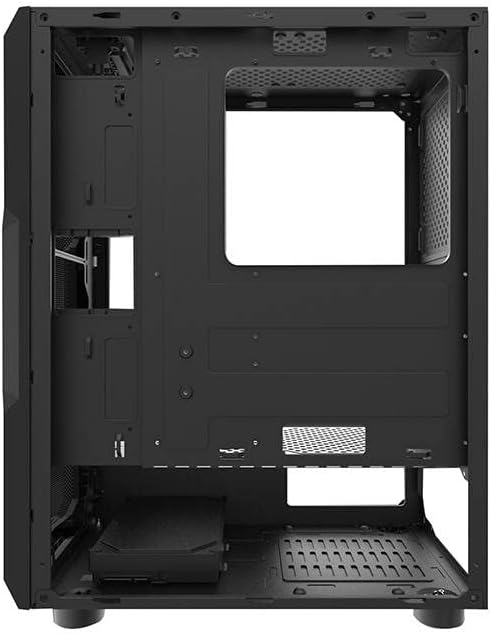
Umfanekiso 4: Ingaphakathi langemuva view of the darkFlash Aquarius Mesh case, showing the motherboard cutout and potential SSD mounting points.
4.5. Expansion Card Installation (e.g., GPU)
- Susa izembozo zesikhala sokunweba ezidingekayo ngemuva kwekesi.
- Insert the expansion card into the appropriate PCIe slot on the motherboard.
- Secure the card with the provided screws or retention clips.
4.6. Ukuphathwa Kwentambo
Utilize the cable routing cutouts and tie-down points behind the motherboard tray to organize cables. This improves airflow and aesthetics.
4.7. Reassembling the Case
Once all components are installed and cables are managed:
- Carefully reattach the side panels, ensuring they slide into place correctly.
- Secure the side panels with the thumbscrews.
5. Iziqondiso Zokusebenza
After assembly, connect your peripherals and power cable.
- Connect your monitor, keyboard, mouse, and other peripherals to the motherboard's I/O ports.
- Xhuma ikhebula likagesi ku-PSU kanye ne-outlet yodonga.
- Press the power button located on the top panel of the case to start your computer.

Umfanekiso 5: Phezulu view of the darkFlash Aquarius Mesh case, showing the front I/O panel with power button, reset button, USB ports, and audio jacks.
6. Isondlo
Regular maintenance helps ensure optimal performance and longevity of your computer components.
- Izihlungi Zothuli: The Aquarius Mesh case features removable dust filters (e.g., on the front, top, and bottom). Regularly remove and clean these filters with water and mild soap, or by vacuuming, to maintain good airflow. Ensure they are completely dry before reinstallation.
- Ukuhlanzwa Kwangaphakathi: Periodically open the case and use compressed air to remove dust buildup from fans, heatsinks, and other components.
- Ukuhlanza Ingaphandle: Sula ingaphandle ngethafa elithambile, damp indwangu. Gwema amakhemikhali anokhahlo.
7. Ukuxazulula izinkinga
Uma uhlangabezana nezinkinga, cabanga ngalezi zixazululo ezivamile ezilandelayo:
- Awekho Amandla:
- Qinisekisa ukuthi iswishi ye-PSU isesimweni 'SOKUBANISWA'.
- Check all power connections to the motherboard and components.
- Verify the power cable is securely plugged into the wall outlet and PSU.
- Abalandeli Abaphenduki:
- Check fan connections to the motherboard or fan controller.
- Ensure fans are not obstructed by cables or dust.
- Iphaneli Engaphambili I/O Ayisebenzi:
- Verify that the front panel connectors (USB, audio, power/reset switches) are correctly connected to the motherboard headers. Refer to your motherboard manual for header locations.
8. Imininingwane
| Isici | Imininingwane |
|---|---|
| Ibhrendi | iFlash emnyama |
| Inombolo Yemodeli | Aquarius Mesh |
| Uhlobo Lwekesi | I-Mid-Tower |
| Okubalulekile | I-alloy Steel |
| Umbala | Mnyama |
| Indlela Yokupholisa | Umoya |
| Ukusetshenziswa Okunconyiwe | Ikhompyutha |
| Hard Drive Form Factor | 3.5 amayintshi |
9. Iwaranti kanye Nokusekela
For warranty information or technical support, please refer to the official darkFlash webisayithi noma uxhumane nesevisi yabo yamakhasimende. Gcina ubufakazi bakho bokuthenga ngezimangalo zewaranti.
Ukuze uthole olunye usizo, ungavakashela i- darkFlash official webindawo.