
Isingeniso
This manual provides detailed instructions for the installation, operation, and maintenance of your ASHATA 4-inch 1080P Car Dash Camera DVR. Please read this manual thoroughly before using the device to ensure proper functionality and to prevent damage. Keep this manual for future reference.
Umkhiqizo Uphelileview
The ASHATA Car Dash Camera is a high-definition driving recorder designed to capture video footage of your journeys. It features a 4-inch display, 1080P resolution, a 170° wide-angle lens, G-Sensor for collision detection, WDR (Wide Dynamic Range) for improved image quality, loop recording, motion detection, and parking monitoring capabilities.
Izici Eziyinhloko:
- Ukuqoshwa kwe-Full HD 1080P: Ithwebula ividiyo ecacile footage at 1920x1080 resolution.
- 170° Ilensi ye-engeli ebanzi: Inikeza ububanzi view yomgwaqo ongaphambili.
- 3-Camera System: Includes a front camera, an in-car camera, and a rear-view camera for comprehensive coverage.
- Inzwa ye-G (Inzwa Yokudonsa): Automatically detects sudden movements or collisions and locks the current video file ukuvimbela ukubhala ngaphezulu.
- Ukuqoshwa kwe-Loop: Continuously records by overwriting the oldest unlocked files when the memory card is full, ensuring uninterrupted recording.
- Ukutholwa kokunyakaza: Automatically starts recording if movement is detected in front of the DVR when parked.
- Ukuqapha Ukupaka: Activates recording if the vehicle is shaken or impacted while parked.
- WDR Technology: Ithuthukisa ikhwalithi yevidiyo ezimeni ezihlukene zokukhanya.
- Isibonisi esingu-4-intshi: Ivumela isikhathi sangempela viewing and playback of recorded footage.
Izingxenye Zomkhiqizo:
Familiarize yourself with the various parts of your dash camera:
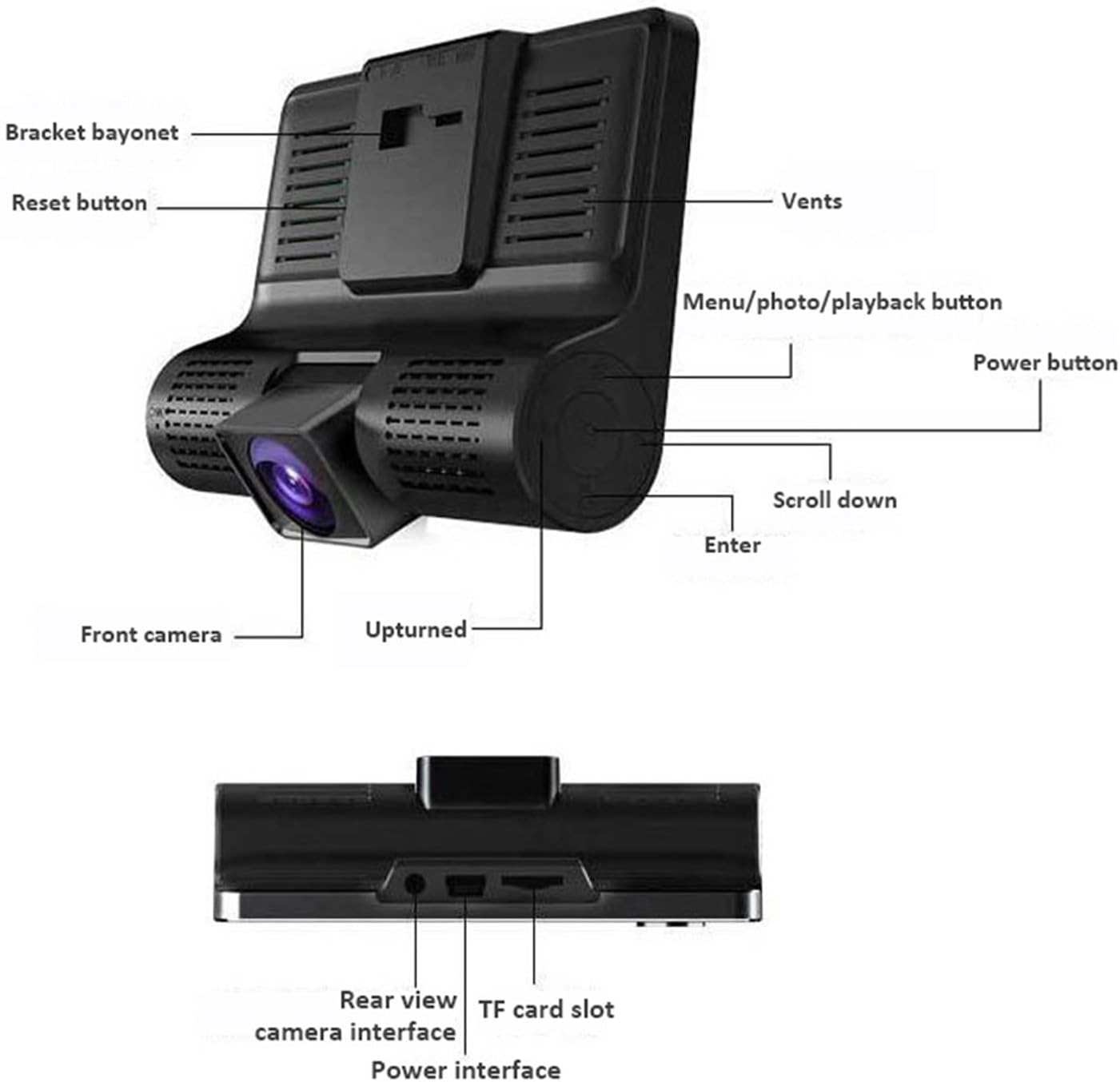
Incazelo yesithombe: A detailed diagram of the ASHATA dash camera, highlighting its various components including the bracket bayonet, reset button, vents, menu/photo/playback button, power button, scroll down button, enter button, front camera, and the upturned indicator. The bottom view ikhombisa ingemuva view camera interface, TF card slot, and power interface.

Incazelo yesithombe: Okunye view of the ASHATA dash camera, labeling the 4.0-inch IPS display screen, inside camera, navigation buttons (up, down, OK), power button, holder slot, reset button, louver, rear camera interface, power interface, TF slot, and front camera.
Setha
Okuqukethwe Kwephakheji:

Incazelo yesithombe: The complete ASHATA dash camera kit, showing the main dash camera unit, a suction cup mount, a car power adapter, a rear camera, and various connecting cables.
Ngaphambi kokufaka, qiniseka ukuthi zonke izingxenye zikhona:
- Main Dash Camera Unit
- ISuction Cup Mount
- Ishaja yemoto
- Ikhamera yangemuva
- Ikhebuli engemuva yekhamera
- Incwadi Yomsebenzisi (le dokhumenti)
Izinyathelo zokufaka:
- Faka Ikhadi le-TF: Insert a Class 10 or higher TF (microSD) card (up to 32GB, not included) into the TF card slot on the side of the dash camera. Ensure it is inserted correctly until it clicks into place.
- Mount the Dash Camera: Attach the suction cup mount to the windshield, preferably behind the rearview isibuko, ukuqinisekisa ukuthi akuvimbeli yakho view. Securely attach the main dash camera unit to the mount.
- Xhuma Amandla: Plug the car charger into your vehicle's cigarette lighter socket. Connect the other end of the charger cable to the power interface on the dash camera. Route the cable neatly along the windshield trim to avoid interference.
- Faka Ikhamera Yangemuva (Ongakukhetha): If using the rear camera, mount it on the rear windshield or near the license plate. Connect the rear camera cable to the rear camera interface on the main unit. Route the cable carefully to the back of the vehicle.
- Lungisa i-engeli yekhamera: Power on the vehicle. The dash camera should automatically turn on and begin recording. Adjust the front camera lens angle to ensure it captures the road ahead clearly. Adjust the rear camera angle if installed.
Imiyalelo yokusebenza
Ukusebenza Okuyisisekelo:
- Vula/Vala: The camera typically powers on automatically when the vehicle starts and powers off when the ignition is turned off. You can manually power it on/off by pressing and holding the Inkinobho yamandla.
- Qala/Yeka Ukuqopha: Once powered on, the camera will automatically start loop recording. A red dot or recording icon on the screen indicates active recording. Press the Inkinobho ethi KULUNGILE to manually start or stop recording.
- Shintsha Ikhamera Views: Ngesikhathi sokurekhoda, cindezela inkinobho Izinkinobho eziphezulu / ezansi to cycle through different camera views (front, in-car, rear, picture-in-picture combinations).
- Ukuzulazula kwemenyu: Cindezela inkinobho Menu/Mode/Playback button to enter the menu settings. Use the Izinkinobho eziphezulu / ezansi to navigate through options and the Inkinobho ethi KULUNGILE to select. Press the Menu/Mode/Playback button futhi ukuze uphume kumenyu.
Izici Ezithuthukile:
The dash camera includes several advanced features to enhance your driving safety and recording experience:
- Ukuqoshwa kwe-Loop: This feature ensures continuous recording. When the memory card is full, the camera automatically overwrites the oldest unlocked video files. You can set the loop recording duration (e.g., 1, 3, 5 minutes) in the settings.

Incazelo yesithombe: This image illustrates two key features: G-sensor based collision detection, where a collision automatically locks video files, and loop recording, which ensures continuous recording by overwriting old files.
- I-G-Sensor (Ukutholwa Kokushayisana): The built-in G-Sensor detects sudden acceleration, braking, or impacts. When triggered, it automatically locks the current video segment, preventing it from being overwritten by loop recording. The sensitivity of the G-Sensor can be adjusted in the settings.
- Ukutholwa kokunyakaza: When enabled in the settings, the camera will automatically start recording if it detects movement in its field of view while the vehicle is parked. This is useful for monitoring your vehicle when you are away.
- Ukuqapha Ukupaka: If the camera detects a shake or impact to the vehicle while parked and the ignition is off, it will automatically power on and record a short video segment. This feature requires a continuous power supply or the camera's internal battery to be charged.

Incazelo yesithombe: A composite image explaining four features: Cyclic Recording (loop recording), G-Sensor (locking footage during impact), Moving Detection (recording when motion is detected), and Parking Monitoring (recording if the car is disturbed while parked).
Ukudlala:
Kuya view recorded videos or photos:
- Stop recording by pressing the Inkinobho ethi KULUNGILE if it's currently recording.
- Cindezela inkinobho Menu/Mode/Playback button repeatedly until you enter playback mode.
- Sebenzisa i- Izinkinobho eziphezulu / ezansi to navigate through your recorded files.
- Cindezela inkinobho Inkinobho ethi KULUNGILE ukudlala ividiyo ekhethiwe noma view isithombe.
- Cindezela inkinobho Menu/Mode/Playback button ukuze uphume kwimodi yokudlala.
Isondlo
- Ukuhlanza Ilensi: Hlanza njalo amalensi ekhamera ngendwangu ethambile, engenantambo ukuze uqinisekise ikhwalithi yevidiyo ecacile. Gwema ukusebenzisa izinto zokuhlanza abrasive.
- Ukuhlanza isikrini: Use a soft, dry cloth to clean the display screen.
- Ukuphathwa Kwekhadi Lememori: It is recommended to format the TF card periodically (e.g., once a month) through the camera's settings menu to maintain optimal performance and prevent data corruption. Back up any important files ngaphambi kokufometha.
- Izinga Lokushisa Lokusebenza: Avoid exposing the dash camera to extreme temperatures for extended periods, as this can affect battery life and device performance.
Ukuxazulula inkinga
If you encounter issues with your ASHATA Dash Camera, refer to the following common problems and solutions:
- Ikhamera ayivuli:
- Ensure the car charger is properly connected to both the camera and the vehicle's power outlet.
- Hlola ukuthi isibani sokukhanyisa ugwayi semoto siyasebenza yini.
- The internal battery might be depleted. Charge the camera for a few hours.
- Ikhamera ayiqophi:
- Check if a TF card is inserted and properly seated.
- Ensure the TF card is not full. Format the card if necessary (back up important files kuqala).
- Verify that loop recording is enabled in the settings.
- The TF card might be faulty or too slow. Use a Class 10 or higher TF card.
- Ividiyo footage is blurry or unclear:
- Hlanza ilensi yekhamera ngendwangu ethambile.
- Qinisekisa ukuthi ifilimu yokuvikela isusiwe kulensi.
- Check if the windshield is clean where the camera is mounted.
- G-Sensor is too sensitive or not sensitive enough:
- Adjust the G-Sensor sensitivity level in the camera's settings menu.
- Camera freezes or malfunctions:
- Cindezela inkinobho Setha kabusha inkinobho (usually a small pinhole, refer to the product overview image for location) using a thin object like a paperclip.
- Update the firmware if a new version is available (check the manufacturer's webindawo).
Imininingwane
| Isici | Ukucaciswa |
|---|---|
| Ibhrendi | ASHATA |
| Inombolo Yemodeli | ASHATAbigdpv1h4x |
| Bonisa Isikrini | Isibonisi se-IPS esingu-4.0 intshi |
| Ukulungiswa kwevidiyo | 1080P (1920x1080) |
| I-Lens angle | 170 Degrees (Ultra Wide Angle) |
| Ukusekelwa Kwekhadi Lememori | TF Card, up to 32GB (Class 10 or higher recommended) |
| Inzwa ye-G | Yebo |
| Iluphu Ukuqopha | Yebo |
| Ukutholwa kokunyakaza | Yebo |
| Ukuqapha Ukupaka | Yebo |
| I-WDR | Yebo |
| Amabhethri afakiwe | Yebo |
| Auto Part Position | Emuva, Ngaphambili |
Iwaranti kanye Nokusekela
Specific warranty information for the ASHATA 4-inch 1080P Car Dash Camera DVR is not provided in the product data. For warranty details, technical support, or customer service inquiries, please refer to the official ASHATA website or contact your retailer directly.