
1. Isingeniso
Siyabonga ngokuthengaasing the Klipsch Reference Premiere RP-1400SW 14-inch High Excursion Subwoofer. This subwoofer is designed to deliver powerful and accurate low-frequency sound, enhancing your home theater or music listening experience. This manual provides essential information for proper setup, operation, and care of your new subwoofer.

Figure 1.1: Klipsch Reference Premiere RP-1400SW Subwoofer (Grille Removed)
2. Ulwazi Olubalulekile Lokuphepha
Please read all safety instructions before operating this product. Keep these instructions for future reference.
- Umthombo wamandla: Connect the subwoofer only to a power supply of the type described in the operating instructions or as marked on the appliance.
- Ukungenisa umoya: Ensure proper ventilation. Do not block any ventilation openings. Install in accordance with the manufacturer's instructions.
- Ukushisa: Ungafaki eduze kwanoma yimiphi imithombo yokushisa njengama-radiator, amarejista okushisa, izitofu, noma ezinye izinto ezisetshenziswayo (okuhlanganisa ampama-lifiers) akhiqiza ukushisa.
- Amanzi Nomswakama: Ungasebenzisi lesi sisetshenziswa eduze namanzi noma umswakama.
- Ukuhlanza: Hlanza kuphela ngendwangu eyomile.
- Ukusevisa: Thumela zonke izinsiza kubasebenzi benkonzo abaqeqeshiwe. Ukuseviswa kuyadingeka lapho umshini wokusebenza ulimele nganoma iyiphi indlela, njengentambo yokuphakela amandla noma ipulaki lonakele, uketshezi luchithekile noma izinto ziwele emshinini, umshini uhlaselwe yimvula noma umswakama, awusebenzi ngendlela evamile. , noma ulahliwe.
- Heavy Object: This subwoofer is heavy (85 lbs). Exercise caution when moving to prevent injury.
3. Yini EseBhokisini
Qinisekisa ukuthi zonke izingxenye zikhona:
- Klipsch Reference Premiere RP-1400SW Subwoofer
- Intambo Yamandla
- Incwadi Yokufundisa (le dokhumenti)
4. Setha
4.1 Ukubekwa kwe-Subwoofer
The Klipsch RP-1400SW features a front-firing driver and Aerofoil front slot port, allowing for flexible placement within your room. Experiment with different locations to find the optimal bass response for your listening environment. Generally, corner placement can enhance bass output, while placement along a wall can provide a more balanced sound. The shock-absorbing rubber feet help isolate the subwoofer from the floor.

Figure 4.1: Front-Firing Driver and Aerofoil Front Slot Port

Figure 4.2: Subwoofer Design Features (Rounded Corners, Shock-Absorbing Feet)
4.2 Izixhumanisi
Your RP-1400SW subwoofer offers both wired and wireless connectivity options.

Figure 4.3: Subwoofer Rear Panel Connections and Controls
- Wired Connection (RCA/LFE):
Connect an RCA cable from the LFE output of your AV receiver to the LFE input on the subwoofer's rear panel. If your receiver does not have an LFE output, use a standard RCA stereo cable to connect the receiver's pre-out (subwoofer output) to both the left and right RCA inputs on the subwoofer.
- Wireless Connection (Optional WA-2 Kit):
For wireless operation, you can connect your subwoofer with a Klipsch WA-2 Wireless Subwoofer Kit (sold separately). This allows for flexible placement without the need for long RCA cables. Refer to the WA-2 kit's instructions for pairing and setup.

Figure 4.4: Wireless Connectivity with Optional WA-2 Kit
- Ukuxhuma kwamandla:
Once audio connections are made, plug the supplied power cord into the subwoofer's power inlet and then into a suitable wall outlet.
5. Ukusebenzisa i-Subwoofer Yakho
5.1 Ilawula ngaphezuluview
The rear panel of your subwoofer features several controls to fine-tune its performance:

Figure 5.1: Easy-to-Use Controls on Rear Panel
- GAIN (Volume): Ilungisa izinga lokukhipha le-subwoofer. Qala ngokusetha okuphansi bese ukhulisa kancane kancane kuze kube yilapho i-bass ihlangana kahle nezipikha zakho eziyinhloko.
- LOW-PASS (Crossover): This control sets the upper frequency limit for the subwoofer. If using an AV receiver with LFE output, set this to LFE (or bypass if available on your receiver). If connecting via stereo RCA, adjust this to blend with your main speakers' low-frequency cutoff.
- ISIGABA (0°/180°): Adjusts the phase of the subwoofer output relative to your main speakers. Experiment with both settings to find the one that provides the most impactful and coherent bass.
- POWER (ON/AUTO/OFF):
- ON: Subwoofer remains continuously on.
- OKUZENZAKALELAYO: Subwoofer automatically turns on when an audio signal is detected and enters a low-power standby mode after a period of inactivity.
- VALIWE: I-Subwoofer ivuliwe.
The 1/2-watt standby mode in AUTO setting ensures exceptional efficiency and reduces energy costs.
5.2 Initial Power On and Adjustment
- Qinisekisa ukuthi konke ukuxhumana kuvikelekile.
- Set the GAIN control to its minimum position.
- Set the LOW-PASS control to LFE if using an AV receiver, or to a suitable frequency (e.g., 80Hz) if connecting via stereo RCA.
- Set the PHASE switch to 0°.
- Set the POWER switch to AUTO.
- Play some audio with significant bass content. Gradually increase the GAIN control until the subwoofer output blends with your main speakers.
- Experiment with the PHASE switch (0° vs. 180°) to determine which setting provides the most impactful and seamless bass response in your listening position.
For optimal performance, consider using your AV receiver's automatic room correction system (if available) after initial setup.
5.3 Product Video: Reference Premiere Subwoofers
Video 5.1: An official Klipsch video showcasing the features and design of the Reference Premiere Subwoofers, including the RP-1400SW. This video highlights advanced acoustics, balanced performance, front-firing Cerametallic woofers, high-efficiency Class D amplifier, front-firing slot port, detailed design, and easy-to-use controls.
6. Isondlo
To ensure the longevity and optimal performance of your Klipsch RP-1400SW subwoofer, follow these simple maintenance guidelines:
- Ukuhlanza: Dust the cabinet regularly with a dry, soft cloth. Avoid using abrasive cleaners, solvents, or strong detergents, as these can damage the ebony vinyl finish.
- Ukubekwa: Avoid placing the subwoofer in direct sunlight or near heat sources, which can cause discoloration or damage to the cabinet.
- Ukungenisa umoya: Qinisekisa ukuthi ingemuva amplifier panel has adequate airflow. Do not block the heat sink.
- Igrile: The durable woven cloth grille can be gently cleaned with a soft brush or vacuum cleaner attachment to remove dust.
7. Ukuxazulula izinkinga
If you experience issues with your subwoofer, consult the following table for common problems and solutions:
| Inkinga | Imbangela Engenzeka | Isixazululo |
|---|---|---|
| Awukho umsindo ovela ku-subwoofer |
|
|
| I-bass ebuthakathaka noma ephikisiwe |
|
|
| Subwoofer hums or buzzes |
|
|
If the problem persists after trying these solutions, please contact Klipsch customer support.
8. Imininingwane
Key technical specifications for the Klipsch Reference Premiere RP-1400SW Subwoofer:
| Isici | Imininingwane |
|---|---|
| Inombolo Yemodeli | I-RP-1400SW |
| Ibhrendi | Klipsch |
| Uhlobo lwesipika | I-Subwoofer |
| I-Woofer Diameter | 14 amayintshi |
| Uhlobo Lomshayeli Womsindo | Dynamic Driver (Cerametallic) |
| Amandla Okukhipha Isipikha aphezulu | 600 Watts |
| Amandla we-RMS | 500 Watts |
| Impendulo Yemvamisa | 20Hz - 1kHz (approximate, based on A+ content) |
| Ubuchwepheshe bokuxhumana | Wired RCA, LFE, and WA-2 Wireless Port |
| Imodi Yokukhipha Umsindo | I-Stereo, Umsindo Ozungezile |
| Uhlobo Lokukhweza | Floor Standing |
| Impahla Ebiyelwe | Izinkuni |
| Umbala | I-Ebony |
| Umthombo wamandla | I-Corded Electric |
| Ubukhulu bento (D x W x H) | 25.67"D x 20"W x 21.34"H |
| Isisindo sento | 85 Amakhilogremu |
| I-UPC | 743878047424 |
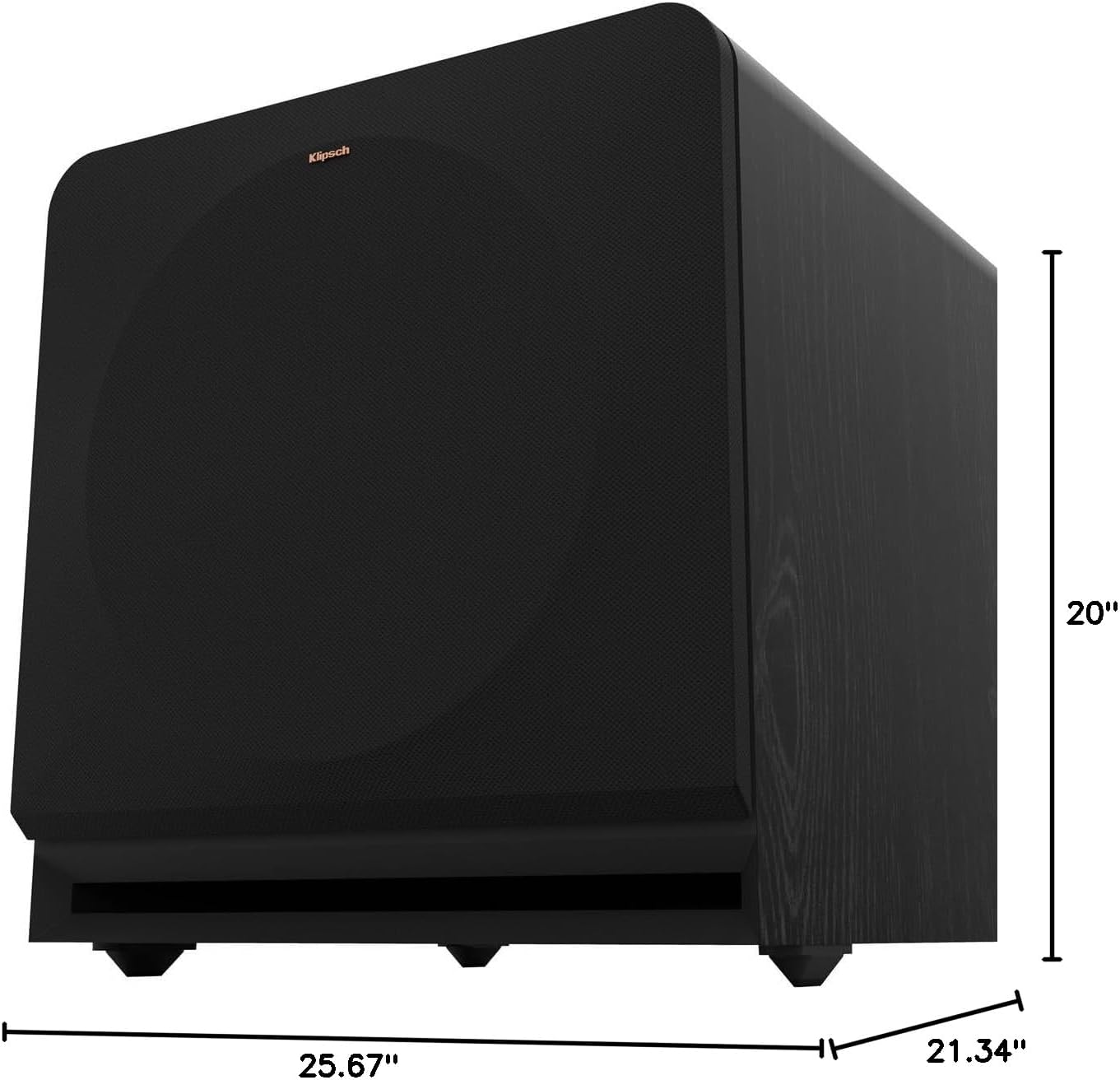
Figure 8.1: Subwoofer Dimensions
9. Iwaranti & Ukusekela
9.1 Ulwazi Lwewaranti
The Klipsch Reference Premiere RP-1400SW Subwoofer comes with a limited warranty:
- Ezogesi: Iminyaka emibili (2).
- Woofer, Cabinet, and Non-Electrical Mechanics: Iminyaka emihlanu (5).
Please retain your proof of purchase for warranty claims. For full warranty terms and conditions, refer to the official Klipsch webisayithi noma uxhumane nokwesekwa kwamakhasimende.
9.2 Ukwesekwa Kwamakhasimende
For further assistance, technical support, or warranty inquiries, please visit the official Klipsch website or contact their customer service department. Contact details can typically be found on the Klipsch webisayithi ngaphansi kwesigaba esithi "Sekela" noma "Thintana nathi".