
1. Isingeniso
This manual provides essential information for the safe installation, operation, and maintenance of your CREATE WIND CLEAR Ceiling Fan. Please read these instructions thoroughly before installation and retain them for future reference.
The CREATE WIND CLEAR Ceiling Fan is a quiet ceiling fan featuring a 40W DC brushless motor and a winter-summer reversal function. Its compact and versatile design includes retractable blades. It is suitable for small to medium-sized rooms and bedrooms, offering a built-in LED light with three adjustable color temperatures. The fan body is constructed from steel, and the blades are made of ABS. It provides 6 speed settings and a programmable timer up to 8 hours, all controllable via the included remote control and WiFi connectivity.
2. Iziyalezo Zokuphepha
- Always disconnect power at the main circuit breaker before installation, maintenance, or cleaning.
- Ukufakwa kufanele kwenziwe ngumsebenzi kagesi oqeqeshiwe ngokuhambisana nawo wonke amakhodi kagesi endawo nakazwelonke.
- Ensure the mounting structure can support the weight of the fan (refer to specifications for weight).
- Ungafaki izinto endleleni yama-fan blades.
- Qinisekisa ukuthi konke ukuxhumana kuvikelekile futhi kugqunywe ngendlela efanele.
- Lo mshini awuhloselwe ukusetshenziswa abantu (okuhlanganisa nezingane) abanekhono elincishisiwe lomzimba, lezinzwa noma lengqondo, noma abangenalo ulwazi nolwazi, ngaphandle uma benikezwe ukugadwa noma umyalelo ophathelene nokusetshenziswa kwento esebenza ngumuntu onesibopho sokuphepha kwabo.
3. Izingxenye Ezihlanganisiwe
Qinisekisa ukuthi zonke izingxenye zikhona ngaphambi kokuqala ukufakwa:
- CREATE WIND CLEAR Ceiling Fan Unit
- Isilawuli kude
- Ibhetri yesilawuli kude
- Mounting Hardware (screws, brackets, etc. - specific items may vary)
- Incwadi Yeziqondiso
For a visual reference of the product and its components, please see the image below:

4. Ukusetha nokufakwa
Professional installation is highly recommended for this ceiling fan. Ensure the power supply is disconnected before starting any installation work.
4.1 Ukufakwa ngokomzimba
- Ubakaki Wokukhweza: Securely attach the mounting bracket to a ceiling joist or a suitable electrical junction box rated for fan support.
- Izintambo: Connect the fan's electrical wires to the household wiring according to the wiring diagram provided in the full installation guide (not included in this summary). Ensure proper grounding.
- Inhlangano yabalandeli: Carefully lift and attach the fan motor assembly to the mounting bracket.
- Ukufakwa kwe-Blade: The fan features retractable blades that deploy automatically when the fan operates. No manual blade installation is typically required after the main unit is mounted.
- Ukufakwa Kwekhithi Ekhanyayo: Attach the LED light kit to the fan housing as per the detailed instructions.
Refer to the following images for visual guidance on the fan's appearance and dimensions:


4.2 WiFi Setup
The fan supports WiFi connectivity for control via a smartphone application. Refer to the specific instructions provided with the fan for pairing the device with your home WiFi network and the CREATE smart home app.
5. Iziqondiso Zokusebenza
Your CREATE WIND CLEAR Ceiling Fan can be operated using the included remote control or via the dedicated smartphone application.
5.1 Imisebenzi yokulawula kude
- Vula/Vala: Cindezela inkinobho yamandla ukuze uvule ifeni futhi ukhanyise noma uvale.
- Isivinini saphephela: Adjust between 6 fan speeds using the designated speed buttons.
- Ukulawula Ukukhanya: Turn the LED light on/off and cycle through three adjustable color temperatures (warm, neutral, cold).
- Isikhathi: Set the fan to turn off automatically after 1, 2, 4, or 8 hours.
- Winter/Summer Mode: Switch between forward (summer) and reverse (winter) rotation modes.

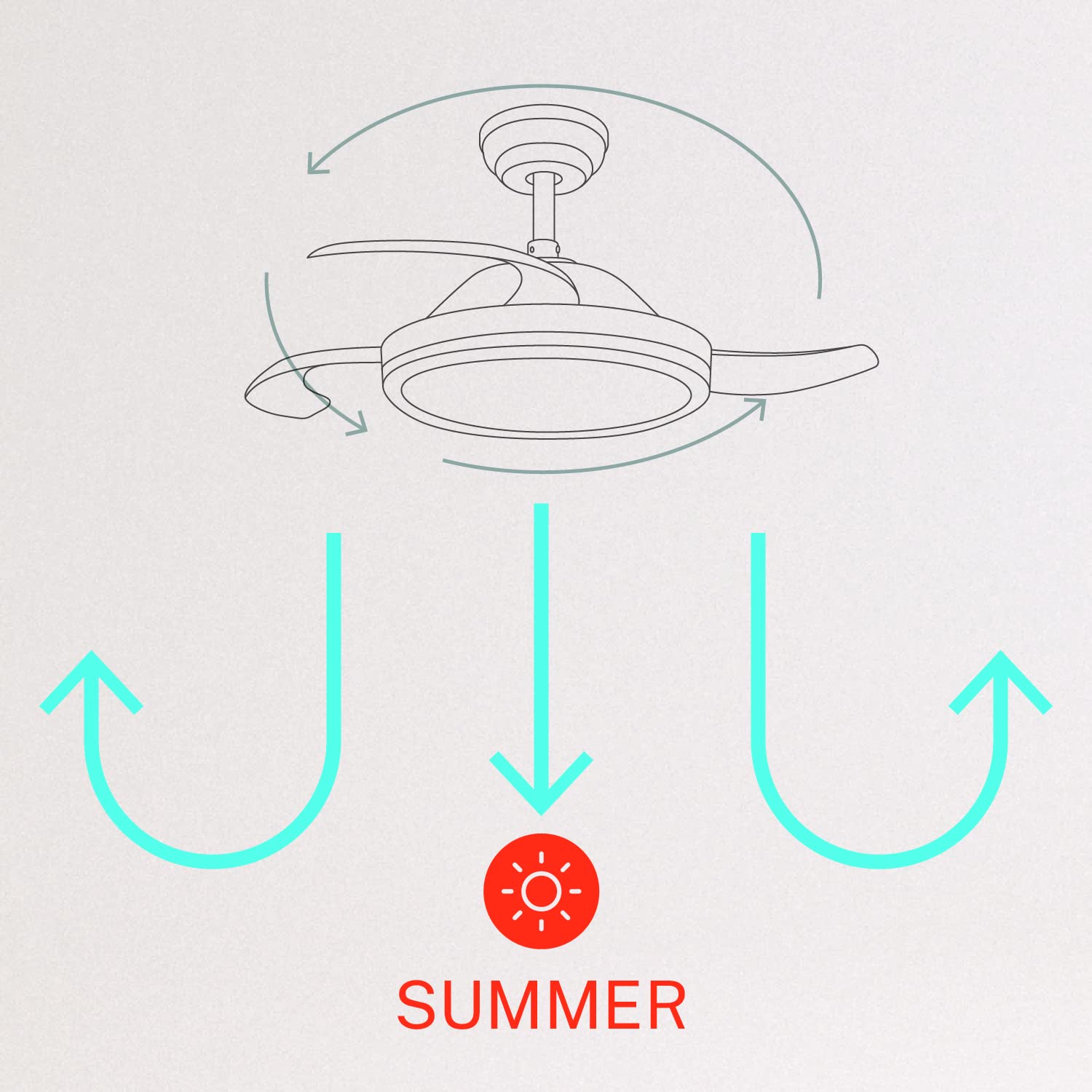
5.2 Winter and Summer Modes
The fan features a reversible motor to optimize air circulation for different seasons:
- Summer Mode (Counter-clockwise rotation): The fan blades rotate counter-clockwise, pushing air downwards to create a cooling breeze.
- Winter Mode (Clockwise rotation): The fan blades rotate clockwise, drawing air upwards to circulate warm air trapped near the ceiling, helping to distribute heat more evenly.

6. Isondlo
Ukugcinwa njalo kuqinisekisa ukusebenza kahle kanye nobude besikhathi somoya wophahla lwakho.
- Ukuhlanza: Hlanza ama-fan nezindlu zenjini ngezikhathi ezithile ngesithambile, damp cloth. Do not use abrasive cleaners or solvents. Ensure the fan is turned off and power is disconnected before cleaning.
- Ukuqinisa izikulufu: Check all mounting screws and blade attachment screws annually to ensure they are properly tightened.
- Umthombo Wokukhanya: The LED light source is integrated. If it requires service, contact qualified personnel.
7. Ukuxazulula izinkinga
Uma uhlangabezana nezinkinga ngomlandeli wakho, bheka izinkinga ezilandelayo nezisombululo:
| Inkinga | Imbangela Engenzeka | Isixazululo |
|---|---|---|
| Umlandeli akaqali | No power supply; Loose wiring; Remote control battery depleted | Check circuit breaker; Verify all wiring connections; Replace remote control battery. |
| Umlandeli uyavevezela | Loose mounting screws; Unbalanced blades | Ensure mounting bracket and fan assembly screws are tight; Check for any obstructions to blade movement. |
| Ukukhanya akusebenzi | Loose wiring; LED module fault | Hlola uxhumano lwezintambo zekhithi ekhanyayo; Xhumana nokwesekwa kwamakhasimende uma imojuli ye-LED inephutha. |
| Isilawuli kude asisebenzi | Depleted battery; Remote not paired | Replace remote control battery; Refer to pairing instructions in the full manual. |
| WiFi control issues | Poor WiFi signal; Incorrect app setup | Ensure strong WiFi signal; Reconfigure WiFi connection in the app. |
8. Imininingwane
| Isici | Imininingwane |
|---|---|
| Ibhrendi | DALA |
| Inombolo Yemodeli | 120760_254772 |
| Umbala | Emhlophe |
| Idizayini yabalandeli bakagesi | Ceiling Fan |
| Umthombo wamandla | I-Corded Electric |
| Isitayela | With WiFi |
| Ubukhulu bomkhiqizo | 107D x 107W x 39H Amasentimitha |
| Uhlobo Lwegumbi | Igumbi lokulala |
| Isici Esikhethekile | Isikhathi |
| Ukusetshenziswa Okunconyiwe | Ukungenisa umoya |
| Wattage | 40 Watts |
| Izingxenye Ezihlanganisiwe | Remote, Battery |
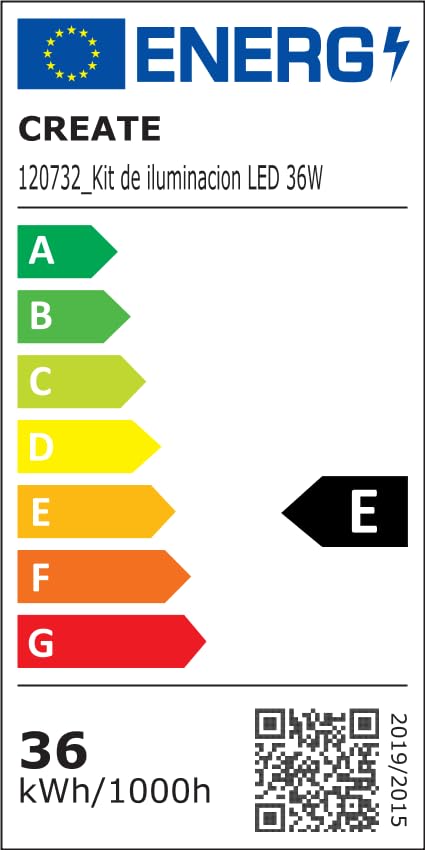
For detailed product data and energy efficiency information, please refer to the following documents:

9. Iwaranti kanye Nokusekela
For warranty information, technical support, or service inquiries, please contact CREATE customer service or refer to the official CREATE webindawo. Gcina irisidi lakho lokuthenga njengobufakazi bokuthenga.