
1. Umkhiqizo Uphelileview
The GIGABYTE G24F 2 is a 23.8-inch gaming monitor designed for an immersive visual experience. It features a Super Speed IPS panel, Full HD (1920 x 1080) resolution, and a high refresh rate for smooth gameplay.

Umfanekiso 1.1: Ngaphambili view of the GIGABYTE G24F 2 gaming monitor.
Izici Eziyinhloko:
- Usayizi Wephaneli: 23.8-inch SS IPS display
- Isixazululo: 1920 x 1080 (FHD)
- Isikhathi Sempendulo: 1ms MPRT
- Isilinganiso Sokuvuselela: 165Hz (Ingasebenza isikhathi eside kune-180Hz)
- Umswakama wokubala: 95% DCI-P3, 125% sRGB
- Ukukhanya: I-300 cd / m2 (TYP)
- Isilinganiso sokuqhathanisa: 1100:1
- Ukuxhumana: 2 x HDMI 2.0, 1 x DisplayPort 1.2 (HDR capable), 2 x USB 3.2 Gen 1 Downstream, 1 x USB 3.2 Gen 1 Upstream, 1 x Earphone Jack
- Izici ezikhethekile: OSD Sidekick, Aim Stabilizer, Black Equalizer, Dashboard, Crosshair, Timer, Counter, Auto-Update, Smart OD, HDR Ready, Flicker-free, Kensington lock
2. Ulwazi Lokuphepha
Sicela ufunde yonke imiyalelo ngokucophelela ngaphambi kokusebenzisa imonitha. Gcina leli bhukwana ukuze lisetshenziswe esikhathini esizayo.
- Ungabeki i-monitor emvuleni noma emswakama ukuze ugweme umlilo noma izingozi zokushaqeka.
- Ungayivuli imonitha casing. Azikho izingxenye ezisebenzisekayo ngaphakathi. Thumela zonke izinsiza kubasebenzi abaqeqeshiwe.
- Beka i-monitor endaweni eqinile, eyisicaba ukuze ingawi.
- Qinisekisa ukuthi umoya ungena kahle eduze kwesibonisi. Ungavimbi izikhala zomoya.
- Sebenzisa kuphela i-adaptha yamandla namakhebuli ahlinzekwe umenzi.
- Khipha imonitha endaweni kagesi phakathi neziphepho zombani noma uma ingasetshenziswa isikhathi eside.
- Clean the screen with a soft, lint-free cloth. Avoid using liquid cleaners directly on the screen.
3. Okuqukethwe Kwephakheji
Qinisekisa ukuthi zonke izinto zikhona kuphakheji yakho:
- GIGABYTE G24F 2 Monitor
- I-Monitor Stand (Isisekelo nentamo)
- Ikhebula Lamandla
- Ikhebula le-HDMI
- USB Cable (Upstream)
- Umhlahlandlela Wokuqala Okusheshayo (QSG)
- Ikhadi lewaranti

Umfanekiso 3.1: Ngemuva view of the monitor, illustrating the stand attachment area.
4. Setha
4.1 Ukuhlanganisa Isitendi
- Khipha ngokucophelela i-monitor ne-stand components ephaketheni.
- Namathisela intamo yokuma kuphaneli yokuqapha. Qinisekisa ukuthi ichofoza ngokuvikelekile endaweni noma iboshelwe ngezikulufo uma ihlinzekiwe.
- Namathisela isisekelo sokuma entanyeni yokuma. Qinisa isikulufu noma izikulufu zesithupha phansi kwesisekelo.
- Beka imonitha ehlanganisiwe endaweni ezinzile, eyisicaba.
4.2 Ukuxhuma i-Monitor
Connect the monitor to your computer and other devices using the appropriate cables.

Figure 4.1: Monitor connectivity ports.
- Ukuxhuma kwamandla: Xhuma ikhebula lamandla kokokufaka kwamandla okuqapha bese uxhume endaweni yamandla.
- Ukuxhumeka kwevidiyo:
- For optimal performance, use the DisplayPort 1.2 cable to connect to your computer's graphics card.
- Alternatively, use one of the two HDMI 2.0 ports.
- Uxhumano Oluphezulu Lwe-USB: Connect the provided USB 3.2 Gen 1 Upstream cable from your computer to the monitor's upstream USB port to enable the monitor's downstream USB ports.
- USB Downstream Connections: Connect USB devices (e.g., keyboard, mouse) to the monitor's two USB 3.2 Gen 1 Downstream ports.
- Okukhipha Umsindo: Xhuma ama-headphone noma izipikha zangaphandle ku-Earphone Jack.
5. Ukusebenzisa i-Monitor
5.1 Vula/Vala amandla
Press the power button, usually located on the bottom or rear of the monitor, to turn the monitor on or off. The power indicator light will show the monitor's status.
5.2 Imenyu yokubonisa okusesikrinini (OSD).
The OSD menu allows you to adjust various monitor settings. Navigate the OSD using the joystick or buttons typically found on the rear of the monitor.

Figure 5.1: OSD Sidekick software for convenient monitor control.
For advanced control, install the OSD Sidekick software on your PC. This utility allows you to adjust monitor settings directly from your desktop.
5.3 Izici Zokudlala
The GIGABYTE G24F 2 includes several features to enhance your gaming experience:
- Aim Stabilizer: Reduces motion blur and improves visual clarity in fast-paced games.
- I-Black Equalizer: Enhances visibility in dark areas of the game without overexposing bright areas.

Umfanekiso 5.2: Isilinganisi Esimnyama sisebenza.
- Ideshibhodi: Displays real-time hardware information (e.g., CPU/GPU temperature, usage) directly on the screen.

Figure 5.3: Dashboard displaying system metrics.
- I-Crosshair: Provides a customizable on-screen crosshair to assist with aiming.

Figure 5.4: On-screen Crosshair.
- Timer/Counter: On-screen timers and counters for in-game tracking.
- Smart OD: Optimizes overdrive settings for the best response time.
- Buyekeza ngokuzenzakalela: Ensures the monitor's firmware and OSD Sidekick software are up-to-date.
5.4 Izilungiselelo zokubonisa
- Isilinganiso Sokuvuselela: The monitor supports up to 165Hz, with an overclock option to 180Hz, for fluid motion.
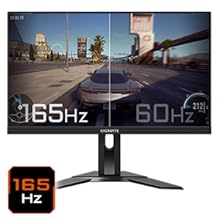
Figure 5.5: Visual comparison of 165Hz vs. 60Hz refresh rate.
- Isikhathi Sempendulo: Enjoy a 1ms MPRT (Moving Picture Response Time) for minimal ghosting.
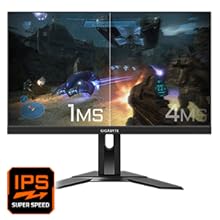
Figure 5.6: Visual comparison of 1ms vs. 4ms response time.
- I-Gamut Yombala: The monitor covers 95% DCI-P3 and 125% sRGB for vibrant and accurate colors.
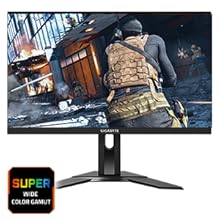
Figure 5.7: Wide color gamut for rich visuals.
- Ukukhanya Okuluhlaza Okuphansi: Reduces blue light emissions to protect your eyes during extended use.
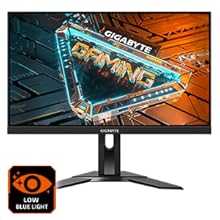
Figure 5.8: Low Blue Light feature for reduced eye strain.
- I-Flicker-Free: Eliminates screen flickering for a more comfortable viewisipiliyoni.

Figure 5.9: Flicker-Free technology for comfortable viewing.
5.5 Product Feature Video
Ividiyo 5.1: I-overview of the GIGABYTE G24F 2 monitor's features and specifications.
6. Isondlo
Ukunakekelwa okufanele kuqinisekisa ubude besikhathi sokuqapha kwakho.
- Ukuhlanza isikrini: Sula isikrini ngobumnene ngendwangu ethambile, eyomile, engenabo uboya. Uma unezimpawu eziqinile, susa kancaneampzu indwangu enamanzi noma isicoci sesikrini esikhethekile (sebenzisa engutsheni, hhayi ngokuqondile esibukweni).
- Ukuhlanza i-Casing: Sebenzisa indwangu ethambile, eyomile ukuze usule imonitha casing. Gwema izihlanzi ezikhuhlayo.
- Ukungenisa umoya: Ensure the ventilation openings on the monitor are clear of dust and obstructions.
- Cisha ugesi: Turn off and unplug the monitor when not in use for extended periods.
7. Ukuxazulula izinkinga
Uma uhlangabezana nezinkinga ngesikrini sakho, bheka ithebula elilandelayo ukuze uthole izinkinga nezixazululo ezivamile.
| Inkinga | Imbangela Engenzeka | Isixazululo |
|---|---|---|
| Akunasithombe esikrinini | Power cable not connected; Video cable not connected; Incorrect input source selected | Hlola uxhumano lwekhebula lamandla nevidiyo; Khetha umthombo wokufaka ofanele nge-OSD. |
| Isithombe sifiphele noma sihlanekezelwe | Isixazululo esingalungile; Ikhebula levidiyo elikhululekile | Setha isinqumo sesibonisi sibe yi-1920x1080; Qinisekisa ukuthi ikhebula levidiyo lixhunywe ngokuphephile. |
| No sound from headphones/speakers | Audio cable not connected; Volume too low; Incorrect audio output selected on PC | Check audio cable connection; Adjust volume; Select monitor as audio output on PC. |
| Izimbobo ze-USB azisebenzi | Ikhebula le-USB elingaphezulu alixhunyiwe | Connect the USB 3.2 Gen 1 Upstream cable from the monitor to your PC. |
| Isikrini esicwayizayo | Refresh rate issue; Faulty cable | Ensure refresh rate is set correctly; Try a different video cable. |
8. Imininingwane
Detailed technical specifications for the GIGABYTE G24F 2 monitor.

Umfanekiso 8.1: Ubukhulu bemonitha.
| Isici | Imininingwane |
|---|---|
| Ibhrendi | I-GIGABYTE |
| Igama Lemodeli | G24F 2 |
| Inombolo Yemodeli | 9DG24F2-00-1ABIN |
| Usayizi Wesikrini | 23.8 amayintshi |
| Isixazululo | Amaphikseli angu-1920 x 1080 (FHD 1080p) |
| I-Aspect ratio | 16:9 |
| Uhlobo lokubonisa | LCD (SS IPS Panel) |
| Isilinganiso Sokuvuselela | 165 Hz (180Hz OC) |
| Isikhathi sokuphendula | 1 Milliseconds (MPRT) |
| Ukukhanya | 300 candela_per_square_meter (TYP) |
| Isilinganiso Sokuqhathanisa | 1100:1 |
| Ukugcwaliswa Kombala | 95% DCI-P3, 125% sRGB |
| Viewing engela | 178 degrees |
| Ukuxhumana | 2 x HDMI 2.0, 1 x DisplayPort 1.2, 2 x USB 3.2 Gen 1 Downstream, 1 x USB 3.2 Gen 1 Upstream, 1 x Earphone Jack |
| Ukuvumelanisa Okuguquguqukayo | I-FreeSync Premium |
| Ukusetshenziswa kwamandla | 17.5 Watts |
| Isisindo sento | 3.2 kg |
| Ubukhulu bento (D x W x H) | 5.3D x 54.1W x 32.6H Amasentimitha |
| Uhlobo Lokukhweza | I-Wall Mount |
| Izici Zomkhiqizo | Flicker-Free, Height Adjustment, High Dynamic Range, Tilt Adjustment |
9. Iwaranti kanye Nokusekela
The GIGABYTE G24F 2 monitor comes with a Iwaranti yonyaka ongu-3 kusuka kumkhiqizi.
For technical support, warranty claims, or further inquiries, please contact GIGABYTE customer service:
- Umkhiqizi: GIGABYTE Technology (India) Pvt Ltd
- Ikheli: B-808, Naman Midtown, Elphinstone Road, Mumbai – 400013 – INDIA
- Ucingo: +91-22-40633222
Sicela ugcine ubufakazi bakho bokuthenga isevisi yewaranti.